
1. Introduksjon
The HITBOX MIG200III is a versatile multi-process welding machine designed for both beginners and professionals. It supports Gas MIG, Flux MIG, Stick (MMA), Lift TIG, and Spot Welding. This welder is suitable for various materials including carbon steel, iron, galvanized steel, stainless steel, and aluminum, providing precision and efficiency for DIY projects, agricultural repairs, and professional tasks.
Key features include an easy-to-read LED display for essential welding data, compatibility with a spool gun for aluminum welding, and 2T/4T/Spot Welding modes for precise control.
2. Sikkerhetsinformasjon
ADVARSEL: Welding can be dangerous. Always follow safety precautions to prevent injury or damage.
- Bruk passende personlig verneutstyr (PPE), inkludert sveisehjelm, hansker og verneklær.
- Ensure adequate ventilation in the work area to avoid inhaling fumes.
- Hold brennbare materialer unna sveiseområdet.
- Ikke berør spenningsførende elektriske deler.
- Always disconnect power before performing maintenance or changing accessories.
- The HITBOX MIG200III is equipped with safety protections such as VRD (Voltage Reduction Device), overcurrent, overvoltage, overload, and overheating protection.

Figur 1: Internal components and safety features of the HITBOX MIG200III welder. This image illustrates the machine's robust design, incorporating protections against overcurrent, overvoltage, overheating, overload, and a Voltage Reduction Device (VRD) for enhanced user safety.
3. Pakkens innhold
Bekreft at alle varene som er oppført nedenfor er inkludert i pakken din:
- Jord Clamp 1.5 m
- Electrode Holder 1.5 m
- MIG 15AK Torch 3.0 m
- Graphene Tube 3.5 m
- Gas Hose 2.0 m
- Flux Wire 0.8 mm 1 kg
- Contact Tips (0.8 mm * 2; 1.0 mm * 2)
- Rollers * 3 (V: 0.6 mm / 0.8 mm & 0.9 mm / 1.0 mm; U: 1.0 mm / 1.2 mm, Note: Max. 1.0 mm supported)
- Skiftenøkkel
- Hammer
- Slange Clamps * 2
- Brukerhåndbok
4. Spesifikasjoner
| Trekk | Detalj |
|---|---|
| Produsent | HITBOX |
| Modellnummer | MIG200III (H1032035) |
| Produktdimensjoner (L x B x H) | 40 x 20 x 35 cm |
| Maskinvekt | 8.52 kg |
| Strømtype | AC |
| Sveiseprosesser | Flux MIG, Gas MIG, MMA (Stick), Lift TIG, Spot Welding |
| Gasless Welding Wire Sizes | 0.8 mm / 0.9 mm / 1.0 mm |
| Gas Welding Wire Sizes (Carbon Steel with CO2) | 0.6 mm / 0.8 mm / 0.9 mm / 1.0 mm |
| Gas Welding Wire Sizes (Aluminum with Argon) | 1.0 mm |
| TIG Electrode Sizes | 1.6 mm til 3.2 mm |
| Sveisetykkelse (TIG) | 1 mm til 4 mm |
| Welding Thickness (MIG) | 1 mm til 4 mm |
| Welding Thickness (MMA) | 2 mm til 10 mm |
| Wire Feed Speed Adjustment | 0 til 10 |
| Inductance Adjustment | -10 til +10 |
| Pre/Post Gas Flow Adjustment | 0 til 2 sekunder |
5. Oppsett
5.1 Strømtilkobling
Connect the welder to a suitable 230V AC power supply. Ensure the power source meets the machine's requirements.
5.2 Wire Spool Installation and Feeding
Open the wire spool compartment. Place the welding wire spool onto the spindle, ensuring it rotates freely. Thread the wire through the guide tube and into the drive rollers. Adjust the tension of the drive rollers to prevent slipping or crushing the wire.
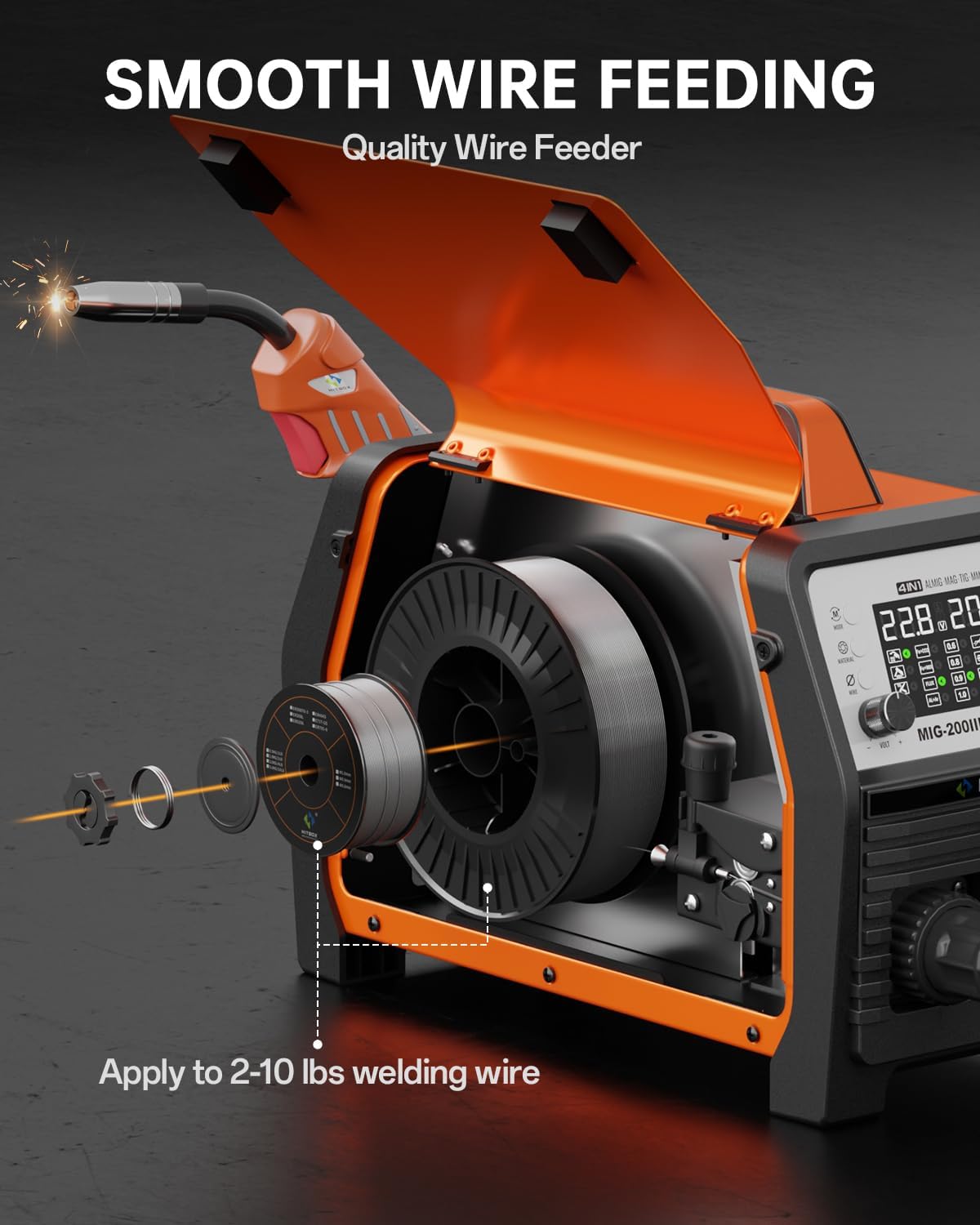
Figur 2: Wire spool installation and feeding mechanism. This illustration shows how to correctly install the welding wire spool and thread it through the machine's smooth wire feeding system, compatible with 2-10 lbs spools.
5.3 Gasstilkobling (for gass MIG/TIG)
For Gas MIG or TIG welding, connect the gas hose (included) from your gas cylinder regulator to the gas inlet on the back of the welder. Ensure all connections are secure and leak-free.
5.4 Brenner og jordingsreléamp Forbindelse
- MIG/TIG without Gas (Flux Core MIG): Koble til jord clamp til den positive (+) terminalen.
- MIG/MMA with Gas: Koble til jord clamp til den negative (-) terminalen.
- Connect the MIG torch or TIG torch (sold separately for TIG) to the appropriate connectors on the front panel.
6. Bruksanvisning
The HITBOX MIG200III offers multiple welding modes and synergic control for ease of use.

Figur 3: Overview of welding processes. This image highlights the 7-in-1 multi-process capabilities of the welder, including Gas MIG, Flux MIG, Spool Gun compatibility, Lift TIG, Spot Welding, Single Pulse MIG, and MMA.
6.1 Synergic Control and Mode Selection
The synergic control feature simplifies parameter setting.
- Select SYN mode: Activate synergic mode on the control panel.
- Velg materiale: Choose the material type (e.g., Fe+CO2 for carbon steel with CO2 gas, AL+Ar for aluminum with Argon gas).
- Select Wire Size: Specify the diameter of your welding wire.
The machine will automatically suggest recommended current and wire feed speed settings. You can fine-tune these settings as needed.

Figur 4: Synergic control panel. The LED display provides clear visual feedback for selecting welding modes, materials, and wire sizes, making setup straightforward for all skill levels.
6.2 Welding Modes and Adjustments
- 2T/4T/Spot Welding: Select between 2T (trigger held for weld), 4T (trigger press to start, press again to stop), or Spot Welding mode for precise control. Spot welding time is adjustable.
- Trådmatingshastighet: Adjust the wire feed speed from 0 to 10 for optimal welding control.
- Induktans: Adjust inductance from -10 to +10 to control arc stability.
- Pre/Post Gas Flow: Customize pre-flow and post-flow gas times from 0 to 2 seconds for optimal weld protection.
6.3 Aluminum Welding
The MIG200III supports aluminum welding with argon gas using a 1.0 mm wire. For enhanced performance, a spool gun (sold separately) is recommended.

Figur 5: Aluminum welding methods. This image demonstrates the use of both the standard MIG gun and an optional spool gun for effective aluminum welding.
7. Vedlikehold
Regelmessig vedlikehold sikrer sveisemaskinens levetid og optimale ytelse.
- Rengjøring: Rengjør maskinens utvendige deler og ventilasjonsåpninger med jevne mellomrom for å forhindre opphopning av støv og rusk. Bruk trykkluft til å rengjøre interne komponenter om nødvendig, og sørg for at maskinen er koblet fra strømnettet.
- Brenner og forbruksvarer: Inspect the MIG torch, contact tips, nozzles, and electrode holder regularly. Replace worn or damaged consumables to maintain weld quality.
- Trådmater: Keep the wire feeder rollers clean and free of debris. Check for proper wire tension.
- Kabler og tilkoblinger: Inspect all cables for damage and ensure connections are tight and secure.
- Lagring: Oppbevar sveiseapparatet på et tørt og rent sted når det ikke er i bruk.
8. Feilsøking
Denne delen inneholder løsninger på vanlige problemer du kan støte på.
| Problem | Mulig årsak | Løsning |
|---|---|---|
| Ingen strøm | Power cable disconnected, circuit breaker tripped, machine switch off | Check power connections, reset breaker, turn on machine switch |
| Poor arc start/unstable arc | Improper ground connection, incorrect settings, dirty workpiece, worn contact tip | Ensure good ground, adjust voltage/wire speed, clean workpiece, replace contact tip |
| Problemer med trådmating | Incorrect roller tension, clogged liner, wrong wire size, tangled wire spool | Adjust roller tension, clean/replace liner, verify wire size, untangle spool |
| Overopphetingsbeskyttelse aktivert | Overskredet driftssyklus, blokkert ventilasjon | Allow machine to cool down, ensure clear ventilation paths |
Hvis du støter på problemer som ikke er dekket her, kan du kontakte kundestøtte.
9. Garanti og støtte
Each HITBOX MIG welding machine undergoes rigorous testing before leaving the factory to ensure it meets high industrial standards.
For specific warranty details and terms, please refer to the warranty card included with your product or contact HITBOX customer support directly.
Kundestøtte: For technical assistance, troubleshooting, or parts inquiries, please visit the official HITBOX webnettstedet eller kontakt deres kundeserviceavdeling.