
Opus GX12
RadioMaster GX12 Dual-Band Gemini-X ExpressLRS Radio Controller M2 User Manual
Modell: GX12
Introduksjon
The RadioMaster GX12 is a state-of-the-art radio controller designed for advanced remote control applications, featuring ExpressLRS Gemini-XROSSBAND (GEM-X) technology. This manual provides essential information for the safe and effective operation, setup, and maintenance of your GX12 radio controller.

Bilde: Foran view of the RadioMaster GX12 radio controller, showcasing its dual antennas, central display, gimbals, and various control switches and buttons.

Image: A promotional graphic for the GX12, emphasizing its advanced features such as dual 1W RF output, dual-band antenna, Gemini Xrossband technology, and high-precision gimbals.
Sikkerhetsinformasjon
Please read the user instructions carefully before operating the device.
- Always ensure the radio controller is fully charged before use.
- Operate the device in a safe environment, away from obstacles and other radio interference sources.
- Ikke utsett enheten for ekstreme temperaturer, fuktighet eller direkte sollys.
- Oppbevares utilgjengelig for barn.
- Only use approved batteries and charging methods.
Hva er i esken
Når du åpner pakken, må du kontrollere at alle komponentene som er oppført nedenfor er til stede:
- GX12 Radio Controller
- Bæreveske
- Battery Tray (Battery Cells Not Included)
- Replacement Switch Panels
- Type-C kabel
- Tilbehør
- User Instructions (Quick Start Guide)

Image: All items included in the GX12 Radio Controller package, neatly laid out, showing the controller, its grey carry case, battery tray, USB-C cable, and other small accessories.
Oppsett
1. Installasjon av batteri
The GX12 Radio Controller requires a 7.4V 2-cell Lithium-Polymer battery, two 3.7V 18650 Lithium-Ion cells, or a 21700 5000mAh battery (batteries not included). Locate the battery compartment on the back of the controller.

Bilde: Bak view of the GX12 radio controller, highlighting the battery compartment cover with a "PUSH" indicator and the RadioMaster strap.
- Åpne batteridekselet.
- Insert the compatible battery into the tray, ensuring correct polarity.
- Lukk batteridekselet godt.
2. Lading
The GX12 supports 2S Smart Balance Charging via its USB-C port.
- Connect the supplied Type-C cable to the USB-C port on the controller and to a suitable USB power source.
- The OLED display will indicate charging status.
3. Antenneoppsett
The GX12 features dual folding 2.4GHz/Sub-G 900MHz omnidirectional antennas.
- For optimal performance, unfold the antennas to an upright position before operation.
- Fold them down for compact storage and transport.

Bilde: Foran view of the GX12 radio controller with its dual antennas folded down, demonstrating its compact form factor for storage.
4. Gimbal Sticks
The GX01 gimbals feature folding sticks for easy transport.
- To fold, gently push the stick downwards and then fold it into the gimbal housing.
- To unfold, pull the stick out until it locks into the upright position.

Bilde: En eksplodert view diagram showing how the gimbal sticks on the GX12 can be folded for transport, highlighting the mechanism for compact storage.
Bruksanvisning
1. Slå på/av
- To power on, press and hold the power button until the OLED display illuminates.
- For å slå av, trykk og hold inne av/på-knappen til skjermen slår seg av.
2. Kontroller overview
The GX12 features a comprehensive set of controls for precise operation:
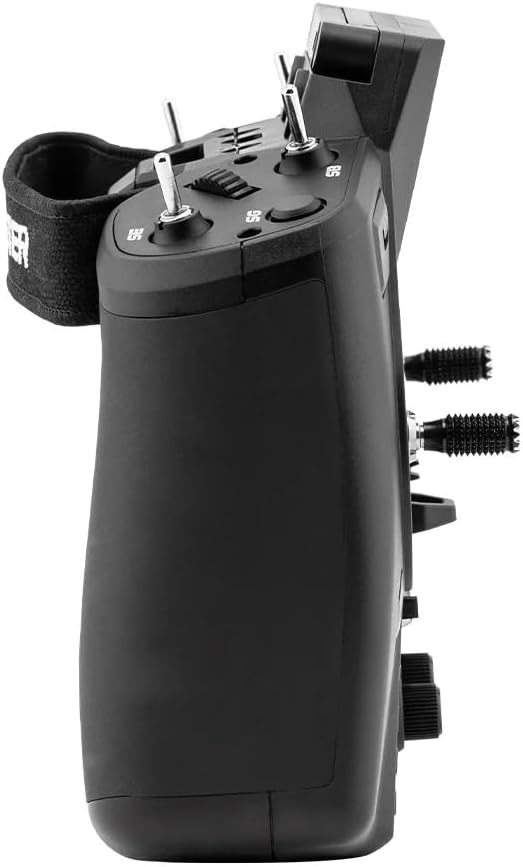
Bilde: Sideprofffile of the GX12 radio controller, illustrating its ergonomic design and the placement of additional switches and controls on the side.
- GX01 1000Hz, 3D Digital CNC Hall Effect Gimbals: Provide precise control inputs.
- Switches (SA, SD, T1-T6): Configurable for various functions.
- Buttons (SYS, RTN, PAGE, TELE): For navigating the EdgeTX firmware menu.
- Pots (P1, P2): Rotary potentiometers for fine adjustments.
- 128*64 Monochrome OLED Display: Shows telemetry data, menu options, and settings.

Bilde: En detaljert utklipp view of the GX01 Digital 1000Hz 12-bit Gimbal, highlighting its CNC aluminum construction, quad ball bearings, and 3D Digital Hall Effect Sensors for exceptional precision.
3. ExpressLRS Gemini-XROSSBAND (GEM-X)
The GX12 is the first radio to feature ExpressLRS Gemini-XROSSBAND (GEM-X), allowing for simultaneous transmission on both 2.4GHz and 915MHz. This ensures unmatched interference rejection and extended range.
- The internal RF module supports ELRS 2.4GHz / Sub-G 900MHz.
- It is compatible with all current 2.4GHz and 900MHz ExpressLRS receivers, as well as the new generation of Gemini Xrossband (Gem-X) receivers.
4. EdgeTX Firmware
The radio operates on EdgeTX firmware, providing a highly customizable and powerful user interface. Refer to the official EdgeTX documentation for detailed instructions on model setup, binding, and advanced configurations.
- Channels: Max 16 channels (Receiver dependent).
- Upgrade Method: USB / EdgeTX Companion PC software.
Vedlikehold
- Rengjøring: Bruk en myk, tørr klut til å rengjøre utsiden av radioen. Unngå bruk av sterke kjemikalier eller slipende materialer.
- Kjølevifte: The GX12 includes a cooling fan to manage heat during operation. Ensure the fan vents are clear of obstructions.
- Lagring: When not in use, store the radio controller in its carry case in a cool, dry place, away from direct sunlight and extreme temperatures.
- Stell av gimbal: The GX01 gimbals are precision components. Avoid applying excessive force or exposing them to dust and debris.
Feilsøking
- Radioen slår seg ikke på:
- Sjekk batteriets ladenivå.
- Ensure battery is correctly installed with proper polarity.
- No Signal/Binding Issues:
- Verify that the receiver is compatible with ExpressLRS.
- Ensure both radio and receiver are in binding mode.
- Check antenna orientation on both devices.
- Skjermen fungerer ikke:
- Sørg for at radioen er slått på.
- Hvis problemet vedvarer, kontakt kundestøtte.
- Problemer med fastvareoppdatering:
- Kontroller at USB-kabelen er ordentlig tilkoblet.
- Use the official EdgeTX Companion PC software for updates.
- Refer to EdgeTX documentation for detailed update procedures.
Spesifikasjoner
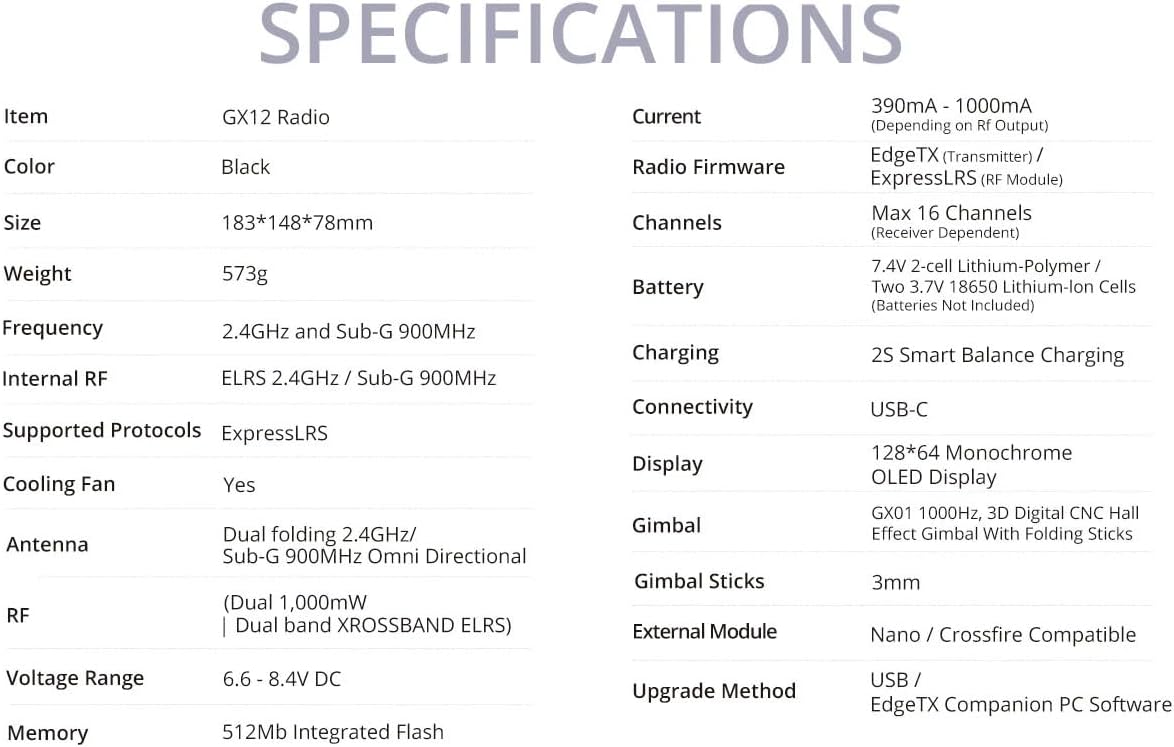
Image: A comprehensive table detailing the specifications of the GX12 Radio, including dimensions, weight, frequency, internal RF, battery, and display type.
| Trekk | Detalj |
|---|---|
| Hyppighet | 2.400GHz og Sub-G 900MHz |
| Internal RF | ELRS 2.4GHz / Sub-G 900MHz |
| Støttede protokoller | Express-LRS |
| Kjølevifte | Ja |
| Antenne | Dual folding 2.4GHz/ Sub-G 900MHz Omni directional |
| RF | Dual 1,000mW | Dual band XROSSBAND ELRS |
| Voltagog rekkevidde | 6.6–8.4 V likestrøm |
| Nåværende | 390mA - 1000mA (Depending on Rf output) |
| Radio fastvare | EdgeTX (Transmitter) / ELRS (RF module) |
| Kanaler | Maks 16 kanaler (mottakeravhengig) |
| Batteri | 7.4V 2-cell Lithium-Polymer / Two 3.7V 18650 Lithium-Ion cells / 21700 5000mAh Battery (batteries not included) |
| Lader | 2S Smart Balance Charging |
| Tilkobling | USB-C |
| Utstilling | 128*64 Monokrom OLED-skjerm |
| Gimbal | GX01 1000Hz, 3D Digital CNC Hall Effect Gimbal med sammenleggbare pinner |
| Gimbal-pinner | 3 mm |
| Ekstern modul | Nano / Crossfire-kompatibel |
| Oppgraderingsmetode | USB / EdgeTX Companion PC software |
| Hukommelse | 512Mb integrert blits |
| Produktdimensjoner | 7.2 x 5.8 x 3 tommer |
| Varevekt | 1.26 pund |
| Opprinnelsesland | Kina |
| Produsent | RadioMaster |
Relaterte dokumenter - GX12
 |
OPUS Integrity Dual Countertop Water Purifier Installation and User Guide Comprehensive guide for installing and maintaining the OPUS Integrity Dual countertop water purification system. Learn about its filtration stages, components, and benefits for clean, mineral-rich water. |
 |
Installasjonsveiledning og funksjoner for OPUS Integrity Dual-2024 benkeplatevannrenser Detaljerte installasjonsinstruksjoner og funksjoner for OPUS Integrity Dual-2024 benkeplatevannrensesystem. Lær om dets 4-stage-filtrering, fjerning av forurensninger, filterbytte og garanti. |
 |
Hurtigstartveiledning for RadioMaster GX12 dobbeltbånds fjernkontrollsystem En hurtigstartveiledning for RadioMaster GX12 Dual-Band fjernkontrollsystem, som dekker introduksjon, sikkerhetsinformasjon, nedlastinger av manualer og fastvare, fjernkontroll overview, battery and charging information, exterior adjustments, model and protocol selection, and specifications. |
 |
RadioMaster GX12 Quick Start Guide: Dual-Band 2.4GHz & Sub-G RC Transmitter Quick start guide for the RadioMaster GX12 dual-band RC transmitter. Learn about setup, features, safety, specifications, and binding for your 2.4GHz and Sub-G Gemini-Xross system. |
 |
Hurtigstartveiledning for trådløs opplæringsmodul fra RadioMaster Steg-for-steg-veiledning for oppsett og feilsøking av RadioMaster Wireless Trainer Module for fjernstyrte radioer for instruktører og elever. Lær om kompatibilitet, konfigurasjon og kobling. |
 |
Brukerhåndbok for RadioMaster Ranger Micro 2.4 GHz ELRS-modul Brukerhåndbok for RadioMaster Ranger Micro 2.4GHz ELRS-modulen, med detaljer om funksjoner, spesifikasjoner og kompatibilitet med ulike radiosendere for avansert ELRS-tilkobling. |