
1. Introduksjon
This manual provides detailed instructions for the setup, operation, maintenance, and troubleshooting of your Transformers TF-Crystal 85 Keys Mechanical Keyboard. Please read this manual thoroughly before using the product to ensure proper functionality and longevity.
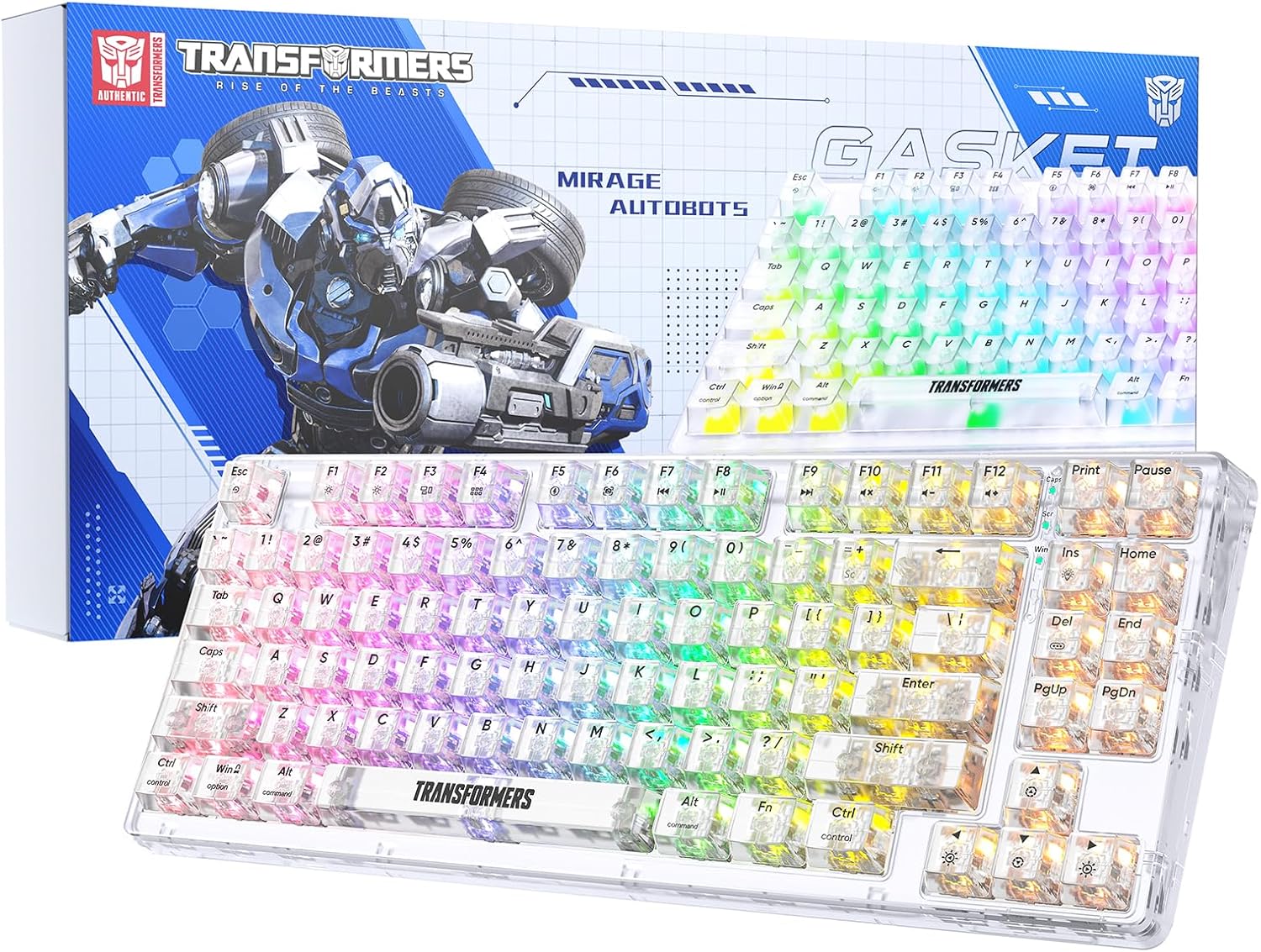
Image 1.1: Transformers TF-Crystal 85 Keys Mechanical Keyboard with its packaging, showcasing the transparent design and RGB lighting.
2. Produktet er overview
2.1 Nøkkelfunksjoner
- 85-tasters oppsett: Compact 75% design retaining essential functions, arrow, and navigation keys.
- Trippelmodus-tilkobling: Støtter Bluetooth 5.0, trådløs 2.4 GHz og kablede USB-C-tilkoblinger.
- Hot-swap PCB: Compatible with most 3-pin and 5-pin mechanical switches, allowing for easy customization and replacement.
- Linear Switches: Pre-lubricated switches with a 50 million keystroke lifespan for durability and smooth operation.
- Pakningsstruktur: Incorporates high-quality gasket materials and a silicone pad to absorb vibrations and reduce typing noise.
- Tilpassbar RGB-bakgrunnsbelysning: Features 20 built-in backlight modes, 16.8 million color options, and dynamic music rhythm effects.
- Programmable Driver: Enables macro customization, key function remapping, and advanced lighting control.
- Lang batterilevetid: Equipped with a 4000mAh battery, providing up to 240 hours of continuous use in 2.4GHz mode without backlighting.
- Bred kompatibilitet: Supports Mac, Windows, iOS, Android, PC, Laptop, Smartphone, Tablet, Switch, Xbox, and PlayStation.
- Gjennomsiktig design: Features transparent keycaps and base for enhanced aesthetic appeal.
3. Oppsett
3.1 Lade tastaturet
Before initial use, fully charge the keyboard. Connect the provided USB-C cable to the keyboard's USB-C port and the other end to a powered USB port (e.g., computer, wall adapter). The charging indicator will show the charging status.
3.2 Tilkobling via 2.4 GHz trådløs modus
- Finn 2.4 GHz USB-mottakeren, som vanligvis oppbevares i et rom på tastaturet.
- Koble USB-mottakeren til en ledig USB-port på datamaskinen.
- Toggle the mode switch on the keyboard to the 2.4G posisjon.
- The keyboard will automatically connect to your device.
3.3 Connecting via Bluetooth 5.0 Mode
- Toggle the mode switch on the keyboard to the BT posisjon.
- Trykk og hold Fn + 1 (eller Fn + 2, Fn + 3) i 3–5 sekunder til indikatorlampen blinker raskt, noe som indikerer paringsmodus.
- Aktiver Bluetooth på enheten din (datamaskin, nettbrett, smarttelefon) og søk etter nye enheter.
- Select "TF-Crystal 85" from the list of available devices to pair.
- Once paired, the indicator light will stop flashing and remain solid. You can pair up to three Bluetooth devices using Fn + 1, Fn + 2, og Fn + 3.
3.4 Tilkobling via USB-C kablet modus
- Koble den medfølgende USB-C-kabelen til tastaturets USB-C-port.
- Koble den andre enden av USB-C-kabelen til en ledig USB-port på datamaskinen.
- The keyboard will automatically switch to wired mode and function without battery power.

Image 3.1: Diagram illustrating the three connection modes: Bluetooth 5.0, 2.4GHz wireless, and USB-C wired, compatible with various devices.
4. Bruksanvisning
4.1 Bytte mellom moduser
Use the physical switch located on the keyboard to select between BT (Blåtann), 2.4G (2.4GHz wireless), and USB-C (wired) modes.
4.2 RGB-bakgrunnsbelysningskontroll
The keyboard features customizable RGB backlighting. Use the following key combinations to adjust:
- Fn + Ins: Cycle through 20 different backlight effects.
- Fn + Del: Switch backlight colors within certain modes.
- Fn + ↑ / ↓: Juster bakgrunnsbelysningens lysstyrke (5 nivåer).
- Fn + ← / →: Adjust backlight effect speed (5 levels).
- Fn + Esc (hold for 3s): Reset backlight settings to default.

Image 4.1: Visual guide for controlling RGB backlight effects, brightness, and speed using Fn key combinations.
4.3 Programmable Driver Usage
The keyboard includes a programmable driver for advanced customization. This driver allows you to:
- Makroredigering: Record and edit complex key sequences.
- Key Redefinition: Customize the function of individual keys.
- RGB Effect Customization: Fine-tune lighting modes, colors, and speeds, including music rhythm lighting effects.
Refer to the software's dedicated user interface for detailed instructions on using these features.

Image 4.2: Screenshot of the programmable driver interface, showing options for macro editing, RGB effects, and key redefinition.
4.4 Hot-swapping-brytere
The TF-Crystal 85 keyboard features a hot-swappable PCB, allowing you to change mechanical switches without soldering. This supports most 3-pin and 5-pin mechanical switches.
- Slå av tastaturet eller koble det fra enheten.
- Bruk den medfølgende tastehetteavtrekkeren til å forsiktig fjerne den ønskede tastehetten.
- Use the provided switch puller to gently grip the switch from its top and bottom clips, then pull it straight up to remove it.
- Juster pinnene på den nye bryteren med hullene på kretskortet. Sørg for at pinnene er rette.
- Trykk forsiktig den nye bryteren på plass til den klikker ordentlig. Ikke bruk makt.
- Sett på tastehetten.

Image 4.3: Illustration of the hot-swappable feature, showing how to remove and insert 3-pin/5-pin switches and the linear switch specifications.
5. Vedlikehold
5.1 Rengjøring av tastaturet
- Koble tastaturet fra alle strømkilder før rengjøring.
- Bruk en myk, lofri klut litt damprengjøres med vann eller et mildt rengjøringsmiddel for å tørke av tastehettene og kabinettet.
- Bruk trykkluft eller en liten børste for å fjerne støv og rusk mellom tastene.
- Avoid using harsh chemicals or abrasive materials that could damage the keyboard's surface.
5.2 Batteristell
- Unngå å utlade batteriet helt ofte.
- Oppbevar tastaturet på et kjølig og tørt sted når det ikke er i bruk over lengre tid.
- If the keyboard will not be used for a long time, charge it to about 50% before storage.
6. Feilsøking
| Problem | Mulig årsak | Løsning |
|---|---|---|
| Tastaturet svarer ikke i trådløs modus. | Low battery, incorrect mode selected, receiver not connected, Bluetooth not paired. | Charge the keyboard. Ensure the mode switch is set correctly (2.4G or BT). Re-insert the 2.4G receiver. Re-pair Bluetooth. |
| Nøkler registreres ikke eller dobbeltskrives. | Feil på bryter, rusk under tastehetten, programvareproblem. | Clean under the keycap. Try hot-swapping the switch with a known working one. Restart your computer. |
| RGB backlight not working or incorrect. | Backlight turned off, incorrect settings, software conflict. | Juster lysstyrken ved hjelp av Fn + ↑Syklusmoduser med Fn + Ins. Reset backlight with Fn + Esc (hold 3s). Check programmable driver settings. |
| Tastaturet lader ikke. | Faulty USB-C cable, power source issue, keyboard port damage. | Try a different USB-C cable. Use a different USB port or power adapter. Ensure the cable is fully inserted. |
7. Spesifikasjoner
| Trekk | Detalj |
|---|---|
| Modellnummer | TF-Crystal 85 |
| Nøkkeloppsett | 85 Keys (75% Compact) |
| Tilkobling | Bluetooth 5.0, 2.4 GHz trådløs, USB-C kablet |
| Brytertype | Pre-lubricated Linear Mechanical Switches |
| Bytt levetid | 50 millioner tastetrykk |
| Hot-Swapable | Ja (kompatibel med 3-pinners/5-pinners) |
| Bakgrunnsbelysning | RGB (20 moduser, 16.8 millioner farger) |
| Batterikapasitet | 4000mAh |
| Battery Life (2.4G, no light) | Opptil 240 timer |
| Batterilevetid (bakgrunnsbelysning PÅ) | Omtrent 22 timer |
| Dimensjoner (L x B x H) | 34.7 cm x 14 cm x 4.5 cm |
| Kompatibilitet | Mac, Windows, iOS, Android, PC, Laptop, Smartphone, Tablet, Switch, Xbox, PlayStation |

Image 7.1: Visual representation of the keyboard's battery life: 240 hours with backlight off, 22 hours with backlight on, powered by a 4000mAh battery.
8. Garanti og støtte
Transformers is committed to providing exceptional customer service. If you encounter any problems with your TF-Crystal 85 Keys Mechanical Keyboard, our after-sales support team is available to assist you. This includes technical support, exchanges, or installation guidance.
Please contact our customer service for assistance. We guarantee a hassle-free service experience.