
1. Introduksjon
This manual provides detailed instructions for the installation, operation, and maintenance of your Acouto 7-Inch TFT LCD VGA Monitor. Please read this manual thoroughly before using the product to ensure proper function and to prevent damage. Keep this manual for future reference.
2. Sikkerhetsinformasjon
- Sørg for at strømforsyningen oppfyller spesifisert voltage (12V) and current (greater than 1A) requirements.
- If using a car power supply, a regulator must be added to prevent interference and voltage svingninger.
- Unngå å utsette skjermen for ekstreme temperaturer, fuktighet eller direkte sollys.
- Ikke forsøk å demontere eller reparere enheten selv. Overlat all service til kvalifisert personell.
- Keep the monitor away from water or other liquids to prevent electric shock.
3. Pakkens innhold
Bekreft at alle varene som er oppført nedenfor er inkludert i pakken din:
- 1 x 7-Inch LCD Display Screen (1024x600)
- 1 x Driver Board (Control Kit)
- 1 x Flat Cable (for connecting LCD to driver board)
- 1 x USB-strømledning
- 1 x fjernkontroll

Image 3.1: Complete package contents including the LCD screen, driver board, various cables, and a remote control.
4. Produktet er overview
The Acouto 7-Inch TFT LCD VGA Monitor is a versatile display solution featuring a 1024x600 resolution. It is designed for various applications, including use with Raspberry Pi 3/2 or as a general computer display. The monitor supports multiple input types and offers image adjustment capabilities.
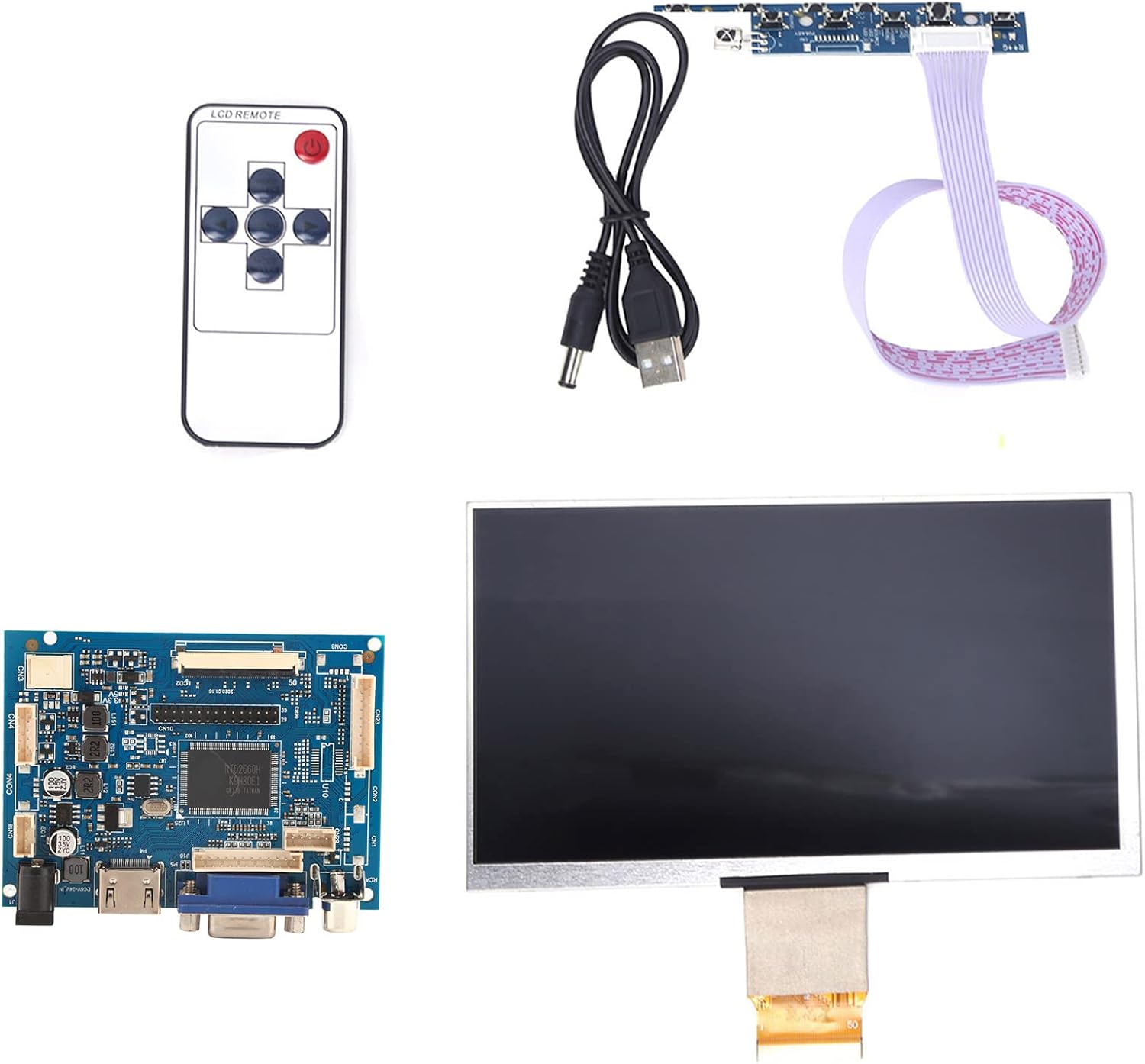
Bilde 4.1: Overview of the Acouto 7-inch TFT LCD VGA Monitor kit components.
4.1. LCD-skjerm
The 7-inch TFT LCD panel provides a clear display with a physical resolution of 1024x600 pixels. It supports various resolutions from 640x480 to 1600x1200 through arbitrary adjustment.

Image 4.2: The 7-inch TFT LCD display screen.
4.2. Driver Board
The driver board serves as the control unit for the LCD, featuring multiple input interfaces including 2 x AV channels, VGA, and 1 x HD input (version 1.2). It also includes buttons for menu navigation and settings adjustment.

Image 4.3: The driver control board with input ports.
4.3. Fjernkontroll
A remote control is included for convenient adjustment of settings and input selection.

Image 4.4: The included remote control.
5. Oppsett
Follow these steps to set up your Acouto 7-Inch TFT LCD VGA Monitor:
- Connect the LCD to the Driver Board: Carefully connect the flat cable from the LCD display to the corresponding connector on the driver board. Ensure the connection is secure and correctly oriented.
- Connect Video Input: Choose your desired video input (VGA, HD, AV1, or AV2) and connect the appropriate cable from your source device (e.g., Raspberry Pi, computer, DVD player) to the driver board.
- Koble til strøm: Connect the USB power cord to the driver board's power input, and then connect it to a 12V power source (greater than 1A). If using a car power supply, ensure a regulator is in place.
- Strøm på: Once all connections are secure, power on the monitor and your source device.

Image 5.1: LCD screen connected to the driver board.
6. Bruksanvisning
6.1. Slå på/av
Press the power button on the driver board or the remote control to turn the monitor on or off.
6.2. Inngangsvalg
Use the 'Input' button on the driver board or remote control to cycle through available video inputs (AV1, AV2, VGA, HD).
6.3. Menynavigering
Access the On-Screen Display (OSD) menu by pressing the 'Menu' button. Use the arrow buttons to navigate and the 'OK' or 'Enter' button to select options. Adjust settings such as brightness, contrast, color, and aspect ratio.
6.4. Image Flip and Convert
The monitor supports image flipping (up/down, left/right) and display format conversion (4:3 / 16:9). These functions can be accessed through the OSD menu or dedicated buttons on the remote control, providing a customizable viewopplevelse.
Note: AV2 video input is designed for automatic camera screen display, typically used in automotive applications for reverse cameras.
7. Vedlikehold
For å sikre at skjermen din holder lenge og har optimal ytelse, bør du følge disse vedlikeholdsretningslinjene:
- Rengjøring av skjermen: Tørk forsiktig av skjermen med en myk, lofri klut. For gjenstridige merker, tørk littampRengjør kluten med vann eller et ikke-slipende skjermrensemiddel. Ikke spray væske direkte på skjermen.
- Rengjøring av Casing: Bruk en myk, tørr klut til å rengjøre skjermensasing. Avoid using strong detergents or solvents.
- Lagring: When not in use for extended periods, store the monitor in a cool, dry place, away from direct sunlight and dust.
8. Feilsøking
Hvis du støter på problemer med skjermen, kan du se følgende feilsøkingsveiledning:
| Problem | Mulig årsak | Løsning |
|---|---|---|
| No display / Black screen |
|
|
| Image distorted / Poor quality |
|
|
| Fjernkontrollen virker ikke |
|
|
9. Spesifikasjoner
Detailed technical specifications for the Acouto 7-Inch TFT LCD VGA Monitor:
| Trekk | Spesifikasjon |
|---|---|
| Merke | Acouto |
| Modellnavn | Acouto536ocyn8e0 |
| Skjermstørrelse | 7 tommer |
| Visningstype | TFT LCD |
| Fysisk oppløsning | 1024 x 600 |
| Støttede oppløsninger | 640x480 til 1600x1200 |
| Aspektforhold | 4:3 (convertible to 16:9) |
| Maskinvaregrensesnitt | VGA, HD (version 1.2), 2 x AV channels |
| Human Interface Input | Buttons, Remote Control |
| Driftsvoltage | 12V (Power supply > 1A required) |
| Nominell effekt | 6-7 W |
| Produktdimensjoner | 30 x 19 x 4 cm |
| Produktvekt | 323 g |
10. Garanti og støtte
For garantiinformasjon og teknisk støtte, se dokumentasjonen som fulgte med ved kjøpstidspunktet eller kontakt forhandleren din. Ta vare på kjøpskvitteringen som kjøpsbevis for eventuelle garantikrav.