
Augnner B005
Augnner Sound Machine Alarm Clock User Manual
Modell: B005
Introduksjon
Thank you for choosing the Augnner Sound Machine Alarm Clock. This device combines a white noise sound machine, alarm clock, night light, and Bluetooth speaker into one compact unit, designed to enhance your sleep environment and daily routine. This manual provides detailed instructions for setup, operation, and maintenance.

The Augnner Sound Machine Alarm Clock, a compact device designed for sleep and daily use.
Produktfunksjoner
The Augnner Sound Machine Alarm Clock offers a versatile set of features:
- 32 Non-Looping Soothing Sounds: Includes white noise, brown noise, pink noise, and natural sounds like rain, streams, birdsong, waves, and more, designed to create an optimal sleep environment.
- Dimmable Alarm Clock: Features a clock display with adjustable brightness (off, 10%, 50%, 100%). Set alarms with 32 gentle natural wake-up sounds that gradually increase in volume. Includes a 9-minute snooze function.
- Multi-functional Night Light: Offers 8 unique light modes, RGB breathing, and 3000 adjustable color temperatures. Infinite dimming and color changes are controllable via the app. Can be used as a bedside lamp or wake-up light.
- Blåtann-høytaler: Connects via Bluetooth 5.3 for fast and stable audio streaming.
- Smart appkontroll: Control all functions including sound, volume, light color, brightness, and auto-off timer via a dedicated mobile application (available for iOS and Android).
- Bærbar design: Compact size (3.15 x 3.15 x 1.85 inches) makes it suitable for home, office, or travel.
- Long-lasting Battery & Memory Function: Equipped with an 800 mAh built-in battery, providing 8+ hours of continuous use after 1-2 hours of Type-C charging. Remembers previous settings for volume, brightness, tracks, alarm, and timers.

The device functions as a sound machine, alarm clock, Bluetooth speaker, and night light.
Pakkeinnhold
Vennligst kryss av i boksen for følgende elementer:
- Augnner Sound Machine Alarm Clock (Model: B005)
- USB Type-C ladekabel
- Brukerhåndbok
Product Controls and Overview
Familiarize yourself with the buttons and ports on your Augnner Sound Machine Alarm Clock:

Topp view of the Augnner Sound Machine with labeled controls.

A detailed diagram illustrating the function of each button on the device.
| Knapp/ikon | Funksjon | Handling |
|---|---|---|
| + | Volume Up / Previous Sound | Short press: Increase volume. Long press: Go to previous track. |
| - | Volume Down / Next Sound | Short press: Decrease volume. Long press: Go to next track. |
| ► || | Play/Pause / Bluetooth Pairing | Short press: Play/Pause sound. Long press (2+ seconds): Enter Bluetooth mode. |
| 🔔 (Bell Icon) | Vekkerknapp | Short press: Turn alarm on/off. Long press (2 seconds): Enter alarm settings. Short press again: Cycle through settings (hour, minute, ringtone, volume, workday). Adjust values with +/- keys. |
| 🕑 (Clock Icon) | Tidsinnstilling | Long press to enter time setting mode. Adjust values with +/- keys. |
| 💡 (Light Bulb Icon) | Light Control / Snooze | Short press: Cycle through light modes/brightness. When alarm sounds, short press for 9-minute snooze. |
| ⏺ (Timer Icon) | Timerknapp | Short press: Start timer. Short press again: Cycle through auto-off durations (30/60/90/120/240 minutes/OFF). |
| ⏺ (Power Icon) | Power Switch / Display Dimmer | Short press: Adjust clock display brightness (Off-10%-50%-100%). Long press: Power On/Off. |
Oppsett
1. Lading av enheten
Before first use, fully charge the device. Connect the provided USB Type-C cable to the charging port on the back of the device and plug the other end into a USB power adapter (not included) or a computer USB port.
- En full lading tar omtrent 1-2 timer.
- The device can operate for 8+ hours on a full charge.
- The app displays the exact battery status.
2. Slå på/av
For å slå på enheten, trykk lenge på ⏺ (Power Icon) button. To power off, long press the same button again.
3. Nedlasting og tilkobling av appen
For smart control and extended features, download the companion app. Søk etter "White Whisper" in your app store or scan the QR codes below:

Scan the QR codes to download the "White Whisper" app from various app stores.
- iOS App Store: Last ned for iOS
- Google Play Butikk: Download for Android (Google Play)
- Alternative Android App Store: Download for Android (Alternative)
Når appen er installert:
- Sørg for at Bluetooth er aktivert på smarttelefonen.
- Open the "White Whisper" app.
- The app will automatically search for and connect to your Augnner Sound Machine. If prompted, confirm the connection.
Bruksanvisning
1. Lydavspilling
- Spiller av lyder: The device will typically start playing a default sound upon power-on.
- Changing Sounds: Trykk lenge på + button for the previous sound or the - button for the next sound. There are 32 soothing sounds available.
- Justere volum: Trykk kort på + button to increase volume or the - knappen for å redusere volumet.
- Pause/spill av: Trykk kort på ► || for å pause eller gjenoppta avspilling.

A visual representation of the 32 soothing sounds available, including various types of noise and natural sounds.
2. Night Light Control
- Changing Light Modes/Brightness: Trykk kort på 💡 (Light Bulb Icon) button to cycle through 8 unique light modes and adjust brightness.
- Appkontroll: For infinite dimming, RGB breathing, and 3000 adjustable color temperatures, use the "White Whisper" app.
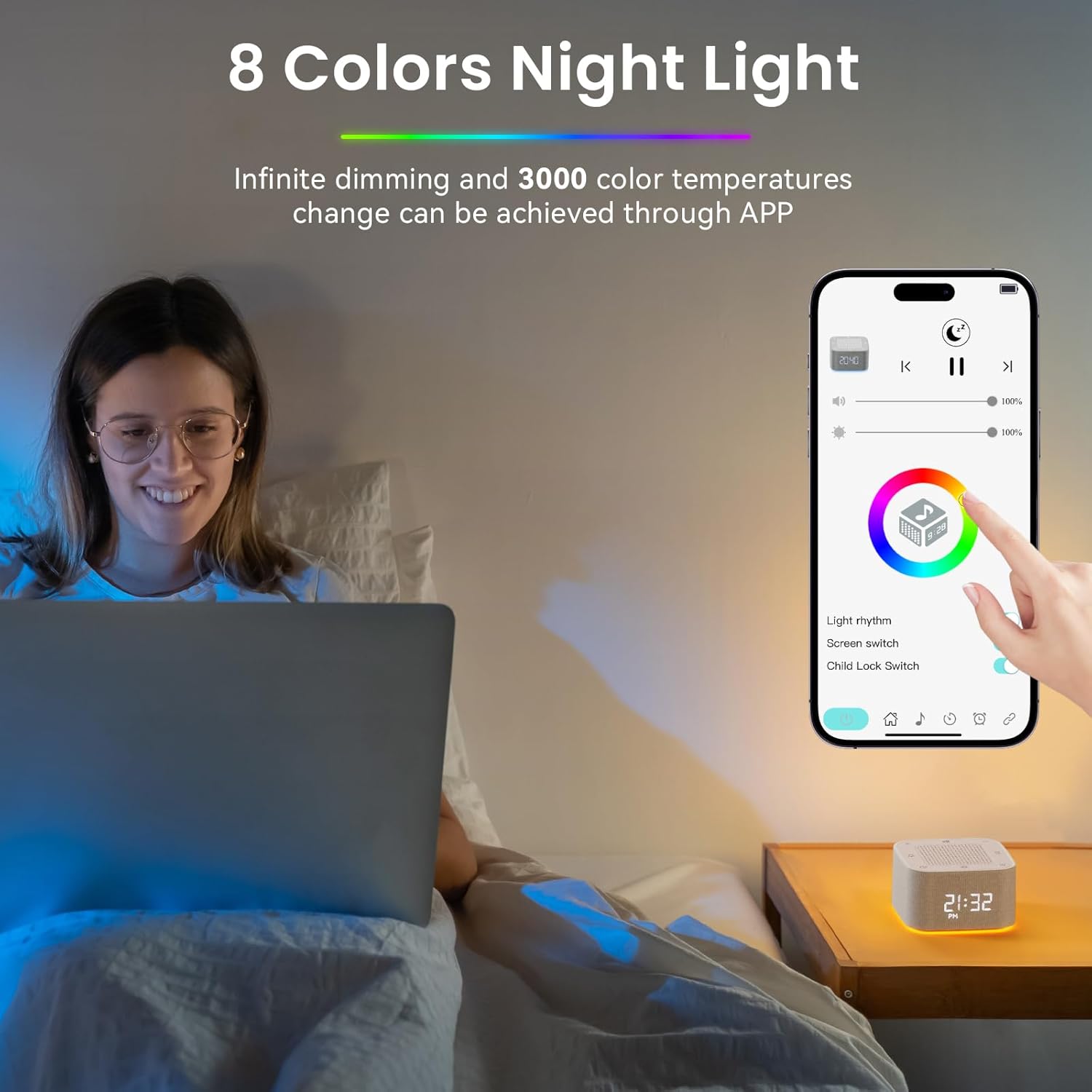
The mobile app interface for controlling the night light's colors and brightness.
3. Alarm Clock Settings
- Stille inn alarm: Trykk lenge på 🔔 (Bell Icon) button for 2 seconds to enter alarm settings.
- Justere innstillinger: Trykk kort på 🔔 button again to cycle through settings: hour, minute, ringtone (choose from 32 sounds), alarm volume, and workday settings. Use the + og - knapper for å justere verdier.
- Turning Alarm On/Off: Trykk kort på 🔔 (Bell Icon) button to toggle the alarm on or off.
- Snooze-funksjon: When the alarm sounds, short press the 💡 (Light Bulb Icon) button for a 9-minute snooze.

The device's smart alarm clock features, including app control for setting multiple alarms and choosing wake-up sounds.
4. Auto-off Timer
- Innstilling av timer: Trykk kort på ⏺ (Timer Icon) button to activate the auto-off timer.
- Cycling Durations: Trykk kort på ⏺ button again to cycle through preset durations: 30, 60, 90, 120, 240 minutes, or OFF.
- Appkontroll: The app allows you to set the auto-off timer for any custom duration.
5. Klokkevisning
- Justering av lysstyrke: Trykk kort på ⏺ (Power Icon) button to cycle through clock display brightness levels: Off, 10%, 50%, 100%.
- Tidsformat: The device supports both 12-hour and 24-hour time formats. This can typically be adjusted via the app or during initial time setting.

Visual representation of the clock display at different brightness levels: Off, 10%, 50%, and 100%.

Examples of the clock display in both 12-hour (AM/PM) and 24-hour formats.
6. Bluetooth-høyttalerfunksjon
- Entering Bluetooth Mode: Trykk lenge på ► || button for more than 2 seconds. The device will indicate it's ready for pairing (e.g., a sound prompt or flashing light).
- Paring: On your smartphone or other Bluetooth-enabled device, search for "Augnner B005" (or similar name) in the Bluetooth settings and select it to pair.
- Avspilling: Once paired, you can play audio from your connected device through the Augnner Sound Machine.
7. Minnefunksjon
The device is equipped with a memory function that remembers your last settings for volume, brightness, tracks, alarm, and timers, even after being powered off. This ensures your preferred settings are retained for convenience.

An icon representing the memory function, indicating the device remembers your last settings.
Vedlikehold
- Rengjøring: Tørk av enheten med en myk, tørr klut. Ikke bruk slipende rengjøringsmidler eller løsemidler.
- Lagring: Oppbevar enheten på et kjølig og tørt sted når den ikke er i bruk over lengre tid.
- Batteripleie: For å forlenge batterilevetiden, unngå å utlade batteriet helt ofte. Lad enheten regelmessig, selv om den ikke er i konstant bruk.
Feilsøking
| Problem | Mulig årsak | Løsning |
|---|---|---|
| Enheten slås ikke på. | Lavt batteri eller ingen lading. | Connect the device to a power source using the USB Type-C cable and allow it to charge for at least 30 minutes before attempting to power on again. |
| Ingen lyd eller lavt volum. | Volume is too low; device is paused; incorrect sound selected. | Increase volume using the + knapp. Kort trykk ► || to ensure it's not paused. Cycle through sounds using + / - langt trykk. |
| Problemer med Bluetooth-tilkobling. | Device not in pairing mode; Bluetooth off on phone; interference. | Langt trykk ► || to enter Bluetooth pairing mode. Ensure Bluetooth is enabled on your phone. Move closer to the device and away from other wireless devices. |
| Alarmen lyder ikke. | Alarm is off; volume is too low; incorrect time set. | Kort trykk 🔔 to ensure alarm is enabled. Check alarm volume. Verify alarm time is correctly set. |
| Clock display is off or too dim. | Brightness set to off or lowest level. | Trykk kort på ⏺ (Power Icon) button to cycle through brightness levels. |
| App cannot connect to device. | Bluetooth not enabled; app not updated; device not powered on. | Ensure device is powered on and Bluetooth is enabled on your phone. Restart the app. Try restarting the device. |
Spesifikasjoner
| Trekk | Detalj |
|---|---|
| Modellnummer | B005 |
| Merke | Augnner |
| Dimensjoner | 3.15 x 3.15 x 1.85 tommer (ca.) |
| Farge | Yellowwhite |
| Materiale | Plast |
| Strømkilde | Battery Powered (800 mAh built-in battery) |
| Ladeport | USB Type-C |
| Bluetooth-versjon | 5.3 |
| Lydbibliotek | 32 Ikke-sløyfer beroligende lyder |
| Nattlys | 8 Light Modes + RGB Breathing, 3000 Adjustable Color Temperatures |

The compact dimensions of the Augnner Sound Machine, highlighting its portability.
Sikkerhetsinformasjon
Vennligst les og overhold følgende sikkerhetsretningslinjer:
- Do not use the device near water or in excessively humid environments.
- To prevent hearing damage, avoid using the device at high volumes for prolonged periods.
- This product is not a toy. Keep it out of reach of children when not in use to prevent accidental damage or injury.
- Ikke forsøk å demontere, reparere eller modifisere enheten selv. Overlat all service til kvalifisert personell.
- Use only the provided or a certified USB Type-C cable for charging.
Uttalelser angående kosttilskudd har ikke blitt evaluert av FDA og er ikke ment å diagnostisere, behandle, kurere eller forhindre noen sykdom eller helsetilstand.
Garanti og støtte
Augnner products are manufactured with high-quality standards. For any questions, technical support, or warranty claims, please contact Augnner customer service through the retailer where the product was purchased or visit the official Augnner webnettsted for kontaktinformasjon.
Vennligst ta vare på kjøpsbeviset av garantihensyn.
Ask a question about this manual
Ask about setup, troubleshooting, compatibility, parts, safety, or missing instructions. Manuals+ will review the question and use this page’s manual context to help answer it.