
1. Introduksjon
Thank you for choosing the Daakro AK30 Mini Bluetooth Amplifier. This compact and powerful 2.0 channel audio amplifier is designed to deliver high-fidelity sound to your passive speakers. Featuring multiple input options including Bluetooth, AUX, USB, and Optical, it offers versatile connectivity for various audio devices. This manual provides detailed instructions for setup, operation, and maintenance to ensure you get the best performance from your amplivligere.
2. Hva er i esken
- 1 x AK30 Amplivligere
- 1 x DC12V/5A strømadapter
- 1 x USB Type-C-kabel
- 1 x 3.5 mm AUX-kabel
- 1 x RCA to 3.5mm AUX Cable
- 1 x Type-C til USB-adapter
- 1 x bruksanvisning

Image: All items included in the Daakro AK30 Mini Bluetooth Amplifer-pakken.
3. Produktfunksjoner
- Lyd med høy ytelse: Utilizes Texas Instruments TPA3116 chips for reliable performance, delivering 50W+50W maximum output power when paired with 4-ohm passive speakers. Achieves an SNR exceeding 92dB and THD below 0.04%, with a frequency range of 20Hz to 20kHz.
- Kompakt og slitesterk design: Features a sturdy black alloy case with a minimalist design.
- Intuitive Single-Knob Control: All functions are integrated into one knob for easy operation:
- Press and release: Play/Pause music.
- Press and hold: Switch between input modes.
- Rotate: Adjust volume.
- Flere inndatametoder: Supports Bluetooth, 3.5mm AUX, USB, and Optical (OPT) inputs for broad compatibility with devices like mobile phones, tablets, laptops, and MP3 players.
- Bred kompatibilitet: Compatible with various devices, though it does not support Amazon Echo, Alexa, or Bose speakers.

Bilde: Internt view highlighting the TPA3116D2 chip.

Bilde: Internt view highlighting the QCC3040 Bluetooth 5.0 chip.
4. Oppsett
4.1 Koble til høyttalere
The AK30 amplifier supports passive speakers. Connect your speakers to the binding posts on the rear of the amplifier. You can use either banana plugs or bare speaker wire. Ensure correct polarity (positive to positive, negative to negative) for optimal sound quality.

Image: Speaker connection options for the AK30 amplivligere.
4.2 Strømtilkobling
Connect the provided DC12V/5A power adapter to the 'DC9V-24V IN' port on the rear of the amplifier, then plug the adapter into a power outlet. The amplifier is designed for reliable performance with the included power supply.
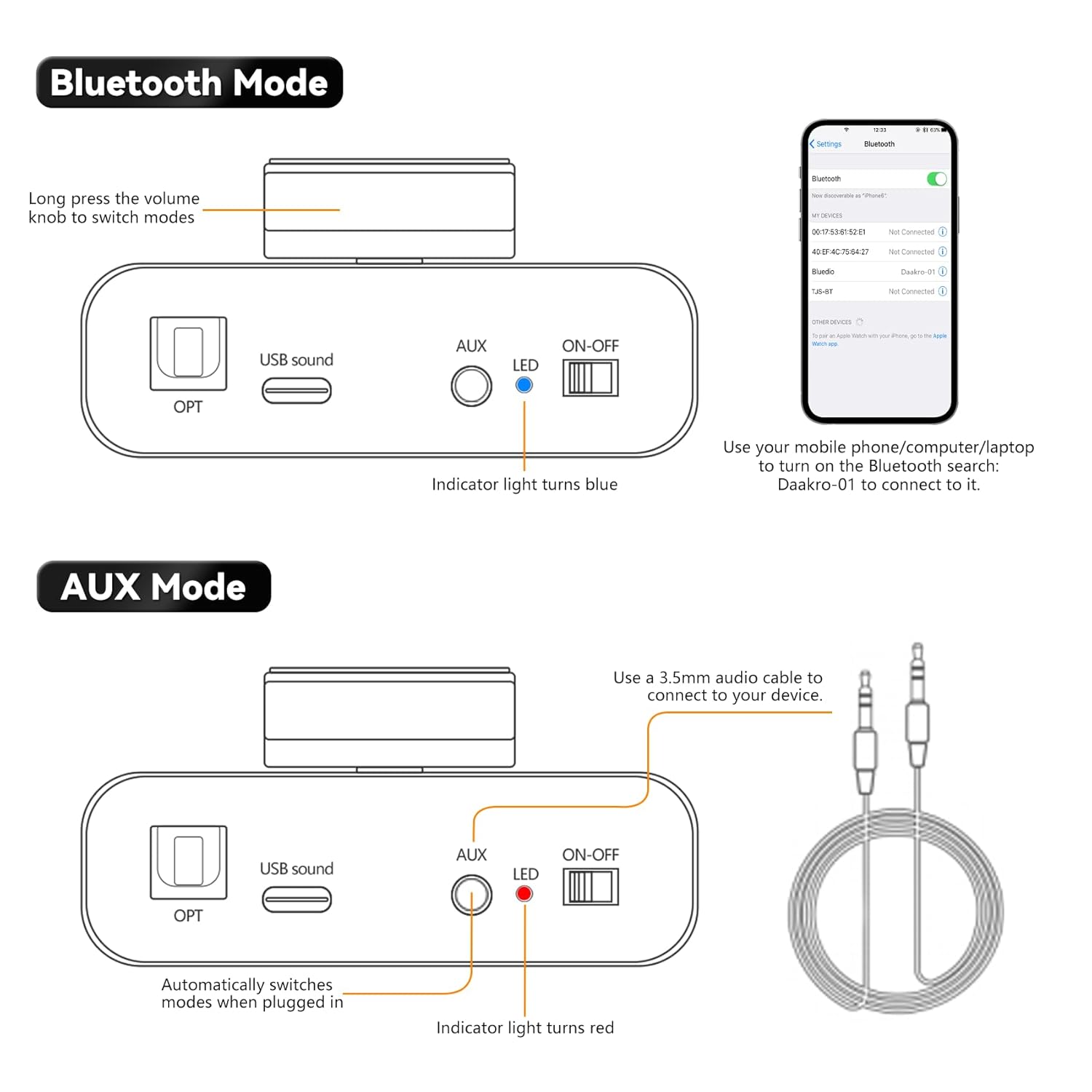
Image: Rear panel connections including power input.
4.3 Input Source Connection
The AK30 offers multiple input options:
- Bluetooth: For wireless connection from your smartphone, tablet, or laptop.
- AUX: Use the 3.5mm AUX cable to connect devices like MP3 players or older audio sources.
- USB: Connect a USB drive or a computer via the USB-C port for digital audio playback.
- OPT: Use an optical fiber cable for high-quality digital audio from TVs or other optical output devices.

Image: Front panel inputs and controls.
Video: Official Daakro AK30 Mini Audio Amplifier overview and setup guide. This video demonstrates the unboxing, connections, and basic operation of the amplifier with various input sources.
5. Bruksanvisning
5.1 Multifunksjonsknapp
The single knob on the front panel controls all primary functions:
- Rotate Left/Right: Increases/Decreases volume. A beep sound indicates minimum/maximum volume.
- Click (Press and Release): Play/Pause music (available in Bluetooth & USB modes).
- Long Press (Press and Hold): Switch between input modes (Blue: Bluetooth, Red: AUX, Green: USB, Purple: OPT).

Image: Multifunctional knob controls.
5.2 Bluetooth-modus
Long press the volume knob to switch to Bluetooth mode (indicator light turns blue). On your device (phone, computer, laptop), search for "Daakro-01" in Bluetooth settings and connect.
5.3 AUX-modus
Plug a 3.5mm audio cable into the AUX input. The amplifier automatically switches to AUX mode (indicator light turns red) when a cable is detected.
5.4 USB-modus
Connect a USB stick directly or use the Type-C to USB adapter to connect a USB device to the USB Sound port. The amplifier automatically switches to USB mode (indicator light turns green).
5.5 OPT Mode
Press and hold the volume knob to switch to OPT mode (indicator light turns purple). Connect an optical fiber cable to the OPT input.

Image: USB and OPT mode connections.
6. Spesifikasjoner
| Trekk | Spesifikasjon |
|---|---|
| Merke | Daakro |
| Modellnummer | AK30 |
| Antall kanaler | 2 |
| Utgangseffekt | 100 Watts (50W+50W @ 4Ω) |
| Voltage | 12 volt (DC) |
| Maksimal forsyning Voltage | 12 volt (DC) |
| Minimum Tilførsel Voltage | 12 volt (DC) |
| Materiale | Legering |
| Monteringstype | Frittstående |
| Varevekt | 1.15 pund |
| Pakkedimensjoner | 6.57 x 6.3 x 2.52 tommer |

Image: Power output table.
7. Feilsøking
- Ingen lyd:
- Sørg for at strømadapteren er ordentlig tilkoblet og at ampkjøleren er slått på.
- Check all audio cables for secure connections and correct polarity.
- Verify the correct input mode is selected on the amplifier (indicated by LED color).
- Øk volumet på begge amplifer og lydkildeenheten din.
- Ensure speakers are properly connected and functional.
- Problemer med Bluetooth-tilkobling:
- Sørg for at amplifier is in Bluetooth mode (blue LED).
- Keep your device within 32ft/10m of the amplifier (6.5ft/2m for PC devices) without obstructions.
- Forget "Daakro-01" from your device's Bluetooth list and try pairing again.
- Start begge på nytt amplifier og Bluetooth-enheten din.
- Forvrengt lyd:
- Reduser volumet på begge amplydkilden.
- Sjekk høyttalertilkoblingene for løse ledninger eller feil polaritet.
- Sørg for at lydkilden ikke sender et overstyrt signal.
- Intermitterende lyd:
- Se etter løse kabelforbindelser.
- For Bluetooth, ensure no interference from other wireless devices and maintain close proximity.
8. Vedlikehold
- Rengjøring: Bruk en myk, tørr klut til å rengjøre amplifier's exterior. Avoid using liquid cleaners or solvents.
- Ventilasjon: Sørg for at amplifier has adequate ventilation to prevent overheating. Do not block any vents.
- Lagring: Når den ikke er i bruk over lengre tid, oppbevar den ampOppbevar væsken på et kjølig og tørt sted, unna direkte sollys og ekstreme temperaturer.
- Håndtering: Håndter enheten forsiktig for å unngå fysisk skade.
9. Garanti og støtte
The Daakro AK30 Mini Bluetooth Amplifier leveres med en 30-dagers refusjons-/erstatningspolicy. For any product inquiries, technical assistance, or warranty claims, please contact Daakro customer support. Our team is dedicated to providing online customer service and ensuring 100% customer satisfaction.
For ytterligere hjelp, vennligst besøk Daakro Store.