
1. Introduksjon
This manual provides detailed instructions for the operation, setup, and maintenance of your TIDRADIO TD-H3 Plus GMRS Handheld Radio. Please read this manual thoroughly before using the device to ensure proper functionality and safety. The TD-H3 Plus is a 5W GMRS handheld radio featuring multi-band reception, USB-C charging, wireless programming, and integration with the Odmaster App.
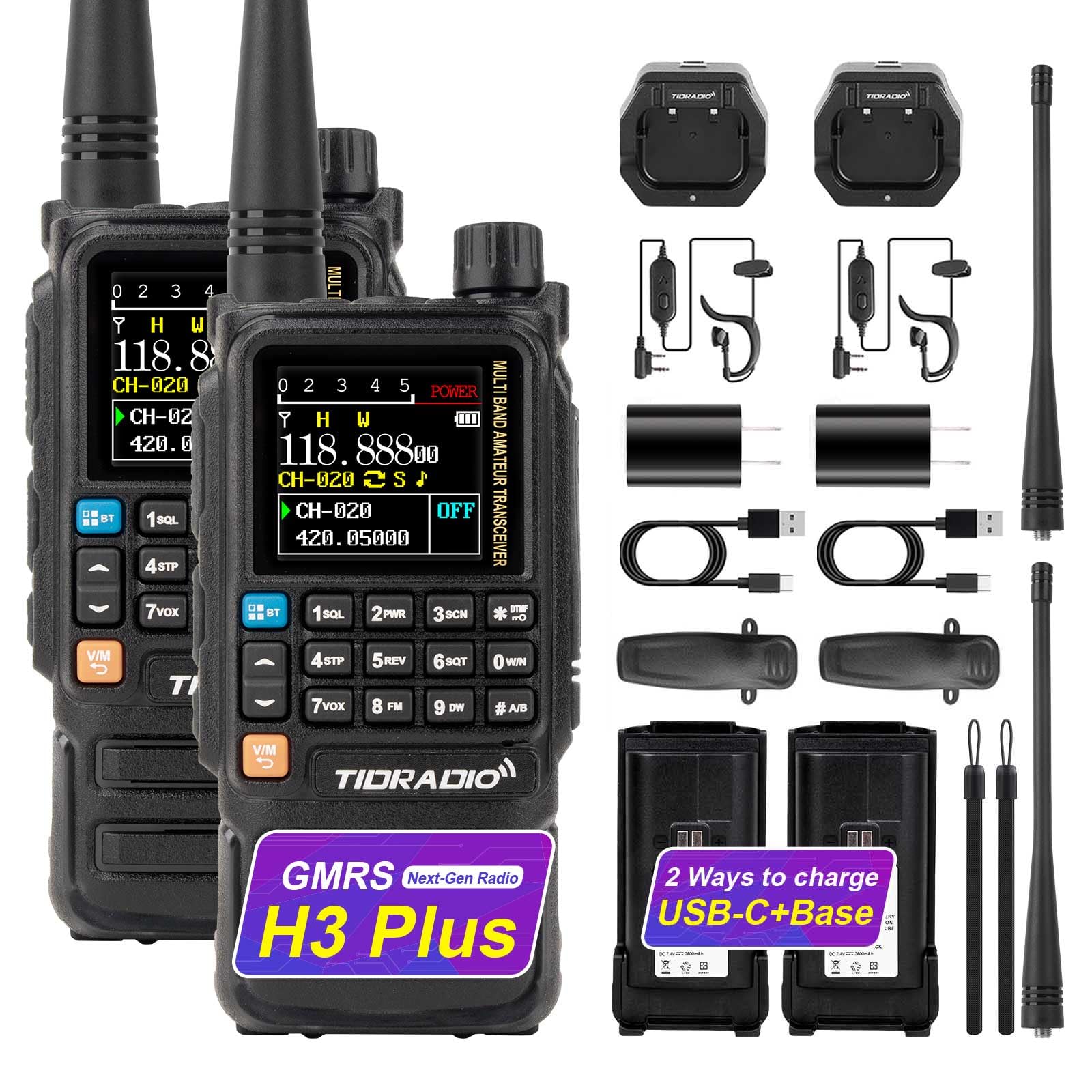
Image 1: TIDRADIO TD-H3 Plus GMRS Handheld Radio, a compact and feature-rich two-way radio.
2. Hva er i esken
Your TIDRADIO TD-H3 Plus GMRS Radio package includes the following items:
- 2 x TD-H3 Plus GMRS Radio
- 2 x 2500mAh batteri
- 2 x USB-C Cable & Desktop Charger
- 2 x standardantenne
- 2 x Ørestykke
- 2 x belteklips
- 2 x håndstropp
- 1 x brukerhåndbok
3. Nøkkelfunksjoner
The TD-H3 Plus GMRS Radio offers a range of advanced features for enhanced communication:
- Multi-band Reception: Covers GMRS (RX/TX), FM, AM Aviation, VHF, and UHF bands.
- USB-C Charging & Programming: Convenient charging and direct programming via USB-C port.
- Trådløs programmering: Configure settings via Bluetooth using the Odmaster App.
- Odmaster App Integration: Enables calling, audio functions, and global walkie-talkie functionality.
- NOAA værradio: Provides real-time weather alerts and broadcasts.
- Frekvenskopi: One-touch duplication of frequency settings.
- Tilpassbare sidetaster: Assign shortcuts for various functions like FM, Lamp, TONE, Alarm, Weather, PTT2, OD PTT.
- Doble PTT-knapper: Separate Push-to-Talk buttons for different channels.
- Forbedret lagring: 128MB external storage for more functions.
- Fastvareoppgradering: Supports upgrades via Odmaster Web platform (CH340 cable required) or USB-C.

Bilde 2: En overview of the key features of the TD-H3 Plus GMRS radio, including wireless programming, multi-band reception, and NOAA weather radio.
4. Oppsett
- Installer batteri: Juster batteriet med baksiden av radioen og skyv det på plass til det klikker ordentlig.
- Fest antennen: Screw the provided antenna clockwise onto the antenna connector at the top of the radio until it is finger-tight.
- Innledende kostnad: Before first use, fully charge the radio's battery using either the desktop charger or the USB-C port. Refer to the 'Charging' section for details.
5. Bruksanvisning
5.1 Strøm på/av
For å slå på radioen, roter volumknappen med klokken. For å slå den av, roter den mot klokken til den klikker.
5.2 Volumkontroll
Adjust the audio volume by rotating the volume knob located at the top of the radio. The display may show a visual indicator of the current volume level.
5.3 Kanalvalg
Use the keypad to directly enter channel numbers or use the up/down arrow buttons to navigate through available channels. The display shows the current channel and frequency.

Image 3: The TD-H3 Plus features multiple display modes and 18 menu color options for user customization.
5.4 Push-to-Talk (PTT)
Press and hold the main PTT button on the side of the radio to transmit. Release to receive. The TD-H3 Plus also features dual PTT buttons for quick switching between two active channels.
5.5 NOAA værradio
Access NOAA Weather Radio for real-time weather alerts and broadcasts. This feature can be assigned to a customizable side key for quick access.

Image 4: The TD-H3 Plus includes a built-in NOAA Weather Radio for receiving critical weather alerts.
5.6 FM-radio
The radio includes an FM broadcast receiver. Tune into your favorite FM stations for entertainment.
5.7 SMS-funksjon
The TD-H3 Plus supports real-time text messaging for efficient communication. Navigate to the SMS menu to send, receive, and manage messages.

Image 5: The SMS function allows for real-time text communication between radios.
5.8 One-Touch Frequency Copy
Hold down the '1' key to activate the frequency copy feature. This allows you to quickly identify and duplicate frequencies from other transmitting radios, saving them to a new channel.

Image 6: The one-key frequency match feature simplifies channel setup by copying frequencies from other radios.
5.9 Cell Phone Voice Calling Mode
When integrated with the Odmaster App, the radio can function as an audio device for answering and making calls. Short press '1' to answer, short press '3' or PTT to hang up. Long press '4' to call back the previous number.

Image 7: The radio can be used for voice calls when connected to a smartphone via the Odmaster App.
5.10 Wireless Speaker Function
Play music from your connected device through the TD-H3 Plus using its wireless speaker function.

Image 8: The TD-H3 Plus can function as a wireless speaker for playing audio from a connected device.
6. Fastvareoppgradering
To ensure optimal performance and access to the latest features, it is recommended to keep your radio's firmware updated. The TD-H3 Plus supports firmware upgrades via USB-C cable or the Odmaster Web plattform.
6.1 Firmware Upgrade via CH340 Cable
This method involves connecting the radio to a computer using a CH340 programming cable and using a dedicated upgrade tool.
Video 1: Tutorial on upgrading the firmware of the TD-H3 Plus GMRS Radio using a CH340 cable.
6.2 Firmware Upgrade via USB-C Cable
The radio can also be upgraded directly via its USB-C port. This method is often simpler and more convenient.
Video 2: Tutorial on upgrading the firmware of the TD-H3 Plus GMRS Radio using a USB-C cable.
6.3 Firmware Upgrade via Odmaster Web
The Odmaster Web platform provides a streamlined process for firmware upgrades. This method is fully compatible with macOS (requires FTDI programming cable).
Video 3: Tutorial on upgrading the firmware of the TD-H3 Plus GMRS Radio via the Odmaster Web plattform.
Viktig: After upgrading to firmware V1.0.37, you can use a shortcut key to switch between GMRS, HAM, and normal versions. If you require assistance with this process, please contact the seller for detailed instructions.
7. Programmering
The TD-H3 Plus offers multiple programming methods to customize your radio settings:
- Odmaster App (Bluetooth Programming): Connect your radio to the Odmaster app on your smartphone (iOS/Android) via Bluetooth for wireless programming. This allows for easy configuration of channels, frequencies, and other settings.
- USB-C Programming: Directly connect the radio to your computer using a USB-C cable for programming with compatible software like CHIRP or CPS.
- CH340/FTDI Cable Programming: Use a dedicated CH340 (for Windows) or FTDI (for macOS) programming cable with CHIRP or CPS software for advanced configuration.

Image 9: The Odmaster App allows for convenient wireless programming and integration with your smartphone.
8. Flerbåndsmottak
The TD-H3 Plus is designed for versatile reception across various frequency bands:
- GMRS Frequencies (RX/TX): 462.55000-467.72500 MHz
- FM Broadcasts (RX Only): 87-108 MHz
- AM Aviation Bands (RX Only): 108-136 MHz
- VHF (RX Only): 136-174MHz, 200-230MHz, 350-370MHz
- UHF (RX Only): 400-520 MHz

Image 10: The radio supports multi-band reception across GMRS, FM, AM, VHF, and UHF frequencies.
9. Lading
The TD-H3 Plus offers flexible charging options to keep your radio powered:
- USB-C-lading: Connect a USB-C cable directly to the radio's USB-C port for fast charging. This is convenient for charging with power banks, laptops, or car chargers.
- Lading av stasjonær base: Place the radio in the provided desktop charging cradle for convenient charging at home or in the office.

Image 11: The TD-H3 Plus can be charged via desktop base, USB-C cable, laptop, or car charger.
10. Tilpassbare funksjoner
The side keys of the TD-H3 Plus can be customized to provide quick access to frequently used functions. Options include:
- FM-radio
- Lamp (Lommelykt)
- TONE
- Alarm
- Weather (NOAA)
- PTT2 (Secondary PTT)
- OD PTT (Odmaster Push-to-Talk)
11. Feilsøking
- Ingen strøm: Ensure the battery is correctly installed and fully charged. Check the battery contacts for any obstruction.
- Kan ikke sende/motta: Verify that the antenna is securely attached. Check the selected channel and frequency settings. Ensure you are within range of other radios or repeaters.
- Dårlig lydkvalitet: Adjust the volume. Check the earpiece or microphone connection if in use. Ensure no obstructions are blocking the speaker or microphone.
- Programmeringsproblemer: Ensure the correct drivers are installed for your programming cable (CH340/FTDI). Verify the Odmaster App or programming software is up-to-date and correctly configured.
- Radio Locks Up: If the radio becomes unresponsive, try removing and reinserting the battery to perform a hard reset.
12. Spesifikasjoner
| Trekk | Spesifikasjon |
|---|---|
| Merke | TIDRADIO |
| Modellnummer | TIDRADIO TD-H3 Plus |
| Antall kanaler | 199 |
| Frequency Range (GMRS) | 462.55000-467.72500 MHz (RX/TX) |
| Maksimal talerekkevidde | 5 Mile |
| Voltage | 7.4 volt |
| Vannmotstandsnivå | Vannbestandig |
| Batterikapasitet | 2500mAh (included) |
| Tilkoblingsprotokoll | Bluetooth |
| Tuner Type | GMRS-frekvens |
13. Støtte
For any questions, technical support, or assistance with firmware updates and unlocking procedures, please contact the seller directly through your purchase platform. Navigate to "Orders" > "Get Help" > Select the order > Click "Other" > Send to "Seller" > Then send your question.