
1. Introduksjon
Thank you for choosing the Kuulaa Magsafe Power Bank 5000mAh. This portable magnetic wireless charger is designed to provide convenient and efficient power for your compatible devices, featuring both wireless and wired charging capabilities, along with a versatile folding swivel stand. Please read this manual carefully before use to ensure optimal performance and safety.
2. Sikkerhetsinformasjon
- Ikke utsett powerbanken for ekstreme temperaturer, direkte sollys eller ild.
- Unngå å miste, demontere eller forsøke å reparere enheten selv.
- Hold powerbanken unna vann og andre væsker.
- Bruk kun sertifiserte ladekabler og adaptere.
- Oppbevares utilgjengelig for barn.
- Kast produktet på en ansvarlig måte i henhold til lokale forskrifter.
3. Pakkens innhold
Vennligst sjekk pakken for følgende varer:
- Kuulaa Magsafe Power Bank 5000mAh
- USB-C ladekabel
- Brukerhåndbok
4. Produktegenskaper og komponenter
The Kuulaa Magsafe Power Bank is designed for convenience and efficiency:
- 5000mAh kapasitet: Provides reliable power for your devices.
- Magnetisk trådløs lading: Securely attaches to compatible iPhone models (12/13/14/15 series) for 7.5W wireless charging.
- PD 20W USB-C-port: Supports fast wired charging for input and output, charging an iPhone to 50% in approximately 30 minutes.
- LED batteriindikator: Four small LED lights display the remaining power level.
- Folding Swivel Stand: Integrert stativ for håndfri viewi forskjellige retninger.
- Slim & Portable Design: Ergonomic, lightweight, and travel-friendly.
- Avanserte sikkerhetsfunksjoner: Built-in protection against overcharging, overcurrent, short circuit, and high temperature.
Produkt overview

Figur 1: Side view of the power bank, illustrating its slim and portable design (0.8cm thickness, 110g weight).

Figure 2: The power bank magnetically attached to a smartphone, showcasing the secure and efficient magnetic connection.

Figure 3: Illustration of both wireless (top) and wired (bottom) charging methods supported by the power bank.
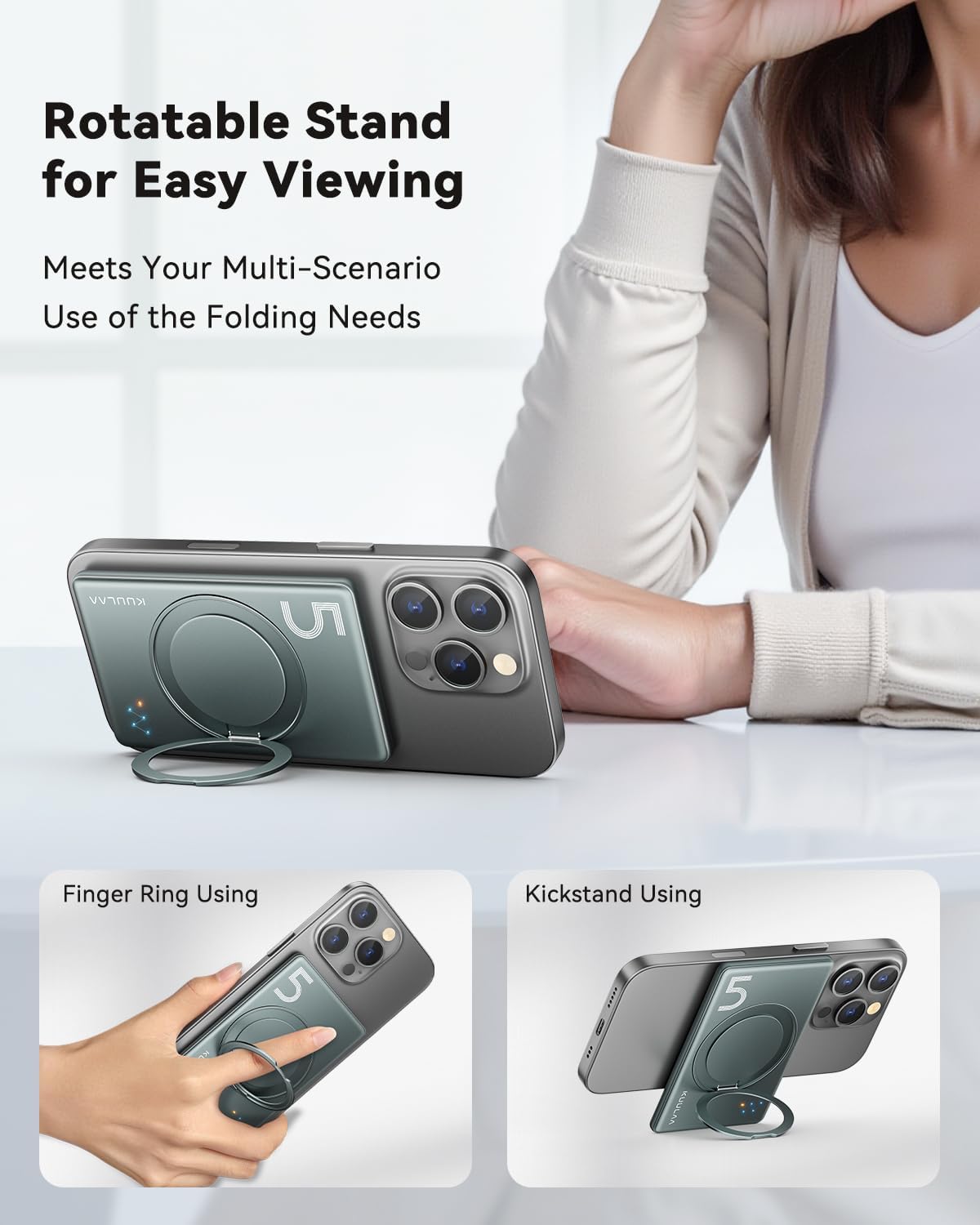
Figur 4: Eksamples of the integrated folding swivel stand being used as a kickstand and a finger ring for enhanced usability.
5. Oppsett
Førstegangslading av powerbanken
- Koble den medfølgende USB-C-kabelen til USB-C-porten på powerbanken.
- Koble den andre enden av USB-C-kabelen til en kompatibel USB-strømadapter (ikke inkludert).
- LED-indikatorene vil lyse for å vise ladestatusen. Alle fire LED-indikatorene vil lyse kontinuerlig når batteriet er fulladet.
- For optimal performance, fully charge the power bank before its first use.
6. Bruksanvisning
6.1. Trådløs lading
- Ensure your device is compatible with MagSafe wireless charging (iPhone 12/13/14/15 series).
- Align the power bank with the back of your iPhone. The magnets will automatically snap it into place.
- Wireless charging will begin automatically. The LED indicators on the power bank will illuminate to confirm charging.
- For best results, ensure there are no foreign objects between the power bank and your device.
6.2. Kablet lading
- Connect one end of a USB-C cable (or your device's charging cable) to the USB-C port on the power bank.
- Connect the other end of the cable to your smartphone, smartwatch, or headphones.
- Powerbanken vil automatisk begynne å lade enheten din.
6.3. Using the Folding Swivel Stand
- Trekk forsiktig ut det integrerte stativet fra baksiden av powerbanken.
- The stand can be rotated 360 degrees to achieve your desired viewing vinkel.
- It can be used as a kickstand for hands-free viewing or as a finger ring for a more secure grip on your phone.
6.4. Sjekke batterinivået
The four LED indicators on the power bank display the remaining battery capacity:
- 4 LEDs Solid: 75 %–100 % belastet
- 3 LEDs Solid: 50 %–75 % belastet
- 2 LEDs Solid: 25 %–50 % belastet
- 1 LED Solid: 0 %–25 % ladet (lades snart opp)
7. Vedlikehold
- Rengjøring: Tørk av powerbanken med en myk, tørr klut. Ikke bruk sterke kjemikalier eller slipende materialer.
- Lagring: Store the power bank in a cool, dry place away from direct sunlight and extreme temperatures. If storing for extended periods, charge it to about 50% every three months to prolong battery life.
- Unngå innvirkning: Beskytt enheten mot fall og støt.
8. Feilsøking
| Problem | Mulig løsning |
|---|---|
| Powerbank lader ikke |
|
| Enheten lader ikke trådløst |
|
| Device not charging via USB-C cable |
|
| LED-indikatorer virker ikke |
|
9. Spesifikasjoner
| Trekk | Detalj |
|---|---|
| Modellnummer | KL-YD68 |
| Batterikapasitet | 5000 mAh |
| Trådløs ladeutgang | 7.5W (for iPhone 12/13/14/15 series) |
| USB-C inngang/utgang | PD 20W Maks |
| Produktdimensjoner | 10L x 6.6W x 0.8Th Centimetres |
| Varevekt | 170 g |
| Antall porter | 2 (1x USB-C, 1x Wireless) |
| Kompatible enheter | Smartphone, Smartwatch, Headphone |
| Produsent | Shenzhen Kula Technology Co.,Ltd. |

Figur 5: Overview of the power bank's sophisticated security features and certifications.
10. Garanti og støtte
The Kuulaa Magsafe Power Bank comes with a standard manufacturer's warranty. For detailed warranty information, please refer to the warranty card included in your package or visit the official KUULAA webnettstedet.
If you encounter any issues or have questions regarding your product, please contact KUULAA customer support through the retailer where you purchased the product or via the contact information provided on the official KUULAA webnettstedet.