
Saiyin DS6301
Saiyin 17-inch Sound Bar Model DS6301 User Manual
Introduksjon
This manual provides detailed instructions for the setup, operation, and maintenance of your Saiyin 17-inch Sound Bar, Model DS6301. Please read this manual thoroughly before using the product to ensure proper function and safety. Keep this manual for future reference.

Image: The Saiyin 17-inch Sound Bar DS6301, a sleek black unit, is shown placed beneath a television screen, accompanied by its remote control. This illustrates a typical setup for home entertainment.
Sikkerhetsinformasjon
Følg følgende sikkerhetsregler for å unngå skade på enheten eller deg selv:
- Ikke utsett lydplanken for regn, fuktighet eller ekstreme temperaturer.
- Ikke åpne c-enasing. Overlat all service til kvalifisert personell.
- Sørg for god ventilasjon rundt enheten.
- Bruk kun den medfølgende strømadapteren.
- Oppbevares utilgjengelig for barn.
Pakkeinnhold
Bekreft at alle varene er til stede i pakken:
- Saiyin 17-inch Sound Bar (Model DS6301)
- Fjernkontroll
- Strømadapter
- 3.5 mm lydkabel
- Optisk kabel
- Hurtigstartguide
- Brukerhåndbok (dette dokumentet)
- Veggmonteringssett (skruer og ankere)

Bilde: En overhead view displaying all components included with the Saiyin Sound Bar: the sound bar itself, a remote control, a power adapter, a 3.5mm audio cable, an optical cable, a quick start guide, a user manual, and wall mounting hardware.
Produkt overview
Sound Bar Features
- Dual full-range speakers for 40W sound output.
- Bluetooth 5.3 for wireless connectivity.
- Optical and Auxiliary (3.5mm) input options.
- SUB OUT port for connecting an external powered subwoofer (subwoofer not included).
- Compact 17-inch design, suitable for various spaces.
- Wall-mountable (kit included).
- Compatible with various TV remotes (Fire TV/Stick, Google Chromecast, Apple TV).

Bilde: En eksplodert view of the Saiyin Sound Bar, illustrating its internal components including two full-range speakers with supersized diaphragms, designed to ensure ample sound output and a total of 40 Watts of power.
Kontroller og indikatorer
The sound bar features both on-device buttons and an LED indicator light for status feedback.
Bilde: En detaljert view of the sound bar's side panel, showing the control buttons and the LED indicator lights. The lights correspond to different input modes: green for AUX, blue for Bluetooth (BT), purple for Optical, and red for Standby. A remote sensor is also visible on the front grille.
- Strømknapp: Slår lydplanken av eller på.
- Modusknapp (M): Cycles through input modes (Bluetooth, Auxiliary, Optical).
- Volum opp / ned-knapper: Justerer lydvolumet.
- LED-indikatorlys: Displays the current input mode and standby status.
- Ekstern sensor: Mottar signaler fra fjernkontrollen.
Oppsett
1. Plassering
The Saiyin Sound Bar can be placed on a flat surface or mounted on a wall.
- Desktop plassering: Position the sound bar directly in front of your TV or monitor on a stable surface.
- Veggmontering: Use the included wall mounting kit. Ensure the wall can support the weight of the sound bar. Follow the instructions provided with the wall mounting kit for secure installation.

Image: The Saiyin Sound Bar is shown securely mounted on a wall directly beneath a television, demonstrating its wall-mountable design. A remote control is visible in the foreground, indicating control options.
2. Koble til strøm
Connect the provided power adapter to the DC IN port on the sound bar and then plug it into a wall outlet.
3. Lydtilkoblinger
The sound bar supports Bluetooth, Optical, and Auxiliary (3.5mm) connections. Choose the method best suited for your device.
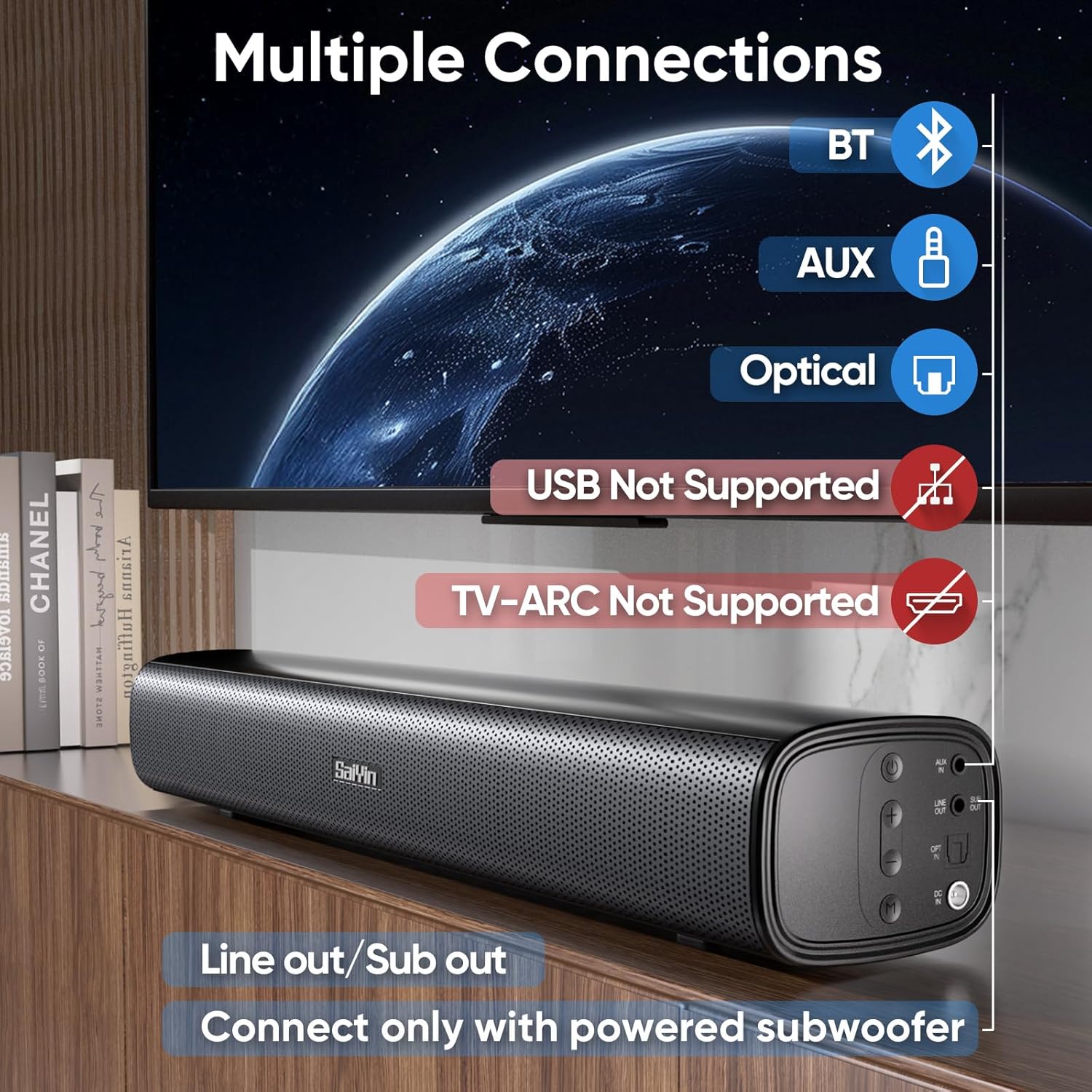
Image: A visual representation of the sound bar's connectivity ports and supported methods. Icons for Bluetooth, AUX, and Optical inputs are shown, along with a "SUB Out" port for an external powered subwoofer. Red "X" marks indicate that USB and TV-ARC connections are not supported.
Bluetooth-tilkobling
- Slå på lydplanken.
- Press the 'M' button on the sound bar or the 'BT' button on the remote until the LED indicator turns blue.
- On your device (e.g., smartphone, TV), enable Bluetooth and search for "Saiyin DS6301".
- Select "Saiyin DS6301" to pair. The LED indicator will stop flashing once connected.
Optisk tilkobling
- Connect one end of the optical cable (included) to the OPTICAL OUT port on your TV and the other end to the OPTICAL IN port on the sound bar.
- Slå på lydplanken.
- Press the 'M' button on the sound bar or the 'OPT' button on the remote until the LED indicator turns purple.
- Viktig: Adjust your TV's audio settings as described in the "TV Audio Settings" section below.
Auxiliary (3.5mm) Connection
- Connect one end of the 3.5mm audio cable (included) to the AUX OUT port on your device (e.g., TV, PC) and the other end to the AUX IN port on the sound bar.
- Slå på lydplanken.
- Press the 'M' button on the sound bar or the 'AUX' button on the remote until the LED indicator turns green.
SUB OUT Connection (Optional)
To enhance bass, you can connect an external powered subwoofer (not included) to the SUB OUT port on the sound bar. Ensure the subwoofer has its own power supply.
4. TV Audio Settings (for Optical Connection)
For optimal sound and to avoid issues like silent or noisy output when using the optical connection, it is crucial to adjust your TV's audio settings.
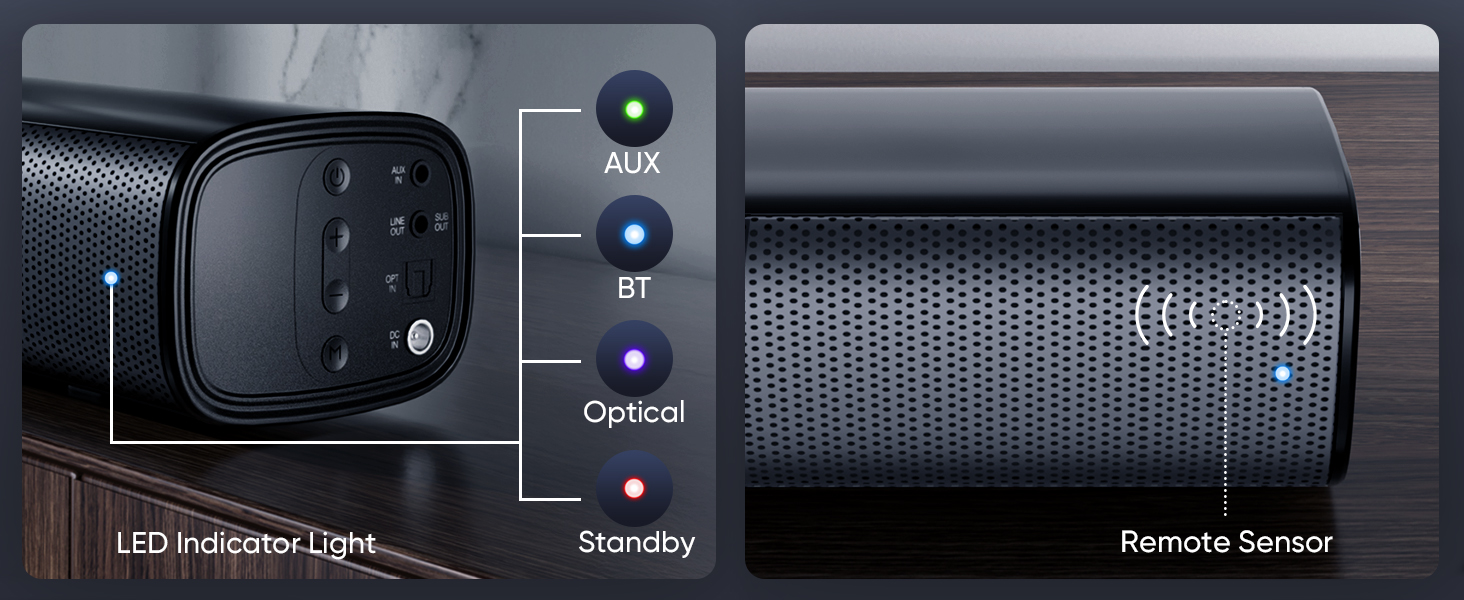
Image: A step-by-step guide demonstrating how to configure TV audio settings for optical connection. It shows navigating to "Sound Output" and selecting "Optical," then changing "Digital Audio Output Format" to "PCM/Stereo Sound," and finally disabling "Dolby / DTS" in both TV settings and streaming applications.
- Navigate to your TV's settings menu.
- Find "Sound Output" or "Audio Settings".
- Select "Optical" as the sound output device.
- Locate "Digital Audio Output Format" or similar setting and change it to "PCM" or "Stereo Sound".
- Disable Dolby and DTS: To prevent silent or noisy output, ensure that Dolby and DTS audio formats are disabled in your TV's audio settings and within any streaming applications (e.g., Netflix, Amazon Prime Video, HBO, Hulu, YouTube).
Bruksanvisning
Slå på/av
Trykk på av/på-knappen på lydplanken eller fjernkontrollen for å slå enheten av eller på.
Selecting Input Mode
Press the 'M' button on the sound bar or the corresponding input button (BT, AUX, OPT) on the remote control to switch between Bluetooth, Auxiliary, and Optical input modes. The LED indicator will change color to reflect the selected mode.
Volumkontroll
Use the Volume Up (+) and Volume Down (-) buttons on the sound bar or the remote control to adjust the audio level.
Bruk av fjernkontroll
The included remote control provides full functionality for the sound bar. Ensure there are no obstructions between the remote and the sound bar's remote sensor.
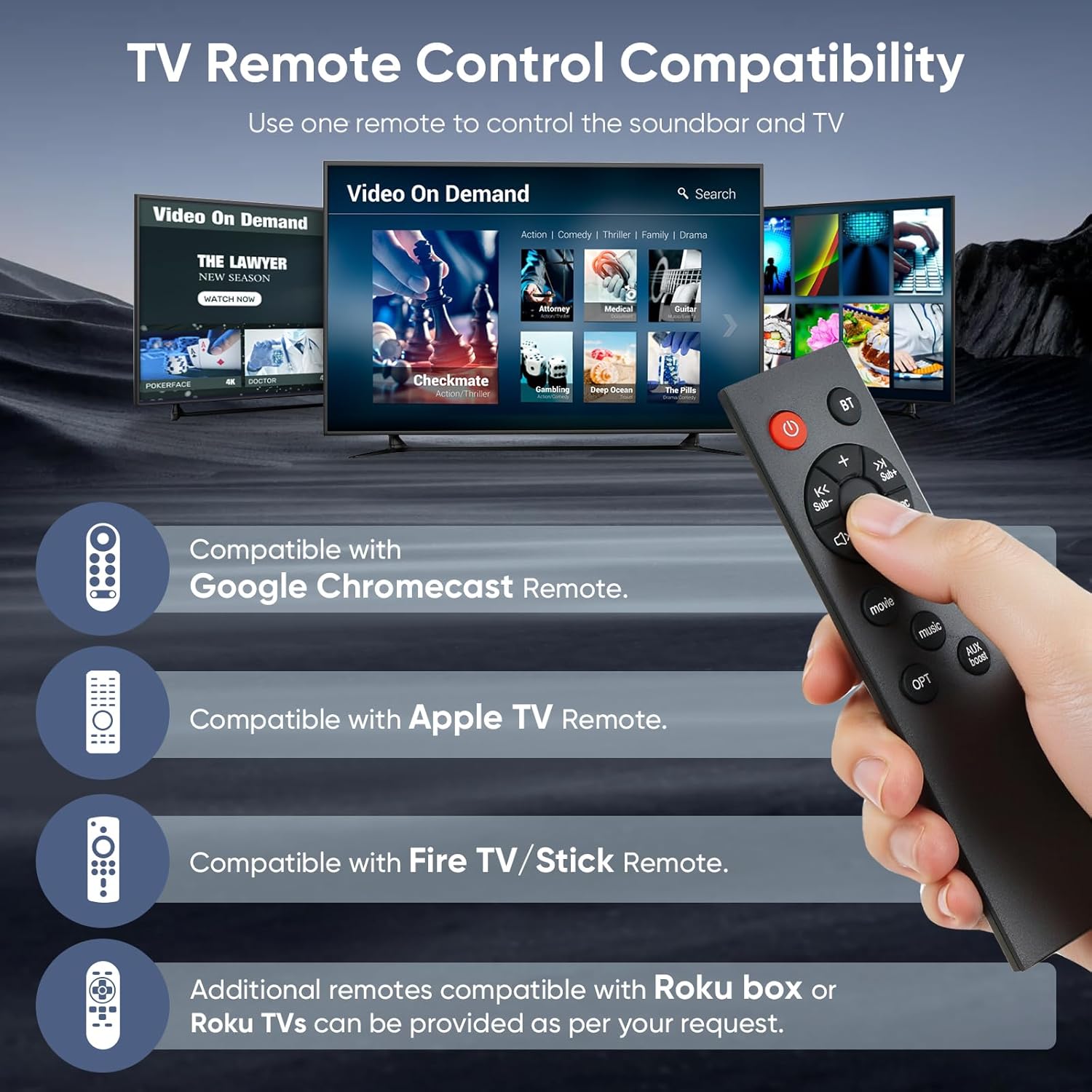
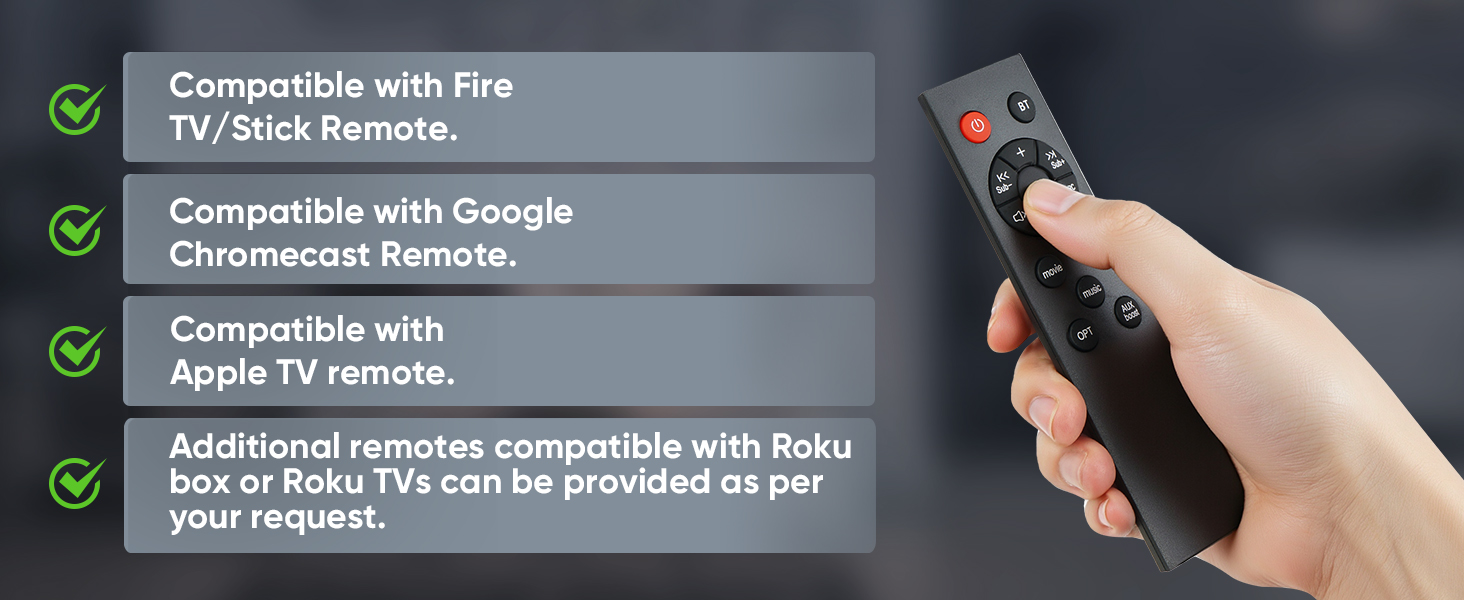
Image: A hand holds the Saiyin Sound Bar remote control, with a background depicting multiple TV screens displaying streaming content. The image highlights the sound bar's compatibility with Fire TV/Stick, Google Chromecast, and Apple TV remotes, allowing for a unified control experience.
The sound bar is designed to be compatible with several popular TV/streaming device remotes, including:
- Fire TV/Stick Remote
- Google Chromecast Remote
- Apple TV Remote
Additional remotes compatible with Roku box or Roku TVs can be provided upon request from customer support.
Lydmoduser
The sound bar offers optimized sound modes for different content types:
- Musikkmodus: Balanced audio for musical content.
- Filmmodus: Enhanced dynamics and bass for cinematic experiences.
- Nyhetsmodus: Optimized for clear dialogue, making voices more prominent.
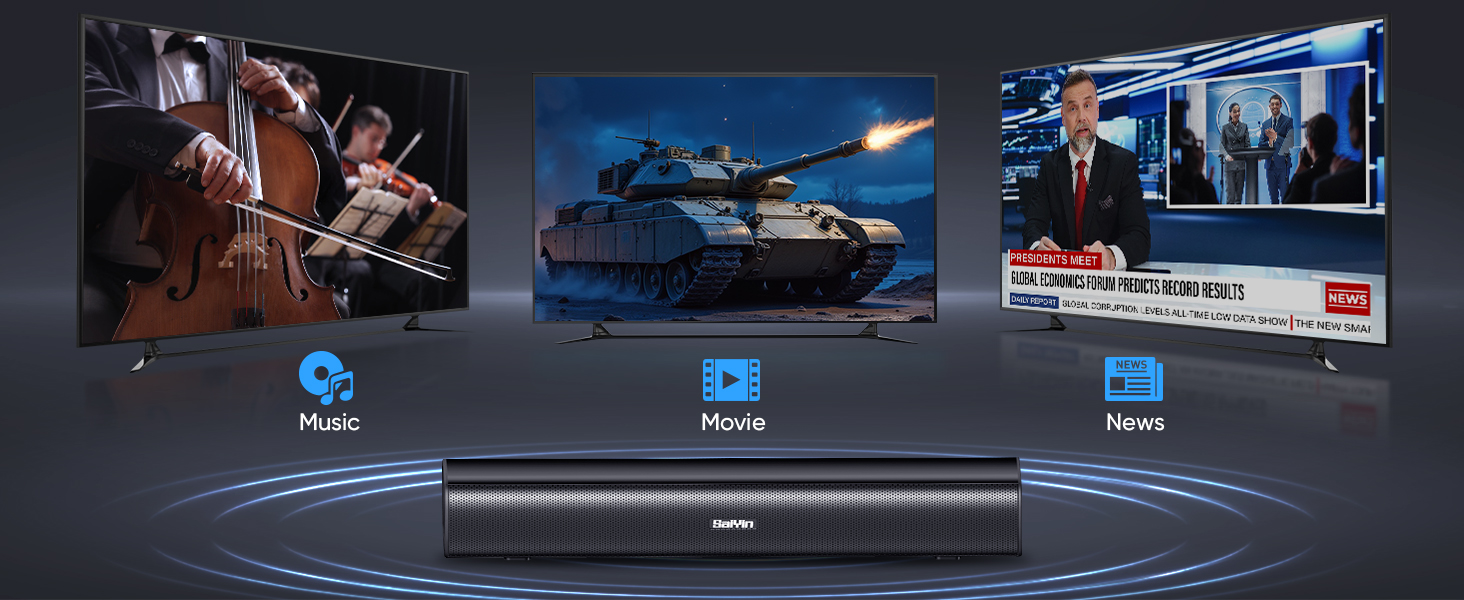
Image: The Saiyin Sound Bar is shown with three television screens above it, each displaying different content: a classical music concert for "Music" mode, an action scene with a tank for "Movie" mode, and a news broadcast for "News" mode. This illustrates the sound bar's specialized audio modes.
Vedlikehold
- Rengjøring: Bruk en myk, tørr klut til å rengjøre overflaten på lydplanken. Ikke bruk flytende rengjøringsmidler eller slipende materialer.
- Lagring: Hvis du oppbevarer lydplanken over lengre tid, må du koble den fra strømmen og oppbevare den på et kjølig og tørt sted.
Feilsøking
| Problem | Mulig årsak | Løsning |
|---|---|---|
| Ingen lyd fra lydplanken. |
|
|
| Statisk eller forvrengt lyd. |
|
|
| Fjernkontrollen virker ikke. |
|
|
| Bluetooth-sammenkobling mislyktes. |
|
|
Spesifikasjoner
| Modellnavn | DS6301 |
| Høyttalertype | Soundbar |
| Høyttalerstørrelse | 17 tommer |
| Høyttaler Maksimal utgangseffekt | 40 watt |
| Surround Sound Channel Configuration | 2.0 |
| Tilkoblingsteknologi | Auxiliary, Bluetooth 5.3, Optical |
| Trådløs kommunikasjonsteknologi | Bluetooth |
| Lydutgangsmodus | Stereo |
| Kompatible enheter | Laptop, Projector, Television |
| Anbefalt bruk | For Televisions, For Gaming Consoles, Home Entertainment |
| Kontrollmetode | Trykknapp, fjernkontroll |
| Monteringstype | Wall Mount or Desktop Placement |
| Produktdimensjoner (L x B x H) | 43.18 cm x 8.89 cm x 6.35 cm (17 x 3.5 x 2.5 tommer) |
| Varevekt | 2 pund (0.91 kg) |
| Farge | Svart |
| Strømkilde | Elektrisk med ledning |
| Produsent | Shenzhen Saiyin Electronics Co.,Ltd. |
Garanti og støtte
Garantiinformasjon
The Saiyin Sound Bar Model DS6301 comes with a limited warranty. Please refer to the Quick Start Guide or contact customer support for specific warranty terms and conditions.
Kundestøtte
For any questions, technical assistance, or to request replacement parts (including optical/auxiliary cables, power cords, and remotes), please contact Saiyin customer care. 24/7 customer care is available.
Contact information can typically be found on the product packaging, Quick Start Guide, or the official Saiyin webnettstedet.
Ask a question about this manual
Ask about setup, troubleshooting, compatibility, parts, safety, or missing instructions. Manuals+ will review the question and use this page’s manual context to help answer it.