
Introduksjon
Welcome to the user manual for your new VAIO SX-R Laptop. This document provides essential information to help you set up, operate, maintain, and troubleshoot your device. Please read this manual thoroughly to ensure optimal performance and longevity of your laptop.
Produkt overview
The VAIO SX-R is a high-performance laptop designed for productivity and creative tasks. It features an Intel Core Ultra 7 processor, a vibrant 14-inch WQXGA Touch Display, ample memory, and fast storage.
Nøkkelfunksjoner
- Prosessor: Intel Core Ultra 7 (16-Core, AI-Boosted) for enhanced speed and responsiveness.
- Utstilling: 14-inch WQXGA Touch Display (2560x1600) offering high resolution and wide color gamut.
- Hukommelse: 32GB LPDDR5 RAM for superior multitasking.
- Lagring: 1TB PCIe NVMe SSD for fast data access and ample lagring.
- Operativsystem: Windows 11 Pro with enterprise-grade security and productivity features.
- Sikkerhet: Integrated IR Camera and Fingerprint Reader for secure login.
- Chassis: Durable Carbon Fiber construction.
Laptop Components and Ports

Figure 1: VAIO SX-R Laptop, illustrating the overall design.
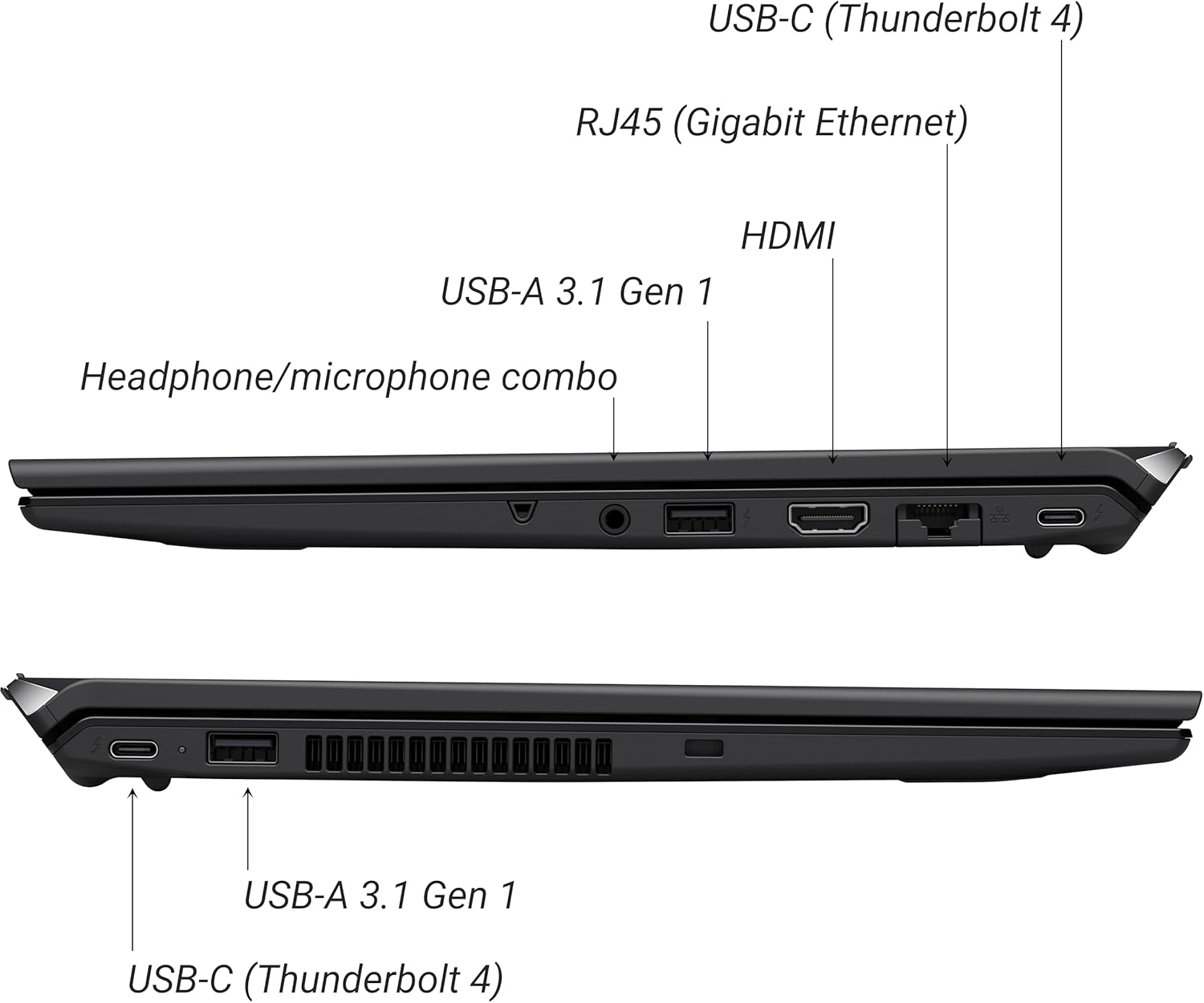
Figure 2: Port layout of the VAIO SX-R Laptop. The left side includes a headphone/microphone combo jack, USB-A 3.1 Gen 1, HDMI, RJ45 (Gigabit Ethernet), and USB-C (Thunderbolt 4). The right side features another USB-C (Thunderbolt 4) and USB-A 3.1 Gen 1 port.
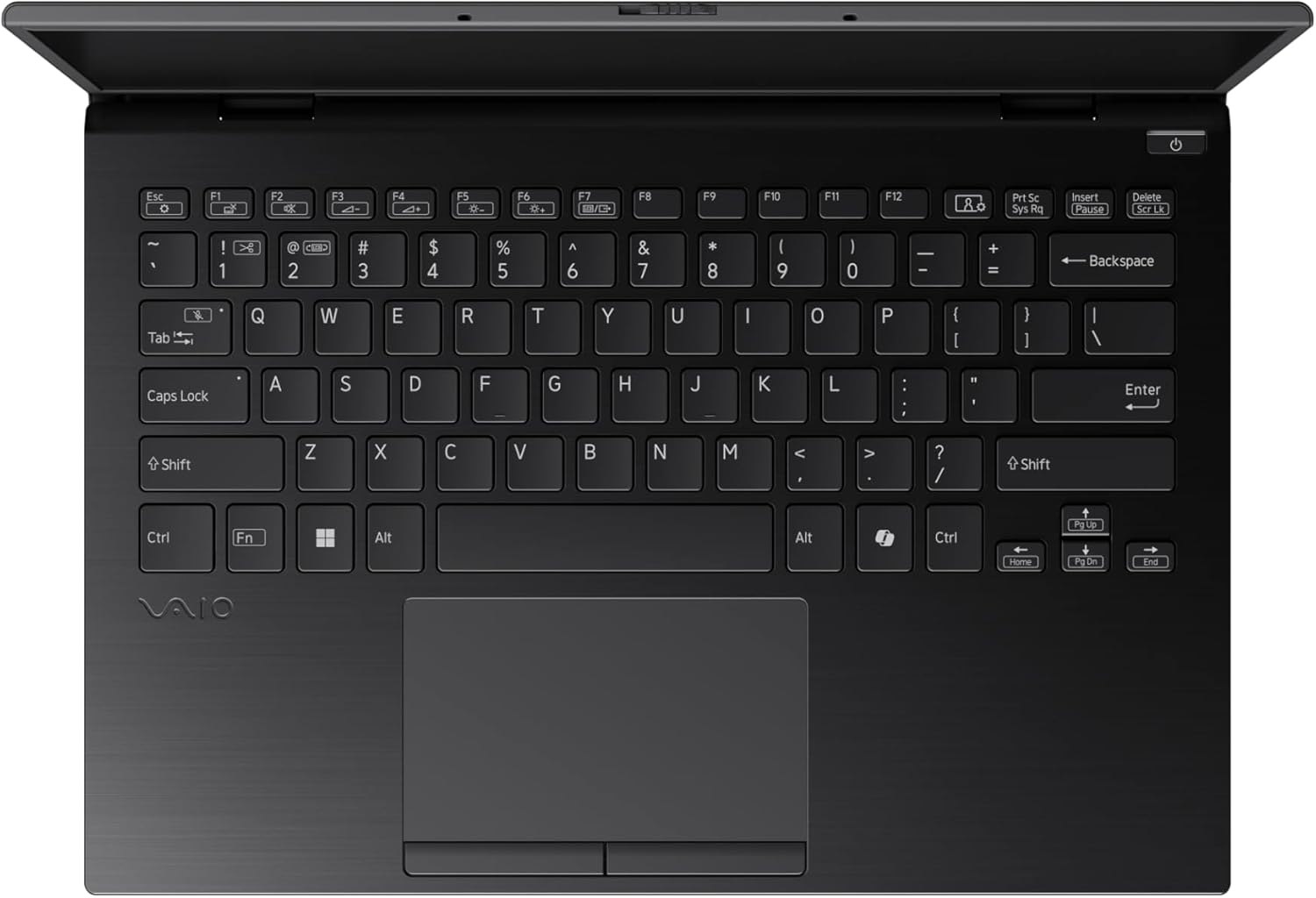
Figure 3: The VAIO SX-R Laptop keyboard and touchpad, featuring a backlit keyboard and integrated fingerprint sensor.
Oppsett
1. Førstegangs oppstart
- Koble til strøm: Koble strømadapteren til strømporten på den bærbare datamaskinen og deretter til en stikkontakt.
- Åpne bærbar PC: Åpne forsiktig lokket på den bærbare datamaskinen.
- Strøm på: Press the power button, typically located on the top right of the keyboard deck. The power indicator light will illuminate.
2. Windows 11 Pro-oppsett
Follow the on-screen instructions to complete the initial Windows 11 Pro setup. This includes:
- Velger region og tastaturoppsett.
- Kobler til et Wi-Fi-nettverk.
- Godtar lisensavtalen.
- Opprette eller logge inn med en Microsoft-konto.
- Setting up your PIN, fingerprint, or facial recognition (IR Camera).
3. Koble til eksterne enheter
You can connect external devices such as mice, keyboards, external monitors, and USB drives to the available ports as shown in Figure 2.
Drift
1. Grunnleggende bruk
- Tastatur: Use the integrated backlit keyboard for typing. Function keys (F1-F12) often have secondary functions accessible via the 'Fn' key.
- Touchpad: The precision touchpad supports multi-touch gestures for navigation.
- Berøringsskjerm: Interact directly with the 14-inch WQXGA display using touch gestures.
2. Sikkerhetsfunksjoner
- Fingeravtrykksleser: Enroll your fingerprints through Windows Settings > Accounts > Sign-in options for quick and secure login.
- IR-kamera: Utilize Windows Hello facial recognition for convenient and secure access. Set this up in Windows Settings > Accounts > Sign-in options.
3. Strømstyring
- Sove modus: Close the lid or press the power button briefly to put the laptop to sleep.
- Slå av: Gå til Start > Av/på > Slå av for å slå av den bærbare datamaskinen helt.
- Start på nytt: Gå til Start > Av/på > Omstart for å starte systemet på nytt.
Vedlikehold
1. Rengjøring
- Skjerm: Bruk en myk, lofri klut litt damprengjøres med vann eller et skjermrensemiddel. Unngå sterke kjemikalier.
- Tastatur og kabinett: Bruk en myk klut. For gjenstridig smuss, bruk en litt tørr klut.amp En klut med mild såpe kan brukes, og sørg for at det ikke kommer væske inn i åpningene.
- Porter: Bruk trykkluft til å forsiktig fjerne støv fra portene.

Figure 4: The VAIO SX-R features a water-resistant keyboard, designed to withstand minor spills.
2. Programvareoppdateringer
Regularly update your Windows operating system and device drivers to ensure optimal performance, security, and compatibility. Access updates via Windows Settings > Windows Update.
3. Batteripleie
- Unngå ekstreme temperaturer.
- Ikke utlad batteriet helt ofte.
- Ved langtidslagring, lad batteriet til omtrent 50–60 %.
Feilsøking
Denne delen tar for seg vanlige problemer du kan støte på.
1. Den bærbare datamaskinen slår seg ikke på
- Sørg for at strømadapteren er ordentlig koblet til både den bærbare datamaskinen og et fungerende strømuttak.
- Sjekk om strømuttaket fungerer ved å koble til en annen enhet.
- Hvis batteriet er helt utladet, la det lade i minst 30 minutter før du prøver å slå det på.
2. Vis problemer
- Ingen visning: Koble en ekstern skjerm til HDMI-porten for å sjekke om problemet er med den interne skjermen på den bærbare datamaskinen.
- Flimrende/forvrengt skjerm: Update your graphics drivers. Adjust display resolution and refresh rate in Windows Settings > System > Display.
3. Problemer med Wi-Fi-tilkobling
- Ensure Wi-Fi is enabled in Windows Settings > Network & internet > Wi-Fi.
- Start ruteren og modemet på nytt.
- Kjør feilsøkingsprogrammet for Windows-nettverk.
4. Treg ytelse
- Lukk unødvendige programmer som kjører i bakgrunnen.
- Sjekk Oppgavebehandling (Ctrl+Shift+Esc) for ressurskrevende prosesser.
- Ensure your system is up to date and free from malware.
Spesifikasjoner
Below are the detailed specifications for the VAIO SX-R Laptop (Model: VJS4R1X0511B).
| Trekk | Spesifikasjon |
|---|---|
| Merke | VAIO |
| Modellnavn | VAIO SX-R |
| Vare modellnummer | VJS4R1X0511B |
| Operativsystem | Windows 11 Pro |
| Prosessor | Intel Core Ultra 7 (1.4 GHz) |
| RAM-minne | 32 GB LPDDR5 |
| Harddisk | 1 TB PCIe NVMe SSD |
| Skjermstørrelse | 14 tommer |
| Skjermoppløsning | 2560 x 1600 piksler (WQXGA) |
| Grafikkort | Intel Integrated Graphics |
| Trådløs type | 802.11 bgn |
| USB 3.0-porter | 3 |
| Gjennomsnittlig batterilevetid | 10 timer |
| Varevekt | 3.1 pund |
| Produktdimensjoner | 14.2 x 15 x 3.3 tommer |
| Spesielle funksjoner | Backlit Keyboard, Fingerprint Reader, HD Audio, Memory Card Slot, Webkam |
Garanti og støtte
1. Garantiinformasjon
Your VAIO SX-R Laptop is covered by a manufacturer's warranty. Please refer to the warranty card included with your product packaging for specific terms, conditions, and duration. Keep your proof of purchase for warranty claims.
2. Teknisk støtte
For technical assistance, troubleshooting beyond this manual, or service inquiries, please contact VAIO customer support. You can typically find contact information on the official VAIO website or in the documentation provided with your laptop.
- Online støtte: Visit the official VAIO support webnettsted for vanlige spørsmål, drivernedlastinger og kontaktalternativer.
- Telefonstøtte: Refer to your product documentation for regional support phone numbers.