
SVITOO SVITOO Tab 10 GMS Certified 1027C
SVITOO Kids Tablet 10 Inch User Manual
Model: SVITOO Tab 10 GMS Certified 1027C
Introduksjon
This manual provides essential instructions for setting up, operating, and maintaining your SVITOO Kids Tablet 10 Inch. Designed for young users, this Android 15 tablet features parental controls, a durable shockproof case, and a vibrant 10-inch HD IPS display. Please read this guide thoroughly to ensure proper use and to maximize your tablet's functionality.
Hva er i esken
- SVITOO Kids Tablet 10 Inch
- Protective Cover (Pre-installed)
- USB-C ladekabel
- Brukerhåndbok
- Gaveeske
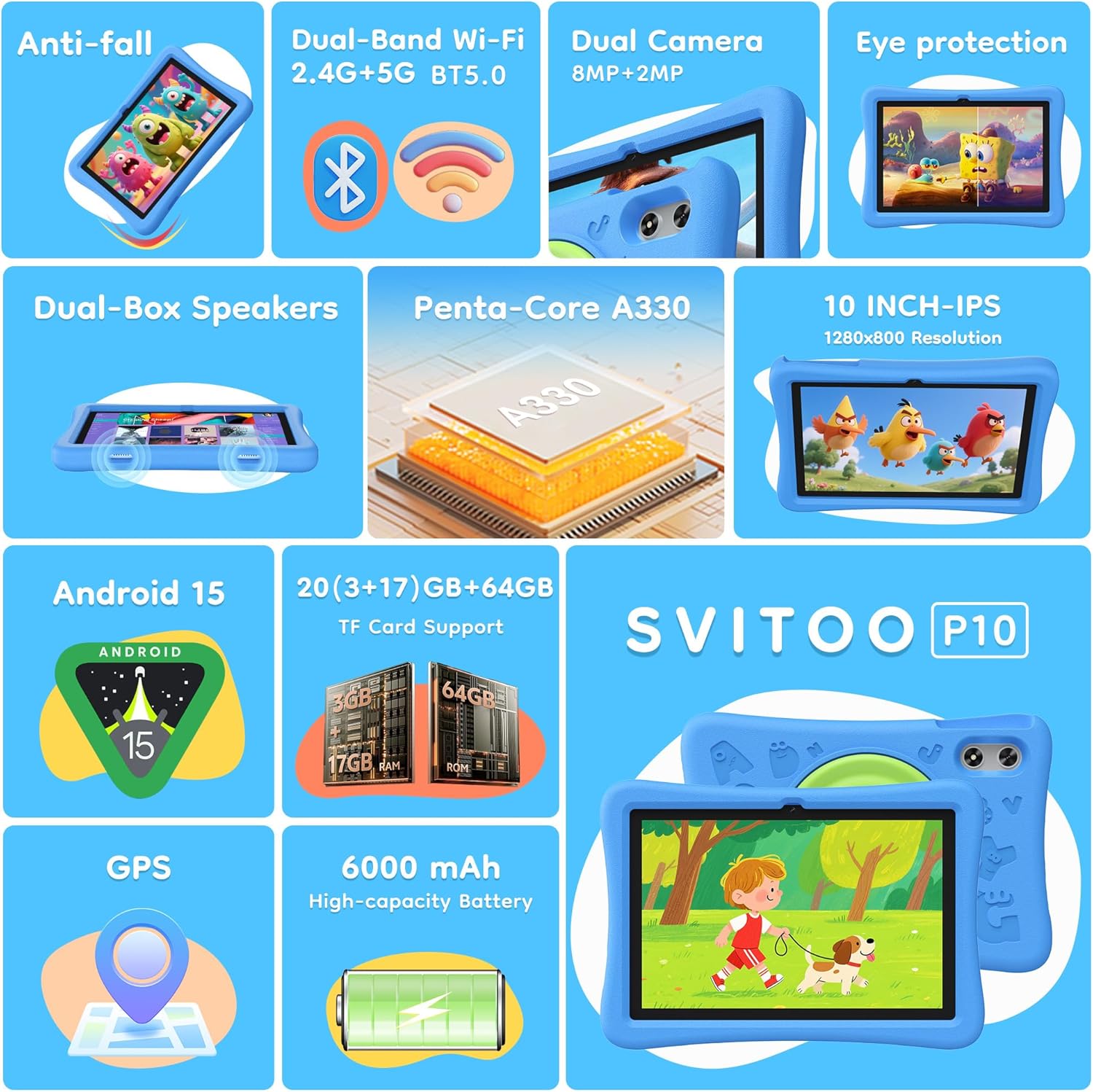
Image: The SVITOO Kids Tablet 10 Inch, shown in its blue protective case, highlighting its robust design suitable for children.
Produkt overview
Nøkkelfunksjoner
- Operativsystem: Android 15 with GMS Certification for full Google Play access.
- Utstilling: 10-inch HD IPS (1280 x 800 pixels) touchscreen with eye protection mode.
- Prosessor: Unisoc T7200 8-core CPU for smooth performance.
- Minne og lagring: 20GB RAM (3GB physical + 17GB virtual) and 64GB internal storage, expandable up to 1TB via microSD card (sold separately).
- Kameraer: 8 MP bakkamera og 2 MP frontkamera.
- Tilkobling: Dual-Band Wi-Fi (2.4/5 GHz) and Bluetooth 5.0.
- Batteri: 6000mAh high-capacity battery for extended usage.
- Lyd: Dual-box speakers and a 3.5mm headphone jack.
- Varighet: Kid-friendly EVA shockproof case with a 360° rotating handle and 180° rotating stand.
- Foreldrekontroll: Advanced settings for screen time limits, content filtering, and app management.
Nettbrettkomponenter
Gjør deg kjent med de fysiske komponentene på nettbrettet ditt:

Bilde: En detaljert view of the tablet's side and rear, indicating the USB Type-C port, headphone jack, power ON/OFF button, volume controls, speakers, rear camera, and front camera.
- USB Type-C-port: For lading og dataoverføring.
- Hodetelefonkontakt (3.5 mm): For tilkobling av kablede hodetelefoner.
- Strøm PÅ/AV -knapp: To turn the tablet on/off or put it to sleep.
- Volumknapper: For å justere lydvolumet.
- Høyttalere: Dual-box speakers for audio output.
- Frontkamera: For videosamtaler og selfier.
- Bakre kamera: For å ta bilder og videoer.
- MicroSD-kortspor: Located under a protective flap, for storage expansion.

Image: The tablet's protective case featuring a versatile 360-degree rotating handle that also functions as a 180-degree rotating stand, allowing for various viewing vinkler.
Oppsettveiledning
- Lad nettbrettet: Before first use, fully charge the tablet using the provided USB-C cable and a compatible power adapter.
- Strøm på: Press and hold the Power ON/OFF button until the screen lights up.
- Førstegangs oppsett: Følg instruksjonene på skjermen for å velge språk, koble til et Wi-Fi-nettverk og konfigurer Google-kontoen din.
- Google Kids Space / Parental Controls: During setup, you will have the option to configure Google Kids Space or other parental control settings. It is highly recommended to set these up immediately to ensure a safe environment for your child.
- Installer apper: Once setup is complete, you can download age-appropriate apps and games from the Google Play Store.
Bruksanvisning
Grunnleggende navigasjon
- Hjemmeskjerm: Swipe left or right to access different app pages.
- App skuff: Sveip opp fra bunnen av skjermen til view alle installerte applikasjoner.
- Varsler og hurtiginnstillinger: Swipe down from the top of the screen to access notifications and quick settings like Wi-Fi, Bluetooth, and screen brightness.
- Tilbake, Hjem, Nylige apper: Use the navigation buttons at the bottom of the screen to go back, return to the home screen, or view nylig åpnede applikasjoner.
Lader nettbrettet
Connect the USB-C charging cable to the tablet's USB-C port and the other end to a power adapter. The battery icon on the screen will indicate charging status. A full charge provides approximately 12 hours of mixed use.

Image: The tablet connected to a charger, displaying a battery icon with 99% charge, illustrating the charging process and battery life features like Night Mode and Energy Saving.
Øyebeskyttelsesmodus
To reduce eye strain, especially during prolonged use, activate the Eye Protection Mode (often called Night Mode or Reading Mode) from the quick settings panel or display settings. This mode adjusts screen colors to warmer tones.
Foreldrekontroll
The SVITOO Kids Tablet features robust parental controls to help manage your child's digital experience. These controls are integrated with Android 15 and Google Family Link.

Image: A family using the tablet, with an overlay showing various parental control options such as setting screen time limits, blocking harmful apps/websites, approving app downloads, and tracking child's location.
Konfigurering av foreldrekontroller:
- Tilgangsinnstillinger: Gå til Innstillinger > Digital velvære og foreldrekontroll or search for "Family Link" in your app drawer.
- Angi tidsgrenser for skjerm: Define daily limits for tablet usage to encourage balanced screen time.
- Innholdsfiltrering: Blokker tilgang til upassende webnettsteder og apper.
- App Approvals: Require parental approval for new app downloads or in-app purchases.
- Stedssporing: Monitor your child's device location (if enabled and configured).
For detailed instructions on Google Family Link, please refer to Google's official support documentation.
Vedlikehold
- Rengjøring: Bruk en myk, lofri klut til å rengjøre skjermen og nettbrettet. Unngå slipende rengjøringsmidler eller løsemidler.
- Batteripleie: To prolong battery life, avoid fully discharging the tablet frequently. Charge it regularly and avoid exposing it to extreme temperatures.
- Programvareoppdateringer: Keep the tablet's operating system and apps updated to ensure optimal performance and security.
- Lagring: Store the tablet in a cool, dry place away from direct sunlight when not in use.
- Beskyttelsesveske: The included EVA shockproof case provides protection against drops and bumps. Ensure it is properly fitted at all times.
Feilsøking
| Problem | Løsning |
|---|---|
| Nettbrettet slår seg ikke på. | Ensure the tablet is fully charged. Connect it to a charger for at least 30 minutes, then try powering it on again. |
| Skjermen reagerer ikke. | Perform a force restart by holding the Power ON/OFF button for 10-15 seconds. If the issue persists, contact support. |
| Problemer med Wi-Fi-tilkoblingen. | Check if other devices can connect to the Wi-Fi network. Restart your router and the tablet. Forget the network and reconnect. |
| Apper krasjer eller er trege. | Close background apps. Clear app cache (Settings > Apps > [App Name] > Storage > Clear Cache). Ensure sufficient storage space is available. Restart the tablet. |
| Batteriet tømmes raskt. | Reduce screen brightness. Close unused apps. Disable Wi-Fi/Bluetooth when not in use. Check battery usage in settings to identify power-hungry apps. |
Spesifikasjoner
| Trekk | Detalj |
|---|---|
| Modellnavn | SVITOO Tab 10 GMS Certified 1027C |
| Operativsystem | Android 15 |
| Skjermstørrelse | 10 tommer |
| Skjermoppløsning | 1280 x 800 piksler (HD IPS) |
| Prosessor | 1.8 GHz (Unisoc T7200 8-core CPU) |
| VÆR | 20 GB (3 GB fysisk + 17 GB virtuell) |
| Intern lagring | 64 GB |
| Utvidbar lagring | Up to 1TB via MicroSD (sold separately) |
| Grafisk koprosessor | Mali-G57 processor Imagination Tech |
| Trådløs type | 802.11a/b/g/n/ac (Dual-Band 2.4/5 GHz) |
| Bluetooth | Bluetooth 5.0 |
| Batterikapasitet | 6000mAh |
| Gjennomsnittlig batterilevetid | 12 timer |
| Frontkamera | 2 megapiksler |
| Bakre kamera | 8 megapiksler |
| Varevekt | 2.44 pund |
| Produktdimensjoner | 9.7 x 6.4 x 0.4 tommer |
Garanti og støtte
Your SVITOO Kids Tablet comes with a 1-Year Manufacturer Protection. This warranty covers manufacturing defects under normal use. It does not cover damage caused by misuse, accidents, natural disasters, or unauthorized modifications.
For technical support, warranty claims, or any questions regarding your product, please contact SVITOO customer service through your Amazon order page. Look for the "Contact Us" option next to your order details.
Vennligst ta vare på kjøpsbeviset av garantihensyn.