
Introduksjon
This manual provides comprehensive instructions for the setup, operation, maintenance, and troubleshooting of your KOORUI GN10 27-inch QHD 240Hz Mini-LED Gaming Monitor. Please read this manual thoroughly before using the product to ensure proper functionality and to prevent damage.
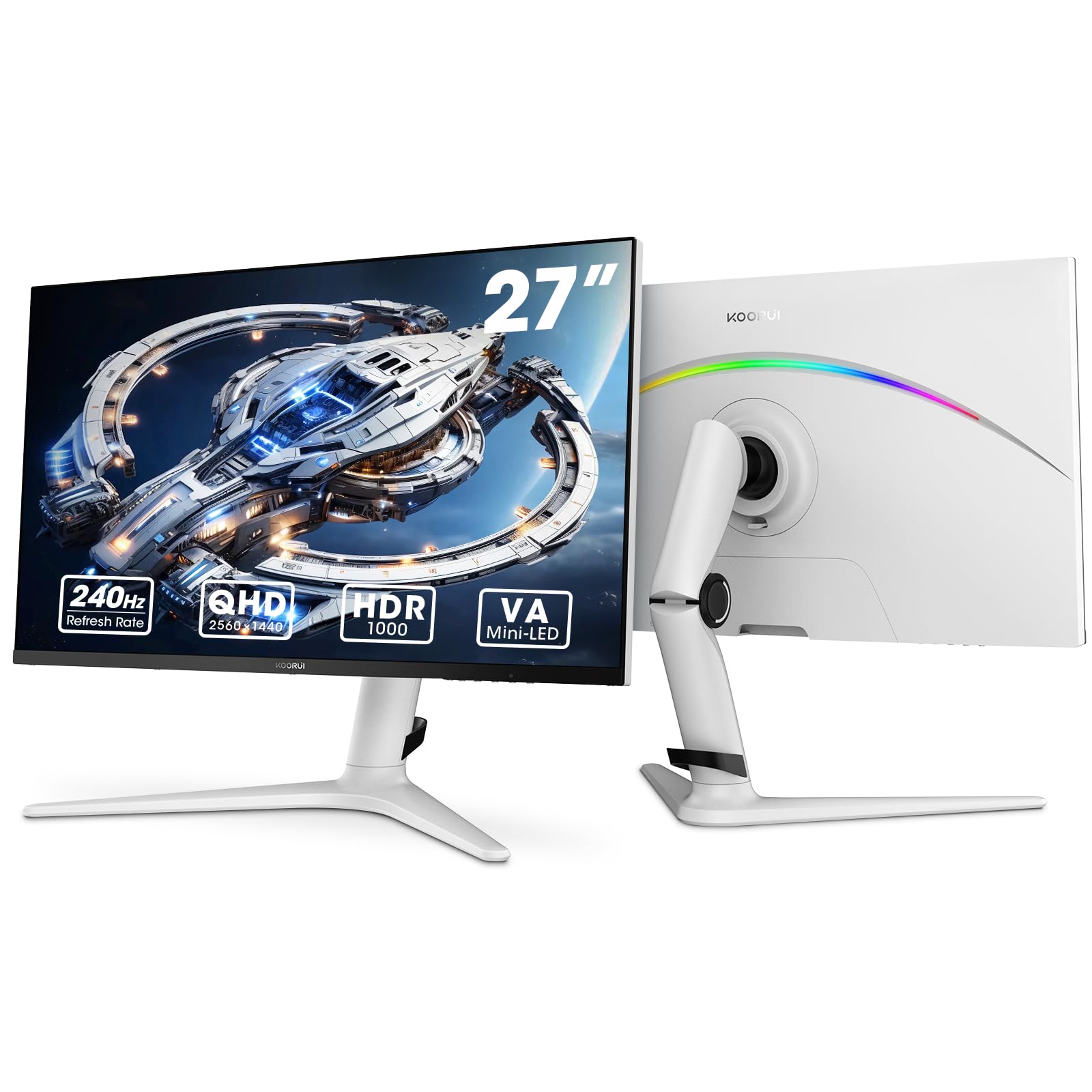
Figure 1: KOORUI GN10 27-inch QHD 240Hz Mini-LED Gaming Monitor.
1. Oppsett
1.1 Utpakking og pakkeinnhold
Fjern alle komponentene forsiktig fra emballasjen. Kontroller at alle elementene som er oppført nedenfor er til stede:
- KOORUI GN10 Monitor
- Skjermstativ (base og arm)
- Strømkabel
- HDMI-kabel (x2)
- DisplayPort (DP)-kabel
- Brukerhåndbok (dette dokumentet)
1.2 Montering av stativ
Følg disse trinnene for å montere skjermstativet:
- Attach the stand arm to the monitor panel. Ensure it clicks securely into place or is fastened with screws if provided.
- Connect the stand base to the stand arm. Tighten any screws to secure the base.
- Plasser den monterte skjermen på en stabil, flat overflate.

Figure 2: Monitor stand showing height, tilt, swivel, and pivot adjustments.
The ergonomic stand allows for height, tilt, swivel, and pivot adjustments to optimize your viewing vinkel.

Figure 3: Monitor dimensions for placement planning.
1.3 Koble til enheter
The monitor supports multiple input sources. Connect your computer or gaming console using the provided cables.
- DisplayPort (DP): For optimal performance, especially at 240Hz refresh rate and QHD resolution, use the DisplayPort cable.
- HDMI: Two HDMI 2.0 ports are available for connecting other devices such as gaming consoles (PS5, Xbox, Switch) or additional computers.
- Lyd ut: Koble eksterne høyttalere eller hodetelefoner til 3.5 mm lydutgangskontakten.

Figur 4: Bak view of the monitor showing available ports (Audio Out, DP 1.4, HDMI 2.0 x2) and VESA mount points.
1.4 Første gangs strøm på
- Connect the power cable to the monitor and then to a power outlet.
- Press the power button, usually located on the back or bottom of the monitor, to turn it on.
- The monitor will automatically detect the input source. If not, use the OSD menu to select the correct input.
2. Bruksanvisning
2.1 On-Screen Display (OSD)-meny
The OSD menu allows you to adjust various monitor settings. Access the OSD menu using the joystick or buttons typically located on the back or bottom of the monitor.
Common OSD menu options include:
- Bildeinnstillinger: Brightness, Contrast, Sharpness, Gamma.
- Fargeinnstillinger: Color Temperature, Hue, Saturation, Color Space (sRGB, DCI-P3).
- Inndatavalg: Bytt manuelt mellom DisplayPort- og HDMI-innganger.
- Lyd: Volumkontroll for lydutgangen.
- Spillfunksjoner: Adaptive Sync, Response Time (Overdrive), Game Modes.
- OSD-innstillinger: Språk, OSD-tidsavbrudd, gjennomsiktighet.
2.2 Skjerminnstillinger
The KOORUI GN10 monitor offers advanced display features for an enhanced visual experience.
- Oppløsning: The native resolution is QHD (2560 x 1440). Ensure your connected device is set to this resolution for optimal clarity.
- Oppdateringsfrekvens: Supports up to 240Hz. Configure your graphics card settings to utilize this high refresh rate for smoother motion.
- Responstid: Features a 1ms (GtG) response time, reducing motion blur and ghosting in fast-paced content.
- HDR 1000: High Dynamic Range 1000 provides superior contrast and color depth. Enable HDR in your operating system and monitor settings for compatible content.

Figure 5: Visual comparison illustrating the enhanced contrast and detail with HDR 1000 enabled.

Figure 6: Comparison of QHD (2560x1440) and FHD (1920x1080) resolutions, highlighting increased detail with QHD.
2.3 Spillfunksjoner
The monitor includes features designed to enhance your gaming experience:
- Adaptive Sync (G-Sync Compatible): Synchronizes the monitor's refresh rate with your GPU's frame rate to eliminate screen tearing and stuttering. Ensure this feature is enabled in both the monitor OSD and your graphics card control panel.
- Game Display Modes: Access specific on-screen overlays via the OSD menu, such as:
- Trådkors: Gir et trådkors på skjermen for forbedret sikting.
- Timer: Displays a countdown timer.
- FPS-teller: Shows your current frames per second.
- RTS Counter: A specific counter for Real-Time Strategy games.

Figure 7: Illustration of various exclusive game display modes and Adaptive Sync functionality.

Figure 8: Visual representation of smooth gaming experience with 240Hz refresh rate and 1ms response time.
2.4 RGB-belysning
The monitor features a crescent RGB light strip on the back. This lighting can be customized through the OSD menu to match your preference or gaming setup.

Figur 9: Bak view of the monitor highlighting the customizable RGB light strip.
3. Vedlikehold
3.1 Rengjøre skjermen
For å opprettholde skjermens utseende og ytelse, følg disse rengjøringsretningslinjene:
- Slå alltid av skjermen og trekk ut strømledningen før rengjøring.
- Bruk en myk, lofri klut litt damprengjøres med vann eller et ikke-slipende skjermrensemiddel.
- Ikke spray rengjøringsmiddel direkte på skjermen. Påfør det først på kluten.
- Avoid using alcohol, ammonia, or abrasive cleaners, as these can damage the screen surface.
- Tørk forsiktig av skjermen for å fjerne støv og flekker.
- Rengjør skjermen casinmed en myk, tørr klut.
3.2 Generell pleie
- Unngå å plassere tunge gjenstander oppå skjermen eller kablene.
- Ikke utsett skjermen for direkte sollys, sterk varme eller ekstrem kulde.
- Keep the monitor away from liquids and high humidity environments.
- Sørg for tilstrekkelig ventilasjon rundt skjermen for å forhindre overoppheting.
4. Feilsøking
Hvis du støter på problemer med skjermen, kan du se følgende vanlige problemer og løsninger:
| Problem | Mulig årsak | Løsning |
|---|---|---|
| Intet bilde på skjermen |
|
|
| Flimrende eller forvrengt bilde |
|
|
| Ingen lyd fra lydutgangen |
|
|
| Adaptive Sync not working |
|
|
Hvis problemet vedvarer etter at du har prøvd disse løsningene, kan du kontakte kundestøtte.
5. Spesifikasjoner
| Trekk | Detalj |
|---|---|
| Merke | KOORUI |
| Modellnummer | GN10 |
| Skjermstørrelse | 27 tommer |
| Oppløsning | QHD Wide 1440p (2560 x 1440) |
| Aspektforhold | 16:9 |
| Skjermoverflate | Matte |
| Kontrastforhold | 20,000,000:1 |
| Oppdateringsfrekvens | 240 Hz |
| Skjermteknologi | Mini-LED |
| Viewing vinkel | 178 grader |
| Lysstyrke | 350 Candela |
| Fargeskala | 100 % sRGB, 95 % DCI-P3 |
| Responstid | 1 Millisecond (GtG) |
| HDMI-porter | 2 2.0 (HDMI XNUMX) |
| DisplayPort | 1 (DP 1.4) |
| Lyd ut | Ja |
| Adaptiv synkronisering | G-Sync-kompatibel |
| Ekstra funksjoner | Flicker-Free, Frameless, Height Adjustable, Tilt Adjustable, Swivel Adjustable, Rotatable |
| Farge | Hvit/grå |
| Monteringstype | Desk Mount, VESA 75x75mm compatible |
6. Garanti og støtte
6.1 Garantiinformasjon
The KOORUI GN10 monitor comes with a 3 års begrenset garanti. The display screen is backed for 1 year, and other accessories for 3 years. A 12-month replacement service is also provided for eligible issues.
This warranty covers manufacturing defects and malfunctions under normal use. It does not cover damage caused by misuse, accidents, unauthorized modifications, or external factors.
6.2 Kundestøtte
For technical assistance, warranty claims, or inquiries regarding missing accessories, please contact KOORUI customer support. Have your product model (GN10) and purchase information ready when contacting support.
Contact information can typically be found on the KOORUI official webnettstedet eller gjennom forhandlerens supportkanaler.
7. Produktvideodemonstrasjon
Video 1: Offisiell produktvideovisningasing the KOORUI GN10 Gaming Monitor's features and design.