
JOYING JY-UTS08N8
JOYING Android Radio 10.1 Inch Car Stereo User Manual
Model: JY-UTS08N8
Introduksjon
This manual provides detailed instructions for the installation, operation, and maintenance of your JOYING Android Radio 10.1 Inch Car Stereo, Model JY-UTS08N8. Please read this manual thoroughly before using the product to ensure proper function and safety.

Bilde: Overview of the JOYING 10.1-inch Single Din Car Radio, highlighting its Android 13 operating system, Qualcomm Snapdragon 6125 processor, Octa Core 2.0GHz, and IPS screen with 1280x800 resolution.
Pakkeinnhold
Bekreft at alle varene som er oppført nedenfor er inkludert i pakken din. Hvis noen varer mangler eller er skadet, kan du kontakte kundestøtte.

Image: All included accessories, such as cables, antennas, and mounting hardware.
- 10.1" Radio Unit
- Single Din Cage
- Monteringshylse
- Venstre og høyre parentes
- Plastic Trim Out
- Extraction Keys
- Installasjonshåndbok
- WiFi-antenne
- GPS-antenne
- 4G Antennas (x2)
- Ekstern mikrofon
- USB-kabler (x2)
- AR Cable
- Screen Ribbon Cable
- ISO Cable
- Brukerhåndbok (dette dokumentet)
Oppsett og installasjon
Professional installation is recommended. Ensure the vehicle's power is disconnected before beginning installation. Refer to the included Installation Manual for detailed wiring diagrams and specific vehicle requirements.
Installasjonshensyn
- Depending on your car's specific model, you may require an additional installation frame kit, a special ISO harness, an amplifier adapter, or a CANbus decoder. These are not included and must be purchased separately if needed.
- The unit does not support the factory car GPS antenna, backup rear camera, Bluetooth, USB, or microphone. Only JOYING accessories are supported for these functions.
- DAB+ digital radio adapter, DVR, OBDII scanner, reverse camera, TPMS, and steering wheel controller are optional accessories and are not included in the standard package.
Montering av enheten
The unit features an upgraded installation structure allowing the fixing position of the left and right brackets to be extended or telescoped. This adaptability helps achieve the best fixing position for various car center consoles.
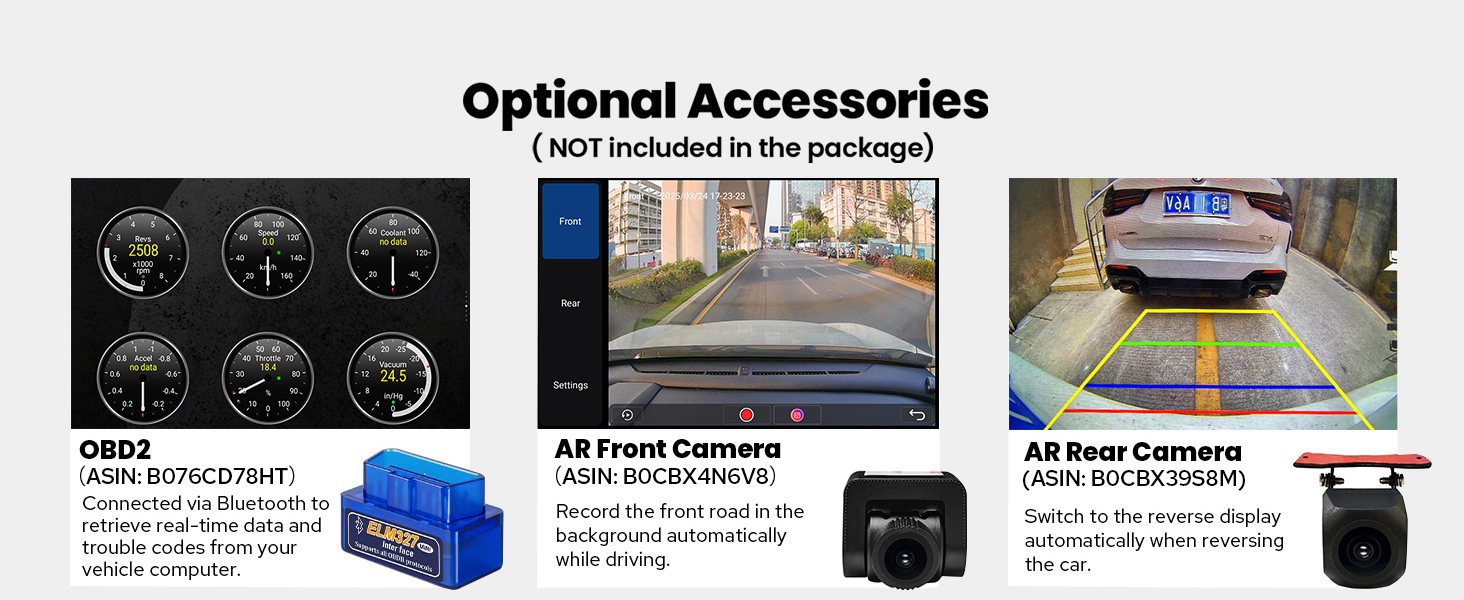
Image: Illustration of the adjustable mounting brackets and their flexibility for different car consoles, part of a larger image showing multiple features.
Connecting Antennas and Cables
Connect the provided WiFi, GPS, and 4G antennas to their respective ports on the rear of the unit. Ensure all cables, including the ISO cable, USB cables, and external microphone, are securely connected according to the Installation Manual.

Bilde: Detaljert view of the rear panel showing various input/output ports including Radio-ANT, USB, MIC, HDMI OUT, Optical, Coaxial, RCA, and Power.
The unit features an independent WiFi antenna for stable signal quality and fast internet access. It supports 802.11a/b/g/n/AC standards across 2.4GHz/5GHz spectral bands.
Image: Close-up of the WiFi antenna connected to the unit, highlighting the improved signal, part of a larger image showing multiple features.
Bruksanvisning
Power On and Initial Boot
The unit features a fast boot function. Once the car key is inserted, the unit will start up and enter the user interface within 2 seconds. The very first boot-up may take approximately 30-40 seconds.
Brukergrensesnitt og navigasjon
The system runs on Android, providing a familiar and customizable interface. Navigate using the capacitive touchscreen. The main screen displays various applications and widgets for quick access.

Image: The main screen of the JOYING Android Radio showing the launcher with navigation, media, and other application icons.
CarPlay og Android Auto
Connect your mobile phone via USB cable or Bluetooth to utilize built-in Apple CarPlay or Android Auto. This allows you to access your phone's apps, navigation, make calls, and listen to music directly on the car stereo's screen.

Image: Side-by-side comparison of Apple CarPlay and Android Auto interfaces displayed on the unit.
GPS-navigasjon
The unit includes precise GPS engines and an antenna for accurate positioning and real-time navigation. It supports BeiDou, GLONASS, and GPS satellite systems. Offline maps can be downloaded and used in supported areas. You can also synchronize mobile phone map data via CarPlay/Android Auto.
Lydfunksjoner
Experience high-quality sound with the TDA7851 DSP chip and a 48-band graphic equalizer. The unit provides 4 audio outputs and 1 SUB output, supporting aftermarket amplifiers. For ultimate sound quality, utilize the Optical Fiber or Coaxial Digital Output if your external amplifier supports these inputs.

Image: A user interacting with the music player on the car stereo, highlighting sound features and output options.
Multitasking på delt skjerm
The unit supports split-screen functionality, allowing you to run two applications simultaneously. To activate, tap the recent apps icon, find the desired app, and tap the split-screen button. Then select the second app from recent apps.

Image: A sequence of three images illustrating how to activate and use the split-screen feature.
HDMI-utgang
The HDMI output provides a full digital image and sound-sending interface, allowing uncompressed audio and video signals to be output synchronously to external displays, such as rear-seat monitors. This enables passengers to watch movies while the driver uses navigation on the main screen.

Bilde: En bil view showing the main unit displaying navigation and rear monitors playing video via HDMI output.
Note: The HDMI cable is not included.
Built-in 4G Module
Insert a SIM card into the unit for internet access. This module supports FDD-LTE (B2/B4/B5/B7/B12/B13/B14/B17/B25/B26/B38/B66/B71) and TDD-LTE (B41) types. Please note that it does not support making phone calls or sending SMS messages directly from the unit via the 4G module.
Rattkontroll
The unit supports steering wheel controls, allowing you to easily switch songs, radio channels, and adjust volume for a safer driving experience. If your car has a CAN system, an additional CANbus cable may be required to enable this feature.

Bilde: A view of a car's steering wheel with controls, alongside the car stereo's interface for configuring steering wheel functions.
Personlige innstillinger
Customize your unit with various personalized settings, including changing the car boot logo, selecting customizable wallpapers, and adjusting button colors to match your vehicle's interior lighting.
Image: A collage of screenshots demonstrating the customization options for the car stereo's interface, including boot logo, wallpapers, and button lighting, part of a larger image showing multiple features.
Vedlikehold
The JOYING Android Radio is designed for minimal maintenance. Keep the screen clean using a soft, dry, lint-free cloth. Avoid using harsh chemicals or abrasive materials.
Kjølesystem
The unit features a dual heat sink design for superior heat dissipation, improved temperature control, and enhanced performance stability. You can set a warning value for CPU temperature or radio volume. If the temperature or volume exceeds this value, the internal fan will automatically activate to prevent overheating.
Bilde: En intern view of the car stereo highlighting the dual heat sink and cooling fan, with a screen showing fan control settings, part of a larger image showing multiple features.
Feilsøking
If you encounter issues with your JOYING Android Radio, refer to the following common problems and solutions. For more complex issues, consult the included Installation Manual or contact customer support.
| Problem | Mulig årsak | Løsning |
|---|---|---|
| Enheten slås ikke på. | Feil kabling; Sikring gått; Utilstrekkelig strømforsyning. | Check all power connections and fuses. Ensure the vehicle's ignition is on. Consult a professional for wiring verification. |
| Ingen lyd eller forvrengt lyd. | Speaker wires incorrectly connected; Volume too low; Audio settings misconfigured; External ampproblem med lier. | Verify speaker wire connections. Check volume levels and mute settings. Adjust equalizer and audio output settings. Ensure external ampForsterkeren er strømførende og riktig tilkoblet. |
| GPS-signalet er svakt eller unøyaktig. | GPS antenna not properly installed or obstructed; Outdated map data. | Sørg for at GPS-antennen er ordentlig tilkoblet og har en klar overflate view of the sky. Update map data if necessary. Note: Does not support factory car GPS antenna. |
| Problemer med Bluetooth-tilkobling. | Device not in pairing mode; Interference; Incorrect pairing procedure. | Ensure your mobile device's Bluetooth is on and in pairing mode. Delete previous pairings and try again. Move closer to the unit. |
| CarPlay/Android Auto fungerer ikke. | Incorrect USB cable; Phone software issue; App permissions. | Use a high-quality USB data cable. Ensure your phone's software is updated. Check app permissions on your phone for CarPlay/Android Auto. |
Spesifikasjoner
Below are the key technical specifications for the JOYING Android Radio 10.1 Inch Car Stereo (Model JY-UTS08N8).
| Trekk | Detalj |
|---|---|
| Merke | GLEDER |
| Modellnavn | Android Radio 10.1 Inch |
| Modellnummer | JY-UTS08N8 |
| Operativsystem | Android |
| Skjermstørrelse | 10.1 tommer |
| Visningstype | LED, Capacitive Touchscreen |
| Minnelagringskapasitet | 128 GB |
| Tilkoblingsteknologi | Bluetooth, Ethernet, HDMI, USB, Wi-Fi |
| Supported Satellite Navigation | BeiDou, GLONASS, GPS |
| Lydutgangsmodus | Stereo (4 audio outputs, 1 SUB output) |
| Spesielle funksjoner | DSP, Equalizer, RCA, RDS, Rear View Camera Input, Built-in 4G Module, Optical Fiber and Coaxial Digital Output |
| Monteringstype | Panel Mount (Single Din) |
| Varevekt | 1200 gram |
Image: Detailed diagram showing the dimensions of the 10.1-inch screen and the main unit, along with all rear panel connections.
Garantiinformasjon
The JOYING Android Radio 10.1 Inch Car Stereo (Model JY-UTS08N8) comes with a 2 års garanti from the date of purchase. This warranty covers manufacturing defects and malfunctions under normal use. Please retain your proof of purchase for warranty claims. For detailed terms and conditions, refer to the warranty card included in your package or contact JOYING customer support.
Kundestøtte
For further assistance, technical support, or inquiries regarding your JOYING Android Radio, please refer to the comprehensive Installation Manual included with your product. You may also visit the official JOYING website for FAQs, software updates, and contact information.
When contacting support, please have your product model number (JY-UTS08N8) and proof of purchase readily available.
Ask a question about this manual
Ask about setup, troubleshooting, compatibility, parts, safety, or missing instructions. Manuals+ will review the question and use this page’s manual context to help answer it.