
Introduksjon
This manual provides detailed instructions for the setup, operation, maintenance, and troubleshooting of your Azeyou 12 Inch Android 15 Tablet, model T12. Please read this manual thoroughly to ensure proper use and to maximize your device's performance and longevity.
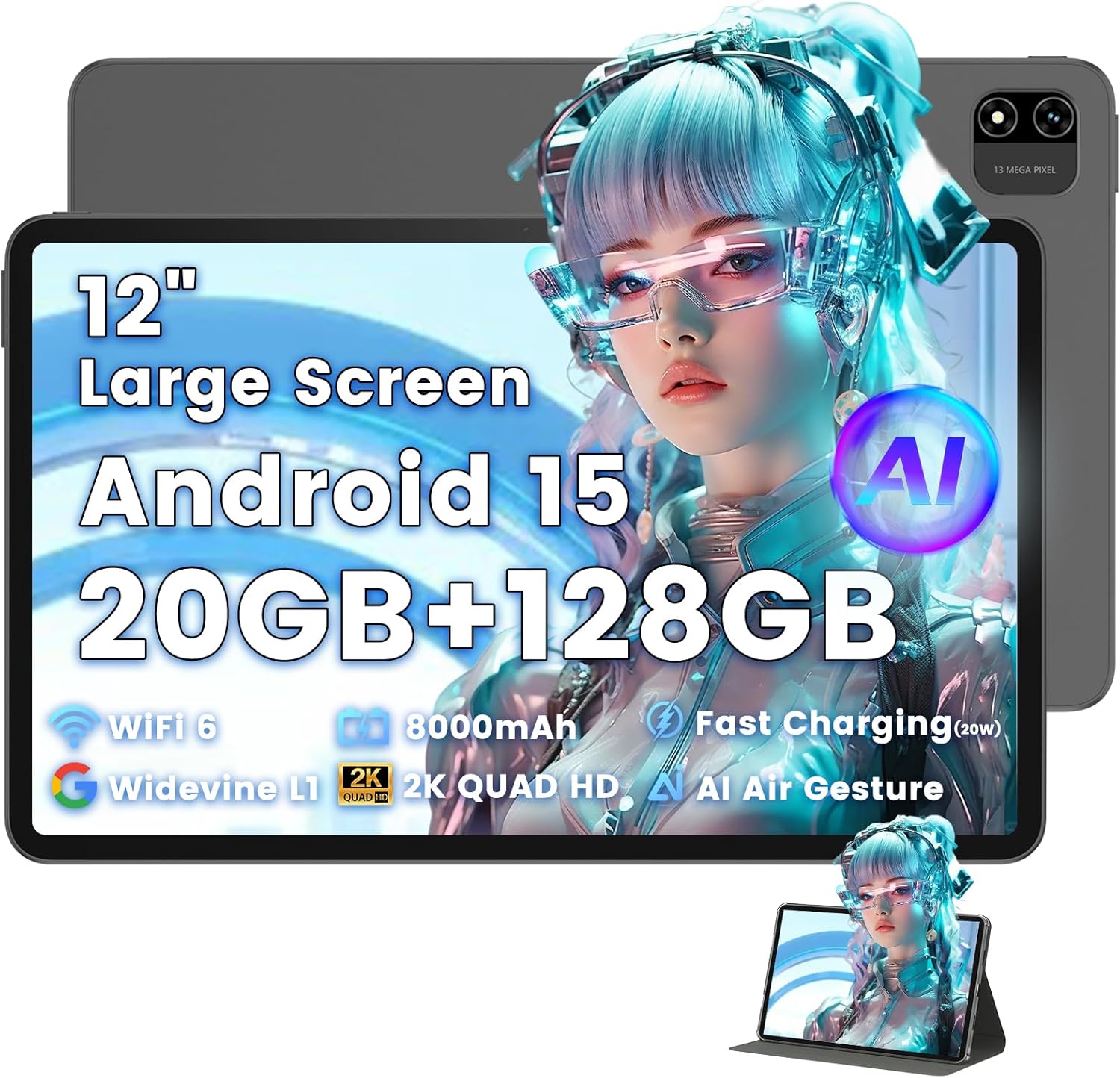
Image: The Azeyou T12 tablet, shown with its protective case, highlighting its large display and sleek design.
Hva er i esken
Bekreft at alle varene er til stede i pakken:
- 1x Azeyou Tablet (T12)
- 1x ladekabel (Type-C)
- 1x brukerveiledning
- 1x nettbrettetui
Oppsett
1. Førstegangslading
Before first use, fully charge the tablet. Connect the provided Type-C charging cable to the tablet's charging port and the other end to a compatible 20W Power Delivery (PD) charger. The battery indicator on the screen will show charging status.

Image: An infographic detailing key features of the Azeyou T12 tablet, including its Android 15 operating system, AI octa-core processor, Wi-Fi 6, Bluetooth 5.0, dual cameras, storage capacity, Widevine L1 support, parental control, split-screen function, and 8000mAh battery.
2. Slå på og av
- For å slå på: Press and hold the Power button located on the side of the tablet until the Azeyou logo appears.
- Slik slår du av: Press and hold the Power button until the power options appear on the screen, then select "Power Off".
- Å starte på nytt: Trykk og hold inne av/på-knappen til strømalternativene vises, og velg deretter «Start på nytt».
3. Veiviser for førstegangsoppsett
Når nettbrettet slås på for første gang, vil det veilede deg gjennom en innledende konfigurasjonsprosess:
- Språkvalg: Velg ditt foretrukne språk.
- Wi-Fi-tilkobling: Velg Wi-Fi-nettverket ditt og skriv inn passordet for å koble til internett.
- Google-konto: Sign in with your Google account or create a new one. This is necessary for downloading apps from the Google Play Store and syncing data.
- Dato og klokkeslett: Angi riktig dato og klokkeslett, eller la nettverket stille det inn automatisk.
- Sikkerhet: Set up a screen lock (PIN, pattern, password, or face unlock).
4. Sette inn et TF-kort (valgfritt)
The tablet supports storage expansion up to 1TB via a TF (microSD) card. Locate the TF card slot, gently insert the card until it clicks into place. Ensure the tablet is powered off before inserting or removing the TF card.

Image: A visual representation of the tablet's memory and storage, indicating 20GB RAM (6GB physical + 14GB virtual), 128GB internal storage, and support for up to 1TB TF card expansion, alongside popular application icons.
Bruksanvisning
1. Basic Navigation and Gestures
- Trykk på: Velg et element eller åpne en app.
- Trykk og hold: Få tilgang til kontekstmenyer eller flytt ikoner.
- Sveip: Bla gjennom skjermer eller lister.
- Klyp for å zoome: Zoom inn eller ut på bilder og web sider.
2. Skjermfunksjoner
The Azeyou T12 features an 11.97-inch 2K FHD (2000x1200) display with a 90Hz refresh rate for smooth visuals.
- Justering av lysstyrke: Swipe down from the top of the screen to access the Quick Settings panel and adjust the brightness slider.
- Blått lysfilter: The tablet includes a built-in blue light filter that automatically adjusts brightness to reduce eye strain. This can be managed in Display Settings.
- Widevine L1: Enjoy high-definition content from streaming services like Netflix and Prime Video due to Widevine L1 certification.

Image: A visual representation of the tablet's display specifications, emphasizing its 12-inch screen, 16:10 aspect ratio, 2000x1200 resolution, and 90Hz refresh rate, with a child watching content on the screen.

Image: An illustration demonstrating the tablet's Widevine L1 certification for HD streaming and its quad-speaker system for rich, immersive audio, surrounded by logos of popular streaming services.
3. Ytelse og fleroppgavekjøring
The tablet is equipped with an A733 octa-core processor and 20GB RAM (6GB physical + 14GB virtual) for smooth operation.
- Delt skjermmodus: To use two apps simultaneously, open one app, then swipe up from the bottom of the screen and hold to access recent apps. Tap the app icon at the top of the window and select "Split screen". Choose a second app to open in the other half of the screen.
- Appadministrasjon: Close background apps from the recent apps menu to optimize performance.
4. AI Smart Features
The A733 octa-core processor includes an AI chip that enables several intelligent functions:
- AI Posture Reminder: The tablet can monitor your sitting posture and provide gentle reminders to encourage better habits, especially useful for online learning or extended use.
- AI-bevegelseskontroll: Navigate the tablet without touching the screen. Use simple hand movements in front of the camera to flip pages, pause videos, or browse content.
- AI-bildeforbedring: The AI engine can enhance low-resolution photos and videos in real-time, improving clarity, detail, and overall visual quality.

Image: A collage demonstrating the tablet's AI capabilities, including an AI Posture Reminder for healthy habits, AI Gesture Control for touch-free navigation, and AI Image Enhancement for improved photo and video quality.
5. Kameraer
The tablet features a 5MP front camera and a 13MP rear camera with autofocus and flash.
- Frontkamera: Ideal for video calls, online classes, and selfies.
- Bakre kamera: Suitable for capturing photos and videos. Features autofocus and flash for improved image quality.
- Ansiktslås: Utilize the front camera for quick and secure access to your device.

Image: A graphic highlighting the tablet's 5MP front camera and 13MP AI rear camera, showcasing features like AI-enhanced photos and Face Unlock for secure access.
6. Tilkobling
- Wi-Fi 6: Connect to high-speed Wi-Fi networks for stable streaming and low-latency online activities. Access Wi-Fi settings via the Quick Settings panel or the Settings app.
- Bluetooth 5.0: Pair with wireless keyboards, headphones, and other Bluetooth accessories. Enable Bluetooth in Quick Settings or the Settings app.
- Type-C-port: Used for charging, fast data transfer, and audio output with compatible Type-C headphones.

Image: A visual representation of the tablet's connectivity features, including Wi-Fi 6, Bluetooth 5.0, and support for Type-C headsets, illustrating seamless integration with various devices and networks.
7. Batterihåndtering
8000 mAh-batteriet gir lengre brukstid. Slik optimaliserer du batterilevetiden:
- Reduser skjermens lysstyrke.
- Deaktiver Wi-Fi og Bluetooth når de ikke er i bruk.
- Lukk unødvendige bakgrunnsapplikasjoner.
- Use power-saving modes available in Battery Settings.
8. Foreldrekontroll
The tablet includes a parental control mode to manage screen time, restrict content, and control app access for children. This feature can be configured in the tablet's settings under 'Digital Wellbeing & parental controls'.

Image: A screenshot of the Android 15 interface on the tablet, highlighting features such as HD streaming, parental control, and split-screen functionality, with various app icons visible.
Vedlikehold
1. Rengjøring av nettbrettet
- Bruk en myk, lofri klut til å rengjøre skjermen og nettbrettets kabinett.
- For gjenstridige flekker, litt dampRengjør kluten med vann eller en skjermrens beregnet for elektronikk.
- Unngå bruk av sterke kjemikalier, slipende materialer eller overdreven fuktighet.
2. Programvareoppdateringer
Se etter og installer programvareoppdateringer regelmessig for å sikre optimal ytelse, sikkerhet og tilgang til nye funksjoner. Gå til Innstillinger > System > Systemoppdatering.
3. Lagringshåndtering
To maintain performance, periodically manage your tablet's storage:
- Slett unødvendige apper og files.
- Tøm hurtigbufferdata for apper i Innstillinger > Apper og varsler > [Appnavn] > Lagring og hurtigbuffer.
- Utilize cloud storage or transfer large files to an external TF card or computer.
Feilsøking
If you encounter issues with your Azeyou T12 tablet, refer to the following common solutions:
- Nettbrettet slår seg ikke på:
- Sørg for at batteriet er ladet. Koble til laderen og vent noen minutter før du prøver å slå på den.
- Utfør en tvungen omstart ved å holde inne av/på-knappen i 10–15 sekunder.
- Treg ytelse eller frysing:
- Lukk unødvendige bakgrunnsapplikasjoner.
- Tøm appens hurtigbuffer og data.
- Start nettbrettet på nytt.
- Se etter tilgjengelige systemoppdateringer.
- Problemer med Wi-Fi-tilkobling:
- Sørg for at Wi-Fi er aktivert på nettbrettet.
- Start Wi-Fi-ruteren på nytt.
- Glem nettverket i Wi-Fi-innstillingene og koble til på nytt.
- Apper som krasjer eller ikke svarer:
- Tving lukking av appen (Settings > Apps & notifications > [App Name] > Force stop).
- Tøm appens hurtigbuffer og data.
- Avinstaller og installer appen på nytt.
- Sørg for at appen er oppdatert til den nyeste versjonen.
- Skjermen svarer ikke:
- Utfør en tvungen omstart.
- Sørg for at skjermen er ren og fri for rusk.
Spesifikasjoner
- Modellnavn:
- T12 Tablet
- Operativsystem:
- Android 15
- Prosessor:
- A733 Octa-Core Processor (Unisoc)
- VÆR:
- 20 GB (6 GB fysisk + 14 GB virtuell)
- Intern lagring (ROM):
- 128 GB
- Utvidbar lagring:
- Opptil 1 TB via TF-kort
- Skjermstørrelse:
- 11.97 tommer
- Skjermoppløsning:
- 2000x1200 FHD
- Oppdateringsfrekvens:
- 90 Hz
- Grafikk-koprosessor:
- Imagination Technologies BXM-4-64 MC1
- Bakre kamera:
- 13 MP med autofokus og blits
- Frontkamera:
- 5 MP
- Batterikapasitet:
- 8000mAh
- Lader:
- 20W Power Delivery (PD) Fast Charging via Type-C
- Trådløs tilkobling:
- Wi-Fi 6 (802.11a/b/g/n/ac), Bluetooth 5.0
- Lyd:
- Quad-Speakers, Type-C Audio Output
- Dimensjoner (LxBxH):
- 11 x 7 x 0.3 tommer
- Varevekt:
- 3.1 pund
- Farge:
- Grå
- Spesielle funksjoner:
- AI Posture Reminder, AI Gesture Control, AI Image Enhancement, Widevine L1, Parental Control, Split-Screen Mode, Face Unlock
Garanti og støtte
Garantiinformasjon
Azeyou products typically come with a standard manufacturer's warranty. Please refer to the warranty card included in your product packaging or visit the official Azeyou website for specific warranty terms and conditions. The warranty generally covers manufacturing defects but does not cover damage caused by misuse, accidents, or unauthorized modifications.
Kundestøtte
For technical assistance, troubleshooting beyond this manual, or warranty claims, please contact Azeyou customer support. Contact details can usually be found on the official Azeyou website or on the product packaging. When contacting support, please have your tablet's model number (T12) and purchase information ready.
Du kan besøke Azeyou Store on Amazon for mer produktinformasjon og støtteressurser.