
1. Introduksjon
This manual provides essential information for setting up, operating, and maintaining your OnePlus Nord 5 smartphone. Please read this guide thoroughly to ensure optimal performance and longevity of your device.

Figur 1: Foran og bak view of the OnePlus Nord 5 smartphone.
2. Innhold i esken
Upon unboxing your OnePlus Nord 5, verify that all the following items are included:
- OnePlus Nord 5 Smartphone
- Strømadapter (80W)
- USB-kabel (Type-C)
- SIM-brettutkaster
- Skjermbeskytter (forhåndspåsatt eller i esken)
- Telefonveske
- Hurtigstartguide
- Garantikort
Video 1: Unboxing the OnePlus Nord 5 and reviewinnholdet.

Figur 2: Foran view of the OnePlus Nord 5.

Figur 3: Bakside view of the OnePlus Nord 5.
3. Oppsett
3.1 Installasjon av SIM -kort
- Finn SIM-kortskuffen på siden av enheten.
- Sett SIM-utkastverktøyet inn i det lille hullet ved siden av skuffen, og trykk godt til skuffen spretter ut.
- Plasser nano-SIM-kortet/-kortet(ene) i de angitte sporene på skuffen. Sørg for at gullkontaktene vender nedover.
- Sett SIM-kortskuffen forsiktig tilbake i telefonen til den klikker på plass.
3.2 Første gangs strøm på
Press and hold the Power button on the side of the device until the OnePlus logo appears. Follow the on-screen instructions to complete the initial setup, including language selection, Wi-Fi connection, and Google account setup.
4. Betjening av enheten
4.1 Ytelse
The OnePlus Nord 5 is equipped with the Snapdragon 8s Gen 3 processor and LPDDR5X RAM, designed for demanding applications and gaming. The device features a 7300mm² VC cooling system to maintain optimal temperatures during extended use.
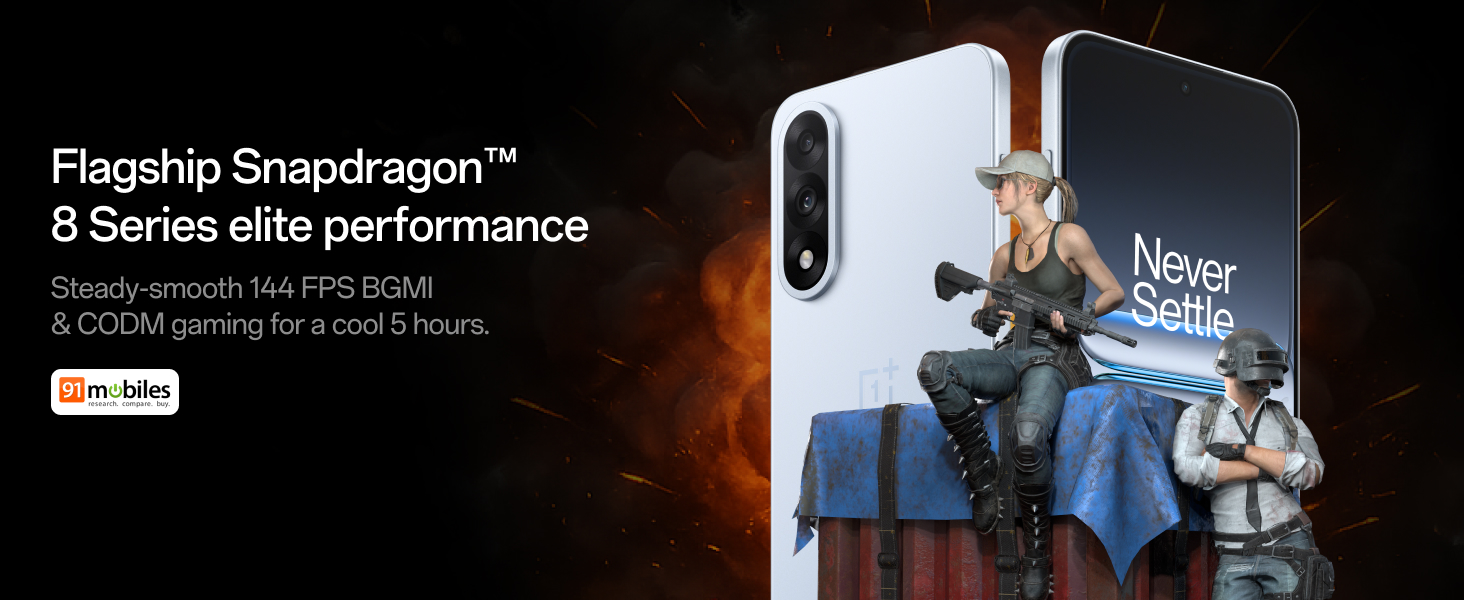
Figure 4: Snapdragon 8s Gen 3 processor for elite performance.
Video 2: Demonstration of gaming performance on the OnePlus Nord 5.
4.2 Kamerafunksjoner
The device features a dual 50MP camera system, including a 50MP front camera (ISOCELL JN5 with hardware autofocus) and a 50MP Sony LYT-700 back camera with Optical Image Stabilization (OIS). It supports 4K 60 FPS video capture.
AI Camera Enhancements:
- AI-viskelær: Removes unwanted objects or people from photos.
- AI Detail Boost: Forbedrer bildets klarhet og detaljer.
- AI Unblur: Corrects blurry images.
- AI Reframe: Suggests improved compositions for photos.
- AI Perfect Shot: Adjusts facial expressions and corrects blinked eyes in group photos.

Figure 5: Dual 50MP camera system overview.

Figure 6: AI features for photo enhancement.
4.3 Batteri og lading
The OnePlus Nord 5 features a 6800 mAh battery and supports 80W ultra-fast charging. It also includes an all-new Bypass Charging feature, which powers the phone directly from the charger during gaming to reduce heat and maintain performance.

Figure 7: Illustration of Bypass Charging technology.
4.4 Skjerm
Experience visuals on a 144Hz 1.5K AMOLED display with Aqua Touch 2.0 technology, offering a resolution of 2800 x 1272 pixels and up to 1400 nits brightness. Aqua Touch 2.0 improves touch responsiveness, even with wet or oily fingers.

Figure 8: Details of the 144Hz AMOLED display.
4.5 AI-funksjoner
The OnePlus Nord 5 integrates various AI functionalities to enhance user experience:
- AI Voice Scribe: Transcribe, translate, and summarize meetings or content.
- Ring rundt for å søke: Quickly search for information by circling content on your screen.
- Gemini Live: An AI assistant for queries and information.
- AI-søk: Intuitively understands natural language prompts for searching device content.

Figure 9: AI VoiceScribe interface.
4.6 Multitasking with Open Canvas
The Open Canvas feature allows for enhanced split-screen multitasking, enabling flexible resizing of applications and drag-and-drop functionality between apps. This improves productivity by extending split-screen capabilities beyond physical display limits.
Video 3: Demonstration of multitasking features on the OnePlus Nord 5.

Figure 10: Open Canvas for advanced multitasking.
4.7 Tilkobling
The Nord 5 supports 5G-Advanced networking, offering faster internet speeds and improved signal stability, particularly in congested areas.

Figure 11: 5G-Advanced network features.
4.8 programvare
The device runs on OxygenOS 15, based on Android 15. It is guaranteed to receive 4 Android version upgrades and 6 years of security updates, ensuring long-term software support and system smoothness.
5. Vedlikehold
- Programvareoppdateringer: Regularly install system updates to ensure optimal performance, security, and access to new features.
- Batteripleie: To prolong battery life, avoid extreme temperatures and frequent full discharges. The device includes a 4-year healthy battery promise.
- Rengjøring: Bruk en myk, lofri klut til å rengjøre skjermen og kabinettet. Unngå slipende materialer eller sterke kjemikalier.
- Lagringsadministrasjon: Fjern unødvendige ting med jevne mellomrom fileog apper for å opprettholde enhetshastigheten og frigjøre lagringsplass.
6. Feilsøking
If you encounter issues with your OnePlus Nord 5, consider the following general troubleshooting steps:
- Start enheten på nytt: En enkel omstart kan løse mange mindre programvarefeil.
- Se etter oppdateringer: Sørg for at enhetens programvare er oppdatert.
- Tøm buffer: For appspesifikke problemer kan du prøve å tømme appens hurtigbuffer i Innstillinger.
- Fabrikkinnstilling: As a last resort, a factory reset can resolve persistent software problems. Advarsel: Dette vil slette alle data på enheten din. Sikkerhetskopier viktig informasjon før du fortsetter.
- Kontakt kundestøtte: If the issue persists, refer to the support section for contact information.
7. Spesifikasjoner
| Trekk | Detalj |
|---|---|
| Operativsystem | Android 15, OxygenOS 15 |
| Prosessor | Snapdragon 8s Gen 3 (CPU Speed: 2, 2.8, 3 GHz) |
| VÆR | 12 GB (som per nåværende modell) |
| Utstilling | 144Hz 1.5K AMOLED, 2800 x 1272 Resolution |
| Bakre kamera | 50MP Sony LYT-700 with OIS |
| Frontkamera | 50MP ISOCELL JN5 with Autofocus |
| Batteri | 6800 mAh, 80W hurtiglading |
| Tilkobling | 5G-Advanced, Bluetooth, NFC, USB, Wi-Fi |
| Dimensjoner | 16.41 x 7.7 x 0.81 cm |
| Vekt | 211 g |
| Modellnummer | CPH2707 |
| Produsent | Oppo Mobiles India Private Limited |
8. Garanti og støtte
The OnePlus Nord 5 comes with a Lifetime Display Warranty, covering green line issues. For detailed terms and conditions, please refer to the official OnePlus website or the warranty card included in the box.

Figure 12: Lifetime Display Warranty information.
For customer service and technical support, you can contact OnePlus using the following information:
- Customer Service Contact Number: 1800 102 8411
- WhatsApp-støtte: +91-9289606888
- Produsentens adresse: PLOT-NO.1, SECTOR ECOTECH-VII, GREATER, NOIDA, UTTAR PRADESH, India-201306