
SatelliteSale SS-RC-NOTUS-M2
SatelliteSale Notus M2 Remote Control User Manual
Model: SS-RC-NOTUS-M2 | Brand: SatelliteSale
1. Introduksjon
This manual provides detailed instructions for the SatelliteSale Notus M2 Remote Control, a voice-activated Bluetooth replacement designed for Optimum Stream Devices. It covers setup, operation, maintenance, and troubleshooting to ensure optimal performance and user experience.

Bilde: Foran view of the SatelliteSale Notus M2 Remote Control.
2. Pakkens innhold
Bekreft at alle varene er til stede i pakken:
- 1 x SatelliteSale Notus M2 Remote Control
- 2 x AAA-batterier (forhåndsinstallert eller inkludert separat)
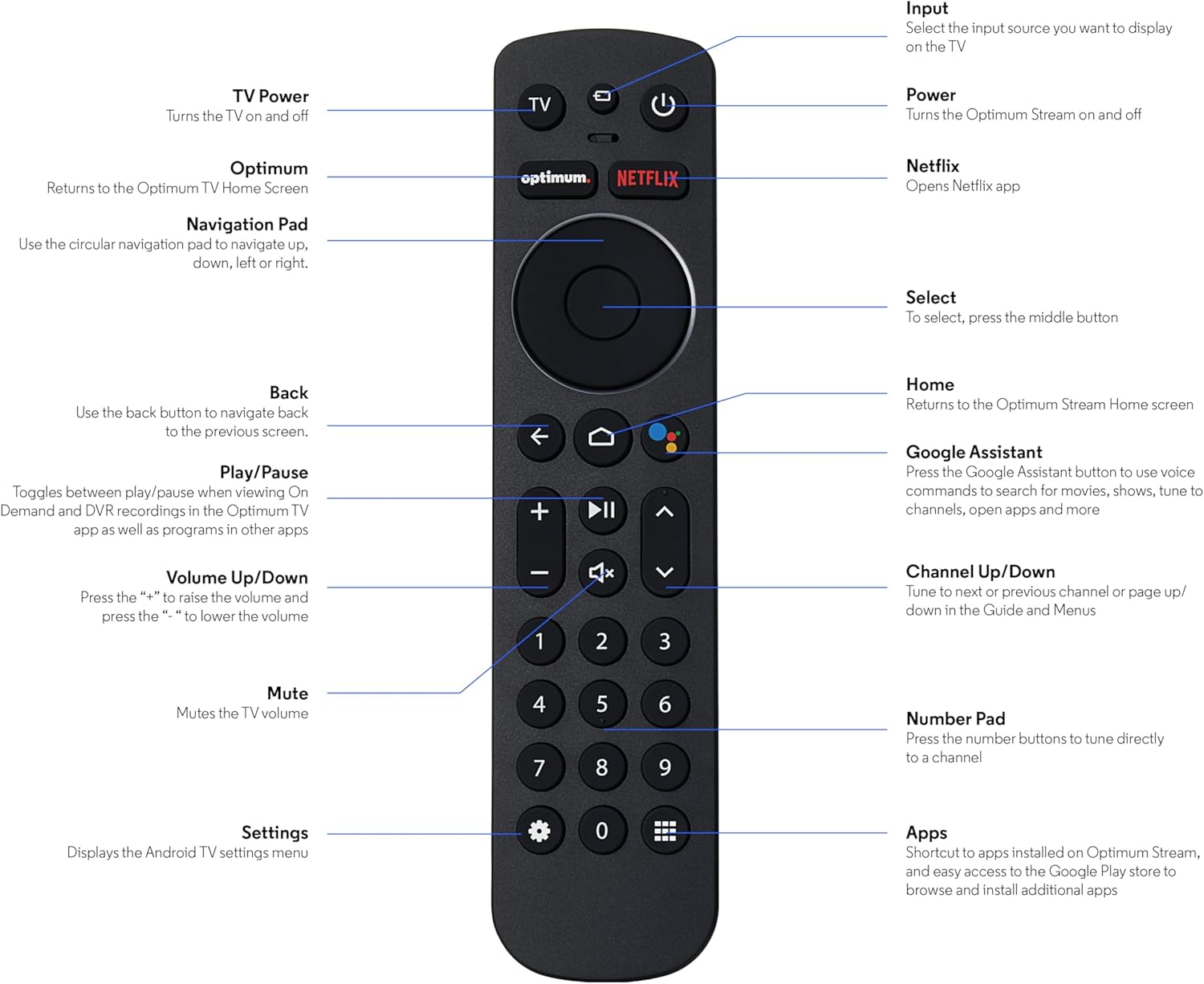
Image: The SatelliteSale Notus M2 Remote Control shown alongside two AAA batteries.
3. Remote Control Layout and Functions
Familiarize yourself with the buttons and their functions on your SatelliteSale Notus M2 Remote Control.

Image: Detailed diagram of the SatelliteSale Notus M2 Remote Control with labels for each button and its corresponding function.
- TV-strøm: Slår TV -en av og på.
- Inndata: Selects the input source to display on the TV.
- Makt: Turns the Optimum Stream device on and off.
- Optimal: Returns to the Optimum TV Home Screen.
- Netflix: Opens the Netflix application directly.
- Navigasjonsflate (sirkulær): Use to navigate up, down, left, or right within menus.
- Select (Middle Button of Nav Pad): Bekrefter et valg.
- Tilbake: Går tilbake til forrige skjermbilde.
- Hjem: Returns to the Optimum Stream Home screen.
- Google Assistant (Microphone Icon): Activates voice commands for search, playback control, and hands-free assistance.
- Spill av/pause: Toggles between play and pause for content.
- Volum opp/ned (+/-): Justerer TV-volumet.
- Stum: Mutes the TV volume.
- Channel Up/Down (Arrows): Tunes to the next or previous channel, or navigates pages in guides and menus.
- Talltastatur (0-9): Directly tunes to a channel or enters numerical input.
- Innstillinger (tannhjulikon): Displays the Android TV settings menu.
- Apps (Grid Icon): Provides shortcuts to installed apps on Optimum Stream and access to the Google Play Store.
4. Oppsett
4.1 Installasjon av batteri
The remote requires two AAA batteries. Ensure correct polarity when inserting.
- Finn batterirommet på baksiden av fjernkontrollen.
- Skyv batteridekselet nedover for å åpne.
- Insert two AAA batteries, matching the (+) and (-) terminals as indicated inside the compartment.
- Replace the battery cover by sliding it back into place until it clicks.

Bilde: View på fjernkontrollen med batterirommet åpent, som viser riktig retning for innsetting av AAA-batterier.
4.2 Pairing Your Remote with Optimum Stream Device
Your remote is designed to be paired with your Optimum Stream device for full functionality, including Bluetooth connectivity and voice control. If your remote becomes unpaired or if you are setting up a new remote, follow these steps:

Image: An illustration explaining the importance of direct line of sight for initial pairing and the flexibility of remote placement after pairing.
Viktig merknad: For initial pairing, the Optimum Stream box needs to be in direct line of sight of the remote. If your box is behind a TV or in a cabinet, you may need to temporarily relocate it so the remote can be directly pointed at the Stream box. Once pairing is complete, the Stream box can be moved out of sight as the remote uses Bluetooth.
- Ensure batteries are correctly installed in your remote.
- Turn on your TV and your Optimum Stream cable box.
- Press any button on the Stream remote to ensure you are on the Home Screen.
- Fra startskjermen velger du Innstillinger (gear icon).
- Velge Device and Remote Settings > Fjernkontroller og tilbehør.
- Velge Add Stream Remote.
- Følg instruksjonene på skjermen for å fullføre sammenkoblingsprosessen.
- You will see an on-screen confirmation once the remote is successfully paired.

Image: Visual representation of pairing steps 1 through 5, showing the remote and on-screen prompts.

Image: Visual representation of pairing steps 6 through 9, detailing the final stages of the pairing process.
5. Bruksanvisning
5.1 Stemmekontroll
The SatelliteSale Notus M2 remote features voice control for convenient operation. Press the microphone button (Google Assistant icon) and speak your command clearly. You can use voice commands to:
- Søk etter content (movies, TV shows, actors).
- Kontroller avspilling (spill av, pause, spol fremover, spol tilbake).
- Åpne applikasjoner.
- Tune to specific channels.
- Get information (weather, sports scores).

Image: A person using the voice control feature of the remote, with sound waves emanating from the remote towards the TV screen.

Bilde: En eksample of a voice command, "Hey Google, turn on the Spider-Man movie," displayed on screen with the remote.
5.2 Bluetooth Wireless Connectivity
Once paired, the remote utilizes Bluetooth for communication with your Optimum Stream device. This means you do not need a direct line of sight to operate the device, allowing for greater flexibility in remote usage and device placement.
5.3 Dedicated Streaming App Buttons
The remote includes dedicated buttons for popular streaming applications, such as Netflix. Pressing these buttons provides one-touch access to your favorite entertainment platforms.
6. Vedlikehold
- Rengjøring: Use a soft, dry cloth to clean the remote. Do not use liquid cleaners or aerosols.
- Batteribytte: Skift batterier når fjernkontrollen reagerer tregt eller slutter å virke. Skift alltid begge batteriene samtidig med nye AAA-batterier.
- Lagring: Oppbevar fjernkontrollen på et kjølig og tørt sted, unna direkte sollys og ekstreme temperaturer.
7. Feilsøking
| Problem | Mulig årsak | Løsning |
|---|---|---|
| Fjernkontrollen svarer ikke. | Døde eller lave batterier. | Bytt ut begge AAA-batteriene med nye. |
| Remote not controlling Optimum Stream device. | Remote is unpaired or pairing failed. | Follow the pairing instructions in Section 4.2. Ensure direct line of sight during initial pairing. |
| Stemmekontrollen fungerer ikke. | Remote not paired via Bluetooth, or microphone issue. | Ensure the remote is properly paired via Bluetooth (Section 4.2). Speak clearly and close to the microphone. |
| Knappene er klissete eller reagerer ikke. | Smuss eller rusk under knappene. | Clean the remote with a soft, dry cloth. Avoid spills. |
8. Spesifikasjoner
| Trekk | Detalj |
|---|---|
| Modellnummer | SS-RC-NOTUS-M2 |
| Tilkobling | Bluetooth trådløs |
| Spesielle funksjoner | Voice Activated (Google Assistant), Dedicated App Buttons, Ergonomic Design |
| Kompatible enheter | Optimum Stream Box (powered by Android TV) |
| Strømkilde | 2 x AAA-batterier (inkludert) |
| Farge | Matt svart |
| Varevekt | 3.66 unser |
| Pakkedimensjoner | 7.28 x 1.89 x 1.22 tommer |
9. Garanti og støtte
For warranty information or technical support, please refer to the official SatelliteSale webnettstedet eller kontakt kundeservicen deres direkte. Ta vare på kjøpskvitteringen for garantikrav.
Produsent: SatellittSale
Webnettsted: Visit the SatelliteSale Store on Amazon
Relaterte dokumenter - SS-RC-NOTUS-M2
 |
T-FAL EY705D51/PZB eksploderte View og deleliste Detaljert oversikt over komponenter for T-FAL EY705D51/PZB-apparatet, med en eksplodert beskrivelse view med alle delenumre for identifikasjon og utskifting. |
 |
Brukerhåndbok for Life Fitness Insignia-serien Omfattende brukermanual for Life Fitness Insignia-seriens kommersielt styrketreningsutstyr, med detaljer om sikkerhet, riktig bruk, installasjon, vedlikehold og produktspesifikasjoner for ulike modeller. |
 |
Pro'sKit SS-593 Series Smoke Absorber User's Manual User's manual for the Pro'sKit SS-593 Series Smoke Absorber, a portable desktop device designed to absorb up to 80% of harmful soldering fumes using an activated carbon filter. Includes specifications, safety notes, operating instructions, and filter replacement guidance. |
 |
Brukerhåndbok for Life Fitness Insignia-serien Omfattende brukermanual for Life Fitness Insignia-serien av styrketreningsutstyr, med detaljer om sikkerhet, riktig bruk, vedlikehold og produktspesifikasjoner for kommersielle treningsstudiomiljøer. |
 |
Tefal 320815 Exploded Parts Diagram Exploded diagram detailing the components and part numbers for the Tefal 320815 product, likely a pressure cooker. The diagram illustrates the assembly of various components. |
 |
Lexus IS200 servicespesifikasjoner og momentveiledning Omfattende servicespesifikasjoner, dreiemomentverdier og tekniske data for Lexus IS200, som dekker motor, girkasse, fjæring, bremser, tenning, lader, clutch, propellaksel og mer. |
Ask a question about this manual
Ask about setup, troubleshooting, compatibility, parts, safety, or missing instructions. Manuals+ will review the question and use this page’s manual context to help answer it.