
1. Introduksjon
This manual provides instructions for the setup, operation, and maintenance of your Retroid Pocket Classic handheld gaming console. The Retroid Pocket Classic is a portable Android-based gaming device featuring a 3.92-inch OLED touchscreen, designed for a versatile gaming experience.

Image 1.1: Retroid Pocket Classic consoles in white and yellow.
2. Hva er i esken
Bekreft at alle varene er til stede i pakken:
- Retroid Pocket Classic Gaming Console
- Ladekabel (USB-C)
- Brukerhåndbok (dette dokumentet)
3. Enhet overview
Familiarize yourself with the physical components and controls of your Retroid Pocket Classic.
3.1 Foran View

Bilde 3.1: Foran view of the Retroid Pocket Classic.
- 3.92-tommers OLED-berøringsskjerm: The primary display for all operations and gaming.
- D-Pad: Directional input for navigation and gameplay.
- Handlingsknapper: (A, B, X, Y or similar layout) for in-game actions.
- Start/Select Buttons: For game and system functions.
- Høyttalergitter: Lydutgang.
3.2 Top and Back View

Bilde 3.2: Topp view showing shoulder buttons and ports.
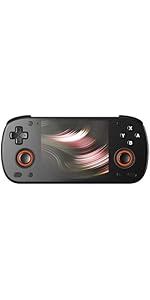
Image 3.3: Curved back design and trigger buttons.
- Skulderknapper (L1, R1): Plassert på den øvre kanten.
- Utløserknapper (L2, R2): Located on the back, below the shoulder buttons.
- USB-C-port: For lading og dataoverføring.
- 3.5 mm lydkontakt: For tilkobling av hodetelefoner.
- Micro SD -kortspor: For utvidelse av lagringsplass.
- Strømknapp: To turn the device on/off or put it to sleep.
- Volumknapper: To adjust audio output.
3.3 Internal Components (Cooling)

Image 3.4: Integrated active cooling system.
The Retroid Pocket Classic features an integrated active cooling system designed to maintain optimal performance and manage heat during extended use.
4. Oppsett
4.1 Innledende lading
Before first use, fully charge the device. Connect the provided USB-C charging cable to the console's USB-C port and the other end to a compatible USB power adapter (not included). The device has a 5000mAh battery.
4.2 Slå på/av
- For å slå på: Trykk og hold inne av/på-knappen til skjermen lyser opp.
- Slik slår du av: Press and hold the Power button, then select "Power Off" from the on-screen options.
- Å sove/våkne: Trykk kort på strømknappen.
4.3 Wi-Fi-tilkobling
To access online features and download applications, connect to a Wi-Fi network:
- Gå til Innstillinger.
- Velge Nettverk og internett.
- Trykk på Wi-Fi og slå den på.
- Velg ønsket nettverk fra listen og skriv inn passordet hvis du blir bedt om det.
4.4 Oppsett av Google-konto
The Retroid Pocket Classic runs Android 14 and supports the Google Play Store. To download apps and games, you will need to sign in with a Google account during the initial setup process or later via the Settings menu.
4.5 Installasjon av Micro SD-kort
To expand the device's storage (128GB internal), insert a Micro SD card into the designated slot. Ensure the card is inserted correctly until it clicks into place. The device supports various Micro SD card capacities.
5. Bruksanvisning
5.1 Navigering i Android-grensesnittet
The device operates on Android 14. Use the touchscreen for navigation, tapping icons to open applications, swiping to scroll, and using gestures for system controls. The D-pad and action buttons can also be used for navigation within compatible applications and games.
5.2 Downloading and Installing Applications
Applications and games can be downloaded from the Google Play Store. Open the Play Store app, search for your desired content, and follow the on-screen prompts to download and install.
Note: The Retroid Pocket Classic does not come with preloaded games. Users are responsible for acquiring and installing their own game content.
5.3 Administrere lagring
Til view and manage internal and external storage, go to Innstillinger > Lagring. Here you can see storage usage and manage files. For optimal performance, ensure sufficient free space is available.
5.4 Bluetooth-tilkobling
The device supports Bluetooth 5.1 for connecting wireless accessories such as headphones or external controllers.
- Gå til Innstillinger.
- Velge Tilkoblede enheter.
- Trykk på Koble til en ny enhet og velg tilbehøret ditt fra listen.
6. Vedlikehold
6.1 Rengjøre enheten
Use a soft, dry, lint-free cloth to clean the device's exterior. For the screen, a screen cleaner specifically designed for electronics can be used. Avoid using harsh chemicals or abrasive materials.
6.2 Batteristell
Slik forlenger du batterilevetiden:
- Unngå ekstreme temperaturer.
- Ikke utlad batteriet helt ofte.
- Oppbevar enheten med delvis lading hvis den ikke brukes over lengre tid.
6.3 Programvareoppdateringer
Se etter og installer systemoppdateringer regelmessig for å sikre optimal ytelse og sikkerhet. Gå til Innstillinger > System > Systemoppdatering for å se etter tilgjengelige oppdateringer.
7. Feilsøking
7.1 Enheten slår seg ikke på
- Ensure the device is sufficiently charged. Connect it to a power source for at least 30 minutes.
- Prøv å holde inne av/på-knappen i 10–15 sekunder for å tvinge frem en omstart.
7.2 Problemer med Wi-Fi-tilkobling
- Bekreft at Wi-Fi er aktivert i Innstillinger.
- Start Wi-Fi-ruteren på nytt.
- Forget the network and reconnect, ensuring the password is correct.
7.3 Applikasjoner som krasjer eller fryser
- Lukk og åpne applikasjonen på nytt.
- Tøm appens hurtigbuffer og data via Innstillinger > Apper > [Appnavn] > Lagring og hurtigbuffer.
- Sørg for at applikasjonen er oppdatert til den nyeste versjonen.
- Start enheten på nytt.
7.4 Skjermen reagerer ikke
- Start enheten på nytt ved å holde inne av/på-knappen.
- Sørg for at skjermen er ren og fri for rusk.
8. Spesifikasjoner

Image 8.1: Retroid Pocket Classic detailed specifications.
| Trekk | Detalj |
|---|---|
| Modellnavn | RP CLASSIC |
| Prosessor | G1 Gen2 (8-Core Kryo CPU, 2 Performance Cores, 6 Efficiency Cores) |
| GPU | Adreno A12 |
| VÆR | 6GB LPDDR4x @2133M |
| Lagring | 128GB EMMC 5.1 (expandable via Micro SD card) |
| Skjerm | 3.92-inch AMOLED, 1240x1080 @60fps |
| Operativsystem | Android 14 |
| Wi-Fi | Wi-Fi 5 |
| Bluetooth | Bluetooth 5.1 |
| Grensesnitt | USB-C / 3.5mm Audio Jack / TF Card Slot |
| Videoutgang | N/A |
| Batteri | 5000mAh |
| Ladehastighet | 27 watt |
| Dimensjoner | 138 x 89.8 x 26 mm (5.43 x 3.53 x 1 tommer) |
| Vekt | 223 g (7.9 unser) |
9. Garanti og støtte
For warranty information and technical support, please refer to the official Retroid Pocket webnettstedet eller kontakt kundeservicen deres. Ta vare på kjøpsbeviset for garantikrav.
Online resources and community forums may also provide helpful information and troubleshooting tips.