
1. Produktet er overview
The AVATTO Smart Door Lock SDL-V1-B60 offers advanced security and convenience for your home. This smart lock features multiple unlocking methods including fingerprint, password, RFID card, Smart Life app, and traditional mechanical keys. It is designed for doors with a thickness of 60mm to 90mm and features an adjustable cylinder length to accommodate various door types.
2. Før du begynner
2.1 Kontroller før installasjon
Before installing the smart door lock, it is crucial to perform the following checks to ensure compatibility and proper fit:
- Confirm Cylinder Type: Ensure your existing door lock cylinder is compatible with the smart lock's design.
- Confirm Cylinder Hole Size: Verify that the cylinder hole dimensions on your door match the requirements of the AVATTO smart lock. The required hole diameter is approximately 20mm, with a keyhole width of 9.8mm and height of 35mm.
- Mål dørtykkelse: This smart lock is suitable for doors with a thickness between 60mm and 90mm.

Image: Pre-installation checks illustrating compatible door types and required cylinder dimensions.
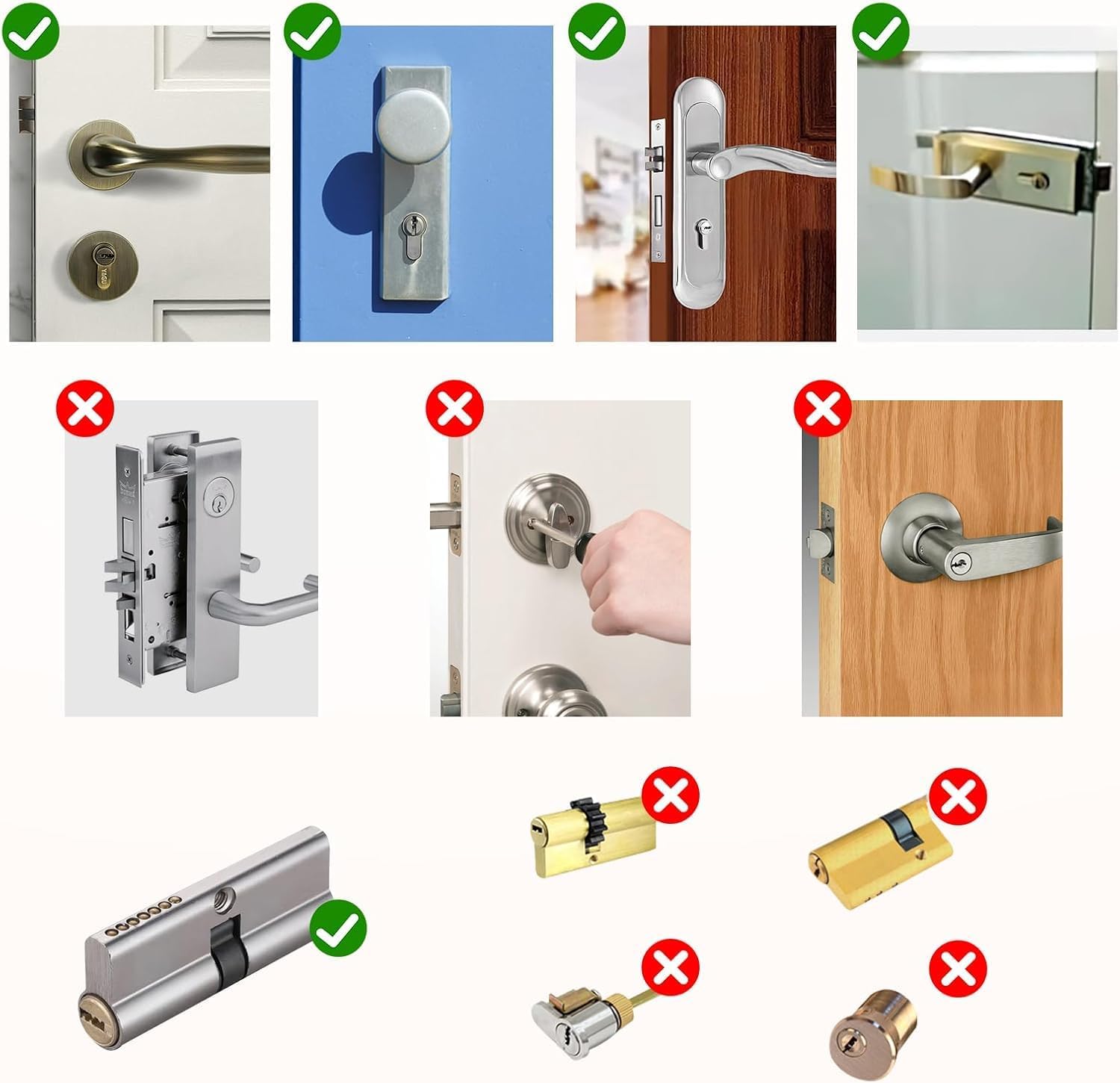
Image: Visual guide for compatible and incompatible door handles and lock mechanisms.
2.2 Batterikrav
This product does not include batteries. You will need to purchase three (3) 1.5V alkaline batteries separately for operation.
3. Pakkens innhold
Sjekk pakken for å sikre at alle komponentene er til stede:
- 1 x Smart Door Lock Cylinder
- 2 x Mekaniske nøkler
- 3 x RFID-kort
- 1 x Reset Card
- 2 x 5mm Lock Cylinder Adapters
- 2 x 10mm Lock Cylinder Adapters

Image: All components of the AVATTO Smart Door Lock package, including the lock, keys, RFID cards, reset card, and cylinder adapters.
4. Installasjon
4.1 Adjustable Cylinder Length
The AVATTO Smart Door Lock features an adjustable cylinder length, making it suitable for both symmetric and asymmetric doors with thicknesses ranging from 60mm to 90mm. The inner and outer cylinder lengths can be freely adjusted from 30mm to 45mm each.

Image: Table illustrating suitable inner and outer cylinder lengths for different door thicknesses (60mm to 90mm).
4.2 Adapters for Cylinder Adjustment
The lock comes with 5mm x 2 and 10mm x 2 cylinder adapters. These adapters allow you to convert a 60mm symmetric lock into an asymmetric lock of various sizes, meeting your specific door requirements.
4.3 Installation for Asymmetric Doors
For asymmetric doors, the distance from the center screw hole to the inside and outside of the door will differ. For example, for an 80mm thick door, the distance to the inside might be 45mm and to the outside 35mm. Use the provided adapters to achieve the correct lengths.

Bilde: Eksample installation for an 80mm asymmetric door, showing the use of cylinder adapters to achieve different inner and outer lengths.
4.4 Installation for Symmetric Doors
For symmetric doors, the distance from the center screw hole to both the inside and outside of the door is equal. For example, for a 60mm thick door, both the inner and outer distances would be 30mm.

Bilde: Eksample installation for a 60mm symmetric door, showing equal inner and outer cylinder lengths.
5. Drift
5.1 Opplåsingsmetoder
The AVATTO Smart Door Lock provides five convenient ways to unlock your door:
- Lås opp fingeravtrykk: Use your registered fingerprint for quick and secure access.
- Passordlås: Enter your personalized password on the keypad.
- RFID-kort: Tap the provided RFID card to the lock for entry.
- Smart Life-appen: Unlock the door remotely or up close using the Smart Life application on your smartphone.
- Mekanisk nøkkel: Use the traditional mechanical keys as a backup or alternative unlocking method.

Bilde: Overview of the five unlocking methods available with the AVATTO Smart Door Lock.
5.2 Internal Components and Power
The internal mechanism includes a rotary knob for manual locking/unlocking from the inside. The lock is powered by three 1.5V alkaline batteries, which are inserted into the battery compartment. The external unit features the fingerprint sensor, keypad, and RFID reader. A Type-C port is available for emergency power supply.

Bilde: Detaljert view of the AVATTO Smart Door Lock's internal components, including battery placement, key slot, IC card reader, and keypad.
6. Smart Life App Integration
The AVATTO Smart Door Lock integrates with the Smart Life application, offering enhanced control and monitoring features:
- Fjernopplåsing: Unlock your door via the app when within Bluetooth range (effective transmission distance of 50 meters).
- Brukeradministrasjon: Add and manage multiple users, assign administrative rights, and revoke access as needed.
- Aktivitetslogg: View a detailed log of all lock and unlock events.
- Varsler: Receive SMS notifications for various lock activities, enhancing security awareness.
Note: For remote control of the lock from outside your home, office, or while traveling, an AVATTO Bluetooth Gateway (sold separately) is required.
7. Vedlikehold
7.1 Batteristyring
The battery status can be checked through the Smart Life application interface. When the batteries are low, the lock will provide a low battery warning. In case of completely depleted batteries, you can still open the door using an external power bank connected via the Type-C port or by using the mechanical emergency keys.
7.2 Rengjøring
Tørk av låsens overflate med en myk, tørr klut. Unngå å bruke slipende rengjøringsmidler eller løsemidler som kan skade overflaten eller de elektroniske komponentene.
8. Feilsøking
If you encounter any issues with your AVATTO Smart Door Lock, please refer to the following general troubleshooting tips:
- Låsen svarer ikke: Check battery levels and replace if necessary. Ensure the lock is properly installed and aligned.
- Fingeravtrykk ikke gjenkjent: Sørg for at fingeren din er ren og tørr. Registrer fingeravtrykket ditt på nytt hvis problemene vedvarer.
- Problemer med apptilkobling: Ensure Bluetooth is enabled on your phone and you are within range. Restart the app or your phone. If using a gateway, ensure it is powered on and connected to the internet.
- Mekanisk nøkkel virker ikke: Sørg for at nøkkelen er satt helt inn og vridd riktig.
For more detailed troubleshooting or specific error messages, please contact AVATTO customer support.
9. Spesifikasjoner
| Trekk | Spesifikasjon |
|---|---|
| Modellnummer | SDL-V1-B60 |
| Produsent | AVATTO |
| Farge | Svart |
| Materiale | Metall |
| Kompatibilitet mellom dørtykkelser | 60 mm - 90 mm |
| Cylinder Length Adjustment | Inner: 30-45mm, Outer: 30-45mm |
| Opplåsingsmetoder | Fingerprint, Password, RFID Card, Smart Life App, Mechanical Key |
| Kontrollertype | Smart Life App |
| Bluetooth-rekkevidde | Opptil 50 meter (effektiv) |
| Strømkilde | 3 x 1.5V Alkaline Batteries (not included) |
| Nødstrøm | Type-C-port |
| Bruksmiljø | Innendørs |
| Pakkedimensjoner | 25 x 10 x 7 cm |
| Varevekt | 850 gram |
10. Garanti og støtte
10.1 Garantiinformasjon
This AVATTO product comes with a 2-year warranty from the date of purchase.
10.2 Kundestøtte
For any questions, technical assistance, or to obtain additional resources such as the German version of the manual, installation videos, network connection videos, or product presentation videos, please contact AVATTO customer support directly.