
1. Introduksjon
The FNIRSI DST-210 is a compact and versatile 3-in-1 handheld device designed for electronic testing and measurement. It integrates the functions of a digital oscilloscope, a true RMS multimeter, and a signal generator into a single portable unit. This manual provides detailed instructions to help you effectively use and maintain your device.
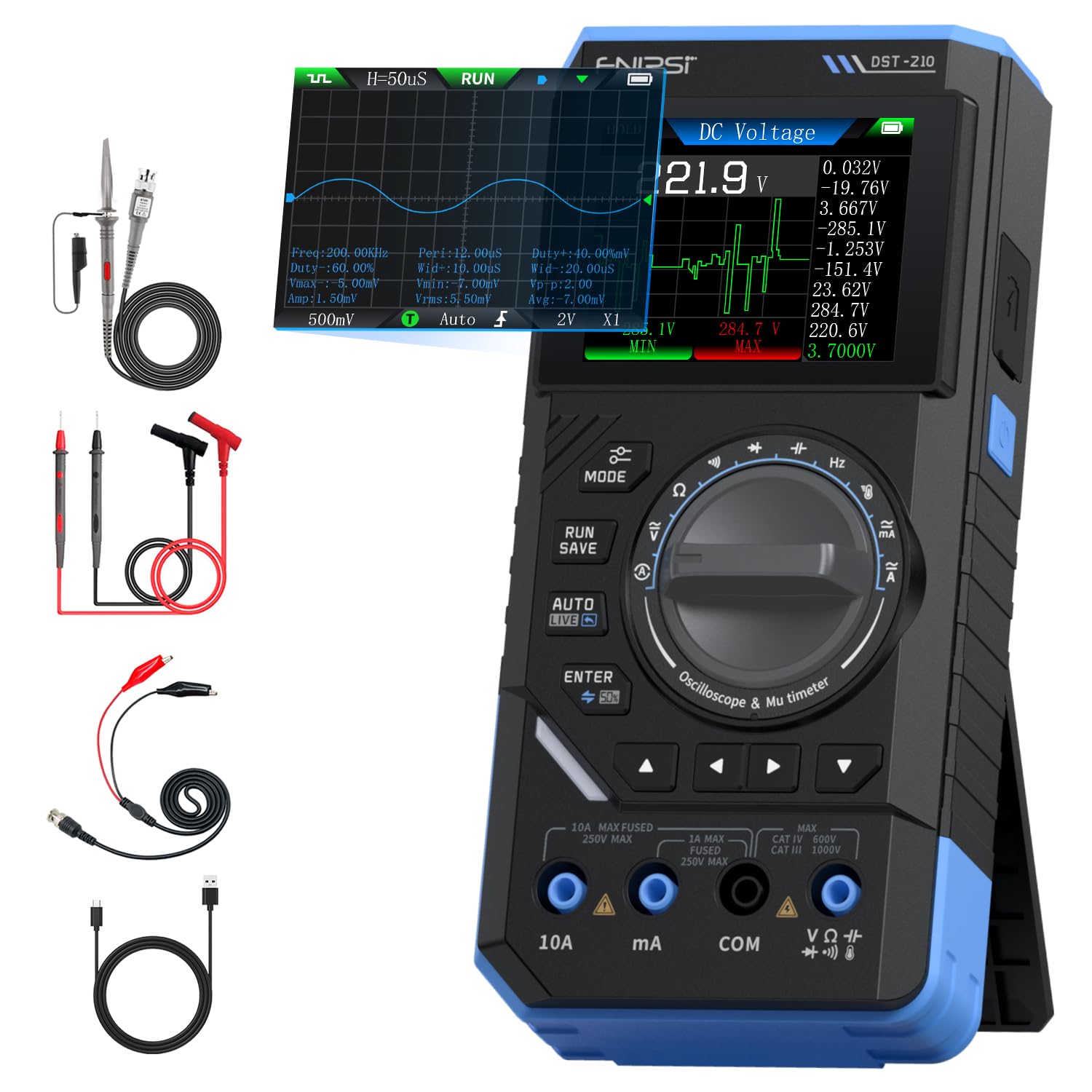
Figure 1: FNIRSI DST-210 3-in-1 Handheld Device
2. Produktet er overview
2.1 Nøkkelfunksjoner
- 3-i-1-funksjonalitet: Combines a digital oscilloscope, a true RMS multimeter, and a signal generator.
- Utstilling: 2.8-inch TFT color LCD for clear data visualization.
- Oscilloskop: 10MHz analog bandwidth, 48MSa/s real-time sampling rate, supports Auto/Normal/Single trigger modes, waveform image saving and display.
- Multimeter: 19999-count true RMS measurement for DC/AC voltage, DC/AC current, resistance, capacitance, frequency, temperature, diode, and continuity. Features data hold, record mode with graphical display, and LIVE function for voltage presence detection.
- Signalgenerator: Outputs 13 types of waveforms (Sine, Square, Sawtooth, Half-wave, Full-wave, Step, Reverse Step, Index Up/Down, DC, Multi-audio, Sink Pulse, Lorentz Wave) with adjustable frequency (0-50KHz), amplitude (0.1–3.0 V) og driftssyklus (0–100 %).
- Portabilitet: Compact design with an integrated stand, powered by a 3000mAh rechargeable lithium battery providing up to 10 hours of continuous use. Type-C charging supported.
2.2 Pakkeinnhold
Bekreft at alle varene er til stede i pakken:
- FNIRSI DST-210 Main Unit
- P6100 Høyt volumtage sonde
- Testledninger (rød og svart)
- Alligator klipp
- Type-C ladekabel
- Instruction Manual (PDF version available online)
- Emballasjeboks

Figur 2: Inkludert tilbehør
3. Oppsett
3.1 Lading av enheten
Before initial use, fully charge the DST-210. Connect the provided Type-C charging cable to the device's Type-C port and a compatible USB power adapter (5V/1A). The battery indicator on the display will show charging status.
3.2 Tilkobling av prober
For accurate measurements, ensure probes are correctly connected:
- Multimeter Measurements: Insert the red test lead into the VΩHzmA or 10A jack (depending on the measurement) and the black test lead into the COM jack.
- Oscilloscope Measurements: Connect the P6100 high voltage probe to the oscilloscope input jack. Ensure the probe's attenuation setting (e.g., X1 or X10) matches the device's setting for accurate readings.
- Signal Generator Output: Connect the output cable to the signal generator output port.

Figure 3: Input Jacks and Controls
4. Bruksanvisning
4.1 Strøm på/av
Press and hold the power button (located on the side) to turn the device on or off.
4.2 Modusvalg
Rotate the central knob to switch between Multimeter, Oscilloscope, and Signal Generator modes. Within each mode, further sub-functions can be selected using the knob or dedicated buttons.

Figure 4: Using the Oscilloscope Function
4.3 Multimeterdrift
In Multimeter mode, the device offers various measurement functions:
- Voltage/Current (DC/AC): Select the appropriate DC V, AC V, DC A, or AC A setting. Connect test leads to the circuit. The device supports a record mode that displays measurement trends graphically, and can store up to 10 sets of data.
- Motstand (Ω): Select the resistance function. Connect test leads across the component.
- Kapasitans (F): Select the capacitance function. Connect test leads across the capacitor.
- Frekvens (Hz): Select the frequency function. Connect test leads to the signal source.
- Diodetest: Select the diode function. Connect test leads across the diode to check its forward voltage slipp.
- Kontinuitetstest: Select the continuity function. Connect test leads across a conductor; a beep indicates continuity.
- Temperatur: Use a K-type thermocouple (not included) connected to the appropriate jacks for temperature measurement.
- LIVE Function: For single-probe voltage presence detection.

Figur 5: Multimetermåling Eks.amples
4.4 Bruk av oscilloskop
In Oscilloscope mode, the device displays waveforms:
- Waveform Display: Connect the oscilloscope probe to the circuit. The device automatically adjusts settings for stable waveform display.
- Utløsermoduser: Select between Auto, Normal, and Single trigger modes to capture different types of signals.
- Waveform Saving: Press the 'RUN/SAVE' button to save the current waveform image. Saved images can be reviewed og eksportert.

Figure 6: Oscilloscope Waveform Display
4.5 Drift av signalgeneratoren
In Signal Generator mode, the device outputs various waveforms:
- Valg av bølgeform: Choose from 13 different waveform types using the menu options.
- Parameterjustering: Adjust the frequency (0-50KHz), amplitude (0.1-3.0V), and duty cycle (0-100%) as required for your application.

Figure 7: Signal Generator Waveform Selection
4.6 PC Connection and Data Export
The DST-210 can connect to a PC via its Type-C USB port for data management and firmware updates.
- Waveform Screenshots: Long-press the 'RUN/SAVE' button to save waveform screenshots.
- Dataeksport: Connect the device to a computer to view, save, and export recorded waveform images and data.
- Fastvareoppdateringer: Periodically check the official FNIRSI website for firmware updates to ensure optimal performance and access to new features. Follow the instructions provided with the firmware update package.

Figure 8: PC Connection for Data Management
5. Vedlikehold
- Rengjøring: Bruk en myk, tørr klut til å rengjøre enheten. Ikke bruk slipende rengjøringsmidler eller løsemidler.
- Lagring: Oppbevar enheten på et kjølig og tørt sted, unna direkte sollys og ekstreme temperaturer.
- Batteripleie: For å forlenge batterilevetiden, unngå å utlade batteriet helt ofte. Lad enheten regelmessig, selv om den ikke er i bruk over lengre tid.
- Sondepleie: Inspect test leads and probes for damage before each use. Replace any damaged accessories immediately.
6. Feilsøking
| Problem | Mulig årsak | Løsning |
|---|---|---|
| Enheten slås ikke på. | Lavt batteri eller defekt strømknapp. | Charge the device fully. If the issue persists, contact support. |
| Unstable or inaccurate readings in Multimeter mode. | Poor probe connection, incorrect mode selection, or external interference. | Ensure probes are securely connected. Verify the correct measurement mode is selected. Minimize external electrical interference. |
| Oscilloscope waveform is not stable. | Incorrect trigger settings or probe attenuation. | Adjust trigger level and mode. Ensure probe attenuation (X1/X10) matches the device setting. |
| Signal generator output is incorrect. | Incorrect waveform type, frequency, amplitude, or duty cycle settings. | Verify all signal generator parameters are set as desired. |
| Cannot connect to PC or export data. | Faulty USB cable, incorrect PC driver, or software issue. | Try a different Type-C cable. Ensure necessary drivers are installed on your PC. Refer to the official website for software and driver downloads. |
7. Spesifikasjoner
7.1 Oscilloscope Parameters
| Kategori | Spesifikasjon |
|---|---|
| Sanntid Sampling rate | 48MSa / s |
| Analog båndbredde | 10 MHz |
| Inngangsimpedans | 1MΩ |
| Koblingsmetode | AC/DC |
| Måling Voltagog rekkevidde | 1:1 Probe: ±80Vpp (±40V), 10:1 Probe: ±800Vpp (±400V) |
| Vertikal følsomhet | 10mV/div ~ 10V/div (at X1) |
| Vertikal offset | Adjustable (with indicator) |
| Horizontal Time Base Range | 50ns ~ 20s |
| Utløsermodus | Auto, Normal, Single |
| Edge Trigger | Rising/Falling Edge |
| Utløsernivå | Adjustable (with indicator) |
| Bølgeformfrysing | Supported (HOLD function) |
| Automatisk måling | Max, Min, Average, RMS, Peak-to-Peak, Frequency, Duty Cycle, etc. |
7.2 Multimeterparametere
| Målefunksjon | Spekter | Nøyaktighet |
|---|---|---|
| DC Voltage | 1.9999V/19.999V/199.99V/1000V | ±(0.5 %+3) |
| AC Voltage | 1.9999V/19.999V/199.99V/750V | ±(1.0 %+3) |
| DC strøm | 19.999mA/199.99mA/1.9999A/9.999A | ±(1.2 %+3) |
| AC strøm | 19.999mA/199.99mA/1.9999A/9.999A | ±(1.5 %+3) |
| Motstand | 19.999MΩ/199.99kΩ/19.999kΩ | ±(2.0 %+5) |
| Kapasitans | 999.9uF/99.99uF/9.999uF/999.9nF/99.99nF, 9.999mF/99.99mF | ±(2.0 %+5) |
| Hyppighet | 9.999MHz/999.9kHz/99.99kHz/9.999kHz/999.9Hz/99.99Hz | ±(0.1 %+2) |
| Temperatur | [-55~1300°C] / [-67~2372°F] | ±(2.5 %+5) |
| Diode/kontinuitet | Støttes | N/A |
| LIVE Function | Støttes | N/A |
7.3 Signal Generator Parameters
| Kategori | Spesifikasjon |
|---|---|
| Output Waveforms | 13 typer |
| Bølgeformfrekvens | 0 ~ 50KHz |
| Duty Cycle | 0 ~ 100% (adjustable) |
| Bølgeform Amplitude | 0.1 ~ 3.0V |
7.4 Generelle spesifikasjoner
| Kategori | Spesifikasjon |
|---|---|
| Produktmodell | DST-210 |
| Utstilling | 2.8-tommers TFT-fargeskjerm |
| Bakgrunnsbelysning | Lysstyrke Justerbar |
| Strømforsyning | Type-C (5V/1A) |
| Batteri | 3000mAh |
| Språkstøtte | kinesisk, engelsk |
| Produktstørrelse | Ca. 177.43 mm x 87 mm x 35 mm |
| Produktvekt | Ca. 300 g |
8. Garanti og støtte
For any questions, issues, or support needs regarding your FNIRSI DST-210, please contact us through the following methods:
- Amazon melding: If you purchased the product on Amazon, you can contact us via the Amazon messaging system. Go to your 'Order History', select the relevant order, and click 'Problem with order' or 'Contact Seller'.
- E-poststøtte: You can also reach our after-sales service center directly via email at support@fnirsi.com. Please include your order number and a detailed description of your issue for faster assistance.
When attaching large photos or videos, email support is recommended due to potential attachment size limits on Amazon's messaging system.
Video 1: Demonstration of FNIRSI DST-210's Multimeter, Oscilloscope, and Signal Generator Functions.