
Introduksjon
Thank you for choosing the Activa Digital ACW2100-003 Digital Quartz Watch. This manual provides essential information for the proper setup, operation, and maintenance of your new timepiece. Please read it thoroughly to ensure optimal performance and longevity of your watch.
Sikkerhetsinformasjon
- Unngå å utsette klokken for ekstreme temperaturer (varme eller kalde) over lengre perioder.
- Ikke forsøk å åpne klokkekassen eller bytte batteri selv, da dette kan ugyldiggjøre garantien og skade klokken.
- Hold klokken unna sterke magnetfelt, da disse kan påvirke nøyaktigheten til kvartsurverket.
- Rengjør klokken med en myk, tørr klut. Unngå å bruke kjemiske rengjøringsmidler.
Produkt overview
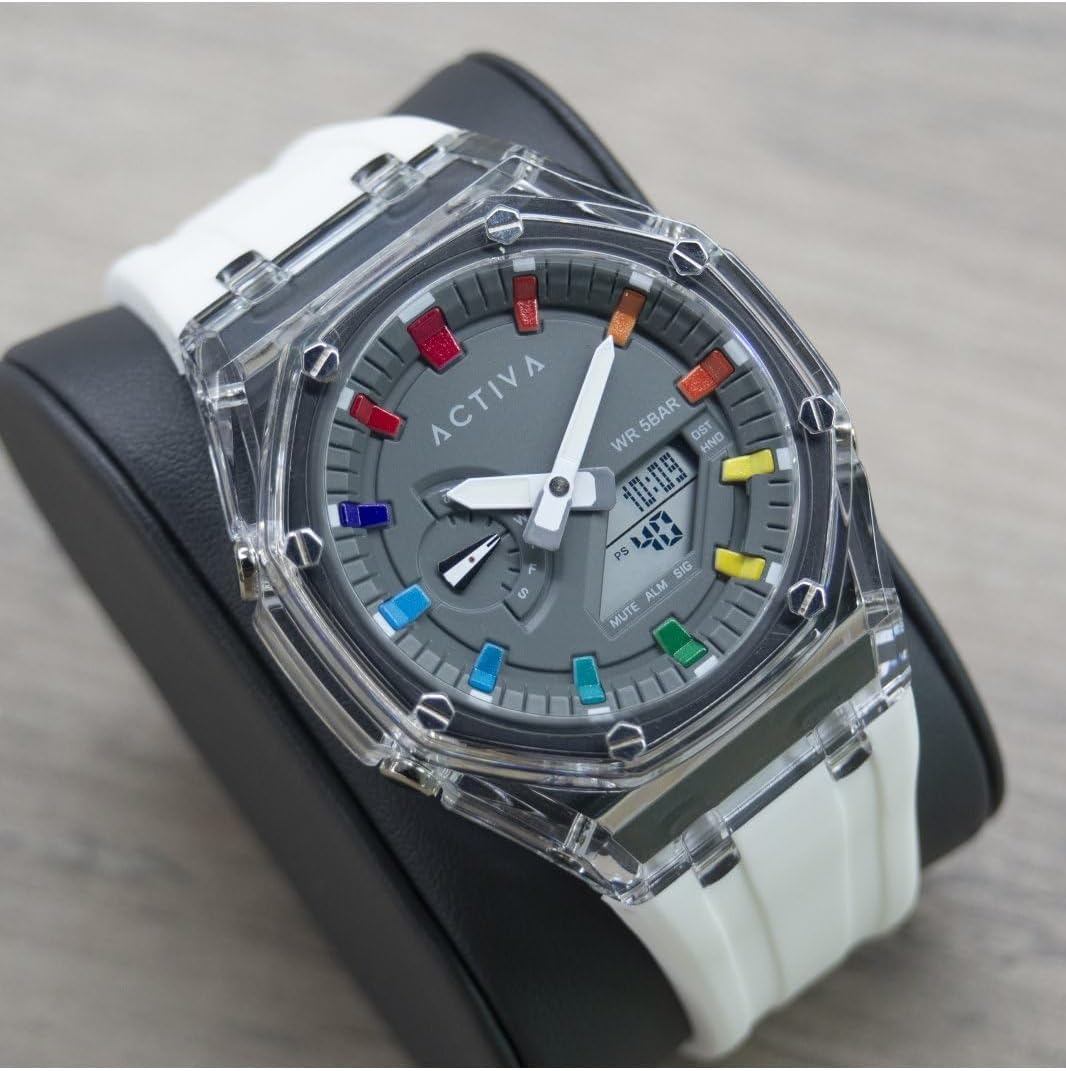
The Activa Digital ACW2100-003 is a robust digital quartz watch designed for daily wear. It features a durable plastic case, a clear digital display, and a comfortable silicone band. The watch is water-resistant up to 5 bars (50 meters), making it suitable for showering and swimming in shallow water, but not for diving.

Nøkkelkomponenter:
- Digital skjerm: Shows time, date, and other functions.
- Funksjonsknapper: Typically located on the sides of the watch for setting and mode changes. (Specific button functions will be detailed in the 'Operating' section).
- Watch Case: Laget av slitesterk plast.
- Klokkereim: Made of comfortable silicone.
Oppsett
Angi tid og dato:
The exact procedure for setting the time and date may vary slightly depending on the specific button configuration. Generally, digital watches follow these steps:
- Gå inn i innstillingsmodus: Press and hold the 'MODE' or 'SET' button (usually on the bottom left or top left) until a digit on the display starts flashing.
- Juster verdier: Use the 'ADJUST' or 'START/STOP' button (usually on the top right or bottom right) to increase or decrease the flashing digit (e.g., hours, minutes, year, month, day).
- Navigate Between Settings: Press the 'MODE' or 'SET' button again to move to the next setting (e.g., from hours to minutes, then to date).
- Avslutt innstillingsmodus: Once all settings are adjusted, press the 'MODE' or 'SET' button one last time, or wait for a few seconds for the watch to automatically exit the setting mode.
Drift
Grunnleggende funksjoner:
- Tidsvisning: The primary mode shows the current time (hours, minutes, seconds) and often the day of the week and date.
- Alarmfunksjon: To set an alarm, navigate to the alarm mode (often indicated by 'ALM'). Use the setting buttons to set the desired alarm time. An alarm icon will typically appear when activated.
- Stoppeklokkefunksjon: To use the stopwatch, navigate to the stopwatch mode (often indicated by 'STW' or 'CHR'). Press a designated button (e.g., 'START/STOP') to begin and end timing, and another (e.g., 'RESET') to clear the time.
- Bakgrunnsbelysning: Many digital watches include a backlight for visibility in low-light conditions. Press a specific button (often labeled 'LIGHT' or a dedicated button on the top left) to activate it.
Vannmotstand:
Your Activa Digital ACW2100-003 watch has a water resistance rating of 5 bars (50 meters). This means it is suitable for:
- Daglig bruk og utilsiktet sprut.
- Showering.
- Svømming i grunt vann.
Det er det ikke egnet for:
- Snorkeling or diving.
- Operating buttons while submerged in water.
- Exposure to hot water or steam (e.g., hot tubs, saunas), as this can compromise the seals.
Vedlikehold
Rengjøring:
For å bevare klokkens utseende:
- Wipe the watch case and band regularly with a soft, slightly damp klut.
- For the silicone band, mild soap and water can be used, then rinse thoroughly and dry completely.
- Avoid harsh chemicals, solvents, or abrasive cleaners, as these can damage the watch materials.
Batteribytte:
The watch is powered by a long-lasting quartz battery. When the display becomes dim or the watch stops functioning, it's time for a battery replacement. It is highly recommended to have the battery replaced by a qualified watch technician to ensure the water resistance seal is properly maintained.
Lagring:
Når klokken ikke er i bruk, bør den oppbevares kjølig og tørt, unna direkte sollys og ekstreme temperaturer.
Feilsøking
| Problem | Mulig årsak | Løsning |
|---|---|---|
| Klokkeskjermen er tom eller svak. | Lavt eller dødt batteri. | Bytt batteri (anbefales av en fagperson). |
| Tiden er unøyaktig. | Feil tidsinnstilling; eksponering for sterke magnetfelt. | Reset the time; keep away from magnets. |
| Vann inni klokken. | Water resistance compromised (e.g., buttons pressed underwater, exposure to hot water/steam, damaged seal). | Ta klokken umiddelbart med til en fagperson for inspeksjon og reparasjon. Ikke forsøk å tørke den selv. |
| Knappene reagerer ikke. | Dirt or debris under buttons; internal malfunction. | Clean around buttons; if issue persists, contact support. |
Spesifikasjoner
| Trekk | Detalj |
|---|---|
| Modellnummer | ACW2100-003 |
| Merke | Invicta (Activa Digital Collection) |
| Bevegelsestype | Electronic Quartz |
| Visningstype | Digital |
| Koffertmateriale | PC (plast) |
| Kassediameter | 44.2 millimeter |
| Sakstykkelse | 14.1 millimeter |
| Bandmaterialetype | Silikon |
| Båndbredde | 20 millimeter |
| Vannmotstandsdybde | 50 Meters (5 Bar) |
| Varevekt | 353.8 Grams (packaged) |
Garanti
Your Activa Digital ACW2100-003 watch comes with a 2-year Activa warranty. This warranty covers manufacturing defects under normal use. It does not cover damage resulting from improper handling, accidents, unauthorized repairs, or normal wear and tear. Please retain your proof of purchase for warranty claims.
Støtte
For further assistance, technical support, or warranty claims, please refer to the contact information provided with your purchase or visit the official Invicta/Activa website. When contacting support, please have your watch model number (ACW2100-003) and proof of purchase readily available.
Emballasje
