
1. Introduksjon
This manual provides detailed instructions for the Loutoc SRC4526 Universal Remote Control, designed for seamless compatibility with Philips Ambilight Smart TVs. Please read this guide thoroughly to ensure optimal use and longevity of your remote control.
1.1 Produkt overview
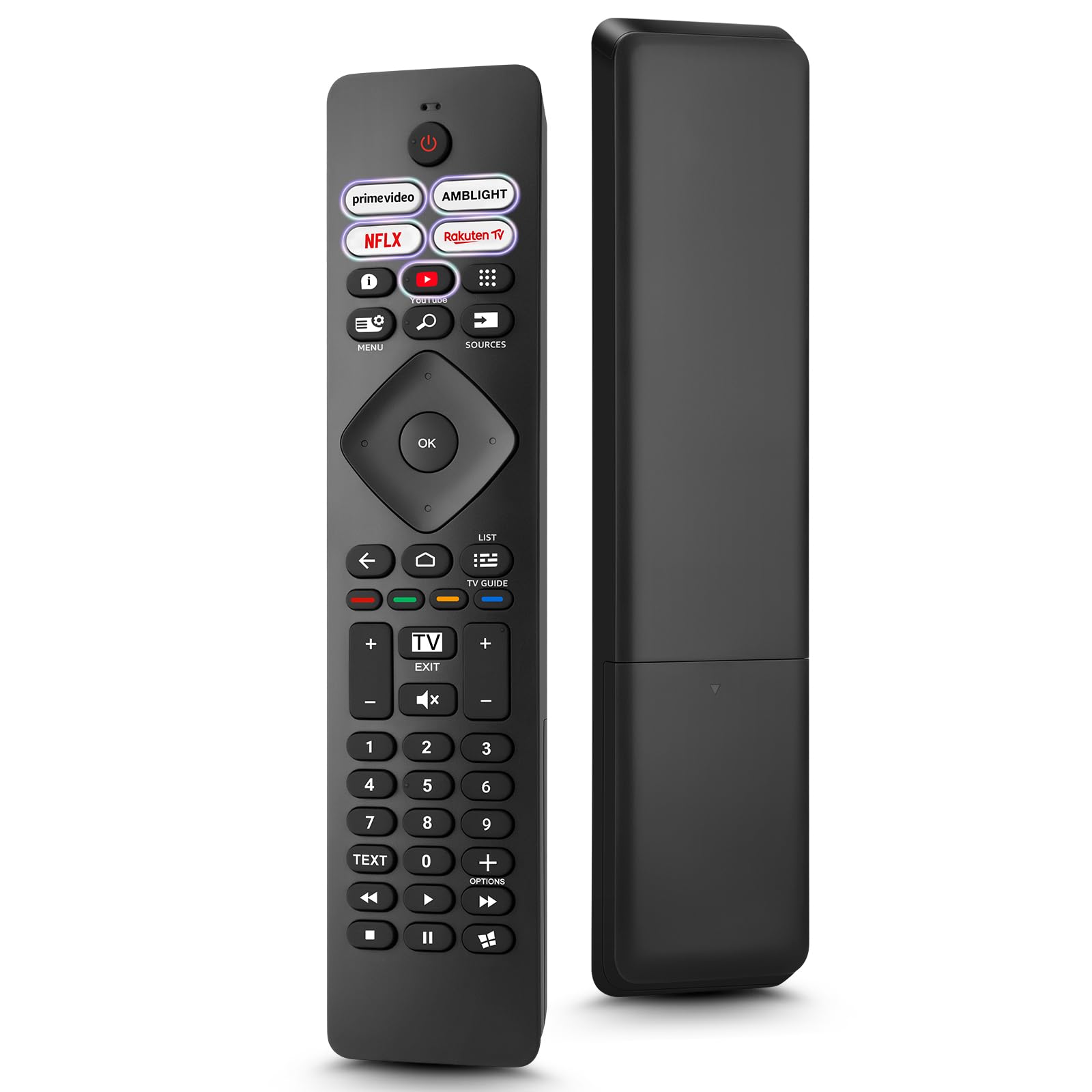
Image: The Loutoc SRC4526 Universal Remote Control, showcasindens ergonomiske design og knappeoppsett.
1.2 Nøkkelfunksjoner
- Convenient Plug-and-Play: No complex setup or programming required. Simply insert batteries and the remote is ready for use.
- Wide TV Compatibility: Fully compatible with Philips Ambilight TVs, including 4K Ambilight LED, OLED, FHD, and Full Ultra HD models.
- Dedikerte snarveisknapper: Features 5 direct access buttons for popular streaming platforms: Ambilight, Video, NFLX (Netflix), Rakuten TV, and YouTube.
- Pålitelig ytelse: Offers an effective operating range of 8 meters (26 feet) and an ultra-fast response time of 0.2 seconds.
2. Oppsett
2.1 Installasjon av batteri
The Loutoc SRC4526 remote control requires two AAA batteries (not included) for operation.
- Finn batterirommet på baksiden av fjernkontrollen.
- Skyv åpningen til batterirommet.
- Sett inn to AAA-batterier, og sørg for at de positive (+) og negative (-) polene er riktig justert med indikatorene inne i batterirommet.
- Lukk batteridekselet godt.
2.2 Førstegangsbruk
This remote control is designed for immediate use with compatible Philips Ambilight TVs. No programming or pairing is required. Once batteries are installed, point the remote at your TV and begin operation.
3. Bruksanvisning
3.1 Knappefunksjoner overview
Refer to the image below for a visual guide to the remote control's buttons and their corresponding functions.

Image: Detailed diagram of the Loutoc SRC4526 remote control, illustrating each button and its primary function.
| Knapp | Funksjon |
|---|---|
| Makt | Switches the TV on or off (Standby mode). |
| Prime Video, Ambilight, Netflix, Rakuten TV | Quickly launches the corresponding application. |
| Meny | Opens the Quick Menu with typical TV functions. Hold to show Gaming control bar. |
| Søk | Opens the Search tab on the Home screen. |
| Kilder | Opens or closes the TV's input sources menu. |
| OK | Bekrefter et valg eller en innstilling. |
| Arrow/Navigation Keys | Navigates up, down, left, or right through menus and options. |
| Tilbake | Går tilbake til forrige skjerm eller kanal. |
| Hjem | Opens the TV's Home menu. |
| TV-guide | Opens or closes the TV Guide. Long press to open the channel list. |
| Color Keys (Red, Green, Yellow, Blue) | Provides direct selection of on-screen options. The blue key typically opens Help. |
| Volum (+/-) | Justerer TV-ens volumnivå. |
| Kanal (+/-) | Switches to the next or previous channel. |
| Gå | Exits current menu/application or returns to live TV. From standby, goes to last viewed source. |
| Stum | Demper eller opphever lyden på TV-en. |
| Talltaster (0-9) | Velger TV-kanaler direkte. |
| TEKST | Opens or closes Text/Teletext. |
| Avspillingskontroller | Controls media playback: Play, Pause, Stop, Rewind, Fast Forward. |
| Apper | Opens the Apps tab on the Home screen. |
3.2 Ambilight Functionality
For Philips TVs equipped with Ambilight functionality, the dedicated Ambilight button on your remote allows you to control the lighting effects.
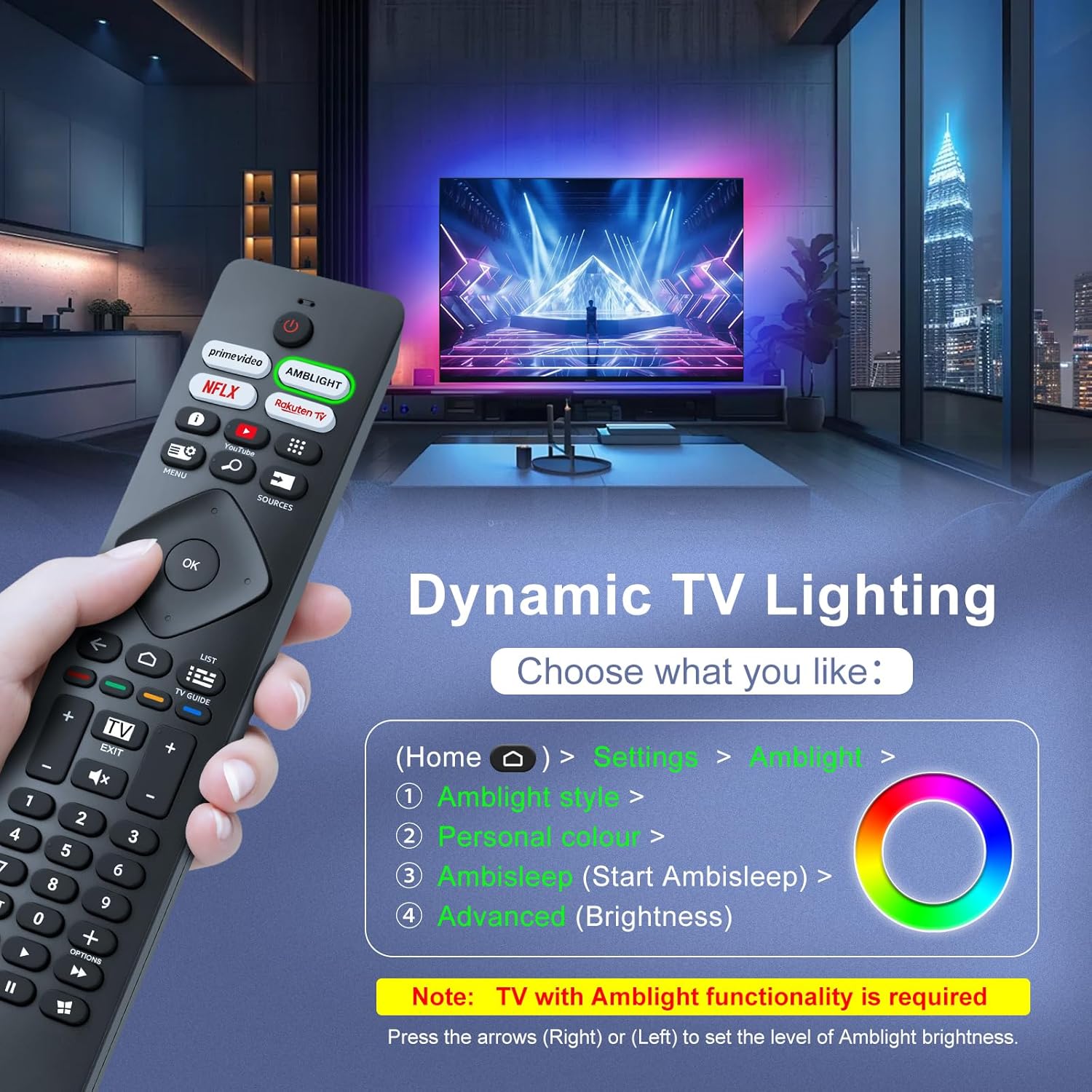
Image: A hand holding the remote control, with an overlay showing Ambilight settings on a TV screen.
After pressing the Ambilight button, you can navigate through the TV's menu to:
- Select different Ambilight display styles.
- Adjust personal color preferences.
- Initiate AmbiSleep mode.
- Adjust Ambilight brightness levels (using the right or left arrow keys).
Note: This feature requires a Philips TV with built-in Ambilight functionality.
4. Vedlikehold
4.1 Rengjøring
To clean your remote control, gently wipe it with a soft, dry cloth. Avoid using liquid cleaners, aerosols, or harsh chemicals, as these can damage the remote's surface or internal components.
4.2 Oppbevaring
Oppbevar fjernkontrollen på et kjølig og tørt sted, unna direkte sollys og ekstreme temperaturer. Hvis fjernkontrollen ikke skal brukes over lengre tid, anbefales det å ta ut batteriene for å forhindre lekkasje.
4.3 Batteristell
- Bytt alle batterier samtidig; ikke bland gamle og nye batterier.
- Ikke bland forskjellige typer batterier (f.eks. alkaliske og oppladbare).
- Kast brukte batterier på en ansvarlig måte i henhold til lokale forskrifter.
5. Feilsøking
5.1 Vanlige problemer og løsninger
- Fjernkontrollen svarer ikke:
- Sjekk om batteriene er satt inn riktig med riktig polaritet.
- Bytt ut batteriene med nye AAA-batterier.
- Sørg for at det ikke er noen hindringer mellom fjernkontrollen og TV-ens infrarøde mottaker.
- Make sure you are within the effective operating range (up to 8 meters).
- Spesifikke knapper fungerer ikke:
- Clean the remote control, especially around the non-functioning buttons, to remove any dirt or debris.
- If only Ambilight functions are not working, ensure your Philips TV model supports Ambilight.
5.2 Kontakt kundestøtte
If you encounter persistent issues that cannot be resolved with the troubleshooting steps above, please contact Loutoc customer support directly. We aim to respond to all inquiries within 12 working hours.
6. Spesifikasjoner
| Trekk | Detalj |
|---|---|
| Merke | Loutoc |
| Modellnavn | SRC4526-FBA |
| Vare modellnummer | SRC4526 |
| Farge | Svart |
| Tilkoblingsteknologi | Infrarød |
| Spesielle funksjoner | No programming required, Ergonomic, Lightweight |
| Kompatible enheter | Television (Philips Ambilight TVs) |
| Maximum Number of Supported Devices | 1 |
| Kontrollertype | Knappkontroll |
| Maksimal rekkevidde | 8 meter (26 fot) |
| Batteribeskrivelse | AAA (2 kreves, ikke inkludert) |
| Produsent | Loutoc |
| Opprinnelsesland | Kina |
| Først tilgjengelig på Amazon.com.be | 31. august 2025 |
7. Garanti og støtte
7.1 Garantiinformasjon
This Loutoc remote control comes with a manufacturer's warranty of 30 days from the date of purchase. Please retain your proof of purchase for any warranty claims.
7.2 Kundestøtte
For any questions, technical assistance, or warranty inquiries, please contact Loutoc customer support. We are committed to providing timely assistance and will respond to your queries within 12 working hours.