
Introduksjon
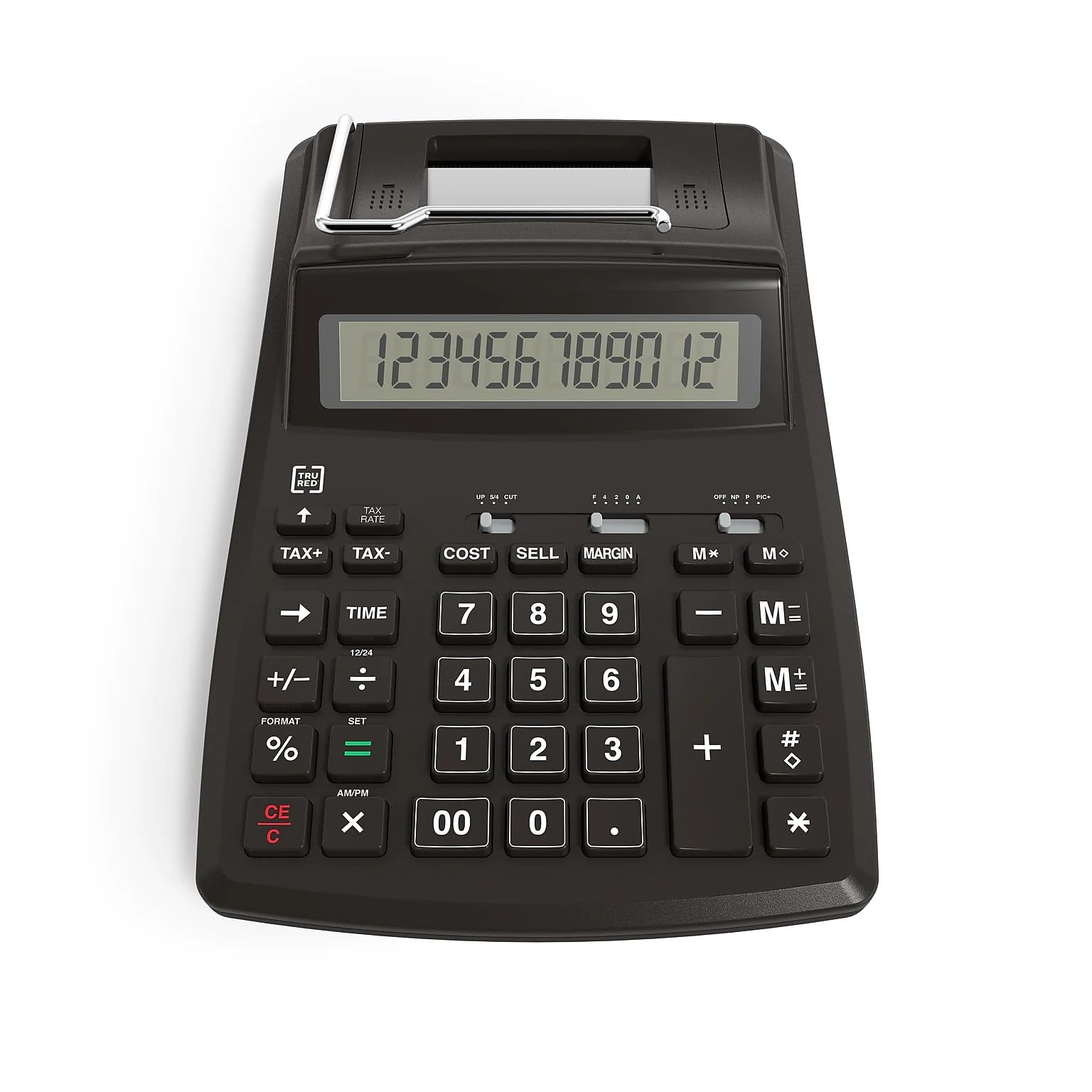
This manual provides detailed instructions for the operation and maintenance of your TRU RED 12-Digit Display Printing Calculator. Designed for efficiency, this multi-function calculator assists in tracking purchases, expenses, and transactions with ease. It is suitable for various environments including school, home, and office settings.
Key features include a 12-digit LCD display, fast printing capabilities, and specialized keys for financial calculations.
Oppsett
Slå på kalkulatoren
Your TRU RED printing calculator can be powered in two ways:
- Vekselstrøm: Connect the provided AC adapter to the calculator and a standard wall outlet.
- Batteristrøm: For portable use, insert 4 AA batteries into the battery compartment located on the underside of the calculator. Ensure correct polarity.
Installere papirrullen
The calculator features an easy-to-install paper roll system for its printing function.
- Open the paper roll cover located at the top rear of the calculator.
- Place a new paper roll into the compartment, ensuring the paper feeds from the bottom of the roll.
- Feed the leading edge of the paper into the printer slot until it emerges from the front.
- Close the paper roll cover securely.

Bruksanvisning
Grunnleggende beregninger
The calculator operates like a standard 12-digit display calculator for basic arithmetic functions (addition, subtraction, multiplication, division).
- Tast inn tall ved hjelp av det numeriske tastaturet.
- Press the desired operation key (+, -, x, /).
- Trykk på = tast for å vise resultatet.
- Bruk CE/C key to clear the current entry or the entire calculation.
Utskriftsfunksjon
The calculator can print your calculations at a speed of up to 2 lines per second.
- Utskriftsmodus: Ensure the print switch (if available, typically labeled PRINT/NON-PRINT) is set to PRINT to record calculations on the paper roll.
- Ikke-utskriftsmodus: Set the switch to NON-PRINT to perform calculations without printing, saving paper.
Finansielle nøkler
Utilize the dedicated financial keys for business calculations:
- KOSTE: Used for cost calculations.
- SELGE: Used for selling price calculations.
- MARGIN: Beregner fortjenestemarginer.
- MVA+ / MVA-: Add or subtract tax from a value. Refer to the calculator's specific tax rate setting instructions for initial setup.
Tilleggsfunksjoner
- Calendar and Clock: The calculator includes integrated calendar and clock functions. Consult the full product manual for specific instructions on setting and viewing these features.
Vedlikehold
Rengjøring
Slik opprettholder du kalkulatorens utseende og funksjonalitet:
- Tørk av utsiden med en myk, tørr klut.
- Do not use liquid cleaners or abrasive materials, as these can damage the display or casing.
Utskifting av papirrull
Replace the paper roll when it runs out or becomes low, following the steps outlined in the "Installing the Paper Roll" section.
Batteribytte
If using battery power, replace all 4 AA batteries when the display dims or the calculator stops functioning correctly. Ensure proper disposal of old batteries.
Feilsøking
- Kalkulatoren slår seg ikke på: Sjekk tilkoblingen til strømadapteren eller skift batterier.
- Skjermen er tom eller svak: Ensure power source is connected or batteries are fresh.
- Printer not working: Verify paper roll is correctly installed and the print mode is active. Check for paper jams.
- Feil beregninger: Double-check input values and ensure correct function keys are being used. Clear previous calculations with the CE/C nøkkel.
Spesifikasjoner
| Trekk | Detalj |
|---|---|
| Visningstype | 12-sifret LCD |
| Utskriftshastighet | Opptil 2 linjer per sekund |
| Strømkilde | AC Power or 4 AA batteries |
| Dimensjoner (L x B) | 23.4 cm x 15.5 cm (9.2" L x 6.1" W) |
| Produktdimensjoner (samlet) | 34.29 x 20.32 x 8.89 cm; 710 g |
| Spesialfunksjoner | Cost, Sell, Margin, Tax keys, Calendar, Clock |
| Modellnummer | 44780-CA |
| UPC | 718103374491 |
| Produsent | Stifter |
| Opprinnelsesland | Canada |
Garantiinformasjon
This TRU RED 12-Digit Display Printing Calculator comes with a 1 års begrenset produsentgaranti. Please retain your proof of purchase for any warranty claims. For full details regarding warranty coverage and terms, refer to the documentation included with your product or contact customer support.
Støtte
For technical assistance, product inquiries, or warranty service, please contact Staples customer support. You can find contact information on the official Staples website or through the documentation provided with your calculator.
Manufacturer Contact Information: 500 STAPLES DR FRAMINGHAM MA 01702-4474 United States of America