
Skyworth H30P
Skyworth H30P Smart 360° Pan & Tilt Indoor Wi-Fi Security Camera User Manual
Modell: H30P
1. Introduksjon
Thank you for choosing the Skyworth H30P Smart 360° Pan & Tilt Indoor Wi-Fi Security Camera. This camera is designed to provide comprehensive surveillance for your indoor spaces, offering advanced features like 360° pan and tilt, two-way audio, and remote viewing via a mobile app. Please read this manual carefully before use to ensure proper installation and operation.
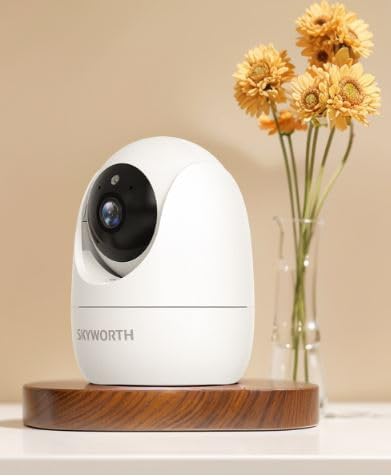
Figure 1: Skyworth H30P Smart Wi-Fi Camera
2. Sikkerhetsinformasjon
- Ensure the camera is used indoors only. It is not water-resistant (IP20 rating).
- Bruk kun strømadapteren som følger med enheten.
- Keep the camera away from direct sunlight, heat sources, and moisture.
- Ikke forsøk å demontere eller modifisere kameraet. Dette vil ugyldiggjøre garantien.
- Oppbevares utilgjengelig for barn og kjæledyr.
- Ensure stable Wi-Fi connectivity for optimal performance.
3. Pakkens innhold
Vennligst sjekk innholdet i pakken når du åpner den. Kontakt kundeservice hvis noen av delene mangler eller er skadet.
- Skyworth H30P Smart Wi-Fi Camera (1 unit)
- Strømadapter (1 enhet)
- Monteringstilbehør (skruer, veggplugger)
- Brukerhåndbok (dette dokumentet)
4. Produktet er overview
The Skyworth H30P camera features a compact dome shape with pan and tilt functionality, allowing for a 360-degree viewing angle. It includes a high-quality CMOS image sensor, infrared LEDs for night vision, and a built-in microphone and speaker for two-way audio communication.
Nøkkelfunksjoner:
- 360° panorering og tilting: Full room coverage with no blind spots.
- 2K-oppløsning: Gir klar og detaljert videofootage.
- Wi-Fi-tilkobling: Easy remote access and control via smartphone app.
- Fullfarge nattsyn: Enhanced visibility in low-light conditions up to 10 meters.
- Toveis lyd: Communicate with people or pets through the camera.
- Bevegelsesdeteksjon: Receive alerts for detected movement.
- Micro SD-kortstøtte: Up to 128GB for local storage (Micro SD card not included).
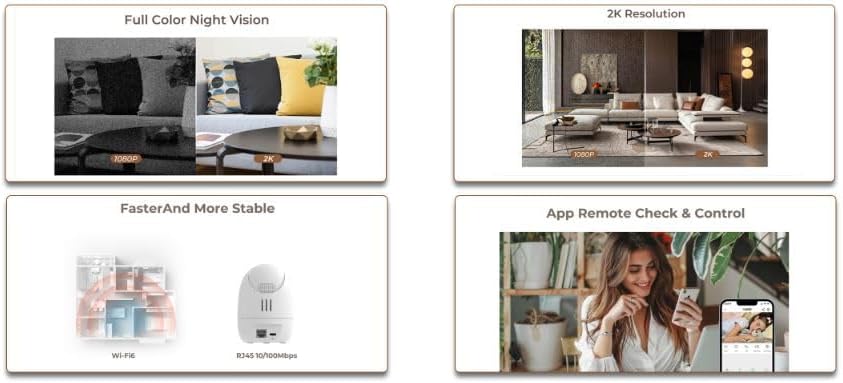
Figure 2: Demonstrates 2K resolution and full color night vision capabilities.
This image illustrates the camera's ability to capture clear images with 2K resolution and its full color night vision feature, which provides visibility even in dark environments.
5. Oppsett
5.1 Slå på
- Koble strømadapteren til kameraets strøminngang.
- Koble strømadapteren til en vanlig stikkontakt.
- The camera will power on, and its indicator light will begin to flash, indicating it is ready for setup.
5.2 Appinstallasjon og kontooppretting
- Download the dedicated mobile application from your smartphone's app store (e.g., App Store for iOS, Google Play Store for Android). Søk etter "Skyworth Smart Home" or refer to the QR code on the packaging.
- Åpne appen og følg instruksjonene på skjermen for å opprette en ny konto eller logg inn hvis du allerede har en.
5.3 Koble til Wi-Fi
- In the app, tap on "Add Device" or the "+" icon.
- Select "Security Camera" or the specific model (H30P) from the list of devices.
- Follow the in-app prompts to connect the camera to your 2.4GHz Wi-Fi network. Ensure your Wi-Fi password is correct.
- The app may ask you to scan a QR code displayed on your phone screen with the camera lens, or to listen for an audible pairing tone.
- Når den er tilkoblet, vil kameraets indikatorlampe lyse konstant, og du vil motta en bekreftelse i appen.

Figure 3: Illustrates Wi-Fi connectivity and remote control via mobile app.
This image shows the camera's wireless connectivity and how it can be controlled and monitored remotely using a smartphone application.
5.4 Montering av kameraet
The H30P camera can be placed on a flat surface like a shelf or table, or mounted on a wall.
Plassering av bordplate/hylle:
- Place the camera on a stable, flat surface within Wi-Fi range.
- Sørg for at kameraet har fri siktlinje til området du ønsker å overvåke.
Veggmontering:
- Choose a suitable location on the wall, ensuring it is within Wi-Fi range and has a power outlet nearby.
- Use the provided mounting template (if available) or mark the screw positions on the wall.
- Bor pilothull og sett inn veggplugger om nødvendig.
- Secure the mounting bracket (if included) to the wall using the screws.
- Fest kameraet til monteringsbraketten.
6. Betjening av kameraet
6.1 Live View
- Open the mobile app and select your H30P camera from the device list.
- You will see the live video feed from the camera.
6.2 Pan- og tiltkontroll
- På direkten view screen in the app, use the directional controls (usually a joystick or arrows) to remotely adjust the camera's viewing vinkel.
- The camera supports 360° horizontal rotation and vertical tilt.
6.3 Toveis lyd
- To speak through the camera, tap the microphone icon in the app and hold it while speaking. Release to listen.
- To listen to audio from the camera's environment, ensure the speaker icon in the app is enabled.
6.4 Bevegelsesdeteksjon og varsler
- Access the camera settings in the app to configure motion detection sensitivity and alert preferences.
- You can set up push notifications to your smartphone when motion is detected.
6.5 Opptak og lagring
- Kameraet støtter kontinuerlig opptak eller hendelsesutløst opptak (f.eks. bevegelsesdeteksjon).
- Insert a Micro SD card (up to 128GB, not included) into the camera's Micro SD card slot for local storage.
- Innspilt footage can be accessed and reviewgjennom mobilappen.
7. Vedlikehold
- Rengjøring: Tørk forsiktig av kameralinsen og kamerahuset med en myk, tørr klut. Ikke bruk flytende rengjøringsmidler eller slipende materialer.
- Fastvareoppdateringer: Regularly check the mobile app for available firmware updates to ensure optimal performance and security.
- Lagringsadministrasjon: Hvis du bruker et Micro SD-kort, må du regelmessig oppdatere detview og slett gammel footage to free up space, or enable loop recording if supported.
8. Feilsøking
| Problem | Mulig årsak | Løsning |
|---|---|---|
| Kameraet slår seg ikke på | Strømadapteren er ikke tilkoblet eller defekt; problem med strømuttaket. | Sjekk strømtilkoblingene. Prøv en annen stikkontakt. Sørg for at strømadapteren fungerer. |
| Kan ikke koble til Wi-Fi | Incorrect Wi-Fi password; camera too far from router; 5GHz Wi-Fi network used. | Bekreft Wi-Fi-passordet. Flytt kameraet nærmere ruteren. Sørg for at du er koblet til et 2.4 GHz Wi-Fi-nettverk. Tilbakestill kameraet og prøv på nytt. |
| Ingen direktesendt videostrøm | Poor Wi-Fi signal; camera offline; app issue. | Check Wi-Fi signal strength. Restart the camera and router. Close and reopen the app. |
| Toveis lyd fungerer ikke | Microphone/speaker muted in app; volume too low; network latency. | Check app settings for audio controls. Adjust volume. Ensure stable network connection. |
| Bevegelsesvarsler ikke mottatt | Motion detection disabled; incorrect sensitivity settings; app notifications blocked. | Enable motion detection in app settings. Adjust sensitivity. Check phone notification settings for the app. |
9. Spesifikasjoner
| Trekk | Detalj |
|---|---|
| Modellnummer | H30P |
| Dimensjoner | 8.5 x 8.5 x 12 cm |
| Vekt | 164 gram |
| Farge | Hvit |
| Tilkobling | Wi-Fi (2.4 GHz) |
| Oppløsning | 2 Megapixels (2K effective video resolution) |
| Bildefrekvens | 30 bilder per sekund |
| Viewing vinkel | 360 degrees (Pan & Tilt) |
| Night Vision Range | Up to 10 meters (Full Color Night Vision with Infrared LEDs) |
| Lagring | Micro SD-kort (opptil 128 GB, ikke inkludert) |
| Strømkilde | AC (5 Watts) |
| Spesielle funksjoner | Pan/Tilt, Full Color Night Vision, Two-Way Audio, Remote View, Bevegelsessensor |
| Innendørs/utendørs bruk | Indoor only (IP20) |
| Kompatible enheter | Smartphone, Tablet, Smart Displays |
10. Garanti og støtte
For warranty information and customer support, please refer to the warranty card included in your product packaging or visit the official Skyworth webnettstedet. Du kan også kontakte forhandleren din for å få hjelp.
Produsent: Skyworth
Opprinnelsesland: Kina