
1. Introduksjon
Thank you for choosing the Rollerhouse ZigBee Smart Motor. This motor is designed to automate your 2-inch (50mm) roller shades, integrating seamlessly with popular smart home systems like Amazon Alexa, Google Home, and the Tuya Smart Life App via a ZigBee 3.0 hub (sold separately). This manual provides detailed instructions for installation, setup, operation, and maintenance to ensure optimal performance and longevity of your device.
Please read this manual thoroughly before installation and operation. Keep it for future reference.
2. Produktfunksjoner
- Smart Home-kompatibilitet: Seamlessly connects with Alexa, Google Home, and Tuya Smart Life App for voice control and scheduling via ZigBee 3.0 protocol (hub required, sold separately).
- Universal 2" Tube Fit: Designed for 50mm (2-inch) roller shade tubes, ideal for DIY smart blinds upgrades.
- Powerful & Quiet Operation: High torque (6N·m) motor supports shades up to 30 lbs (14 kg) with ultra-smooth and low-noise operation.
- Enkel installasjon: No complex wiring needed; includes 50mm rubber drive fittings. Works with most standard roller blinds (verify tube size before purchase).
- Group Control & Automation: Create custom scenes (e.g., "Good Morning" tilt) or group multiple motors for synchronized shade control via the Tuya/ZigBee hub.
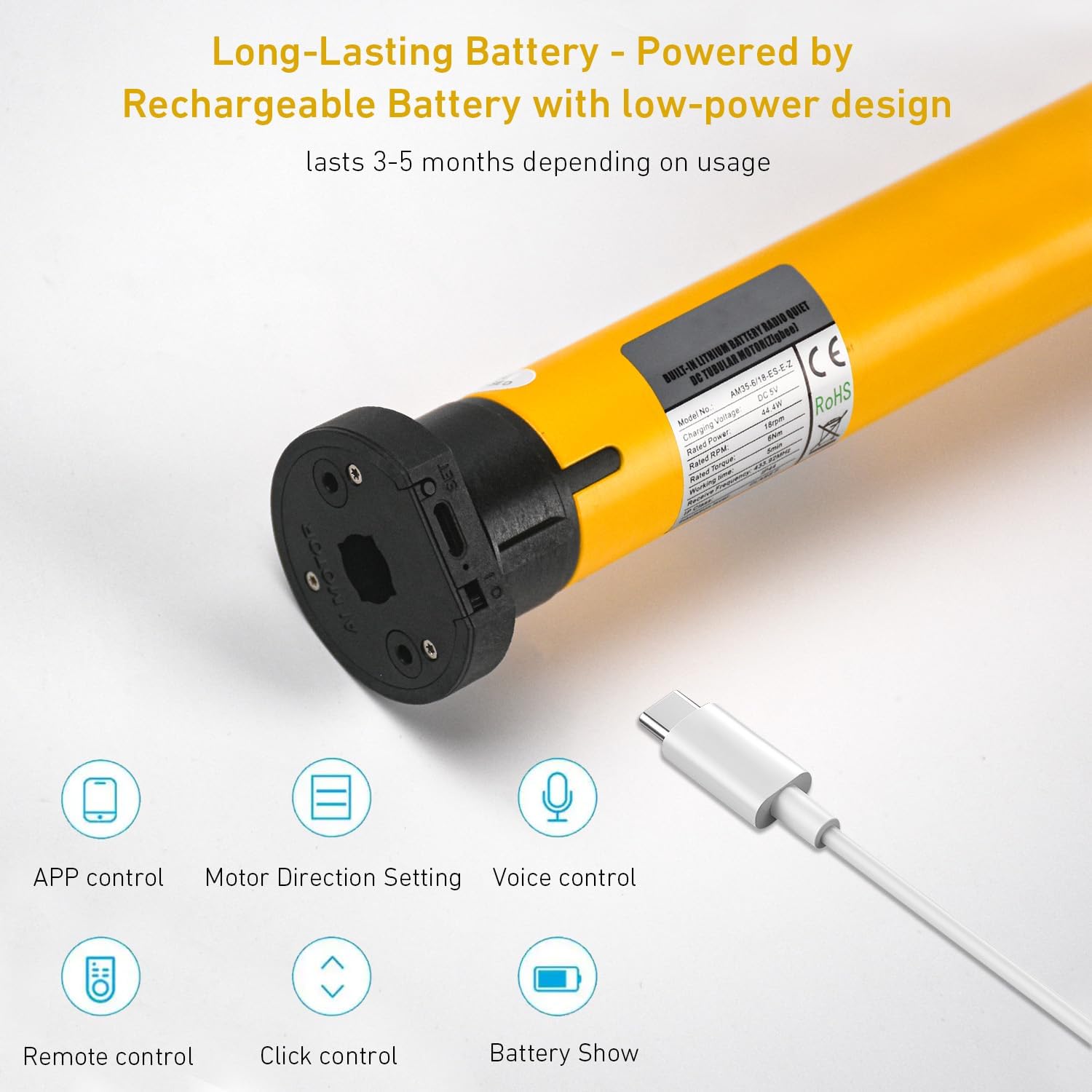
- Langvarig batteri: Powered by a rechargeable battery with a low-power design, lasting 3-5 months depending on usage.
3. Spesifikasjoner

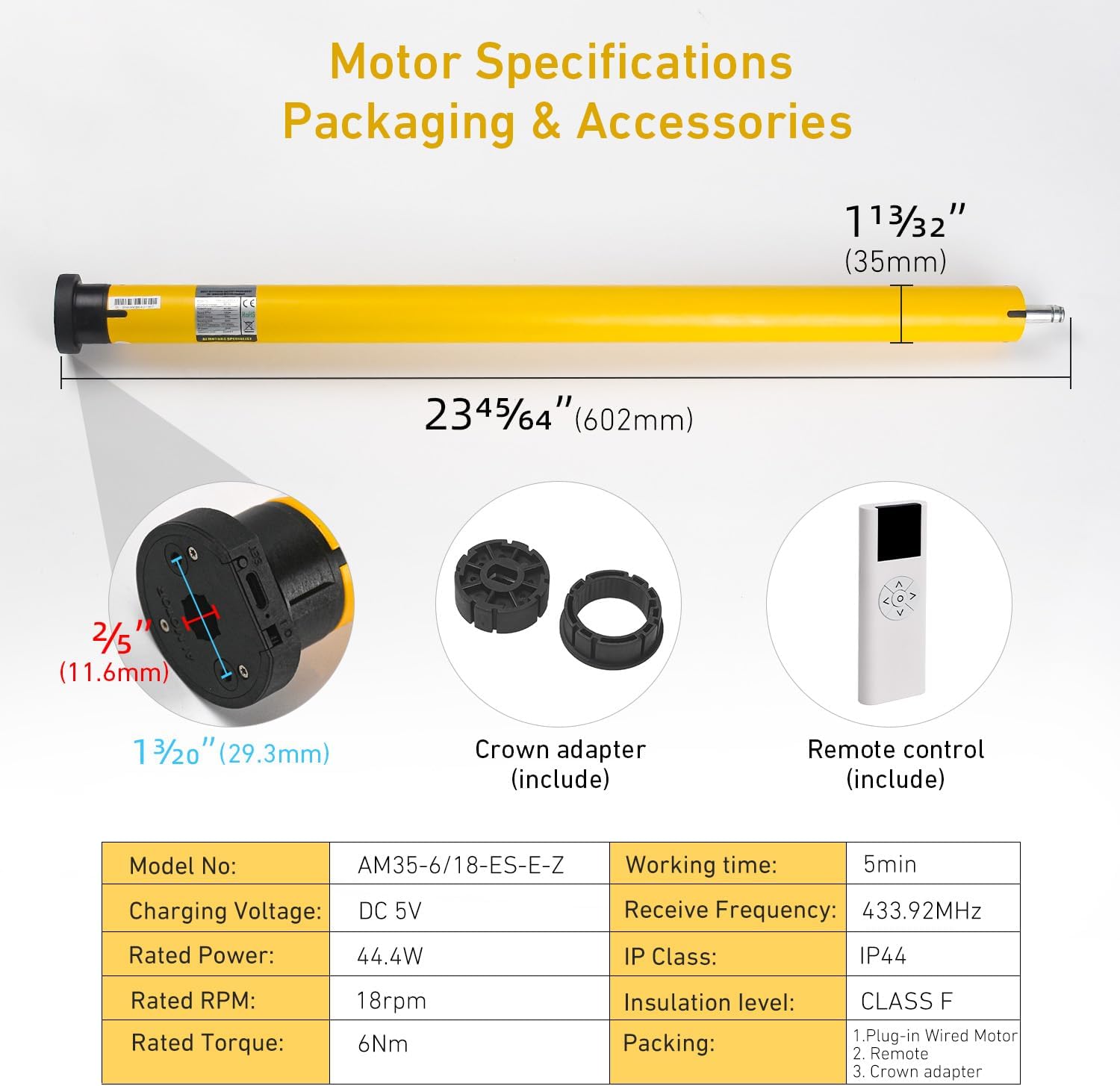
| Parameter | Verdi |
|---|---|
| Modellnr. | AM35-6/18-ES-E-Z |
| Lading Voltage | DC 5V |
| Nominell effekt | 44.4W |
| Vurdert RPM | 18 rpm |
| Nominell dreiemoment | 6 Nm |
| Arbeidstid | 5 min |
| Motta frekvens | 433.92 MHz |
| IP klasse | IP44 |
| Isolasjonsnivå | KLASSE F |
| Materiale | Metall, plast |
| Produktdimensjoner | 17"L x 4"W (Motor length: 23.7"/602mm, Diameter: 1.4"/35mm) |
| Varevekt | 1.64 pund |
4. Pakkens innhold
Kontroller at alle komponentene er tilstede i pakken:
- ZigBee Smart Motor (AM35-6/18-ES-E-Z)
- Battery Tube/Wand
- Removable End Caps
- Battery Wand Clips
- Crown Adapter (for 2"/50mm tube)
- Fjernkontroll (kan variere avhengig av pakke)
- USB ladekabel
5. Installasjonsveiledning
5.1. Measure Your Shade Tube
Ensure your roller shade tube has an outer diameter (OD) of 2 inches (50mm) for proper fitment of the motor and crown adapter.

5.2. Insert Motor into Shade Tube
- Attach the crown adapter to the motor head.
- Slide the motor, with the crown adapter, into one end of your 2-inch roller shade tube. Ensure it fits snugly.
- Secure the other end of the shade tube with the appropriate end cap and mounting bracket.
5.3. Mounting the Shade
Mount the roller shade assembly to your wall or ceiling using suitable brackets. Ensure the motor's charging port is accessible if it's battery-powered and requires periodic charging.
6. Oppsett og paring
6.1. Charging the Motor
Before initial use, fully charge the motor using the provided USB charging cable. The charging port is typically located on the motor head.
6.2. Pairing with a ZigBee Hub
This motor requires a ZigBee 3.0 compatible hub (e.g., Tuya ZigBee Hub) to connect to your smart home system. Follow the instructions provided with your ZigBee hub to add a new device.
- Ensure your ZigBee hub is powered on and in pairing mode.
- Refer to the motor's specific pairing button location (often a small button on the motor head or a sequence of remote presses). Press and hold the pairing button until the motor indicates pairing mode (e.g., LED flashes).
- Once detected by the hub, follow the on-screen prompts in your smart home app (e.g., Tuya Smart Life App) to complete the pairing process.
6.3. Integrating with Smart Home Platforms
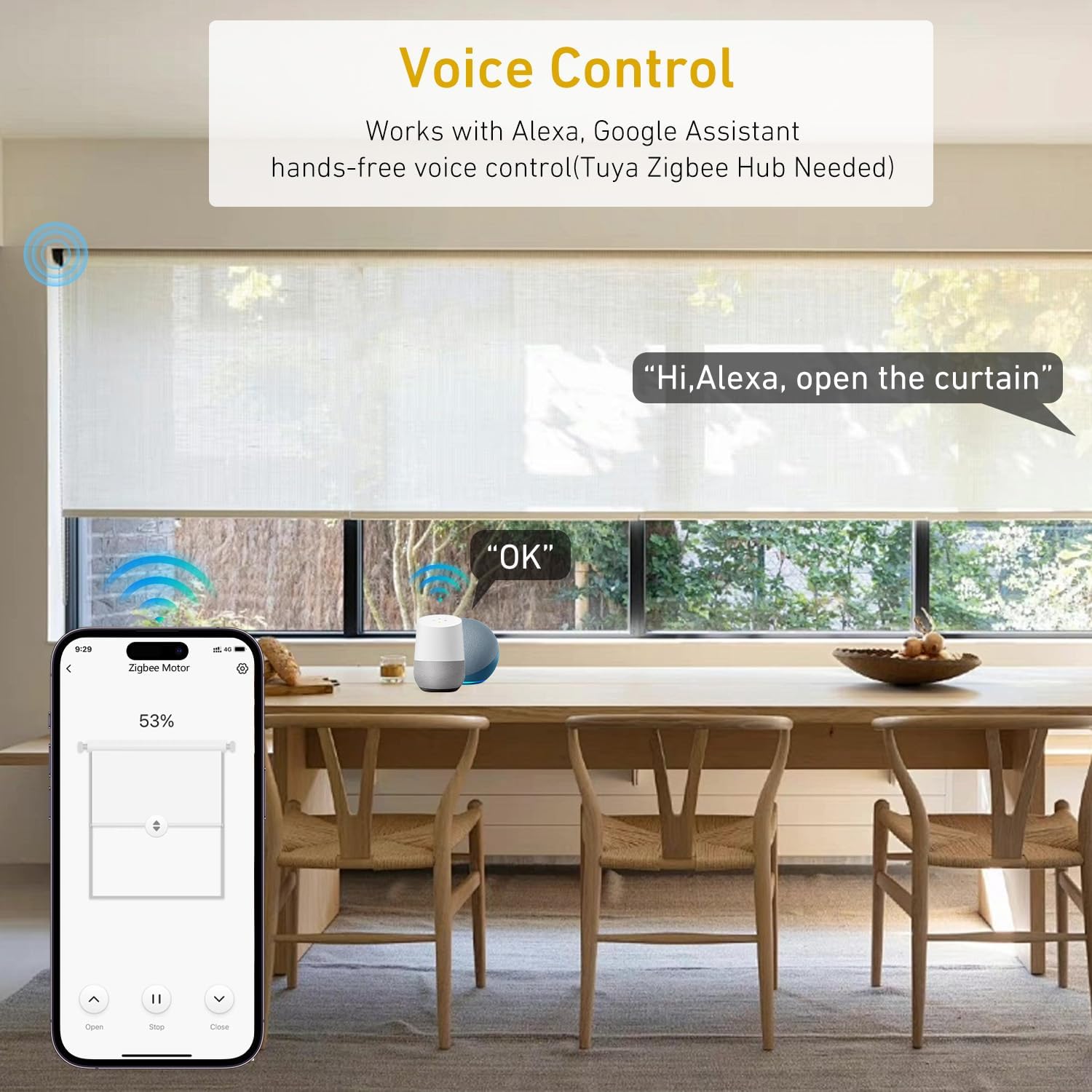
After pairing with your ZigBee hub, you can link your smart home app (e.g., Tuya Smart Life) to voice assistants like Amazon Alexa or Google Home.
- For Alexa: Open the Alexa app, go to 'Skills & Games', search for 'Tuya Smart' or 'Smart Life', enable the skill, and link your account. Then, 'Discover Devices'.
- For Google Home: Open the Google Home app, tap '+' > 'Set up device' > 'Works with Google', search for 'Tuya Smart' or 'Smart Life', link your account.
7. Bruksanvisning
7.1. Fjernkontrolldrift
If your package includes a remote control, use it for direct operation:
- Opp-knapp: Raises the shade.
- Ned-knapp: Lowers the shade.
- Stopp/pause-knapp: Stopper rullegardinen i sin nåværende posisjon.
- Innstillingsknapper: Used for setting upper/lower limits or pairing (refer to remote's specific manual).
7.2. Appkontroll
Use the Tuya Smart Life App (or your preferred smart home app) for comprehensive control:
- Åpne lukke: Full control over shade position.
- Prosenttage Kontroll: Adjust the shade to a specific percentage open/closed.
- Motorretningsinnstilling: If the motor operates in the reverse direction, you can usually adjust this setting within the app.
- Batteristatus: Monitor the motor's battery level directly from the app.

7.3. Stemmekontroll
Once integrated with Alexa or Google Home, use voice commands:
- «Alexa, åpne persiennene i stuen.»
- "Hey Google, close the kitchen shade."
- "Alexa, set bedroom shade to 50%."
7.4. Timer & Scheduling
Utilize the scheduling features in your smart home app to automate shade movements:
- Set daily routines, e.g., open shades at sunrise, close at sunset.
- Create custom schedules for specific days or times.
- Integrate with other smart home devices for scene automation (e.g., "Good Morning" scene opens shades and turns on lights).


8. Vedlikehold
8.1. Batterilading
The motor is battery-powered and requires periodic charging. When the battery level is low (indicated by the app or a motor LED), connect the motor to a DC 5V power source using the provided USB charging cable. A full charge typically lasts 3-5 months, depending on usage frequency.
8.2. Rengjøring
Clean the motor and exposed parts with a soft, dry cloth. Do not use abrasive cleaners or immerse the motor in water. Spot clean only.
9. Feilsøking
- Motoren reagerer ikke:
- Sjekk batterinivået og lad opp om nødvendig.
- Ensure the motor is properly paired with the remote or ZigBee hub.
- Verify the ZigBee hub is powered on and connected to the internet.
- Shade moves in the wrong direction:
- Adjust the motor direction setting within your smart home app.
- Stemmekontroll fungerer ikke:
- Ensure your smart home app is correctly linked to Alexa or Google Home.
- Sjekk internettforbindelsen din og statusen til stemmeassistentenheten din.
- Verify the device name in the smart home app matches the name you are using in voice commands.
- Motor makes unusual noise:
- Ensure the motor is securely installed within the shade tube and that the tube is properly mounted.
- Check for any obstructions preventing smooth shade movement.
10. Sikkerhetsinformasjon
- Ikke forsøk å demontere eller reparere motoren selv. Kontakt kundestøtte for å få hjelp.
- Keep the motor and accessories out of reach of children and pets.
- Bruk kun den angitte ladevolumentage (DC 5V) and cable.
- Ensure the shade tube is securely mounted before operating the motor.
- Avoid exposing the motor to extreme temperatures or moisture.
11. Garanti og støtte
This product comes with a standard manufacturer's warranty. For specific warranty details, please refer to the product packaging or contact Rollerhouse customer support. If you encounter any issues or have questions not covered in this manual, please reach out to our support team for assistance.
Kontaktinformasjon: Please refer to the seller's information on the purchase platform or the official Rollerhouse webnettstedet for den mest oppdaterte kontaktinformasjonen for support.