
MOZOTER SP9i
MOZOTER SP9i Wireless Earbuds User Manual
Model: SP9i
Introduksjon
Thank you for choosing the MOZOTER SP9i Wireless Earbuds. These earbuds are designed to provide a comfortable and stable audio experience with advanced Bluetooth 5.3 technology, deep bass sound, and extended playtime. This manual will guide you through the setup, operation, and maintenance of your new earbuds to ensure optimal performance.
Hva er i esken
- MOZOTER SP9i Wireless Earbuds (Left and Right)
- Ladeetui
- USB-C ladekabel
- Ørepropper (størrelser S, M, L)
- Brukerhåndbok
Produkt overview
The MOZOTER SP9i earbuds feature an over-ear hook design for secure fit and comfort. Each earbud is equipped with intuitive touch controls for easy management of audio and calls. The compact charging case provides additional battery life and convenient storage.

Image: The MOZOTER SP9i Wireless Earbuds resting in their open charging case, showcasing the over-ear hook design and the charging contacts.
Bilde: En detaljert view of an earbud highlighting the integrated Bluetooth 5.3 technology for stable and efficient wireless connectivity.
Oppsett
1. Lade øreproppene og etuiet
Before first use, fully charge the earbuds and the charging case. Connect the provided USB-C cable to the charging port on the case and a power source. The indicator lights on the case will show the charging status.
- Ladetid: Omtrent 1.5 timer for full lading.
- Spilletid for øreplugger: Opptil 12 timer på en enkelt lading.
- Total spilletid med etuiet: Opptil 60 timer.

Image: The charging case with earbuds inside, illustrating the 60-hour total playtime, 12-hour single charge, and 48-hour case capacity, along with the USB-C charging port.
2. Paring med enheten din
- Ensure the charging case has power and the earbuds are inside.
- Åpne ladeetuiet. Øreproppene slår seg på automatisk og går inn i paringsmodus.
- Aktiver Bluetooth på enheten din (smarttelefon, nettbrett, bærbar PC).
- Søk etter tilgjengelige Bluetooth-enheter og velg "SP9i" fra listen.
- Når tilkoblingen er fullført, vil du høre en bekreftelsestone, og indikatorlampene på øreproppene vil slå seg av eller blinke sakte.
Øreproppene kobler seg automatisk til den sist parede enheten når de tas ut av etuiet, hvis Bluetooth er aktivert på enheten.

Image: An illustration showing the MOZOTER SP9i earbuds in their open case, with a smartphone screen displaying a successful Bluetooth connection to "SP9i".
Bruksanvisning
For optimal sound quality and comfort, it is important to wear the earbuds correctly and choose the appropriate eartip size.
1. Valg av ørepropper
The earbuds come with small (S), medium (M), and large (L) eartips. Experiment with different sizes to find the pair that provides the best seal and comfort for your ears. A good seal enhances bass response and passive noise cancellation.
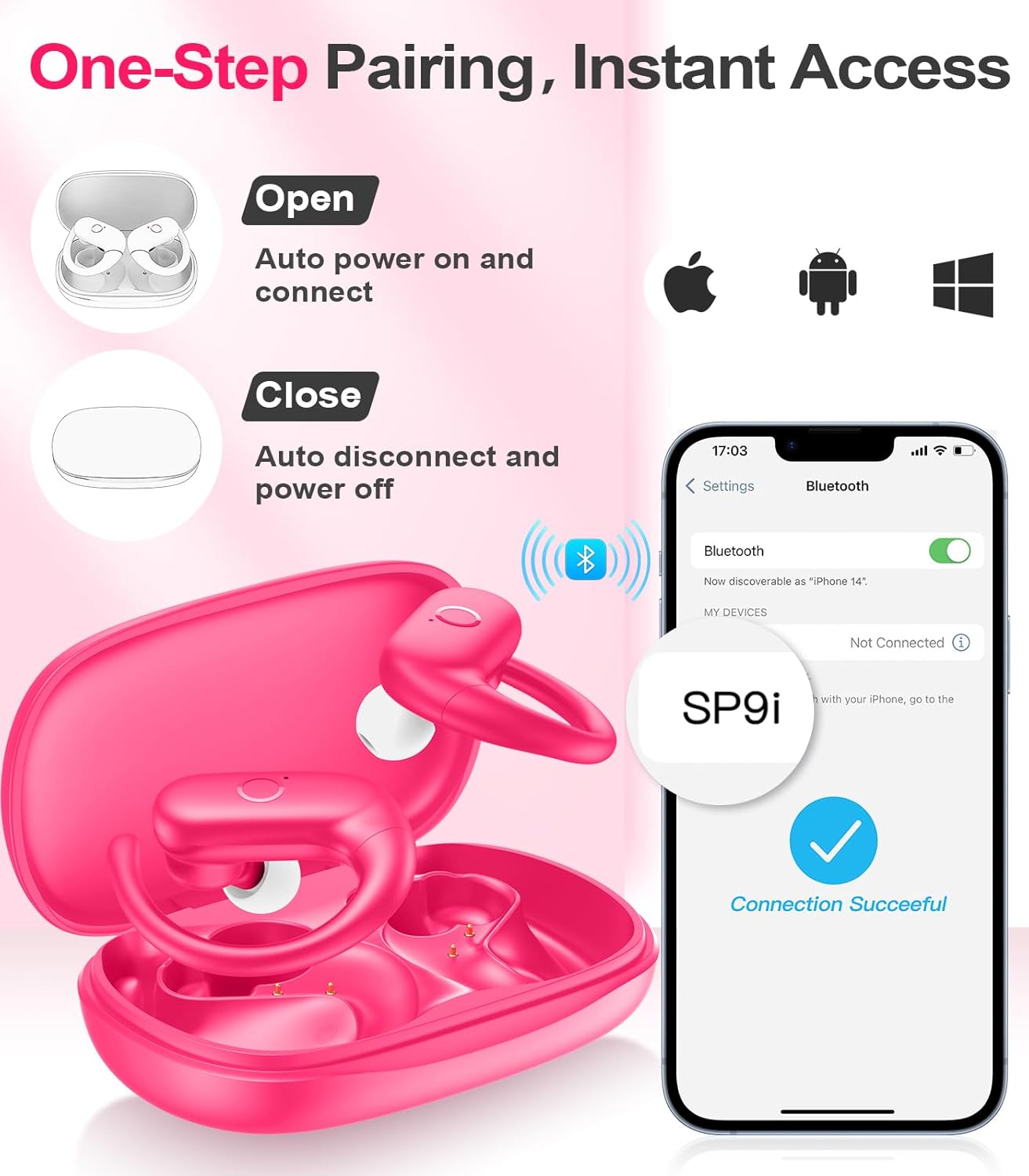
Image: A woman wearing an earbud, with an inset showing the three available eartip sizes (S, M, L) for a customized and comfortable fit.
2. Oppnå en sikker passform
- Trinn 1: Plasser ørekroken over øret.
- Trinn 2: Sett øreproppen forsiktig inn i øregangen.
- Trinn 3: Rotate the earbud slightly to find a comfortable and secure angle. The flexible ear hooks ensure a stable fit, ideal for sports and active use.

Image: A three-step diagram illustrating the correct method to wear the MOZOTER SP9i earbuds, ensuring a secure and comfortable fit with the ear hook.

Image: A woman wearing the MOZOTER SP9i earbuds, demonstrating the ergonomic design that rests comfortably and securely on the ear.
Bruksanvisning
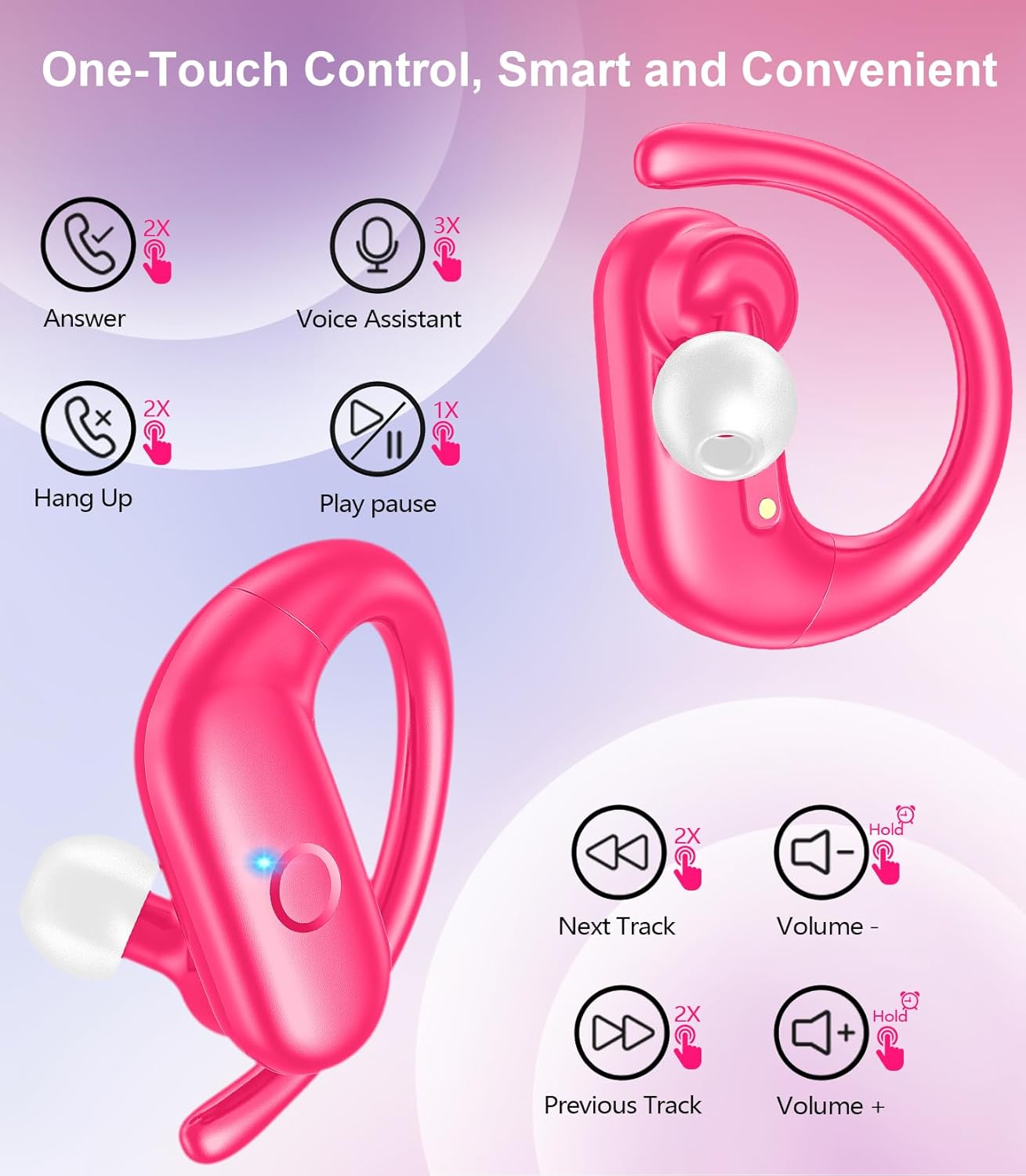
The MOZOTER SP9i earbuds feature intuitive touch controls on each earbud. The following table outlines the functions:
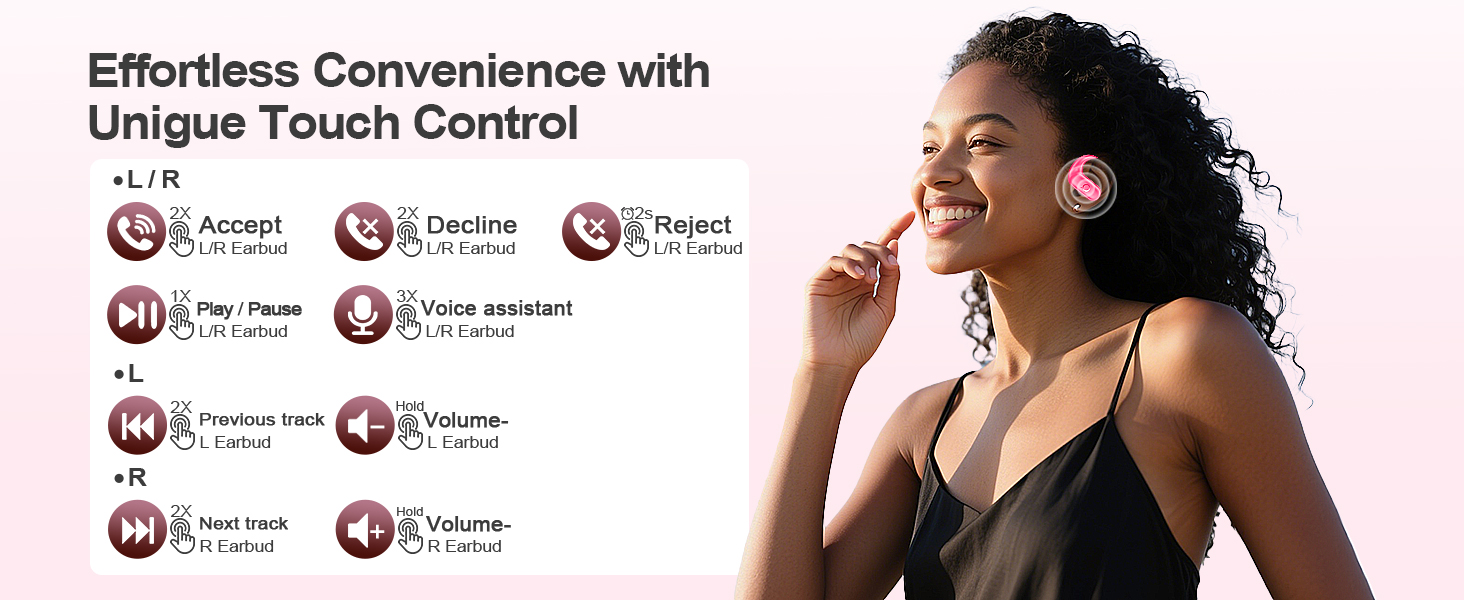
Image: A visual guide detailing the various touch control gestures for the MOZOTER SP9i earbuds, including call management, music playback, and volume adjustments.
| Handling | Gesture (L/R Earbud) |
|---|---|
| Svar på anrop | Double-tap (2X) |
| Legg på samtalen | Double-tap (2X) |
| Avvis anrop | Triple-tap (3X) |
| Spill av/pause musikk | Single-tap (1X) |
| Aktiver stemmeassistent | Triple-tap (3X) |
| Neste spor | Double-tap (2X) on Høyre ørepropp |
| Forrige spor | Double-tap (2X) on Igjen ørepropp |
| Volum opp | Hold fast Høyre ørepropp |
| Volum ned | Hold fast Igjen ørepropp |
Vedlikehold
Riktig vedlikehold sikrer øreproppenes levetid og ytelse.
- Rengjøring: Regularly clean the eartips and the charging contacts on both the earbuds and the case with a soft, dry, lint-free cloth. Avoid using harsh chemicals or abrasive materials.
- Lagring: Når de ikke er i bruk, oppbevar øreproppene i ladeetuiet for å beskytte dem mot støv og skader.
- Vanneksponering: Selv om øreproppene er laget for sport, bør du unngå å senke dem ned i vann. Tørk av svette eller fuktighet umiddelbart etter bruk.
Feilsøking
If you encounter any issues with your MOZOTER SP9i earbuds, please refer to the following common solutions:
- Øreproppene kobles ikke sammen: Ensure both earbuds are charged and removed from the case. Turn off and on your device's Bluetooth. If issues persist, try resetting the earbuds (refer to manufacturer's webnettsted for spesifikke tilbakestillingsinstruksjoner hvis ikke i håndboken).
- Bare én ørepropp fungerer: Place both earbuds back into the charging case, close the lid, wait a few seconds, then open the lid and remove them. This often resynchronizes them.
- Dårlig lydkvalitet: Ensure the eartips provide a good seal in your ear. Clean any debris from the earbud speakers. Check your device's volume and audio settings.
- Ladeproblemer: Sørg for at ladekabelen er ordentlig koblet til både etuiet og strømkilden. Rengjør ladekontaktene på øreproppene og inni etuiet.
- Ørepropper faller ut: Experiment with different eartip sizes and adjust the ear hooks for a more secure fit as described in the Wearing Instructions section.
Spesifikasjoner
| Trekk | Detalj |
|---|---|
| Modellnavn | SP9i |
| Tilkoblingsteknologi | Trådløs (Bluetooth 5.3) |
| Støykontroll | Passiv støyreduksjon |
| Impedans | 4 Ohm |
| Øreproppsvekt | Omtrent 8 g per ørepropp |
| Spilletid for øreplugger | Opptil 12 timer |
| Total spilletid (med etui) | Opptil 60 timer |
| Ladeport | USB-C |
| Inkluderte komponenter | Earbuds, Charging Case, Eartips, User Manual |
Garanti og støtte
MOZOTER products are designed and manufactured to the highest quality standards. For warranty information and customer support, please refer to the documentation included with your purchase or visit the official MOZOTER website. If you require further assistance, please contact our customer service team.
Ask a question about this manual
Ask about setup, troubleshooting, compatibility, parts, safety, or missing instructions. Manuals+ will review the question and use this page’s manual context to help answer it.