
Phanteks G400A
Brukerhåndbok for Phanteks Eclipse G400A ATX Mid-Tower datamaskinkabinett
Model: G400A | Brand: Phanteks
Introduksjon
The Phanteks Eclipse G400A is a high-performance ATX Mid-Tower computer case designed for optimal airflow and component compatibility. Featuring a tempered glass side panel and pre-installed D-RGB fans, it offers both aesthetic appeal and efficient cooling. This manual provides detailed instructions for setting up, operating, maintaining, and troubleshooting your Eclipse G400A case.

Figure 1: Phanteks Eclipse G400A ATX Mid-Tower Computer Case (White)
Oppsettveiledning
1. Utpakking og inspeksjon
Carefully remove the computer case from its packaging. Inspect the case for any signs of damage during transit. Ensure all accessories, including screws, cable ties, and the user manual, are present.
2. Komponentinstallasjon
The Eclipse G400A is designed for easy installation of your PC components. Follow these general steps:
- Installasjon av hovedkort: Install your ATX motherboard onto the pre-installed standoffs. Ensure proper alignment and secure it with screws. The case supports rear-side connector mainboards for a cleaner build.
- Installasjon av strømforsyningsenhet (PSU): Install your PSU into the dedicated compartment at the bottom rear of the case. The case supports PSUs up to 270mm in length.
- Installasjon av lagringsstasjon: The case supports 2x 2.5" SSDs and 2x 3.5" HDDs. Utilize the dedicated storage brackets and cable management tray for a clean setup.

Figure 2: Internal layout with highlighted storage and cable management areas
- Installasjon av grafikkort (GPU): Install your graphics card into the appropriate PCIe slot. The case supports large GPU cards and includes triple mid-plate 120mm fan locations for direct GPU cooling.
- Installasjon av radiator og vifte: The case comes with 4x M25-140 Gen2 D-RGB fans pre-installed. It offers dedicated 360mm radiator support in the top without restrictions.
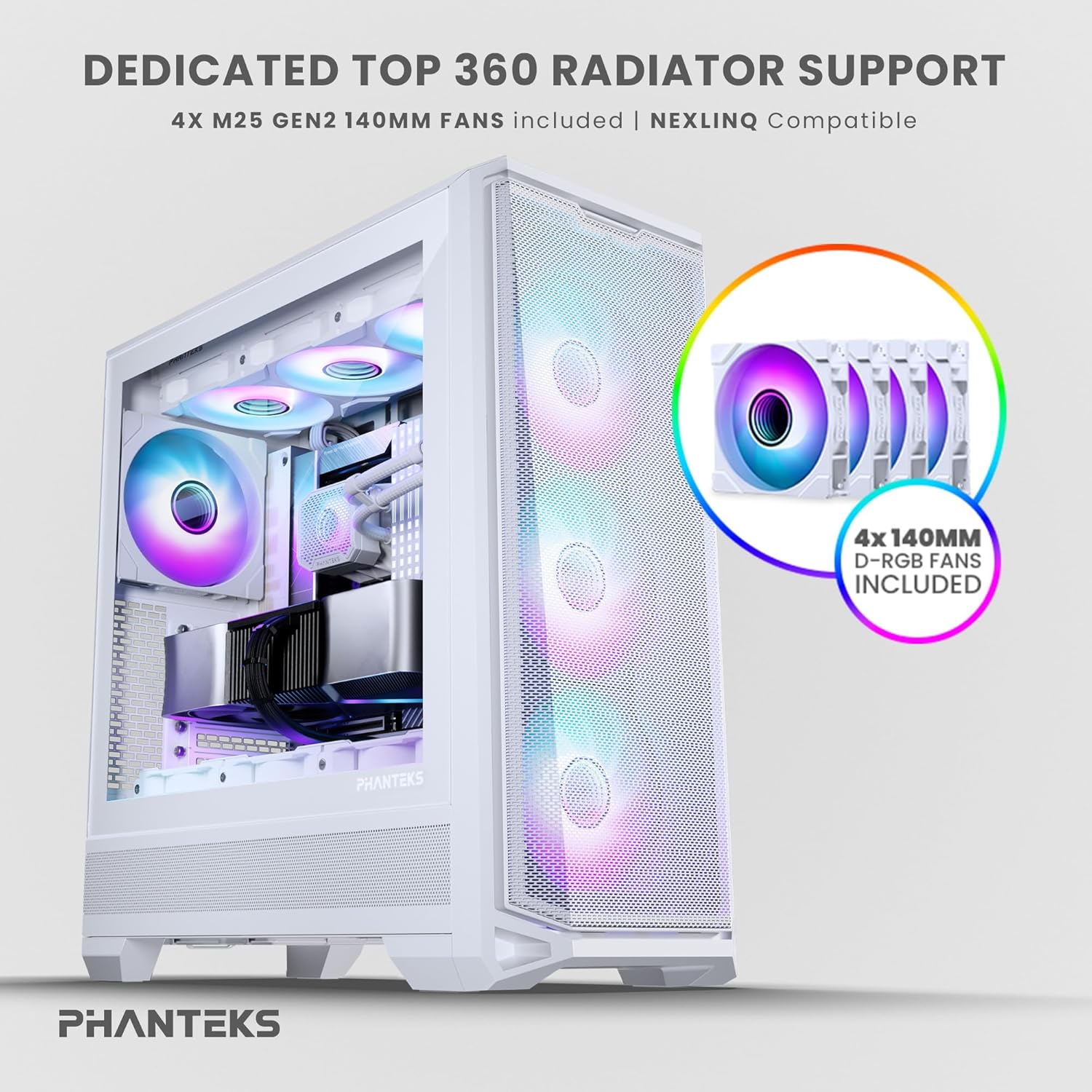
Figure 3: Top radiator support and pre-installed 140mm D-RGB fans

Figure 4: Dedicated 120mm fan positions for direct GPU cooling
3. Kabeladministrasjon
Utilize the dedicated cable management tool and Velcro ties provided to route and secure cables behind the motherboard tray. This ensures optimal airflow and a clean interior.
Bruksanvisning
1. Slå på
After connecting all internal components and external peripherals, connect the power cable to your PSU and a wall outlet. Press the power button located on the top I/O panel of the case to power on your system.

Figure 5: Front I/O Panel Layout
2. RGB-lyskontroll
The pre-installed M25-140 Gen2 D-RGB fans feature addressable RGB lighting. Control the lighting effects through your motherboard's RGB software (if compatible with D-RGB/ARGB) or a dedicated Phanteks RGB controller (sold separately).
Vedlikehold
1. Rengjøring
Regelmessig rengjøring bidrar til å opprettholde optimal ytelse og forlenger levetiden til komponentene dine.
- Støvfiltre: The Eclipse G400A features ultra-fine performance mesh panels on the top, left, and right sides, acting as dust filters. Regularly remove and clean these filters using compressed air or a soft brush to prevent dust buildup.
- Ytre: Tørk av de utvendige overflatene med en myk, damp klut. Unngå slipende rengjøringsmidler eller løsemidler.

Figure 6: Removable front mesh panel and dust filter for easy cleaning
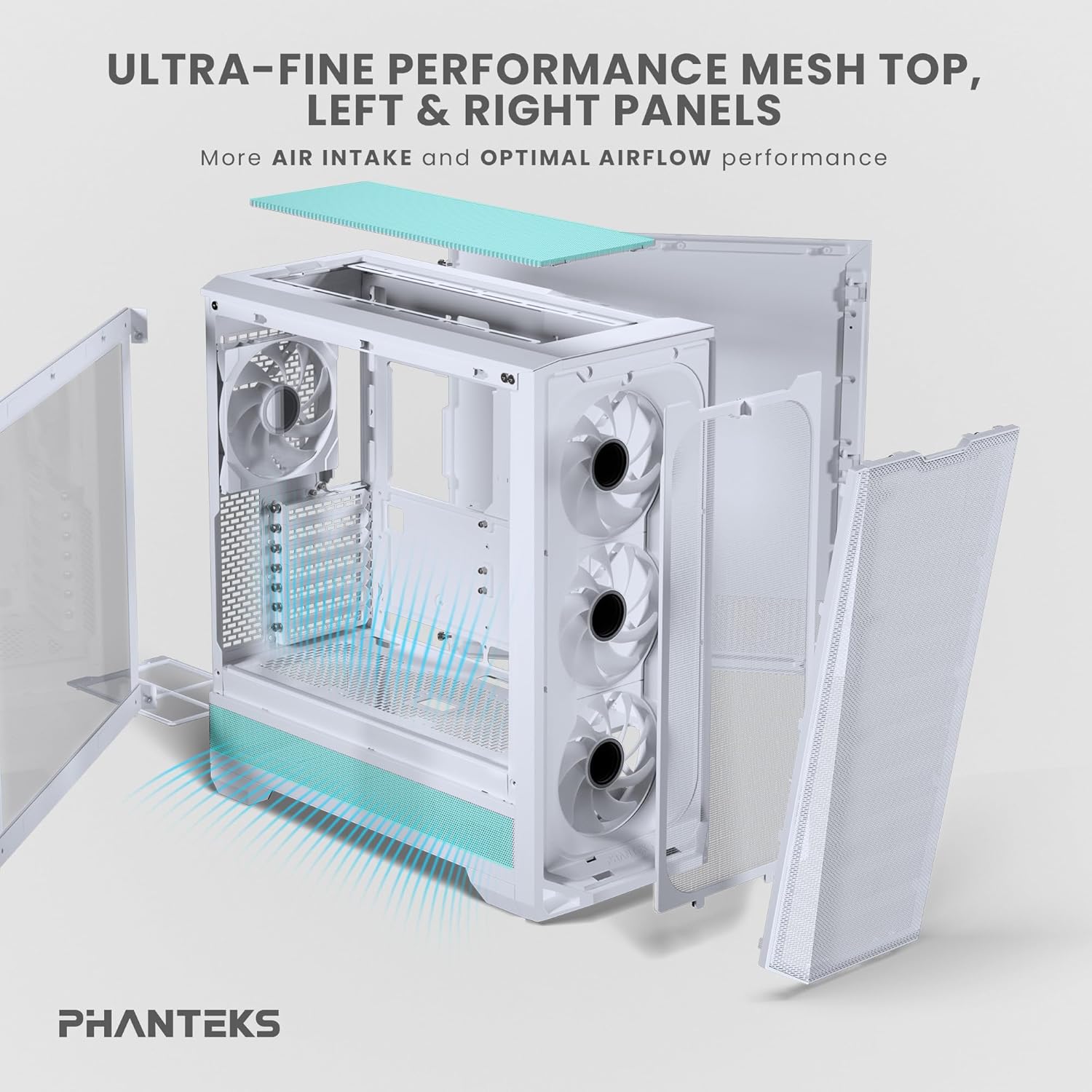
Figure 7: Disassembled panels demonstrating airflow and access for cleaning
2. Optimalisering av luftstrøm
Ensure cables are neatly managed to avoid obstructing airflow. Periodically check fan operation to ensure they are spinning freely and quietly.
Feilsøking
- Systemet slår seg ikke på:
- Check all power connections, including the PSU to wall outlet, PSU to motherboard (24-pin and CPU 8-pin), and front panel power switch header.
- Sørg for at strømforsyningsbryteren er i «PÅ»-posisjon.
- Fans Not Spinning / RGB Not Lighting Up:
- Verify fan and RGB cables are correctly connected to the motherboard headers or a dedicated RGB controller.
- Check motherboard BIOS/UEFI settings for fan control and RGB settings.
- Poor Airflow / High Temperatures:
- Rengjør alle støvfiltre og vifter.
- Ensure proper cable management to avoid airflow obstruction.
- Verify fan orientation (intake/exhaust) for optimal airflow path.
Tekniske spesifikasjoner
| Trekk | Spesifikasjon |
|---|---|
| Merke | Phanteks |
| Modellnavn | Eclipse G400A |
| Sakstype | Mid Tower |
| Farge | Hvit |
| Materiale | Rustfritt stål, herdet glass |
| Dimensjoner (LxBxH) | 49.48 x 22.99 x 52.20 cm (D x B x H) |
| Varevekt | 19 pund (8.62 kg) |
| Forhåndsinstallerte vifter | 4x M25-140 Gen2 D-RGB 140mm Fans |
| Radiatorstøtte | Opptil 360 mm (topp) |
| Lagringsstøtte | 2x 2.5" SSD, 2x 3.5" HDD |
| Front I/O | USB-C 3.2 Gen 2, 2x USB 3.0, Audio/Microphone, Power Button, Reset Button |
Garanti og støtte
Phanteks products are manufactured to the highest quality standards. For warranty information and technical support, please refer to the official Phanteks webnettstedet eller kontakt kundeservicen deres direkte. Ta vare på kjøpsbeviset for garantikrav.
For further assistance, visit the official Phanteks support page: www.phanteks.com/support.html
Ask a question about this manual
Ask about setup, troubleshooting, compatibility, parts, safety, or missing instructions. Manuals+ will review the question and use this page’s manual context to help answer it.