
Introduksjon
Thank you for choosing the Bigben Karaoke Microphone. This all-in-one portable karaoke system combines a stereo microphone with a powerful 15W Bluetooth speaker and dynamic light effects, designed to enhance your singing and music listening experience. This manual provides essential information for safe and optimal use of your device.
Sikkerhetsinformasjon
- Les alle instruksjonene før du bruker enheten.
- Hold enheten unna vann og fuktighet.
- Ikke utsett for ekstreme temperaturer eller direkte sollys.
- Ikke forsøk å demontere eller reparere enheten selv. Kontakt kvalifisert servicepersonell.
- Bruk kun det spesifiserte ladetilbehøret.
- Oppbevares utilgjengelig for barn.
Pakkeinnhold
Vennligst sjekk at alle varene er til stede i pakken:
- Bigben Karaoke Microphone (Model PARTYBTMIC2WH)
- Ladekabel (USB)
- Brukerhåndbok (dette dokumentet)
- Front Glass (as an included component, likely pre-installed or a protective cover)

Bilde 1: The Bigben Karaoke Microphone shown in its retail packaging. The packaging highlights features such as Bluetooth connectivity, 4 vocal effects, and wireless speaker functionality.
Produkt overview
The Bigben Karaoke Microphone features an integrated speaker and various controls for an interactive experience.
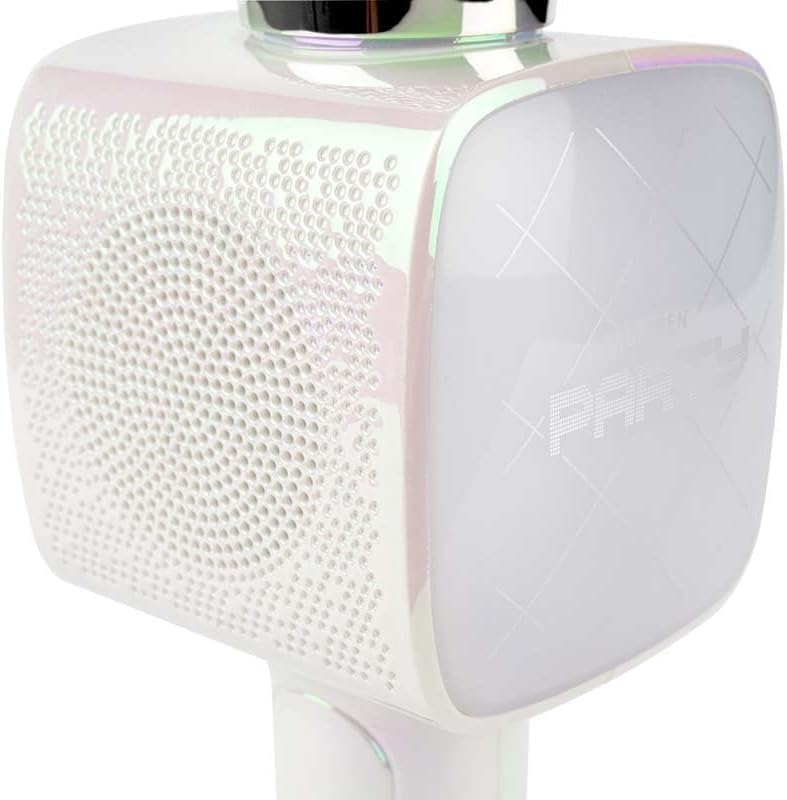
Bilde 2: Et nærbilde view of the Bigben Karaoke Microphone, focusing on the speaker grille and the light-up panel. The panel displays "PARTY" and shows dynamic light effects.
Nøkkelfunksjoner:
- Bluetooth 5.0: For stable wireless connection to your devices.
- Integrert høyttaler: 15W output for clear and powerful sound.
- Lette effekter: Dynamic lighting to enhance the karaoke experience.
- Lydeffekter: 4 different vocal effects and an echo effect.
- Flere innganger: USB, Micro SD, and 3.5mm headphone jack.
Oppsett
1. Lade mikrofonen
- Connect the provided USB charging cable to the microphone's charging port.
- Koble den andre enden av USB-kabelen til en kompatibel USB-strømadapter (ikke inkludert) eller en datamaskins USB-port.
- Ladeindikatorlampen vil lyse. Når den er fulladet, kan lampen endre farge eller slukkes.
2. Slå på/av
- To power on, press and hold the Power button for a few seconds until the indicator light illuminates and you hear an audible prompt.
- For å slå av, trykk og hold inne av/på-knappen igjen til indikatorlampen slukkes.
3. Bluetooth-paring
- Ensure the microphone is powered on and in Bluetooth pairing mode (usually indicated by a flashing light).
- Gå til Bluetooth-innstillingene på smarttelefonen, nettbrettet eller en annen Bluetooth-aktivert enhet.
- Søk etter available devices and select "Bigben Karaoke Mic" (or similar name) from the list.
- Når paringen er fullført, vil du høre en bekreftelseslyd, og indikatorlampen vil slutte å blinke.
Bruksanvisning
1. Spille musikk
- Via Bluetooth: After successful pairing, play music from your connected device. The sound will output through the microphone's speaker.
- Via USB/Micro SD: Insert a USB drive or Micro SD card (with music files) into the respective port. The microphone will automatically detect and play music.
- Via 3.5mm Audio Cable: Connect an external audio source using a 3.5mm audio cable (not included) to the headphone input.
2. Bruke mikrofonen
- Speak or sing directly into the microphone grille.
- Adjust the microphone volume using the dedicated controls on the device.
3. Lydeffekter
- Vokale effekter: The microphone offers 4 different vocal effects. Press the "Effect" button (or similar labeled button) to cycle through these effects.
- Ekkoeffekt: Activate or adjust the echo effect using its dedicated control.
4. Lyseffekter
The microphone features dynamic light effects. These lights typically activate automatically when the device is on and can often be toggled or changed using a dedicated light button, if available.
Vedlikehold
- Rengjøring: Tørk av mikrofonen med en myk, tørr klut. Ikke bruk slipende rengjøringsmidler eller løsemidler.
- Lagring: Oppbevar enheten på et kjølig, tørt sted vekk fra direkte sollys når den ikke er i bruk.
- Batteripleie: For optimal battery life, charge the device regularly, even if not used frequently.
Feilsøking
| Problem | Mulig årsak | Løsning |
|---|---|---|
| Ingen strøm | Batteriet er utladet. | Lad mikrofonen helt opp. |
| Ingen lyd fra høyttaleren | Volume is too low; device not connected; incorrect input mode. | Increase volume; ensure Bluetooth is paired or cable is connected; check USB/Micro SD insertion. |
| Mikrofonen virker ikke | Microphone volume is too low; microphone function is off. | Increase microphone volume; ensure microphone is active. |
| Bluetooth-tilkoblingen er ustabil | Device is too far from the microphone; interference. | Move devices closer; avoid obstacles; disconnect and re-pair. |
Spesifikasjoner
| Trekk | Detalj |
|---|---|
| Merke | Bigben |
| Modellnummer | PARTYBTMIC2WH |
| Tilkobling | Bluetooth 5.0, USB, Micro SD, 3.5mm Headphone Jack |
| Høyttalerutgang | 15W |
| Lydeffekter | 4 Vocal Effects, Echo Effect |
| Produktdimensjoner (LxBxH) | 20 x 15 x 10 cm |
| Varevekt | 300 gram |
| Farge | Hvit |
| Antall kanaler | 2 |
| Batterier påkrevd | Yes (type unknown, likely integrated rechargeable) |
Garanti og støtte
For warranty information and customer support, please refer to the documentation provided with your purchase or visit the official Bigben webnettstedet. Ta vare på kjøpsbeviset for garantikrav.
For technical assistance or further inquiries, please contact Bigben customer service through their official channels.