
1. Introduksjon
Thank you for choosing the RebotAi A11 Android 15 Tablet. This manual provides essential information for setting up, operating, maintaining, and troubleshooting your device. The RebotAi A11 features an 11-inch 2.5K IPS display, a powerful MediaTek Helio G100 Octa-Core processor, 24GB RAM, 128GB ROM, and an 8200 mAh battery, designed for a smooth and immersive user experience.
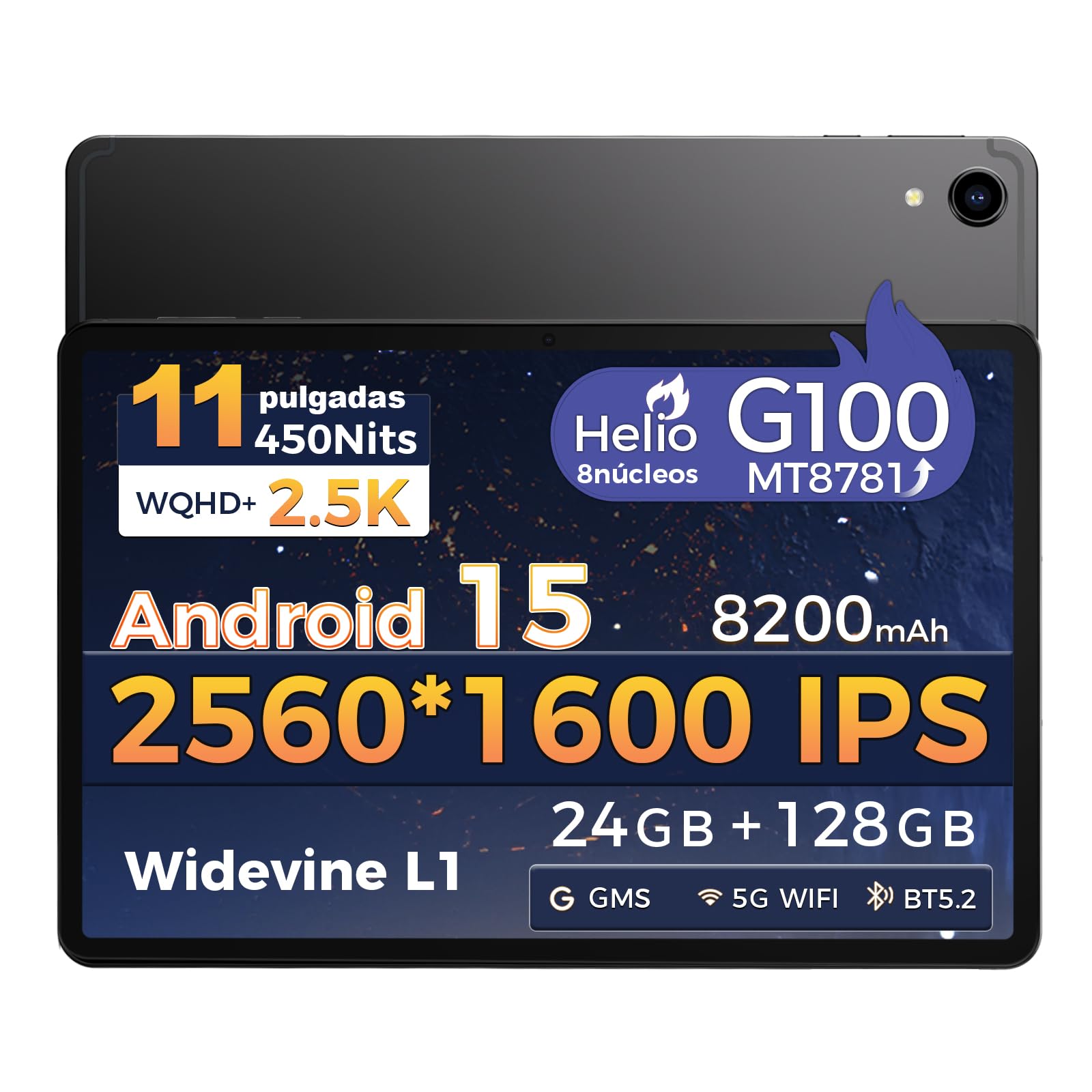
Bilde: Foran view of the RebotAi A11 Tablet.
2. Hva er i esken
Upon opening your RebotAi A11 package, please ensure all the following items are present:
- RebotAi A11 Tablet (x1)
- Leather Case (x1)
- USB-C to USB-C Charging Cable (x1)
- Pekepenn (x1)
- SIM Ejector Pin (x1)
- Brukerhåndbok (x1)
Note: In accordance with global environmental guidelines, the RebotAi A11 tablet does not include a wall charger. Only a USB-C charging cable is provided.
Image: Contents of the RebotAi A11 Tablet package.
3. Oppsett
3.1 Lading av batteriet
Before first use, fully charge your tablet. Connect the provided USB-C cable to the tablet's USB-C port and the other end to a compatible USB wall charger (not included) or a computer. The tablet supports 20W PD fast charging.
3.2 Slå på/av
- For å slå på: Press and hold the Power button located on the side of the tablet until the RebotAi logo appears.
- Slik slår du av: Press and hold the Power button until the power options appear on the screen, then select "Power Off."
- Å starte på nytt: Press and hold the Power button until the power options appear, then select "Restart."
3.3 Første oppsett
When you power on the tablet for the first time, follow the on-screen instructions to:
- Velg ditt språk.
- Koble til et Wi-Fi-nettverk.
- Logg inn med Google-kontoen din, eller opprett en ny.
- Konfigurer skjermlås (PIN, mønster, passord eller ansiktslåsing).
3.4 Sette inn et MicroSD-kort
The RebotAi A11 supports MicroSD cards up to 1TB for expanded storage. Use the provided SIM ejector pin to open the card tray, insert the MicroSD card into the designated slot, and then close the tray securely.
3.5 Bruk av pekepennen
The included stylus can be used for precise navigation, drawing, writing, and signing documents on the tablet's screen. No charging is required for the stylus.

Bilde: Side view of the RebotAi A11 Tablet, showing ports and buttons.
4. Bruksanvisning
4.1 Skjermfunksjoner
The RebotAi A11 features an 11-inch IPS Full HD 2.5K anti-glare display with a resolution of 2560 x 1600 pixels. It supports Widevine L1 certification for high-definition streaming and dynamic brightness adjustment. The anti-glare screen and immersive reading mode help prevent eye fatigue.

Image: The RebotAi A11's 2.5K high-definition display with eye protection and automatic brightness.

Image: Widevine L1 support for premium streaming services.
4.2 Ytelse og lagring
The tablet is powered by the MediaTek Helio G100 Octa-Core processor (MT8781), featuring 2 high-performance Cortex-A76 cores and 6 power-efficient Cortex-A55 cores. This ensures smooth operation for daily tasks, social media, video playback, and light gaming. It comes with 8GB base RAM, expandable by 16GB virtual RAM for a total of 24GB, and 128GB of internal storage, expandable up to 1TB via a MicroSD card.

Image: The Helio G100 chip, demonstrating high performance and energy efficiency.

Image: Large capacity storage with 24GB RAM and 128GB ROM, expandable to 1TB.
4.3 kameraer
The RebotAi A11 is equipped with a 5MP front-facing camera and a 16MP rear-facing camera. These cameras are suitable for video calls, online meetings, and capturing everyday moments with clear and natural images.

Image: The 5MP front and 16MP rear cameras for clear photos and video calls.
4.4 Batteristyring
The tablet features an 8200 mAh high-capacity battery, providing long-lasting power for reading, online courses, video playback, and office work. It supports 20W PD fast charging, allowing the device to be fully charged quickly.

Image: Powerful 8200 mAh battery with 20W fast charging for extended use.
4.5 Tilkobling
The RebotAi A11 supports dual-band Wi-Fi (2.4GHz and 5GHz) with 802.11ac for fast and stable internet access. It also includes Bluetooth 5.2 for energy-efficient wireless connections and GPS for precise navigation, compatible with Beidou, Galileo, and GLONASS.

Image: Fast connectivity and precise positioning with dual-band Wi-Fi, Bluetooth 5.2, and GPS.
4.6 Fleroppgavekjøring
With the dual-screen function, you can run two applications simultaneously on a single screen. This allows for seamless navigation, watching videos while chatting, or consulting information while working.

Image: Dual-screen functionality for fluid multitasking.
4.7 Lyd
Equipped with dual BOX speakers, the tablet offers an immersive audio experience for both movies and music. The balanced reproduction of highs and lows creates a pleasant listening experience.

Image: Immersive and crystal-clear audio from dual BOX speakers.
4.8 Intelligent Sensors
The A11 is equipped with intelligent sensors and AI, offering a more intelligent user experience. The gyroscope improves immersion in games, while the magnetometer ensures precise navigation, even in tunnels. Other sensors include G-sensor (automatic rotation), proximity sensor (automatic screen off), and ambient light sensor (adjustable backlight).

Image: Intelligent detection with various sensors for enhanced user experience.
4.9 Fysiske egenskaper
The tablet features a uniform metallic body crafted with advanced nano-coating technology, providing a smooth and delicate touch while being durable. Its surface is resistant to fingerprints and scratches, offering a high-quality texture and feel. It is surprisingly light at 510g and thin at 7.8mm.

Image: The tablet's lightweight and slim design, achieved through nano-molding technology.
5. Vedlikehold
5.1 Rengjøring av nettbrettet
For å rengjøre nettbrettet, bruk en myk, lofri klut. For gjenstridige flekker, tørk littampRengjør kluten med vann eller et skjermsikkert rengjøringsmiddel. Unngå bruk av sterke kjemikalier, slipende materialer eller overdreven fuktighet.
5.2 Programvareoppdateringer
Regularly check for and install software updates to ensure optimal performance, security, and access to new features. You can usually find this option in Innstillinger > System > Systemoppdatering.
5.3 Batteristell
Slik forlenger du batterilevetiden:
- Unngå ekstreme temperaturer.
- Ikke la batteriet tømmes helt for ofte.
- Trekk ut laderen når nettbrettet er fulladet.
- Juster skjermens lysstyrke til et komfortabelt nivå.
6. Feilsøking
| Problem | Mulig løsning |
|---|---|
| Nettbrettet slår seg ikke på | Ensure the battery is charged. Connect to a power source for at least 30 minutes. If it still doesn't turn on, try a forced restart by holding the power button for 10-15 seconds. |
| Skjermen reagerer ikke | Restart the tablet. If the issue persists, perform a factory reset (data will be lost). |
| Problemer med Wi-Fi-tilkobling | Start Wi-Fi-ruteren og nettbrettet på nytt. Glem nettverket i nettbrettinnstillingene og koble til på nytt. Sørg for at du er innenfor rekkevidden til Wi-Fi-signalet. |
| Apper krasjer eller fryser | Tøm hurtigbufferen og dataene for den problematiske appen i Innstillinger > Apper. If the issue continues, uninstall and reinstall the app. Ensure sufficient storage space is available. |
| Batteriet tømmes raskt | Reduce screen brightness, close unused apps, disable Wi-Fi/Bluetooth when not in use. Check battery usage in Innstillinger> Batteri for å identifisere strømslukende apper. |
7. Spesifikasjoner
| Trekk | Spesifikasjon |
|---|---|
| Merke | RebotAi |
| Modellserie | A11 |
| Produktdimensjoner | 25 x 15 x 5 cm |
| Vekt | 900 g |
| Farge | Grå |
| Skjermstørrelse | 11 tommer |
| Skjermoppløsning | 2560 x 1600 piksler (2.5K) |
| Produsent av prosessor | MediaTek |
| Prosessormodell | Helio G100 (MT8781) |
| Prosessorhastighet | 2.2 GHz |
| RAM-størrelse | 8 GB (expandable to 24 GB with virtual RAM) |
| Lagringskapasitet | 128 GB (expandable up to 1 TB via MicroSD) |
| Bak Webcam oppløsning | 16 MP |
| Front Webcam oppløsning | 5 MP |
| Operativsystem | Android 15 |
| Trådløs tilkobling | Wi-Fi 6 (802.11ac, 802.11n), Bluetooth 5.2, GPS |
| Batterikapasitet | 8200 mAh |
| Gjennomsnittlig batterilevetid | 24 timer |
| Rask lading | 20W PD |
8. Garanti og støtte
RebotAi offers a 2 års garanti for your tablet, ensuring peace of mind with your purchase. We are committed to providing excellent customer service.
8.1 Kundestøtte
If you encounter any technical issues or have questions regarding the use of your RebotAi A11 tablet, our customer support team is available 24/7. You can contact us through the seller contact option on the Amazon product page.

Image: RebotAi customer service support information.