
1. Introduksjon
This manual provides detailed instructions for the installation, operation, and maintenance of your UNITOPSCI 8 Core 4G+64G Android 15 Car Stereo. Please read this manual thoroughly before using the product to ensure proper function and safety. Keep this manual for future reference.
2. Sikkerhetsinformasjon
- Profesjonell installasjon anbefalt: Installation of this car stereo requires technical knowledge and experience. It is highly recommended to have it installed by a qualified professional.
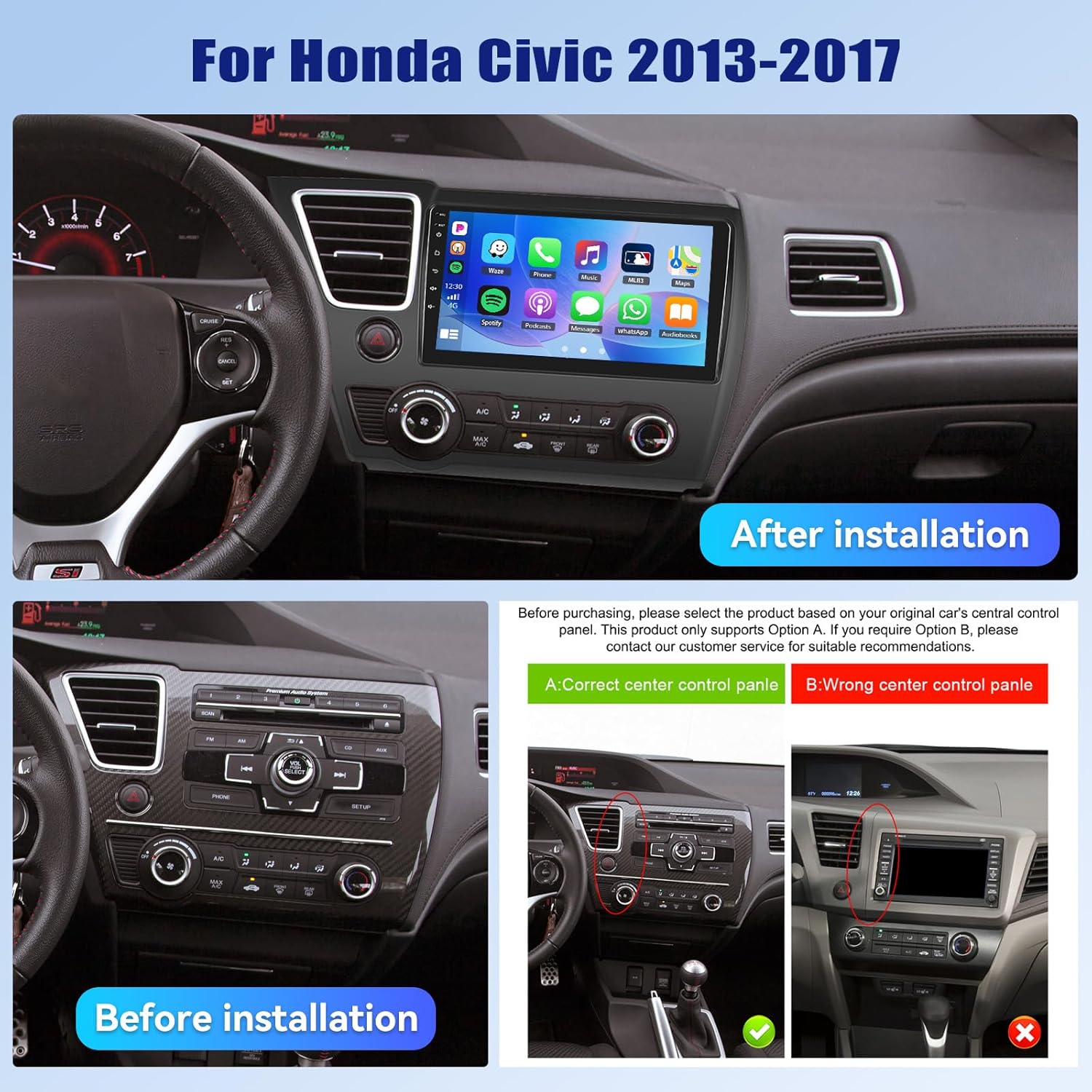
- Kjøretøy kompatibilitet: This unit is designed specifically for Honda Civic models from 2013 to 2017. Verify compatibility with your vehicle's center console before installation.
- Strømforsyning: Ensure the vehicle's power supply is disconnected before beginning installation to prevent electrical shock or damage.
- Kabling: Follow the provided wiring diagram carefully. Incorrect wiring can cause damage to the unit or vehicle.
- Betjening under kjøring: Ikke bruk enheten på en måte som distraherer deg fra kjøringen. Prioriter alltid trafikksikkerhet.
- Temperatur: Unngå å utsette enheten for ekstreme temperaturer eller direkte sollys over lengre perioder.
3. Pakkens innhold
Bekreft at alle varene er til stede i pakken:
- 1 x Car Radio
- 1 x strømkabel
- 1 x Bil bak View Kamera
- 1 x Installation Tool Set
- 1 x GPS-antenne
- 1 x inngangskabel for bakkamera
- 1 x RCA-kabel
- 2 x USB-kabel
- 1 x brukerhåndbok
- 1 x mikrofon
- 1 x Original Car USB & Radio Adapter Cable
- 1 x Canbus-dekoder

4. Produktet er overview
4.1 Nøkkelfunksjoner
- Operativsystem: Android 15
- Prosessor: Qualcomm 8-Core Chip
- Hukommelse: 4 GB RAM + 64 GB ROM
- Utstilling: 9-inch 1280x720P IPS Capacitive Touchscreen
- Tilkobling: Bluetooth 5.1, Dual-Band WiFi (2.4GHz & 5GHz)
- Smarttelefonintegrasjon: Wireless/Wired Apple CarPlay, Wireless/Wired Android Auto, Mirror Link
- Lyd: Built-in DSP (Digital Sound Processor)
- Navigasjon: GPS Navigation (supports online and offline maps)
- Radio: FM/RDS-radio
- Kamerastøtte: AHD Backup Camera (included)
- Ytterligere funksjoner: Steering Wheel Control (SWC), Built-in Cooling Fan, Picture-in-Picture, Customizable UI.


5. Installasjonsveiledning
5.1 Kontroll før installasjon
Before proceeding with installation, ensure your Honda Civic's center console matches the compatible design. Refer to the image below for guidance.
5.2 Koblingsskjema
A detailed wiring diagram is typically included with your product. Connect the power cable, speaker wires, GPS antenna, USB cables, rear camera input, and other accessories according to the diagram. Ensure all connections are secure to prevent malfunctions.
5.3 Fysisk installasjon
- Carefully remove the original car stereo and trim panels.
- Connect the new car stereo's wiring harness to the vehicle's existing harness, matching colors and connectors.
- Installer GPS-antennen på et sted med klar overflate view av himmelen.
- Route the rear camera cable and install the camera (if applicable).
- Mount the new car stereo securely into the dashboard opening.
- Monter alle pyntepanelene på nytt.
- Reconnect the vehicle's power supply.
6. Første oppsett
Upon first power-on, the system may guide you through an initial setup process. This typically includes:
- Språkvalg: Velg ditt foretrukne språk.
- Tid og dato: Set the correct time zone, date, and time.
- WiFi-tilkobling: Connect to a stable Wi-Fi network to enable online features and app downloads.
- GPS-kalibrering: Allow the GPS system to acquire satellite signals for accurate positioning.
7. Bruksanvisning
7.1 Tilpasning av brukergrensesnitt
The car stereo offers various customization options for its user interface.
- Shaderlab Topics: Adjust the UI color and font color to your preference.
- Vindusdesign: Select from different themes (Card, SplitView, Wallpaper) and layouts for easy operation.
- 3D Car Dynamic Effects: Customize the displayed 3D car model, including its color and type (Car, MPV, SUV).


7.2 Bluetooth 5.1
Connect your smartphone via Bluetooth for hands-free calling, music playback, and access to your phone's contacts and call history. Bluetooth 5.1 offers improved range and stability.

7.3 FM/RDS-radio
Tune into your favorite radio stations. The RDS (Radio Data System) feature provides additional information such as station name, song title, and traffic updates where available.

7.4 trådløs CarPlay og Android Auto
Connect your iPhone or Android smartphone wirelessly or via USB to access CarPlay or Android Auto. This allows for hands-free calls, navigation, music streaming, and voice commands (Siri or Google Assistant).

Video 7.1: Wireless CarPlay Radio Operation Guide with Qualcomm Chips. This video demonstrates the setup and usage of the Wireless CarPlay feature on the UNITOPSCI car stereo, highlighting its responsiveness and ease of use.
7.5 Speilkobling
Mirror Link allows you to display your smartphone screen directly onto the car stereo. Android users can also control their phone applications directly from the car's touchscreen.
7.6 GPS-navigasjon
The unit supports both online and offline navigation. Connect to Wi-Fi for real-time traffic updates and precise route guidance. Pre-installed maps or downloadable map applications can be used.

7.7 DSP Audio Processing
The built-in Digital Sound Processor (DSP) allows for advanced audio tuning. Adjust equalization, sound field modes, and speaker settings to achieve strong bass, soft midrange, and clear treble for a personalized audio experience.

7.8 Cooling Fan Settings
The integrated cooling fan system helps maintain optimal operating temperature for the radio. You can monitor the temperature and adjust fan settings (e.g., Auto/On) to ensure stable performance.
7.9 Bilde-i-bilde (PIP)
The Picture-in-Picture feature allows you to view video content simultaneously while performing other operations, such as navigation or music playback.
7.10 AHD Backup Camera
The included AHD wide-angle backup camera provides clear night vision and is waterproof. It assists with parking by displaying a real-time view of the area behind your vehicle with parking guidelines. Note: Does not support original car camera.

7.11 Rattkontroll (SWC)
Utilize your vehicle's existing steering wheel buttons to control various functions of the car stereo, such as adjusting volume, changing tracks, and answering calls. This enhances convenience and safety while driving.

7.12 Delt skjerm
The split-screen function allows for simultaneous display of two applications, such as navigation and music, for convenient multitasking.
8. Feilsøking
| Problem | Mulig årsak | Løsning |
|---|---|---|
| Enheten slås ikke på | Feil kabling; Sikring gått; Utilstrekkelig strømforsyning. | Check power connections and fuses. Ensure proper voltage. Consult a professional if unsure. |
| Ingen lyd | Høyttalerledningene er frakoblet; Volumet er for lavt; Dempefunksjonen er aktiv. | Verify speaker connections. Increase volume. Deactivate mute. Check DSP settings. |
| Bluetooth kobler ikke til | Bluetooth av på telefon/enhet; Enheten er ikke i paringsmodus; Forstyrrelser. | Ensure Bluetooth is enabled on both devices. Put unit in pairing mode. Try pairing in a different location. |
| GPS-signal tapt/unøyaktig | GPS antenna obstructed; Antenna faulty; Software issue. | Relocate GPS antenna to a clear area. Check antenna connection. Update navigation software. |
| Berøringsskjermen reagerer ikke | System frozen; Screen calibration needed. | Start enheten på nytt. Hvis problemet vedvarer, utfør en tilbakestilling til fabrikkinnstillingene (se innstillingsmenyen). |
| Ryggekameraet viser ikke | Camera cable disconnected; Camera faulty; Incorrect settings. | Check camera input cable connection. Verify camera power. Ensure reverse gear signal is connected. |
9. Spesifikasjoner
- Varevekt: 4.36 pund
- Pakkedimensjoner: 15.35 x 9.65 x 3.35 tommer
- Skjermstørrelse: 9 tommer
- Skjermstørrelse: 9 tommer
- Operativsystem: Android
- Minne lagringskapasitet: 64 GB
- Berøringsskjermtype: Kapasitiv
- Tilkoblingsteknologi: Bluetooth, WiFi
- Karttype: North America, Worldwide
- Lydutgangsmodus: Stereo
10. Garanti og støtte
UNITOPSCI offers the following support for this product:
- Garanti: 1-Year Manufacturer's Warranty.
- Pengene-tilbake-garanti: 30-day money-back service.
- Erstatningstjeneste: 12-month replacement service.
- Ettersalgsstøtte: Dedicated 24/7 professional after-sales team available to assist with installation or usage inquiries.
For online support, please contact: UNITOPSCI@126.com