
1. Introduksjon
This manual provides essential information for the NIMO 15.6" Gaming Laptop (Model N159). It covers product features, setup procedures, operating instructions, maintenance guidelines, troubleshooting tips, and detailed specifications. Please read this manual thoroughly before using your new laptop to ensure optimal performance and longevity.

Image: The NIMO 15.6" Gaming Laptop, showcasing its display and key features like fingerprint unlock, Type-C PD charger, and backlit keyboard.
2. Hva er i esken
Kontroller at alle varene er tilstede i emballasjen:
- 1 x NIMO N159 bærbar PC
- 1 x Type-C 100W PD hurtiglader
- 1 x brukerhåndbok (dette dokumentet)
- Windows 11 Home-operativsystem (forhåndsinstallert)
- Garantiinformasjon (2 års garanti, 90 dagers returrett)
3. Produktet er overview
3.1 Nøkkelfunksjoner
- Prosessor: AMD Ryzen 7 7735HS (8 kjerner, 16 tråder, opptil 4.75 GHz)
- Grafikk: Integrated AMD Radeon 680M GPU
- Utstilling: 15.6" Full HD (1920x1080) IPS Anti-Glare Display
- Hukommelse: 16GB DDR5 RAM (upgradeable)
- Lagring: 1TB PCIe 4.0 SSD (upgradeable)
- Lader: 100W Type-C PD hurtiglader
- Sikkerhet: Fingerprint Reader for secure unlock
- Tastatur: Bakgrunnsbelyst tastatur med numerisk tastatur
- Lyd: Dual 2W stereo speakers, dual beamforming microphones
- Webkamera: 2MP with physical camera shutter
- Operativsystem: Windows 11 Home

Image: An illustration detailing the AMD Ryzen 7 7735HS processor, highlighting its 8 cores, 16 threads, and integrated Radeon 680M graphics for balanced performance.
3.2 Porter og kontakter
Familiarize yourself with the available ports on your NIMO laptop:

Image: A detailed diagram illustrating the location and type of ports on the NIMO laptop, including USB 2.0, USB 3.2 Gen1, Type-C Gen2 (multifunction), HDMI 2.0, Audio Jack, Micro SD Reader, and Kensington Lock.
- USB 2.0-port: For tilkobling av eldre USB-enheter.
- USB 3.2 Gen1-porter (x4): For høyhastighets dataoverføring med kompatible USB-enheter.
- Type-C Gen2 Ports (x2, Multifunction): Supports data transfer, video output, and power delivery (100W PD fast charging).
- HDMI 2.0-port: For tilkobling til eksterne skjermer eller TV-er.
- Lydkontakt: For tilkobling av hodetelefoner eller eksterne høyttalere.
- Micro SD-leser: For lesing av Micro SD-minnekort.
- Kensington-låsspor: For securing your laptop with a compatible lock.
4. Oppsett
4.1 Første gangs strøm på
- Pakk ut den bærbare datamaskinen og alt tilbehøret fra esken.
- Connect the 100W Type-C PD Fast Charger to one of the Type-C ports on the laptop and then to a power outlet.
- Åpne lokket på den bærbare datamaskinen. Den bærbare datamaskinen slår seg kanskje på automatisk, eller du må kanskje trykke på av/på-knappen.
- Følg instruksjonene på skjermen for å fullføre Windows 11 Home-oppsettet, inkludert språkvalg, nettverkstilkobling og opprettelse av brukerkonto.
4.2 Lading av batteriet
Before first use, it is recommended to fully charge the laptop battery. The 100W Type-C PD Fast Charger can provide approximately 5 hours of usage time with just 1 hour of charging.

Image: A visual representation of the 100W Type-C lightning-fast charger connected to the NIMO laptop, demonstrating its ability to charge quickly and efficiently.
5. Bruksanvisning
5.1 Strøm på/av og hvilemodus
- Strøm på: Trykk på av/på-knappen som er plassert på tastaturet.
- Slå av: Klikk på Start-knappen i Windows, og velg deretter Av/på > Slå av.
- Sove modus: Click the Start button, then select Power > Sleep, or close the laptop lid.
5.2 Using the Fingerprint Unlock
The fingerprint reader is integrated into the touchpad for quick and secure access.
- During Windows setup or later in Windows Settings, configure your fingerprint for login.
- To unlock, simply place your registered finger on the fingerprint reader on the touchpad.
5.3 Adjusting the Backlit Keyboard
The keyboard backlight can be adjusted for comfortable typing in various lighting conditions.

Image: A visual guide demonstrating the fingerprint unlock feature on the touchpad and the functionality of the backlit keyboard, including how to cycle through brightness settings using the F9 key.
- Trykk på F9 key to cycle through backlight settings:
- 1 Tap: Light (Temporary)
- 2 Taps: Light (Temporary)
- 3 Taps: Light (Constant)
- 4 Taps: Off
5.4 Bruke Webcam Shutter
For privacy, the laptop includes a physical camera shutter.
- Slide the shutter to the left to open the camera.
- Slide the shutter to the right to close and cover the camera lens.

Image: A visual guide demonstrating the physical camera shutter, showing both the 'Camera Open' and 'Camera Close' statuses for enhanced privacy.
6. Vedlikehold
6.1 Rengjøring av den bærbare datamaskinen
- Always power off the laptop and disconnect the charger before cleaning.
- Bruk en myk, lofri klut litt damprengjøres med vann eller et skjermrensemiddel for skjermen.
- Bruk en myk, tørr klut til tastaturet og kabinettet. Unngå sterke kjemikalier eller slipende materialer.
- Bruk trykkluft til å fjerne støv fra ventilasjonsåpninger med jevne mellomrom.
6.2 Batteristell
- Unngå å utlade batteriet helt ofte.
- Oppbevar den bærbare datamaskinen på et kjølig og tørt sted hvis den ikke brukes over lengre tid.
- Ikke utsett den bærbare datamaskinen for ekstreme temperaturer.
6.3 Programvareoppdateringer
Se etter og installer regelmessig oppdateringer til operativsystemet og driverne for å sikre optimal ytelse og sikkerhet.
7. Feilsøking
| Problem | Mulig årsak | Løsning |
|---|---|---|
| Den bærbare datamaskinen slår seg ikke på. | Problem med lavt batteri eller strømadapter. | Connect the charger and wait a few minutes before attempting to power on. Ensure the charger is properly connected to both the laptop and the power outlet. |
| Skjermen er blank eller svart. | Bærbar datamaskin i hvilemodus, problem med skjerminnstillinger eller maskinvareproblem. | Press any key or the power button to wake from sleep. Try connecting an external monitor to check if the display output works. Restart the laptop. |
| Baklyset på tastaturet fungerer ikke | Backlight turned off or at lowest setting. | Trykk på F9 key repeatedly to cycle through brightness levels and turn on the backlight. |
| Fingerprint unlock not working. | Finger not properly placed, or sensor issue. | Ensure your finger is clean and dry and covers the sensor completely. Re-register your fingerprint in Windows Settings if the issue persists. |
| Treg ytelse. | Too many applications running, insufficient storage, or outdated drivers. | Close unnecessary applications. Check available storage space. Update Windows and device drivers. |
If you encounter issues not listed here or require further assistance, please contact NIMO customer support.
8. Spesifikasjoner
| Merke | NIMO |
| Modellnavn | NIMO N159B |
| Skjermstørrelse | 15.6 tommer |
| Skjermoppløsning | 1920 x 1080 piksler (FHD IPS) |
| Prosessor | AMD Ryzen 7 7735HS (8 Cores, 4.75 GHz Max Turbo) |
| VÆR | 16 GB DDR5 (4800 MHz) |
| Harddisk | 1024 GB SSD (PCIe 4.0) |
| Grafisk koprosessor | AMD Radeon 680M (integrert) |
| Operativsystem | Windows 11 Home |
| Trådløs type | 802.11a/b/g/n/ac |
| USB 2.0-porter | 1 |
| USB 3.0-porter | 4 |
| Gjennomsnittlig batterilevetid | 5 Hours (54Wh, 11.4V/4700mAh) |
| Varevekt | 3.8 pund |
| Produktdimensjoner | 14.07 x 8.98 x 0.76 tommer |
| Farge | Blå |
| Bak Webcam oppløsning | 2 MP |
| Spesielle funksjoner | Bakgrunnsbelyst tastatur, fingeravtrykksleser, HD-lyd, numerisk tastatur |
9. Garanti og støtte
9.1 Produsentens garanti
Your NIMO N159 laptop is covered by a comprehensive 2 års produsentgaranti from Nimo Direct Inc. This warranty covers defects in materials and workmanship under normal use. For warranty claims, please contact customer support.

Image: A technician working on a laptop's internal components, representing the 2-year support provided for Nimo products.
9.2 Returpolicy
Nimo Direct Inc. offers a 90-dagers problemfri returrett. You may return any Nimo product for any reason within 90 days of purchase. Please refer to your purchase documentation for specific return procedures.
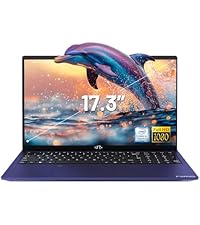
Image: A delivery person handing a package to a customer, illustrating the 90-day return policy for Nimo products.
9.3 Kundestøtte
For any product-related questions, technical assistance, or warranty claims, please contact our professional after-sales service team. Our dedicated support team is available to resolve issues or facilitate replacements.
- E-post: service@nimopc.com
- På nett: Besøk den offisielle NIMO website or product page for contact options.

Image: Customer service representatives wearing headsets, indicating professional customer assistance available via phone and live chat.