
1. Introduksjon
Thank you for choosing the Antec VCX300 ARGB ATX/M-ATX PC Case. This manual provides detailed instructions for the installation, operation, and maintenance of your new computer chassis. Please read this manual thoroughly before installation to ensure proper setup and optimal performance.
2. Sikkerhetsinformasjon
- Koble alltid fra strømforsyningen før du monterer eller fjerner komponenter.
- Handle components with care to avoid damage from electrostatic discharge. Use an anti-static wrist strap if available.
- Keep the case away from water, moisture, and direct heat sources.
- Sørg for tilstrekkelig ventilasjon rundt kabinettet for å forhindre overoppheting.
- Do not attempt to open or repair the power supply unit inside the case. Refer to qualified service personnel.
3. Pakkens innhold
Vennligst sjekk at alle varene er til stede i pakken din:
- Antec VCX300 ARGB ATX/M-ATX PC Case
- Accessory Box (Screws, standoffs, cable ties)
- Brukerhåndbok (dette dokumentet)
4. Produktet er overview
Familiarize yourself with the various parts of your Antec VCX300 ARGB PC Case.
4.1 Frontpanel I/O
- Strømknapp
- Tilbakestill-knapp
- USB 3.0-porter
- USB 2.0-porter
- Lydkontakter (hodetelefoner/mikrofon)
- LED Control Button (for ARGB lighting)
4.2 Intern layout
The VCX300ARGB case supports ATX and Micro-ATX motherboards. It features multiple drive bays for storage and ample space for cooling solutions.
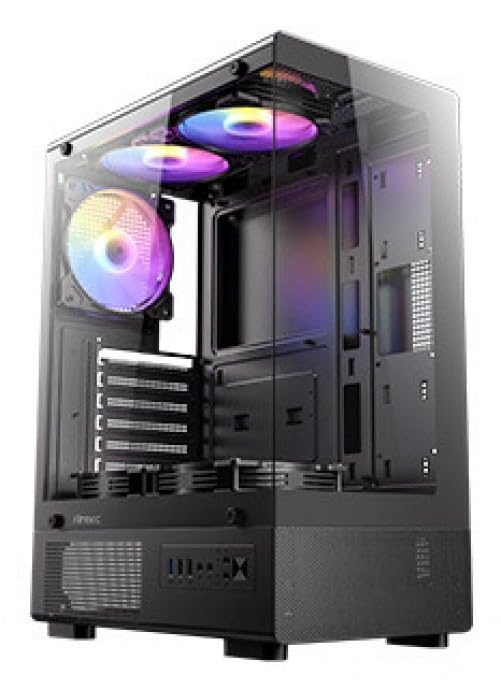
Figur 1: Foran view of the Antec VCX300 ARGB PC Case, showcasing the ARGB lighting elements and front panel I/O ports.
5. Oppsett og installasjon
Follow these steps to install your components into the Antec VCX300 ARGB PC Case.
5.1 Forberedelse av saken
- Plasser etuiet på en flat, stabil overflate.
- Fjern sidepanelene ved å skru ut tommelskruene på baksiden av kabinettet og skyve panelene bakover.
5.2 Hovedkortinstallasjon
- Installer I/O-skjoldet i den bakre åpningen på kabinettet.
- Align the motherboard with the pre-installed standoffs. Ensure the screw holes on the motherboard match the standoffs.
- Fest hovedkortet med de medfølgende skruene fra tilbehørsboksen.
5.3 Installasjon av strømforsyning
- Position the power supply unit (PSU) in the designated compartment at the bottom rear of the case.
- Secure the PSU with screws from the outside rear of the case.
5.4 Installasjon av lagringsstasjon (HDD/SSD)
- Locate the drive bays. The VCX300ARGB typically features dedicated bays for 3.5" HDDs and 2.5" SSDs.
- For 3.5" HDDs, slide the drive into the bay and secure it with screws or tool-less clips if available.
- For 2.5" SSDs, mount the drive onto the designated brackets or trays and secure with screws.
5.5 Expansion Card Installation (GPU, etc.)
- Fjern de nødvendige dekslene til utvidelsessporene fra baksiden av kabinettet.
- Insert the expansion card (e.g., graphics card) into the appropriate PCIe slot on the motherboard.
- Fest kortet med en skrue.
5.6 Kabelhåndtering
Bruk utskjæringene for kabelføring og festepunkter bak hovedkortbrettet til å håndtere kablene. Dette forbedrer luftstrømmen og estetikken.
- Connect all power cables from the PSU to the motherboard and components.
- Connect front panel I/O cables (USB, audio, power/reset switches, LED) to the corresponding headers on the motherboard.
- Connect ARGB cables from the case fans/strips to the motherboard's ARGB header or the integrated ARGB controller.
6. Drift
6.1 Slå på
- Ensure all components are correctly installed and cables are connected.
- Close and secure the side panels.
- Connect the power cable to the PSU and a wall outlet.
- Flip the power switch on the PSU to the "ON" position.
- Press the Power Button on the front panel of the case.
6.2 ARGB-lyskontroll
The Antec VCX300 ARGB case features customizable ARGB lighting. You can control the lighting effects in two ways:
- LED-kontrollknapp: Press the dedicated LED control button on the front panel to cycle through various pre-set ARGB lighting modes and colors. Hold the button for a few seconds to turn off/on the lighting.
- Programvare for hovedkort: If the ARGB cables are connected to a compatible motherboard ARGB header, you can synchronize and customize lighting effects using your motherboard's proprietary software (e.g., ASUS Aura Sync, MSI Mystic Light Sync, Gigabyte RGB Fusion, ASRock Polychrome Sync). Refer to your motherboard manual for specific instructions.
7. Vedlikehold
Regelmessig vedlikehold bidrar til å sikre optimal ytelse og levetid for PC-komponentene dine.
- Støvfiltre: The VCX300ARGB includes dust filters. Regularly remove and clean these filters to prevent dust buildup inside the case, which can impede airflow and cooling performance. Use compressed air or a soft brush.
- Innvendig rengjøring: Periodically open the case and use compressed air to remove dust from fans, heatsinks, and other components. Ensure the system is powered off and unplugged before cleaning.
- Utvendig rengjøring: Tørk av utsiden av dekselet med en myk klutamp klut. Unngå sterke kjemikalier eller slipende materialer.
8. Feilsøking
| Problem | Mulig årsak | Løsning |
|---|---|---|
| PC-en slår seg ikke på. | Power cable disconnected, PSU switch off, front panel power button not connected, faulty PSU. | Check power cable connections. Ensure PSU switch is ON. Verify front panel power button cable is correctly connected to motherboard. Test PSU if possible. |
| ARGB lighting not working. | ARGB cables disconnected, incompatible motherboard header, LED control button issue. | Ensure ARGB cables are securely connected to the motherboard or controller. Try cycling modes with the LED control button. Verify motherboard ARGB header compatibility. |
| Poor airflow/overheating. | Dust buildup, incorrect fan orientation, obstructed vents. | Clean dust filters and internal components. Ensure fans are oriented correctly for optimal airflow (intake/exhaust). Check for any obstructions. |
9. Spesifikasjoner
| Trekk | Detalj |
|---|---|
| Modellnavn | VCX300ARGB |
| Sakstype | Mid Tower |
| Hovedkortstøtte | ATX, Micro-ATX |
| Dimensjoner (D x B x H) | 14.57" D x 8.07" B x 17.72" H (ca. 370 mm x 205 mm x 450 mm) |
| Varevekt | 3.6 kilo |
| Interne stasjonsrom | 5 (combination of 3.5" HDD and 2.5" SSD) |
| Front I / O-porter | USB 3.0, USB 2.0, Audio In/Out, Power, Reset, LED Control Button |
| Spesielle funksjoner | Built-In Fan, Dust Filter, LED Control Button, Noise Reduction Technology, Partition Plate Cooling Technology, ARGB Lighting |
| Farge | Svart |
10. Garanti og støtte
Antec products come with a limited warranty. Please refer to the official Antec website or your regional distributor for specific warranty terms and conditions applicable to your product.
For technical support, product registration, or further inquiries, please visit the official Antec support page: www.antec.com/support
Kontaktinformasjon for importør: Ariisto House, 5th Floor, Junction of N.S.Phadke Road, Telli Gali, Andheri (E), Mumbai- 400 069 Maharashtra, India