
1. Viktig sikkerhetsinformasjon
Please read all instructions carefully before using this monitor. Keep this manual for future reference.
- Strømkilde: Bruk kun strømledningen og adapteren som følger med skjermen. Sørg for at strømuttaket er skikkelig jordet.
- Ventilasjon: Ikke blokker ventilasjonsåpningene. Sørg for tilstrekkelig plass rundt skjermen for riktig luftstrøm.
- Fuktighet: Do not expose the monitor to rain, moisture, or high humidity. Avoid placing liquids near or on the monitor.
- Rengjøring: Trekk ut strømledningen før rengjøring. Bruk en myk, tørr klut. Ikke bruk flytende rengjøringsmidler eller sprayrengjøringsmidler.
- Plassering: Place the monitor on a stable, flat surface. Avoid direct sunlight or heat sources.
- Service: Ikke prøv å utføre service på dette produktet selv. Henvis all service til kvalifisert servicepersonell.
2. Pakkens innhold
Kontroller at alle varene er til stede i pakken før du fortsetter med oppsettet.
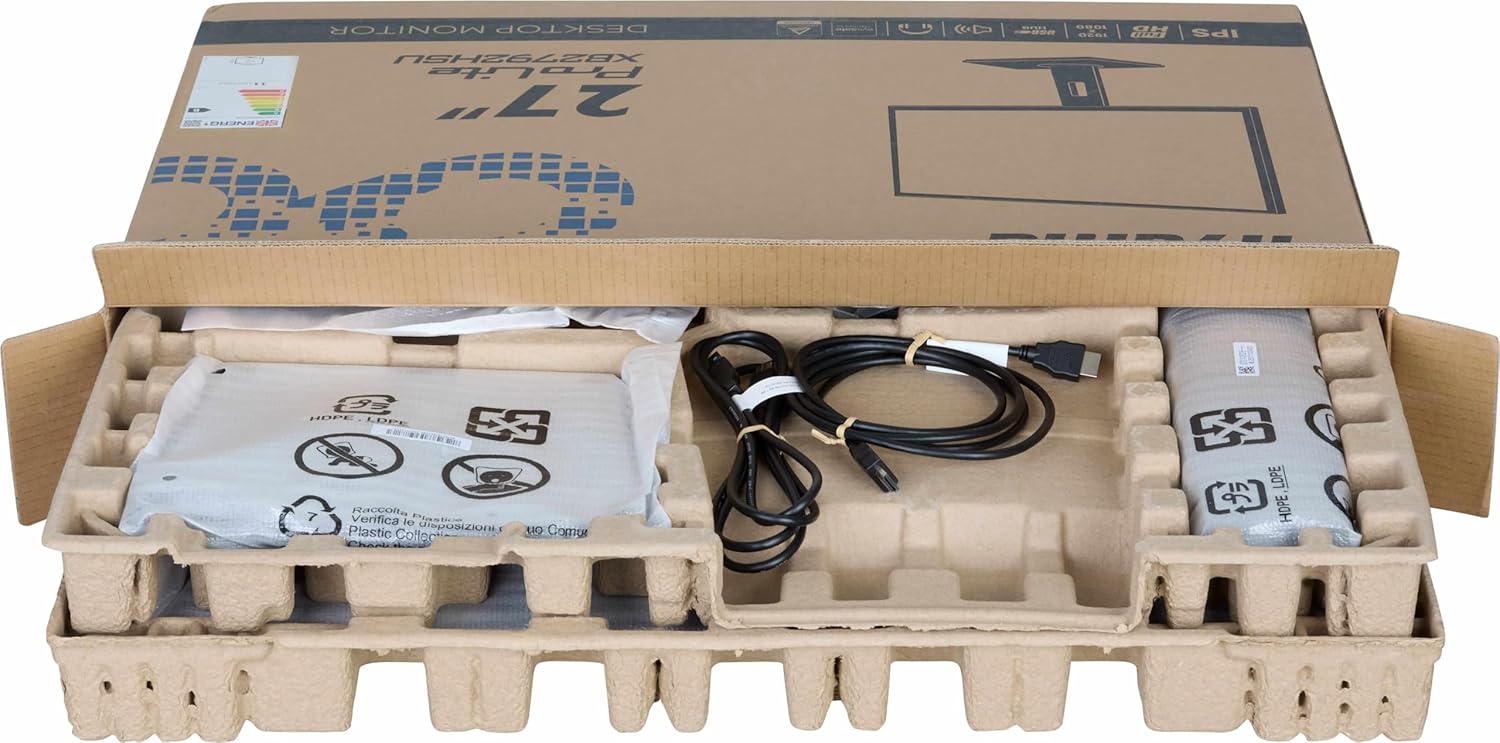
Bilde: The iiyama ProLite XB2792QSU-B1 monitor and its accessories, including cables and stand components, neatly packed in the retail box.
- iiyama ProLite XB2792QSU-B1 Monitor
- Skjermstativ (base og hals)
- Strømkabel
- HDMI-kabel
- USB Cable (for USB hub functionality)
- Quick Start Guide / Safety Guide

Bilde: Et nærbilde view of the power cable, HDMI cable, and USB cable included with the monitor.
3. Installasjonsinstruksjoner
3.1 Montering av stativet
- Carefully remove the monitor from its packaging, keeping it protected on a soft surface (e.g., foam packaging).
- Fest stativhalsen til baksiden av skjermen. Sørg for at den klikker ordentlig på plass, eller at den er festet med skruer hvis de følger med.
- Fest stativbasen til stativhalsen. Stram tommelskruen(e) fra bunnen av basen for å feste den.

Bilde: The rear of the iiyama ProLite XB2792QSU-B1 monitor, showing the stand securely attached to the monitor panel.
3.2 Tilkoblingskabler
Sørg for at skjermen og datamaskinen er slått av før du foretar noen tilkoblinger.
- Strømtilkobling: Koble strømkabelen til skjermens strøminngang og deretter til en jordet stikkontakt.
- Videotilkobling: Connect one end of the HDMI or DisplayPort cable to the corresponding port on your computer's graphics card and the other end to the HDMI or DisplayPort input on the monitor.
- USB Hub Connection (Optional): Connect the supplied USB cable from your computer's USB port to the upstream USB port on the monitor to enable the monitor's built-in USB 3.2 hub.
- Lydtilkobling (valgfritt): If you wish to use external speakers or headphones connected to the monitor, connect an audio cable from your computer's audio output to the monitor's audio input, or connect headphones directly to the monitor's audio output jack.

Bilde: En detaljert view of the monitor's connectivity panel, showing the power input, HDMI ports, DisplayPort, USB 3.2 ports, and audio jack.
3.3 Første gangs strøm på
- Slå på datamaskinen.
- Trykk på av/på-knappen på skjermen. Av/på-indikatorlampen skal lyse.
- The monitor should automatically detect the input signal. If not, you may need to manually select the input source using the On-Screen Display (OSD) menu.
4. Betjening av monitoren
4.1 On-Screen Display (OSD)-meny
The OSD menu allows you to adjust various monitor settings. The control buttons are typically located on the bottom or rear of the monitor.

Bilde: Fronten view of the iiyama ProLite XB2792QSU-B1 monitor, displaying its slim bezel design and the location of the control buttons (usually on the bottom right bezel or rear).
- Trykk på Meny-knappen for å åpne OSD.
- Bruk navigasjonsknappene (vanligvis piler) for å navigere gjennom menyalternativene.
- Trykk på Velg/OK-knappen for å bekrefte et valg eller gå inn i en undermeny.
- Trykk på Avslutt/Tilbake-knappen for å gå tilbake til forrige meny eller avslutte skjermmenyen.
4.2 Vanlige OSD-innstillinger
- Bilde: Adjust Brightness, Contrast, Sharpness, Gamma, OverDrive.
- Farge: Adjust Color Temperature, RGB levels, or select preset color modes.
- Inndatavalg: Bytt manuelt mellom HDMI- og DisplayPort-innganger.
- Lyd: Adjust volume for the built-in speakers or headphone output.
- OSD-innstillinger: Adjust OSD language, position, and timeout.
- Informasjon: Display current resolution, refresh rate, and model information.
4.3 Ergonomiske justeringer
Skjermstativet gir mulighet for ulike justeringer for å optimalisere viewkomfort.

Bilde: En sideprofffile of the iiyama ProLite XB2792QSU-B1 monitor, illustrating its adjustable stand that allows for height, tilt, and swivel movements.
- Høydejustering: Gently push or pull the monitor panel up or down to adjust its height.
- Justering av vippe: Hold the top and bottom edges of the monitor panel and gently tilt it forwards or backwards.
- Svingjustering: Rotate the monitor panel left or right on its stand base.
- Pivotfunksjon: The monitor can be rotated 90 degrees to a portrait orientation. Ensure the monitor is at its maximum height and tilted back slightly before pivoting to avoid hitting the desk.
5. Vedlikehold
5.1 Rengjøre skjermen
- Trekk alltid ut skjermens strømledning fra stikkontakten før rengjøring.
- Bruk en myk, lofri klut litt damprengjøres med vann eller et mildt, ikke-slipende skjermrensemiddel.
- Ikke spray rengjøringsmiddel direkte på skjermen. Påfør det først på kluten.
- Unngå å bruke benzen, tynner, ammoniakkbaserte rengjøringsmidler eller slipende materialer, da disse kan skade skjermen ellerasing.
5.2 Oppbevaring
Hvis du oppbevarer skjermen over lengre tid, koble fra alle kabler og pakk den i originalemballasjen hvis mulig. Oppbevar den på et kjølig og tørt sted, unna direkte sollys og ekstreme temperaturer.
6. Feilsøking
Hvis du støter på problemer med skjermen, kan du se følgende vanlige problemer og løsninger.
| Problem | Mulig løsning |
|---|---|
| Ingen strøm / Strøm-LED av |
|
| Ingen signal / "Ingen signal"-melding |
|
| Bildet er uskarpt eller forvrengt |
|
| Fargene er feil |
|
| USB-porter fungerer ikke |
|
If the problem persists after trying these solutions, please contact iiyama customer support.
7. Tekniske spesifikasjoner
Below are the key technical specifications for the iiyama ProLite XB2792QSU-B1 monitor.
| Trekk | Spesifikasjon |
|---|---|
| Modellnummer | XB2792QSU-B1 |
| Skjermstørrelse | 27 tommer |
| Paneltype | IPS |
| Oppløsning | 2560 x 1440 (QHD) |
| Oppdateringsfrekvens | 120 Hz |
| Aspektforhold | 16:9 |
| Responstid | 5 millisekunder |
| Lysstyrke | 350 cd/m² |
| Viewing vinkel | 178° (H) / 178° (V) |
| Maskinvareforbindelse | 1x HDMI, 1x DisplayPort, 2x USB 3.2 Gen 1, 3.5mm Audio Out |
| Varedimensjoner (D x B x H) | 8.25" D x 24.25" B x 15.59" H |
| Varevekt | 5.5 kilo |
| Farge | Svart |
8. Garanti og støtte
This iiyama monitor comes with a manufacturer's warranty. For detailed warranty terms and conditions, please refer to the warranty card included in your product packaging or visit the official iiyama webnettstedet.
For technical support, troubleshooting assistance, or service inquiries, please contact iiyama customer support through their official channels. Have your monitor's model number (XB2792QSU-B1) and serial number ready when contacting support.
Official iiyama Webnettsted: www.iiyama.com