
1. Introduksjon
The Radioddity X1 Walkie Talkies are designed for reliable two-way communication in various environments. Featuring an IP67 waterproof and dustproof rating, durable construction, and advanced noise reduction, these FRS radios are suitable for outdoor adventures, professional use, and emergency situations. They offer a long communication range and include essential features like NOAA weather alerts and voice-activated transmission (VOX).

Image: The Radioddity X1 Walkie Talkie, showcasing dens robuste design.
2. Hva er i esken
Upon opening your Radioddity X1 package, you should find the following items:
- 2 x Radioddity X1 Walkie Talkies
- 2 x oppladbare batterier
- 1 x 2-i-1 USB-C-ladekabel
- 2 x belteklips
- 2 x håndstropper
- 1 x adaptere
- 1 x brukerhåndbok (dette dokumentet)

Image: All components included in the Radioddity X1 package, including two radios, batteries, charging cable, belt clips, hand straps, and adapters.
3. Oppsett
3.1. Installasjon av batteri
- Sørg for at walkie-talkien er slått av.
- Finn batterirommet på baksiden av enheten.
- Align the battery with the contacts and gently push it into the compartment until it clicks into place.
3.2. Lader batteriet
The Radioddity X1 features a 2500mAh rechargeable lithium battery. For optimal performance, fully charge the battery before first use.
- Connect the provided USB-C charging cable to the charging port on the walkie talkie.
- Connect the other end of the USB-C cable to the adapter, and then plug the adapter into a standard power outlet. Alternatively, you can connect the USB-C cable to a compatible USB power source (e.g., computer, power bank).
- Batteriindikatoren på displayet viser ladestatus. En full lading tar vanligvis flere timer.
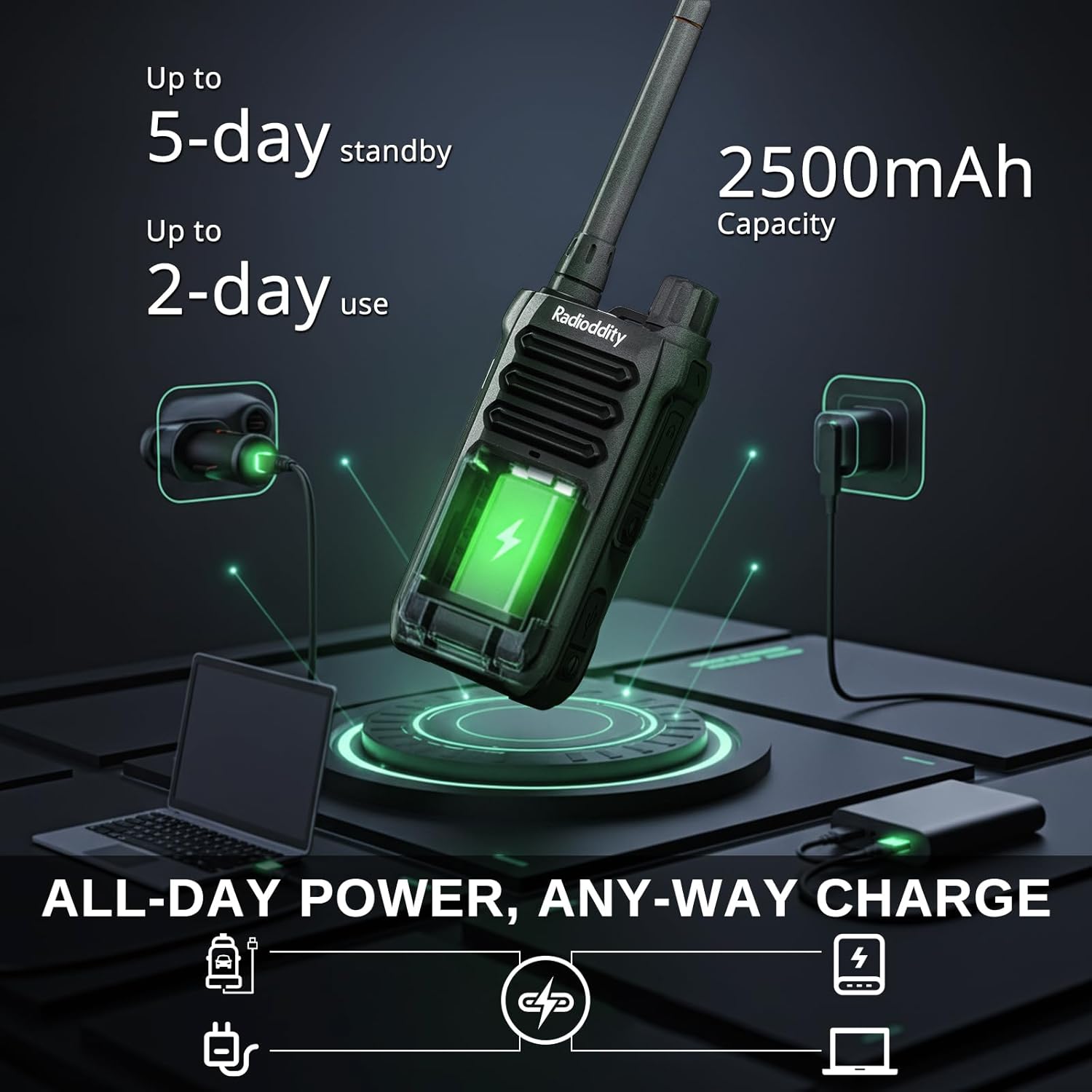
Image: The Radioddity X1 Walkie Talkie connected to a USB-C charger, illustrating the charging process.
3.3. Feste tilbehør
- Belteklips: Secure the belt clip to the designated slot on the back of the walkie talkie.
- Håndstropp: Thread the hand strap through the loop on the top or side of the walkie talkie for added security.
3.4. Slå på/av
To power on or off the device, rotate the power/volume knob located on the top of the unit clockwise to turn on, and counter-clockwise until it clicks to turn off.
4. Bruksanvisning
4.1. Kanalvalg
The Radioddity X1 comes pre-programmed with 22 FRS channels. To select a channel:
- Trykk på MENY knappen for å gå inn i menyen.
- Bruk Pil opp/ned buttons to navigate to the channel setting.
- Pressen OK for å bekrefte, bruk deretter Pil opp/ned knappene for å velge ønsket kanal (1–22).
- Pressen OK again to save the selection and MENY å gå ut.
4.2. Privacy Codes (CTCSS/DCS)
The radio supports 155 privacy codes (CTCSS/DCS) to filter out unwanted conversations on a channel. While not providing true privacy, these codes ensure you only hear transmissions from radios set to the same channel and code.
- Trykk på MENY knapp.
- Navigate to the CTCSS or DCS setting using the Pil opp/ned knapper.
- Pressen OK, then select your desired code.
- Pressen OK å lagre og MENY to exit. Ensure all radios in your group use the same channel and privacy code.
4.3. Trykk-og-snakk (PTT)
To transmit, press and hold the large PTT knappen på siden av radioen. Snakk tydelig inn i mikrofonen. Slipp PTT knappen for å lytte.
4.4. VOX-funksjon (stemmestyrt overføring)
The VOX function allows for hands-free operation. When activated, the radio transmits automatically when it detects your voice.
- Trykk på MENY knapp.
- Naviger til VOX innstilling.
- Pressen OK, then select an appropriate sensitivity level (higher numbers for lower sensitivity).
- Pressen OK å lagre og MENY å gå ut.

Image: Icon representing the Voice Operated Transmission (VOX) function.
4.5. NOAA Weather Alerts
Stay informed with 10 built-in NOAA weather channels providing real-time alerts.
- Trykk på MENY knapp.
- Naviger til NOAA innstilling.
- Pressen OK, then select the desired NOAA channel or activate weather alerts.
- Pressen OK å lagre og MENY å gå ut.

Image: Icon representing the NOAA Scan & Alert feature.
4.6. Opptak avspilling
The Radioddity X1 features a unique recording playback function for up to 20 messages.
- To record, press and hold the dedicated REKORD button (if available, or refer to specific menu options).
- To play back recorded messages, press the SPILL OM knapp.

Image: The Radioddity X1 display showing the recording and replay functions, highlighting its audio safety net capability.

Image: Icon representing the Recording function.
4.7. Støyreduksjon
The dual-way noise reduction feature ensures clear communication even in noisy environments.

Image: The Radioddity X1 in a construction setting, illustrating its noise reduction capabilities for clear communication.
5. Vedlikehold
5.1. IP67 Waterproof and Dustproof Care
The Radioddity X1 is rated IP67, meaning it is dustproof and can withstand submersion in up to 1 meter of water for 30 minutes. To maintain its integrity:
- Ensure all port covers (e.g., charging port, accessory port) are securely closed before exposure to water or dust.
- After exposure to water, wipe the radio dry with a clean cloth. Do not charge the radio if the charging port is wet.
- Avoid prolonged submersion beyond the specified depth and time.

Image: The Radioddity X1 Walkie Talkie submerged in clear water, demonstrating its IP67 waterproof capability.

Image: The Radioddity X1 Walkie Talkie partially covered in sand, highlighting its dustproof design.
5.2. Batteripleie
The 2500mAh battery provides up to 48 hours of average use. To prolong battery life:
- Unngå å utlade batteriet helt regelmessig.
- Oppbevar radioen på et kjølig og tørt sted når den ikke er i bruk.
- Bruk kun den medfølgende ladekabelen og adapteren.
5.3. Rengjøring
Tørk av radioen med en myk, damp klut. Ikke bruk sterke kjemikalier eller skurende rengjøringsmidler.
6. Feilsøking
| Problem | Mulig årsak | Løsning |
|---|---|---|
| Ingen strøm | Batteriet er lavt eller ikke riktig installert. | Lad batteriet eller installer det på nytt. |
| Kan ikke sende eller motta | Feil kanal eller personvernkode. Utenfor rekkevidde. | Verify channel and privacy code settings. Move closer to the other radio. |
| Dårlig lydkvalitet | Weak signal, interference, or volume too low. | Adjust volume. Move to an area with less obstruction. Check for interference sources. |
| Kort kommunikasjonsrekkevidde | Obstructions (buildings, terrain), low power channel. | Move to an open area. Use channels 1-7 or 15-22 for higher power output. |
7. Spesifikasjoner
| Trekk | Detalj |
|---|---|
| Merke | Radiodditet |
| Modellnummer | X1 |
| Farge | Svart |
| Antall kanaler | 22 (FRS) |
| Frekvensområde | FRS |
| Maksimal talerekkevidde | 5 Miles (open areas), 2 Miles (urban settings) |
| Vannmotstandsnivå | IP67 vanntett |
| Spesielle funksjoner | Dust Proof, Emergency Alarm (SOS), Long Range, Shockproof, Voice Operated Transmission (VOX), Noise Reduction, NOAA Weather Alerts, Recording Playback |
| Batterikapasitet | 2500mAh litium |
| Gjennomsnittlig batterilevetid | 48 timer |
| Lader | USB-C |
| Produktdimensjoner (D x B x H) | 1.1 cm x 2.4 cm x 7.1 cm |
| FCC ID | 2AN62-X1 |

Image: Visual representation of the Radioddity X1's communication range, showing up to 5 miles in open areas and 2 miles in urban settings.

Image: The Radioddity X1 Walkie Talkie on the ground at a construction site, illustrating its durability and shockproof design after 1,000+ drop tests.
8. Garanti og støtte
8.1. Garantiinformasjon
The Radioddity X1 Walkie Talkies come with an 18 måneders garanti from the date of purchase. This warranty covers manufacturing defects and ensures your product is free from material and workmanship flaws under normal use. Please retain your proof of purchase for warranty claims.
8.2. Kundestøtte
For technical assistance, troubleshooting, or warranty inquiries, please visit the official Radioddity website or contact their customer support team. You can find contact information and additional resources on their webnettsted: www.radioddity.com.
9. Produktvideoer
Radioddity X1 | Built for Harsh Conditions
Video: This official Radioddity video demonstrates the X1's robust features, including its IP67 dustproof and waterproof capabilities, drop resistance, car-crush resistance, long-range communication, and noise-cancelling audio, highlighting its suitability for challenging environments.