
1. Overview
The Waveshare Luckfox PicoKVM is a compact IP KVM remote management tool designed for efficient control of various devices such as personal computers, laptops, desktops, and servers. It offers seamless integration with 1920×1080@60fps HDMI input and HID output, featuring a 1.54-inch touch display for real-time status monitoring. Its hardware-independent architecture enhances security and reliability for remote operations.

Bilde: Foran view of the Luckfox PicoKVM device, showcasing its 1.54-inch touch display and compact design.
2. Pakkeinnhold
Pakken inneholder følgende varer:
- Luckfox PicoKVM device x1

Image: The package content showing the Luckfox PicoKVM device.
3. Nøkkelfunksjoner
The Luckfox PicoKVM offers a robust set of features for comprehensive remote management:
- HDMI-inngangsgrensesnitt: Recognized by PC as a display for video capture, offering seamless integration.
- USB-port: Simulates mouse, keyboard, and USB storage devices for versatile control.
- 100Mbps Ethernet Port: Enables efficient video and control signal transmission over the network.
- 1.54-inch Touch Display: Displays IP address, connection status, and system operating status for easy monitoring.
- TF Card Slot & I/O Expansion: Supports storage expansion and host power ON/OFF control via I/O interface.

Image: Visual representation of the key features of the Luckfox PicoKVM, including keyboard/mouse simulation, HDMI input, remote OS installation, I/O power control, web access, and TF card storage expansion.
4. Oppsett
Follow these steps to set up your Luckfox PicoKVM device:
- Koble til HDMI-inngang: Use an HDMI cable to connect the HDMI output of your target device (PC, server, etc.) to the HDMI IN port on the PicoKVM.
- Connect USB for HID: Connect a USB cable from your target device to the USB port on the PicoKVM. This simulates mouse, keyboard, and USB storage devices for control.
- Koble til Ethernet: Plug an Ethernet cable from your local area network (router/switch) into the ETH port on the PicoKVM for network communication.
- Strøm på: Connect a USB Type-C cable to the USB Type-C port on the PicoKVM for power supply. The device will power on automatically.
- Innledende konfigurasjon: The 1.54-inch touch display will show the device's IP address and connection status. Note this IP address for web adgang.

Bilde: Detaljert view of the Luckfox PicoKVM's ports and buttons, including HDMI IN, PIN OUT, USB, ETH, Reset, Boot, and TF card slot.
Demonstrasjonsvideo for oppsett
Video: An official Waveshare video demonstrating the setup and features of the Luckfox PicoKVM series, including port connections and basic operation.
5. Bruksanvisning
Once the PicoKVM is set up, you can begin remote operations:
- Adgang Web Grensesnitt: Åpne a web browser on any device connected to the same network as the PicoKVM. Enter the IP address displayed on the PicoKVM's touch screen into the browser's address bar.
- Fjernkontroll: De web interface will display the screen of your connected target device. You can control the mouse and keyboard remotely through this interface.
- Virtuelle medier: Utilize the TF card slot for storage expansion. The web interface allows you to mount images for remote OS installation or booting.
- I/O Power Control: If using the optional PicoKVM Ext Expansion Board, you can achieve physical-level remote power ON/OFF and restart control for the host device via the I/O interface.
- Wake-on-LAN (WOL): The device supports Wake-on-LAN functionality, allowing you to power on compatible target devices remotely via the network.

Image: The Luckfox PicoKVM connected to an external expansion board for remote power control, demonstrating its advanced capabilities.
6. Vedlikehold
To ensure optimal performance and security of your Luckfox PicoKVM, regular maintenance is recommended:
- Fastvareoppdateringer: Periodically check for and install firmware updates via the web interface. Updates often include enhancements to security, reliability, and performance.
- TF-korthåndtering: Ensure the TF card used for storage expansion is in good condition and has sufficient space for virtual media operations.
7. Feilsøking
If you encounter issues with your Luckfox PicoKVM, consider the following troubleshooting steps:
- Ingen HDMI-signal: Verify all HDMI connections are secure. Ensure the target device is powered on and outputting a signal. Check for firmware updates, as initial firmware versions may have HDMI detection issues.
- Problemer med tastaturinndata: Ensure the USB connection to the target device is secure. Check for firmware updates, as some users reported random character typing or no input with older firmware.
- Video Output Color/Quality: If the video output appears discolored (e.g., yellowish) or of poor quality, check for available firmware updates. Adjust display settings within the PicoKVM web interface if options are available.
- Feil med fastvareoppdatering: If the update function via the web interface fails, consult the Waveshare wiki page for manual firmware flashing instructions.
- Slow ISO Uploads: For faster virtual media uploads, consider using SCP (Secure Copy Protocol) instead of the web interface, or write directly to the SD card.
- Incorrect Time Zone: Adjust the time zone setting within the PicoKVM's web grensesnitt.
- General Connection Issues: Ensure all cables (HDMI, USB, Ethernet) are properly connected and undamaged. Verify your network connection is stable and active. Try restarting both the PicoKVM device and your target computer.
8. Spesifikasjoner
| Trekk | Detalj |
|---|---|
| Merke | Waveshare |
| Modellnavn | Luckfox PicoKVM |
| Modellnummer | Luck-fox PicoKVM |
| Kompatible enheter | Personal Computer, Laptop, Desktop, Server |
| HDMI-inngang | 1920x1080@60fps |
| HID Output | USB (simulates mouse, keyboard, storage) |
| Ethernet-port | 100 Mbps |
| Trykk på Display | 1.54-tommers |
| Lagringsutvidelse | TF-kortspor |
| I/O-grensesnitt | Supports host power ON/OFF control |
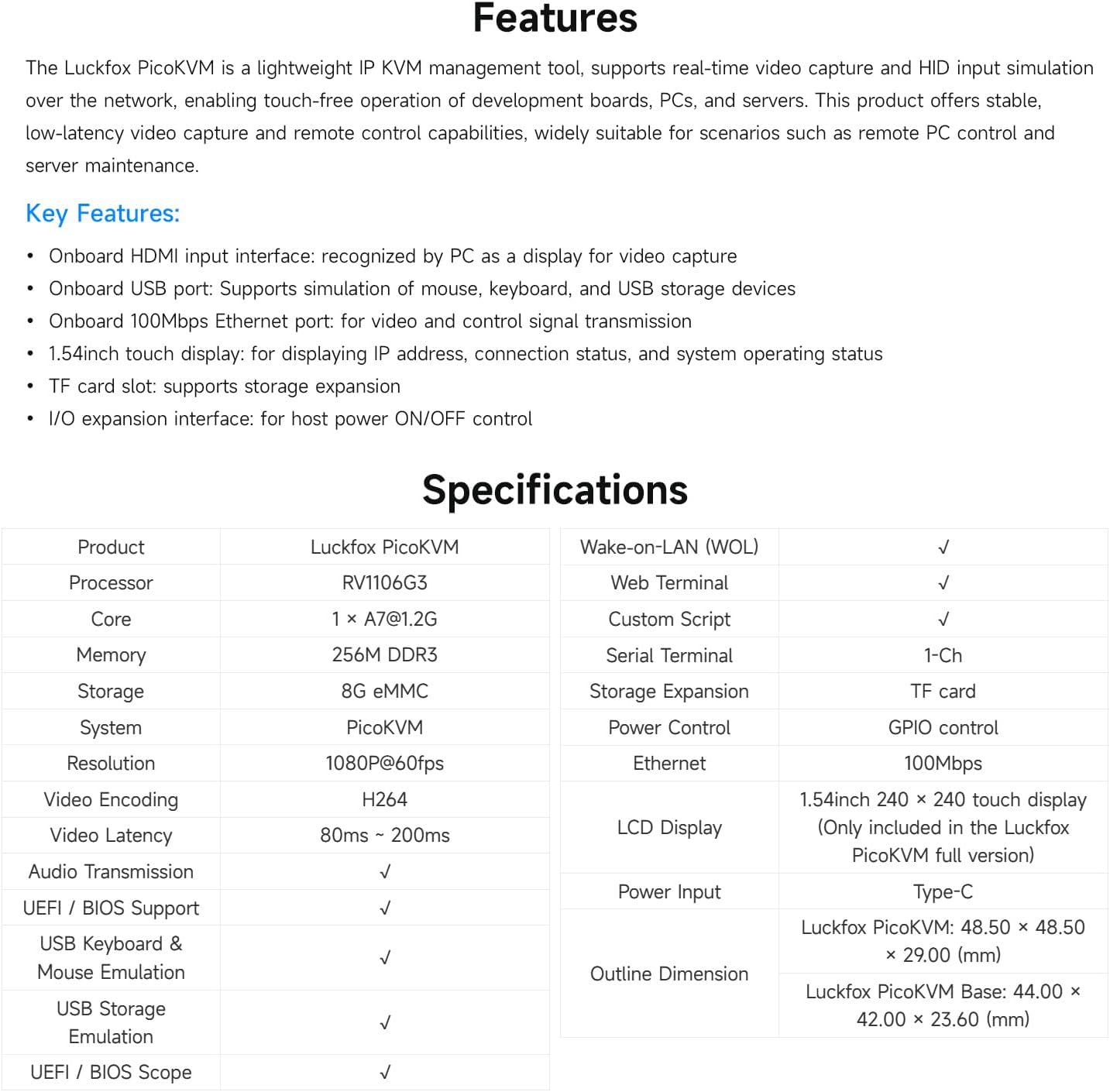
Image: A detailed table outlining the technical specifications and features of the Luckfox PicoKVM.

Image: Diagram showing the outline dimensions of the Luckfox PicoKVM and its base version in millimeters.
9. Garanti og støtte
The Waveshare Luckfox PicoKVM comes with a 1 års garanti fra kjøpsdatoen.
For further technical support, detailed documentation, and community resources, please visit the official Waveshare webnettstedet eller kontakt kundesupportkanalene deres.