
Introduksjon
The Peplink MAX BR1 Pro 5G (HW3) is a rugged, enterprise-grade 5G router designed to provide high-speed, reliable internet connectivity in various environments. Featuring an X65 5G modem, Wi-Fi 6, and advanced networking capabilities like SpeedFusion, this device ensures consistent performance for business-critical applications, vehicles, and remote sites. This manual provides essential information for setting up, operating, and maintaining your router.
Pakkeinnhold
Bekreft at alle varene som er oppført nedenfor er inkludert i pakken din:
- 1x BR1 Pro 5G (HW3) Router
- 4x LTE/5G-antenner
- 2x dobbeltbånds Wi-Fi-antenner
- 1x GPS Active Antenna
- 1x 12V 2A 4 Pin DC Power Supply

Produkt overview
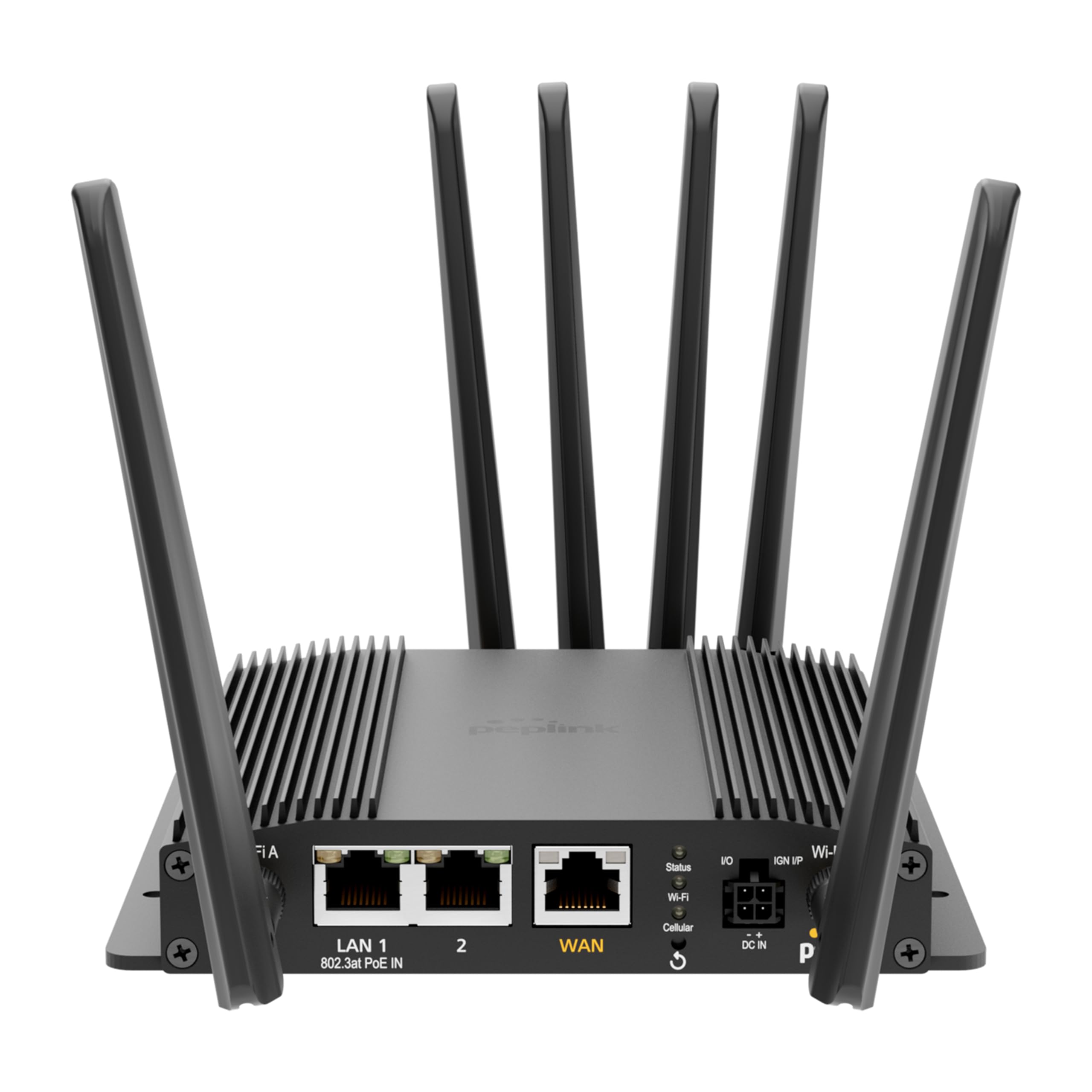
The Peplink MAX BR1 Pro 5G (HW3) features a robust design with multiple connectivity options and indicators.
Frontpanel

- LAN 1 (802.3at PoE IN): Gigabit Ethernet port with Power over Ethernet input capability.
- LAN 2: Gigabit Ethernet-port.
- WAN: Gigabit Ethernet port for primary internet connection.
- Wi-Fi Antenna A & B: Connectors for dual-band Wi-Fi antennas.
- Status-LED: Indikerer enhetens driftsstatus.
- Wi-Fi LED: Indikerer Wi-Fi-aktivitet.
- Cellular LED: Indicates cellular signal strength and connection status.
- I/O & IGN I/P: Input/Output and Ignition Input ports for specialized applications.
- DC IN: Strøminngangsport.
Bakpanel
- Cellular A, B, C, D: Connectors for LTE/5G cellular antennas.
- GPS: Connector for the GPS active antenna.
- Cellular SIM: Redundant SIM slots for 5G/LTE connectivity.
Oppsett
1. Installasjon av SIM-kort
- Sørg for at ruteren er slått av.
- Locate the Cellular SIM slots on the rear panel.
- Insert your activated Nano-SIM cards into the designated slots until they click into place. The router supports redundant SIM slots for failover.
2. Antennetilkobling
- Connect the 4 LTE/5G antennas to the Cellular A, B, C, and D ports on the rear panel.
- Attach the 2 Dual Band Wi-Fi antennas to the Wi-Fi Antenna A and B ports on the front panel.
- Connect the GPS Active Antenna to the GPS port on the rear panel.
- Ensure all antenna connections are finger-tight.
3. Strømtilkobling
- Connect the 12V 2A 4 Pin DC Power Supply to the DC IN port on the front panel.
- Alternatively, if using Power over Ethernet, connect an 802.3at PoE-compliant power source to the LAN 1 port.
4. Innledende konfigurasjon
- Power on the router. Wait for the Status LED to indicate readiness.
- Connect a computer to one of the LAN ports or connect to the default Wi-Fi network (SSID and password usually found on a label on the device).
- Åpne a web nettleseren og naviger til ruterens standard IP-adresse (f.eks. http://192.168.50.1).
- Follow the on-screen wizard to set up your administrative password, time zone, and initial WAN connections.
Bruksanvisning
Nettverkstilkobling
- 5G/LTE Cellular: The router automatically detects and connects to available 5G or LTE networks via the installed SIM cards. It supports major US carriers (AT&T, Verizon, T-Mobile, FirstNet) and global bands.
- Wi-Fi 6: The built-in Wi-Fi 6 (802.11ax) supports 2x2 MU-MIMO technology, operating in both Wi-Fi WAN and/or AP Mode for fast wireless connections.
- Ethernet WAN: Connect a wired internet source to the WAN port for primary or backup connectivity.
Avanserte funksjoner
- SpeedFusion: Utilize Peplink's SpeedFusion bonding and Hot Failover technologies to ensure unbreakable connections and maintain uptime for critical applications.
- GPS & Fleet Ready: Integrated GPS with InControl 2 provides real-time location tracking and remote management capabilities, ideal for mobile deployments.
- Edge Intelligence: Run lightweight applications and diagnostics directly on the router, leveraging its Docker support and 8GB storage.
- PoE-in Power: Supports Power over Ethernet input for flexible deployment in locations with limited power outlets.

Vedlikehold
Firmware oppdateringer
Se etter og installer fastvareoppdateringer regelmessig via ruterens web administration interface. Firmware updates provide new features, security enhancements, and bug fixes. Refer to the Peplink official webnettsted for den nyeste fastvaren og oppdateringsinstruksjoner.
Rengjøring
Use a soft, dry cloth to clean the exterior of the router. Avoid using liquid cleaners or aerosols, which may damage the device. Ensure ventilation slots are clear of dust and debris to prevent overheating.
Feilsøking
If you encounter issues with your Peplink MAX BR1 Pro 5G (HW3) router, consider the following:
- Ingen Internett-tilkobling: Check the Cellular LED for signal strength. Ensure SIM cards are properly inserted and activated. Verify WAN cable connection if using Ethernet.
- Lave hastigheter: Check cellular signal strength. Ensure antennas are correctly positioned. Consider network congestion or data plan limits.
- Wi-Fi-problemer: Verify Wi-Fi antennas are connected. Check Wi-Fi LED. Ensure devices are within range and connected to the correct SSID.
- Strømproblemer: Ensure the power adapter is securely connected or PoE is active on LAN 1.
- Fabrikkinnstilling: If problems persist, a factory reset may resolve configuration issues. Refer to the device's web interface or the official Peplink documentation for instructions on performing a factory reset.
Spesifikasjoner
| Trekk | Detalj |
|---|---|
| Merke | Peplink |
| Modellnavn | MAX BR1 Pro 5G (HW3) |
| Tilkoblingsteknologi | 5G, Ethernet, Wi-Fi |
| Standard for trådløs kommunikasjon | 802.11ax (Wi-Fi 6) |
| Frekvensbåndklasse | Dual-Band |
| Dataoverføringshastighet | 1 Gigabits Per Second (LAN), up to 4.1 Gbps (5G downlink) |
| Maksimal oppstrøms dataoverføringshastighet | 900 megabit per sekund |
| Antall porter | 3 (LAN 1, LAN 2, WAN) |
| PoE-inngang | 802.3at PoE IN on LAN 1 |
| SIM-spor | Redundant Cellular SIM slots |
| GPS | Integrated GPS with Active Antenna support |
| Edge Computing | Docker support, 8GB storage |
| Sikkerhetsprotokoll | WPA2-Enterprise, WPA2-PSK, WPA3 |
| Varevekt | 0.43 kilo |
| Varemål L x B x H | 5.78 cm L x 5.68 cm B x 1.15 cm H |
Garanti og støtte
The Peplink MAX BR1 Pro 5G (HW3) comes with a 1 Year PrimeCare Warranty. For detailed warranty terms, technical support, and additional resources, please visit the official Peplink webnettstedet eller kontakt kundeservicen deres. Ta vare på kjøpskvitteringen for garantikrav.
For further assistance, refer to the comprehensive documentation available on the Peplink Official Webnettstedet.