
1. Overview
The NBD K200 is a compact digital camera designed for capturing high-quality photos and videos. It features a 64MP photo resolution, 4K video recording capabilities, 16X digital zoom, and autofocus. Its lightweight design and user-friendly interface make it suitable for various users, including beginners and travelers.

Bilde: Overview of the NBD K200 camera highlighting its 64MP, 4K, Beauty Mode, Backlight Portrait, Auto Focus, 16X Zoom, Smart Stabilization, and Built-in Filters features.
Pakkeinnhold
Sørg for at alle varene er til stede i pakken:
- NBD K200 Digital Camera Body
- 64GB TF Card (MicroSD Card)
- USB-C-kabel
- Halsstropp
- Brukerhåndbok (dette dokumentet)

Image: The NBD K200 camera, USB cable, card reader, 64GB memory card, lens cleaning cloth, and camera wrist strap, presented as a complete kit.
2. Oppsett
2.1 Lading av batteriet
Before first use, fully charge the camera battery. The camera uses a Lithium Ion battery.
- Insert the battery into the camera's battery compartment.
- Connect the camera to a power source using the provided USB-C cable.
- The charging indicator light will show the charging status. A full charge typically allows for over 300 photos.

Image: The NBD K200 camera connected via USB-C cable to a power bank, illustrating the charging process and highlighting its powerful battery life for approximately 300 photos per charge.
2.2 Sette inn minnekortet
The camera supports microSD cards. A 64GB TF card is included.
- Finn minnekortsporet på kameraet.
- Insert the TF card into the slot with the gold contacts facing the correct direction until it clicks into place.
- For å ta ut, trykk forsiktig på kortet til det spretter ut.
3. Betjening av kameraet
3.1 Strøm på/av
Trykk og hold inne av/på-knappen for å slå kameraet av eller på.
3.2 Grunnleggende kontroller
The camera features a Multi-Functional Roller Button for simplified operation.
- Rulleknapp: Used for one-touch mode switching and precise zoom adjustment. Roll left to zoom out, roll right to zoom in.
- Utløserknapp: Trykk for å ta et bilde eller starte/stoppe videoopptak.
- Modusknapp: Cycles through different shooting modes.
- Flash-knapp: Activates the built-in flash.
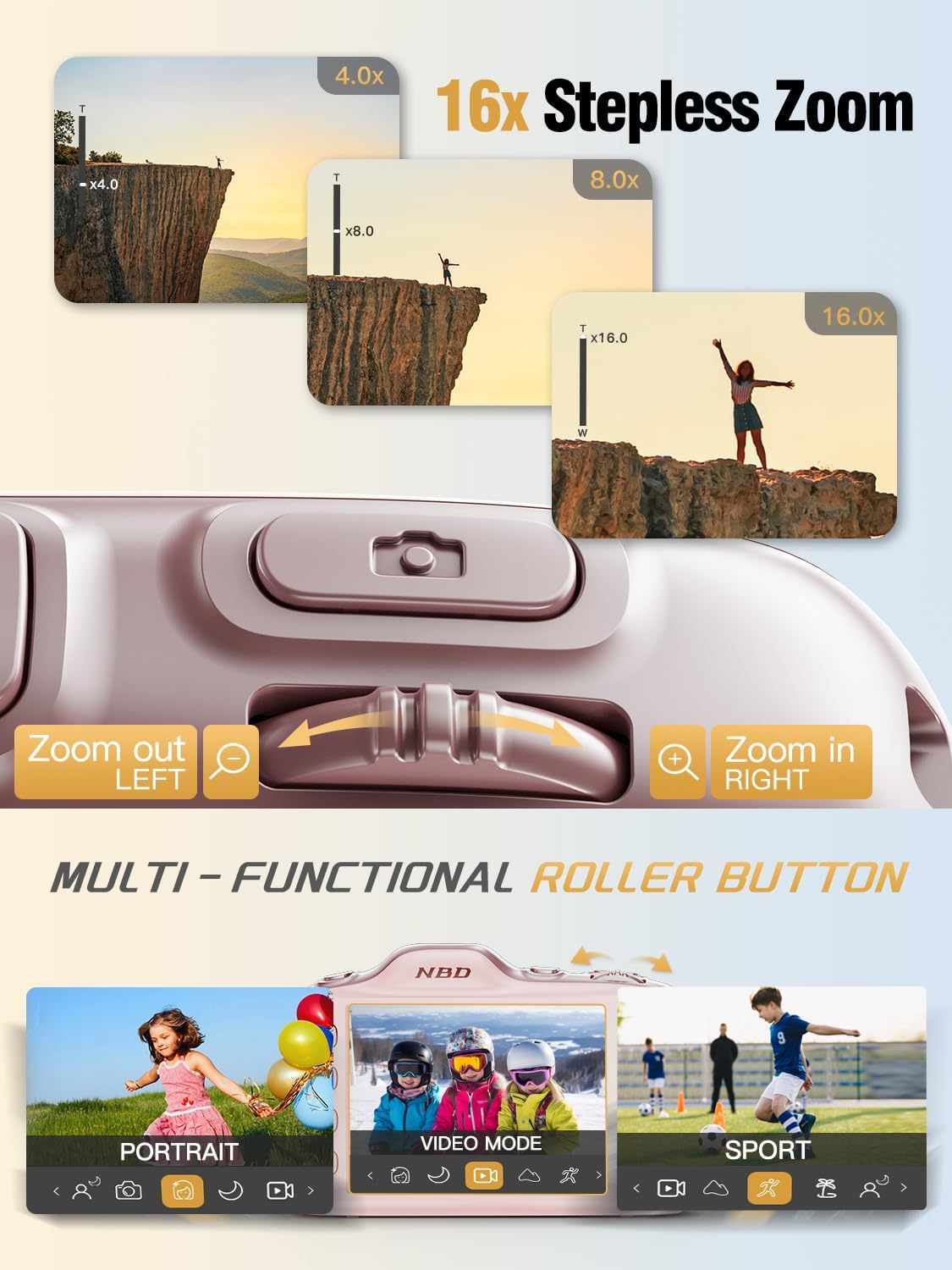
Image: Close-up of the NBD K200 camera's top, highlighting the 16x stepless zoom roller button for zooming in and out, and the mode switch for selecting different shooting modes like Portrait, Video, and Sport.
3.3 Ta bilder
The camera features autofocus for clear images.
- Point the camera at your subject. The autofocus system will automatically detect and focus.
- Use the roller button to adjust the 16X digital zoom as needed.
- Press the shutter button fully to capture the photo.

Image: A woman holding the NBD K200 camera, with the screen displaying an autofocus frame around a subject's face, illustrating the camera's auto-focus capability for effortless portrait photography.
3.4 Spille inn videoer
The camera supports 4K video recording at various frame rates (24, 30, 60 FPS).
- Switch to video mode using the mode button or roller.
- Press the shutter button to start recording. A red indicator will typically appear on the screen.
- Trykk på utløserknappen igjen for å stoppe opptaket.

Image: A young girl running through a field with balloons, illustrating the NBD K200 camera's 4K 30FPS cinema capture capability for smooth, ultra HD video recording.
3.5 Opptaksmoduser og funksjoner
The NBD K200 offers several modes and features to enhance your photography.
- Skjønnhetsmodus: Enhances facial features for portraits and selfies.
- Nattmodus: Optimizes settings for low-light conditions, smoothing grain and balancing tones.
- Portrettmodus: Designed for capturing natural radiance in subjects, balancing tones and softening light.
- Sportsmodus: Ideal for capturing fast-moving subjects with anti-shake stabilization.
- Burst-modus: Captures multiple photos in quick succession (up to 10FPS) for action shots.
- Innebygde filtre: Apply various creative filters like Vintage, Cool Tone, Warm Tone, Sepia, Sketch, and Japan Style.
- Selvutløser: Options for 3, 5, 7, or 10-second delays for group shots or selfies.

Image: A circular diagram illustrating the NBD K200 camera's various shooting modes, including Photo, Video, Night Mode, Portrait Mode, Burst Mode, and Beauty Mode, with example images for each.

Bilde: Eksamples of built-in filters available on the NBD K200 camera, including Vintage, Cool Tone, Warm Tone, Sepia, Sketch, and Japan Style, demonstrating how they alter image ambiance.
3.6 Overføring Files
Transfer photos and videos to a computer or smartphone using the USB-C cable.
- Connect the camera to your device using the USB-C cable.
- Kameraet vil vises som en flyttbar lagringsenhet.
- Dra og slipp files til ønsket plassering.
4. Vedlikehold
4.1 Batteristell
- Lad batteriet helt opp før lengre tids lagring.
- Unngå å utsette batteriet for ekstreme temperaturer.
- Bruk kun de medfølgende eller godkjente ladekablene og adapterne.
4.2 Rengjøring av kameraet
- Bruk en myk, lofri klut til å rengjøre kamerahuset.
- Bruk en spesialklut og -løsning for rengjøring av linsen. Unngå å berøre linsen direkte.
- Ikke bruk sterke kjemikalier eller skurende materialer.
4.3 Oppbevaring
- Oppbevar kameraet på et kjølig og tørt sted, unna direkte sollys.
- If storing for a long period, remove the battery.
- Keep the camera in its protective case or a soft pouch to prevent scratches.
5. Feilsøking
Hvis du støter på problemer, kan du se følgende vanlige løsninger:
| Problem | Mulig løsning |
|---|---|
| Kameraet slår seg ikke på | Sørg for at batteriet er ladet og satt inn riktig. |
| Cannot take photos/videos | Check if the memory card is inserted and has sufficient space. Ensure the camera is not in playback mode. |
| Bildene er uskarpe | Ensure autofocus is engaged. Check for smudges on the lens. Hold the camera steady or use anti-shake feature. |
| Camera not recognized by computer | Sørg for at USB-C-kabelen er ordentlig tilkoblet. Prøv en annen USB-port eller kabel. |
| Flash fungerer ikke | Ensure the flash is enabled in the camera settings or via the dedicated flash button. |
6. Spesifikasjoner
Detailed technical specifications for the NBD K200 Digital Camera:
| Trekk | Detalj |
|---|---|
| Merke | NBD |
| Modellnavn | K200 |
| Effektiv stilloppløsning | 64 MP |
| Videooppløsning | 4K (2160p) |
| Bildefrekvens | 24, 30, 60 FPS |
| Zoom | 16X digital zoom |
| Autofokus | Yes (Contrast Detection) |
| Bildestabilisering | Anti-shake |
| Fotosensorteknologi | CMOS (1/2.4-inch) |
| Blenderåpning | F1.8 |
| Minimum lukkerhastighet | 1/4000 sekunder |
| Visningstype | LCD (2.8 Inches, Color Screen) |
| Lagringsmedier | microSD (up to 64GB included) |
| File Format (Photo) | JPEG (Fine Quality) |
| File Format (video) | MOV |
| Batteritype | Litiumion |
| Tilkobling | USB-C |
| Varevekt | 0.26 kilogram (ca. 121 g) |
| Vannmotstandsnivå | Ikke vannbestandig |
7. Garanti og støtte
For warranty information and technical support, please refer to the contact details provided with your purchase or visit the official NBD webnettstedet. Ta vare på kjøpsbeviset for garantikrav.