
1. Introduksjon
This manual provides detailed instructions for the safe and efficient use of your Surfans F20 Pro Android Hi-Res Music Player. Please read this manual thoroughly before operating the device and retain it for future reference.
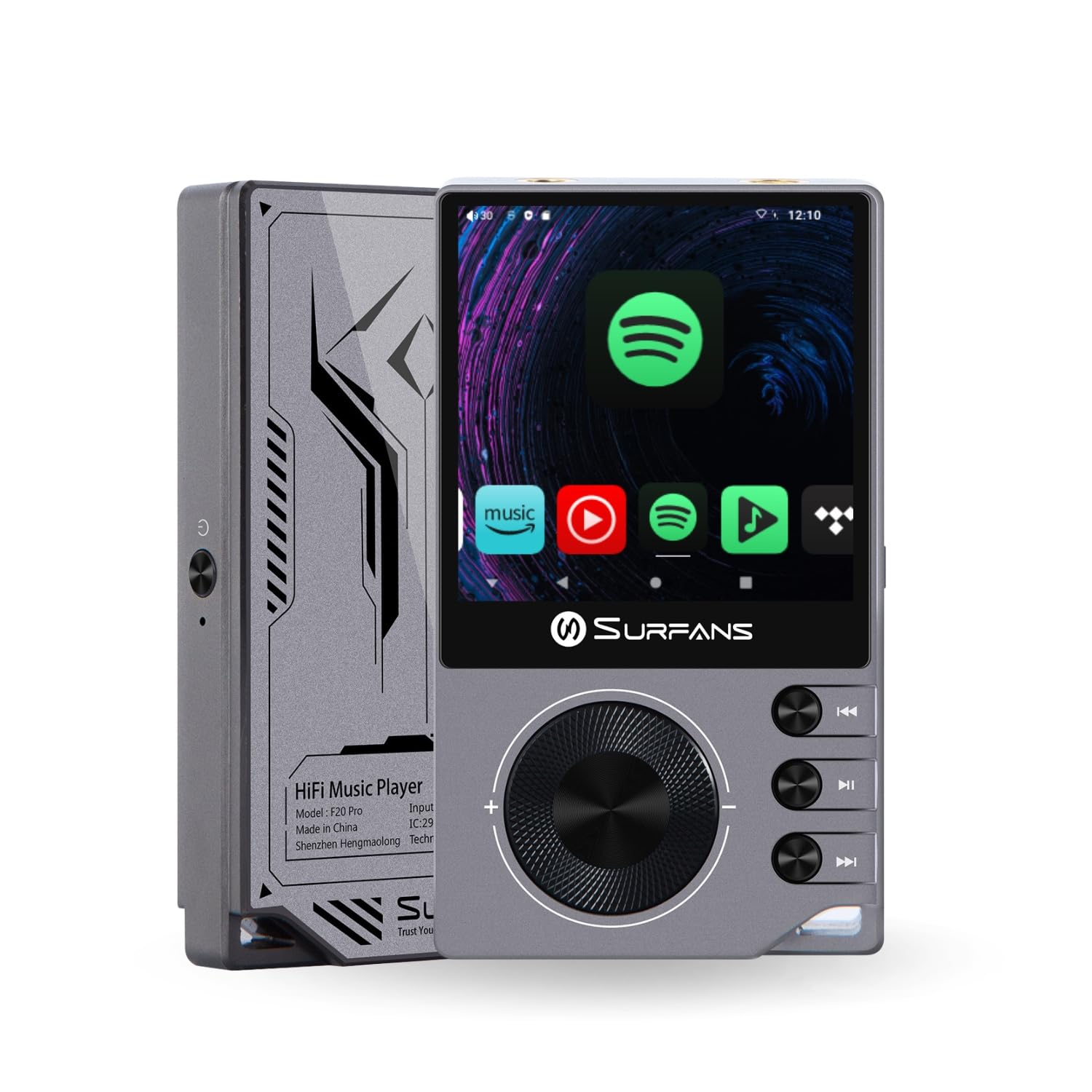
The Surfans F20 Pro Hi-Res Music Player, showcasing its compact design and touchscreen interface.
2. Pakkens innhold
Bekreft at alle varene er til stede i pakken:
- Surfans F20 Pro Hi-Res Music Player
- USB Type-C-kabel
- 32 GB MicroSD Memory Card (pre-installed or separate)
- Beskyttende etui
- Brukerhåndbok (dette dokumentet)
3. Enhet overview
Familiarize yourself with the physical components and ports of your F20 Pro player.

Foran og bak view of the Surfans F20 Pro, highlighting its robust CNC metal chassis and button layout.
3.1. Nøkkelfunksjoner
- Dual ESS9018Q2M DACs: For high-fidelity audio processing.
- Octa-Core Android 12 System: Enables streaming app compatibility and smooth operation.
- 3.5mm Single-Ended & 4.4mm Balanced Outputs: Versatile headphone connectivity.
- Bluetooth 5.0 with LDAC: High-quality wireless audio transmission.
- Dobbeltbånds Wi-Fi (2.4 GHz og 5 GHz): For stable internet connectivity.
- Utvidbar lagring: Supports up to 1TB via MicroSD card.
- 2.7-tommers berøringsskjerm: Intuitivt brukergrensesnitt.
4. Oppsett
4.1. Lading av enheten
Before first use, fully charge the F20 Pro. Connect the included USB Type-C cable to the device's charging port and a compatible USB power adapter (not included) or computer USB port. The charging indicator will show the charging status.
4.2. Sette inn et MicroSD-kort
The F20 Pro supports MicroSD cards up to 1TB for expanded storage. Locate the MicroSD card slot on the side of the device. Gently insert the card until it clicks into place. To remove, push the card in again until it springs out.
4.3. Førstegangs oppstart
Press and hold the power button until the screen illuminates. Follow the on-screen prompts to complete the initial setup, including language selection and Wi-Fi connection.
4.4. Koble til Wi-Fi
Naviger til Innstillinger > Nettverk og internett > Wi-Fi. Select your desired network and enter the password if prompted. The F20 Pro supports both 2.4GHz and 5GHz Wi-Fi bands.

The Surfans F20 Pro demonstrating its dual-band Wi-Fi capability for fast and stable connections.
4.5. Bluetooth-paring
Slik kobler du til Bluetooth-hodetelefoner eller -høyttalere:
- Sørg for at Bluetooth-enheten din er i paringsmodus.
- On the F20 Pro, go to Innstillinger > Tilkoblede enheter > Par ny enhet.
- Select your device from the list and confirm pairing.

An illustration of the Bluetooth 5.0 chip, indicating support for high-resolution wireless audio codecs like LDAC.
5. Betjening av enheten
5.1. Grunnleggende navigering
The F20 Pro features a 2.7-inch touchscreen for navigation. Swipe to scroll, tap to select, and use the physical buttons for quick controls:
- Strømknapp: Power on/off, screen on/off.
- Volumhjul: Justerer lydutgangsvolumet.
- Avspillingskontrollknapper: Spill av/pause, neste spor, forrige spor.
5.2. Musikkavspilling
The F20 Pro supports various audio formats including DSD512, 192kHz/24bit, FLAC, WAV, WMA, M4A, MP3, MP2, and AAC.
5.2.1. Lokalt Files
Overfør musikk files to the device's internal storage or MicroSD card via USB connection to a computer. Use the pre-installed music player application to browse and play your library.
5.2.2. Streaming Applications
The Android 12 operating system allows installation of streaming apps like Spotify, Apple Music, Tidal, or YouTube. Connect to Wi-Fi and download apps from the Google Play Store or other compatible sources.

The Surfans F20 Pro's screen showing various streaming application icons, demonstrating its Android capabilities.
5.3. Headphone Connections
The device offers both single-ended and balanced audio outputs.
- 3.5 mm enkeltendet utgang: Standard headphone jack (125mW/32Ω).
- 4.4 mm balansert utgang: For enhanced audio performance with compatible headphones (500mW/32Ω).

Nærbilde view of the 3.5mm single-ended and 4.4mm balanced audio output ports on the Surfans F20 Pro.
6. Vedlikehold
6.1. Rengjøring
Use a soft, dry, lint-free cloth to clean the device. Avoid using abrasive cleaners or solvents, which may damage the surface.
6.2. Programvareoppdateringer
Periodically check for software updates to ensure optimal performance and access to new features. Updates can typically be found in Innstillinger > System > Systemoppdatering.
6.3. Batteripleie
To prolong battery life, avoid fully discharging the device frequently. Store the device in a cool, dry place when not in use for extended periods.

En intern view of battery cells, representing the long-lasting battery capacity of the F20 Pro.
7. Feilsøking
If you encounter issues with your F20 Pro, refer to the following common problems and solutions:
| Problem | Mulig årsak | Løsning |
|---|---|---|
| Enheten slås ikke på | Lavt batteri; Systemkrasj | Charge the device; Press and hold the power button for 10-15 seconds to force restart. |
| Ingen lydutgang | Volume too low; Incorrect output selected; Faulty headphones | Increase volume; Check headphone connection; Test with different headphones. |
| Kan ikke koble til Wi-Fi | Feil passord; Utenfor rekkevidde; Ruterproblem | Verify password; Move closer to router; Restart router. |
| Slow performance/App crashes | For mange apper kjører; Lite lagringsplass; Utdatert programvare | Close background apps; Free up storage; Check for system updates. |
8. Spesifikasjoner
Detailed technical specifications for the Surfans F20 Pro:
| Trekk | Detalj |
|---|---|
| Merke | Surfans |
| Modellnavn | F20 PRO |
| DAC-brikker | Dual ESS9018Q2M |
| Op-Amps | Dual OPA1612 |
| Operativsystem | Android 12 |
| VÆR | 3 GB |
| Intern lagring | 32 GB |
| Utvidbar lagring | Opptil 1 TB via MicroSD-kort |
| Skjermstørrelse | 2.73 tommer |
| Tilkobling | Aux, Bluetooth 5.0 (LDAC), USB Type-C, Wi-Fi (2.4GHz & 5GHz) |
| Lydutganger | 3.5mm Single-Ended (125mW/32Ω), 4.4mm Balanced (500mW/32Ω) |
| Støttede lydformater | DSD512, 192kHz/24bit, FLAC, WAV, WMA, M4A, MP3, MP2, AAC |
| Farge | Grå |

An illustration of the dual ESS9018K2M DAC chips, central to the F20 Pro's high-resolution audio capabilities.
9. Garantiinformasjon
The Surfans F20 Pro comes with a 1 års garanti from the date of purchase. This warranty covers manufacturing defects and workmanship under normal use. It does not cover damage caused by misuse, accidents, unauthorized modifications, or normal wear and tear. Please retain your proof of purchase for warranty claims.
10. Kundestøtte
For further assistance, technical support, or warranty inquiries, please contact Surfans customer service through the official website or your retailer. You may also find additional resources and FAQs online.