
Introduksjon
This manual provides detailed instructions for the installation, operation, and maintenance of your Gawfolk GF490D 49-inch Ultra-Wide Curved Gaming Monitor. Please read this manual thoroughly before using the product to ensure proper setup and optimal performance. Keep this manual for future reference.
Sikkerhetsinformasjon
Always follow these basic safety precautions when using your monitor:
- Ikke plasser skjermen på en ustabil vogn, stativ eller bord.
- Ikke blokker ventilasjonsåpningene.
- Do not use near water or sources of heat.
- Bruk kun strømledningen og adapteren som følger med fra produsenten.
- Overlat all service til kvalifisert servicepersonell.
- Trekk ut støpselet til skjermen under tordenvær eller når den ikke brukes over lengre tid.
Pakkeinnhold
Kontroller at alle komponentene er tilstede i pakken:
- Gawfolk GF490D Monitor
- Monitor Stand Components (Base, Neck)
- Strømadapter og kabel
- HDMI-kabel
- DisplayPort-kabel
- Brukerhåndbok
Oppsett
1. Montering av stativet
- Ta skjermen forsiktig ut av emballasjen, og oppbevar den beskyttet på en myk overflate.
- Fest stativhalsen til skjermpanelet.
- Fest stativbasen til halsen med de medfølgende skruene.

Figur 1: Illustration of monitor ergonomic adjustments, including height adjustment (0-160mm), wall bracket compatibility (75x75mm), and tilt adjustment (-5° to 15°).
2. Koble til enheter
The monitor is equipped with multiple input ports for various devices:
- Power Connector (DC): Connect the power adapter to this port and then to a power outlet.
- HDMI 2.1-porter (x2): Connect to devices such as PCs, game consoles (PS5/Xbox Series X), or laptops using an HDMI cable.
- DisplayPort 1.4 Ports (x2): Connect to PCs or other compatible devices using a DisplayPort cable for high-resolution and high-refresh-rate signals.
- Lydutgangsgrensesnitt: Koble til eksterne høyttalere eller hodetelefoner.

Figur 2: Bak view of the monitor showing the available input ports: DC power connector, two DisplayPort 1.4 interfaces, two HDMI 2.1 interfaces, and an audio output interface.
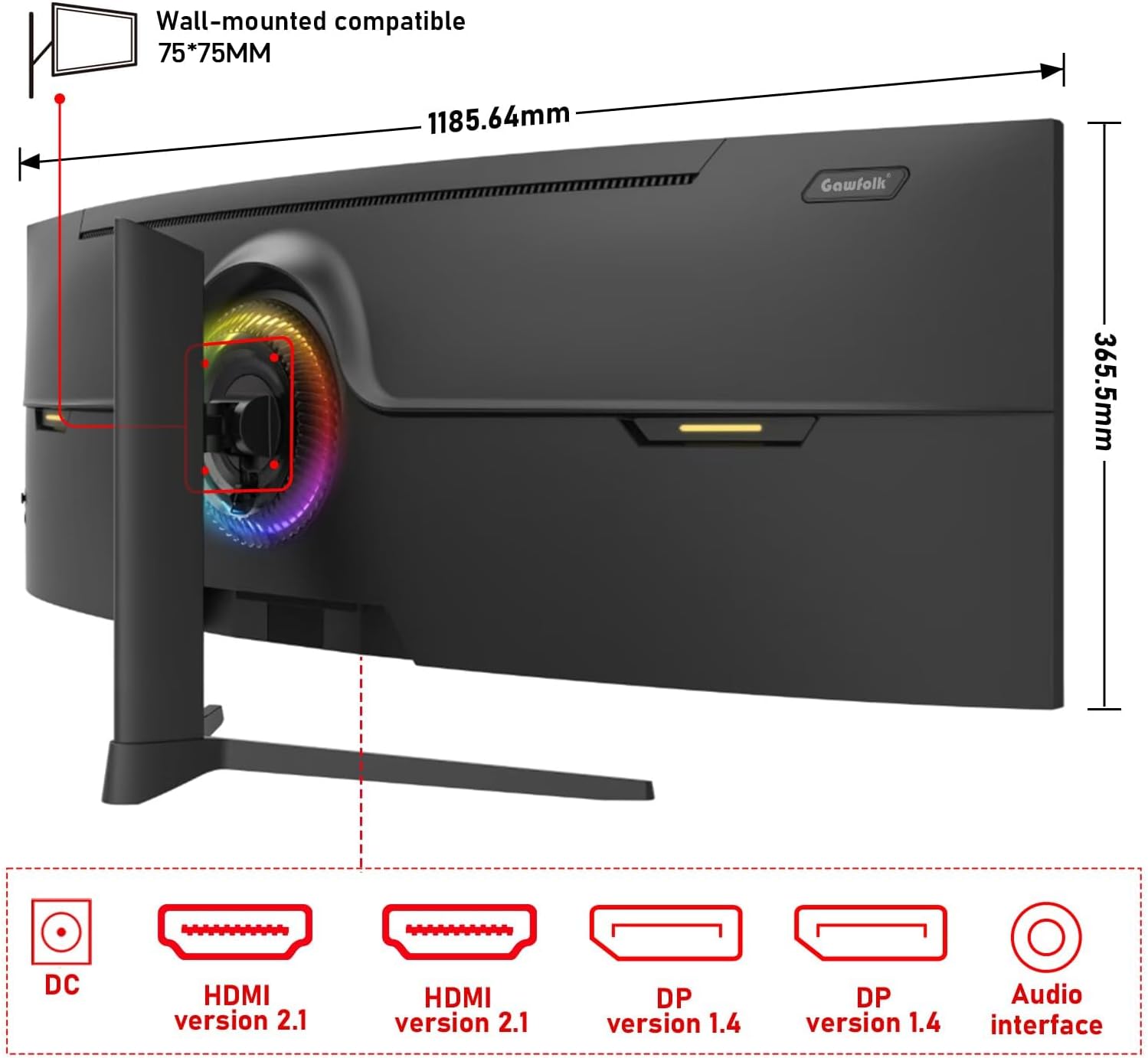
Figur 3: Bak view of the monitor illustrating its approximate dimensions (1185.64mm width, 365.5mm height without stand) and indicating 75x75mm VESA wall-mount compatibility.
3. Veggmontering (valgfritt)
The monitor supports a 75x75mm VESA wall mount. Ensure the wall mount can support the monitor's weight (7.9 kg) and follow the wall mount manufacturer's instructions for installation.
Bruksanvisning
1. Slå på/av
- Koble strømadapteren til skjermen og en stikkontakt.
- Press the power button (location typically on the rear or bottom-right of the monitor) to turn the monitor on or off.
2. Justere skjerminnstillinger
The monitor features an On-Screen Display (OSD) menu for adjusting various settings. Use the joystick or buttons (refer to the physical monitor for exact controls) to navigate the OSD menu.
- Inndatakilde: Select between HDMI 1, HDMI 2, DP 1, or DP 2.
- Lysstyrke/kontrast: Juster bildets lysstyrke.
- Fargeinnstillinger: Modify color temperature, gamma, and color gamut (120% sRGB).
- Oppdateringsfrekvens: The monitor supports up to 240Hz. Ensure your connected device and cable support this refresh rate for optimal performance.
- Adaptive Sync (FreeSync): Enable this feature in the OSD and your graphics card settings to synchronize the monitor's refresh rate with your GPU's frame rate, reducing screen tearing and stuttering.
- Lavt blått lys-modus: Activate to reduce eye strain during prolonged use.

Figur 4: The 49-inch 32:9 ultra-wide display with DQHD (5120x1440) resolution, offering an expansive field of view compared to traditional 16:9 QHD (2560x1440) monitors.

Figur 5: Visual comparison demonstrating the smoothness of a 240Hz refresh rate versus lower refresh rates (100Hz and 60Hz), highlighting reduced motion blur and stuttering.

Figur 6: Illustration of Adaptive Sync (FreeSync) technology, showing how it eliminates screen tearing and input lag for a smoother gaming experience compared to when it is disabled.

Figur 7: The 1500R curvature of the screen, designed to provide an immersive viewing experience by conforming to the human eye's natural field of vision.

Figur 8: Display characteristics including 120% sRGB color gamut, 8-bit color depth (16.7 million colors), 3000:1 contrast ratio, and 330 cd/m² brightness, ensuring rich and accurate color reproduction.

Figur 9: A visual comparison demonstrating the difference between a 1000:1 contrast ratio and the monitor's 3000:1 contrast ratio, showing enhanced detail in dark and bright areas.
3. Fysiske tilpasninger
Skjermstativet muliggjør ergonomiske justeringer:
- Høydejustering: Adjust the screen height by up to 160mm.
- Sving: Rotate the monitor left or right by 15 degrees.
- Tilt: Adjust the screen tilt from -5 degrees to 20 degrees.
4. RGB Ambient Lighting
The monitor features customizable RGB ambient lighting on its rear. This can be configured through the OSD menu to match your preferences or gaming setup.
Vedlikehold
Rengjøre skjermen
- Koble alltid fra skjermen før rengjøring.
- Bruk en myk, lofri klut lett damprengjøres med vann eller et mildt, ikke-slipende skjermrensemiddel.
- Ikke spray rengjøringsmiddel direkte på skjermen.
- Avoid using benzene, thinner, or any volatile solvents, as they may damage the monitor's surface.
Feilsøking
| Problem | Mulig årsak | Løsning |
|---|---|---|
| Intet bilde på skjermen | Strømkabel frakoblet, videokabel frakoblet, feil inngangskilde valgt. | Check power and video cable connections. Select the correct input source via the OSD menu. Ensure the computer is powered on. |
| Bildet er uskarpt eller forvrengt | Incorrect resolution or refresh rate settings, faulty video cable. | Set the display resolution to 5120x1440 and refresh rate to 240Hz (or compatible with your GPU). Try a different video cable. |
| Skjermriving eller hakking | Adaptive Sync (FreeSync) is not enabled or not supported by GPU/game. | Enable FreeSync in the monitor's OSD menu and your graphics card control panel. Ensure your GPU supports FreeSync. |
| Døde piksler | Produksjonsfeil. | Refer to warranty policy. A small number of dead pixels may be considered within acceptable manufacturing tolerances. |
| Ingen lyd | Audio cable disconnected, incorrect audio output selected on PC, monitor volume too low. | Check audio cable connection. Ensure the correct audio output device is selected in your computer's sound settings. Adjust monitor volume. |
Spesifikasjoner
| Trekk | Detalj |
|---|---|
| Modellnummer | GF490D |
| Skjermstørrelse | 49 tommer |
| Oppløsning | DQHD (5120x1440 Pixels) |
| Aspektforhold | 32:9 |
| Krumning | 1500R |
| Oppdateringsfrekvens | 240 Hz |
| Responstid | 1 millisekund |
| Paneltype | VA (LCD Display Technology) |
| Lysstyrke | 350 Candela (cd/m²) |
| Kontrastforhold | 3000:1 |
| Fargeskala | 120 % sRGB |
| Viewing vinkel | 178 grader |
| Adaptiv synkronisering | FreeSync |
| Videoinnganger | 2x HDMI 2.1, 2x DisplayPort 1.4 |
| Lyd utgang | 3.5mm Audio Jack |
| Monteringstype | Wall Mount (75x75mm VESA compatible) |
| Produktdimensjoner (D x B x H) | 5 x 118.5 x 43 cm (med stativ) |
| Varevekt | 7.9 kilo |
| Ekstra funksjoner | Blue Light Filter, Curved, Frameless, RGB Ambient Lighting |
Garanti og støtte
The Gawfolk GF490D monitor comes with a 12 måneders ettersalgsservice (1 year manufacturer warranty). If you encounter any issues or have questions regarding your monitor, please contact Gawfolk customer support for assistance.
Manufacturer: Shenzhen Qinghong Zhuoyue Technology Co., Ltd.