
Produkt overview
The DIERYA DK68 is a 60% compact mechanical keyboard designed for versatility and performance. It features triple-mode connectivity, allowing seamless switching between Bluetooth 5.0, 2.4GHz wireless, and USB-C wired connections. Equipped with clicky blue mechanical switches and vibrant RGB backlighting, it offers a responsive and customizable typing experience for both gaming and office use.

Figure 1: DIERYA DK68 Wireless Mechanical Keyboard showcasing dens kompakte design og RGB-belysning.
Pakkeinnhold
Sørg for at alle varene er til stede i pakken:
- DIERYA DK68 Wireless Mechanical Keyboard
- USB-C til USB-A-kabel
- Keycap puller
- 2.4GHz USB Receiver (stored in the keyboard's back compartment)
- Brukerhåndbok (dette dokumentet)
Oppsett og tilkobling
The DK68 keyboard supports three connection modes: USB-C wired, 2.4GHz wireless, and Bluetooth 5.0. Choose the mode that best suits your needs.
1. USB-C kablet modus
- Koble den medfølgende USB-C-kabelen til tastaturets USB-C-port.
- Koble USB-A-enden av kabelen til en ledig USB-port på datamaskinen.
- Tastaturet vil bli automatisk gjenkjent og klart til bruk.
2. 2.4 GHz trådløs modus
- Locate the 2.4GHz USB receiver in the compartment on the back of the keyboard.
- Remove the receiver and plug it into an available USB port on your computer.
- Turn on the keyboard using the switch located on the back.
- The keyboard should automatically connect to the receiver. If not, press Fn + G (labeled '2.4G' on the key) to activate 2.4GHz pairing mode.

Figure 2: Triple-mode connectivity options including 2.4GHz wireless.
3. Bluetooth 5.0-modus
Tastaturet kan kobles til opptil tre Bluetooth-enheter.
- Turn on the keyboard using the switch on the back.
- Trykk og hold Fn+Z (labeled 'BT1'), Fn + X (labeled 'BT2'), or Fn+C (labeled 'BT3') for 3-5 seconds until the corresponding key's backlight flashes rapidly. This indicates pairing mode.
- On your device (PC, laptop, tablet, phone), enable Bluetooth and search for "DIERYA DK68".
- Select the keyboard to pair. The key's backlight will stop flashing once connected.
- For å bytte mellom parede Bluetooth-enheter, trykk ganske enkelt på Fn + Z/X/C.

Figure 3: Bluetooth connectivity for multiple devices.
Bruksanvisning
RGB-bakgrunnsbelysningskontroll
The DK68 features 20 built-in RGB lighting effects and 16.8 million customizable colors. Use the following key combinations to control the lighting:
- Fn + Backspace: Turn backlighting On/Off.
- Fn+Shift: Switch light colors.
- Fn + Enter: Switch light modes (20 dynamic RGB modes).
- Fn + Pil opp: Øk lysstyrken.
- Fn + Pil ned: Reduser lysstyrken.
- Fn + venstre pil: Decrease light speed.
- Fn + høyre pil: Increase light speed.

Figure 4: RGB lighting control key combinations for the DK68 keyboard.
Tastetilpasning og makroer
The DIERYA DK68 supports full key anti-ghosting and N-Key Rollover (NKRO) for accurate input. For advanced customization, including key remapping, macro programming, and additional lighting effects, dedicated software is available. Please refer to the official DIERYA webnettsted for nedlasting av programvare og instruksjoner.

Figure 5: Full N-Key Rollover and software customization capabilities.
Mekaniske blå brytere
The keyboard is equipped with clicky blue mechanical switches, providing a distinct tactile bump and an audible click with each keystroke. These switches are ideal for users who prefer clear feedback and a satisfying typing experience. They feature a medium 60gf actuation force (±15gf) and 2.3mm travel (±0.6mm), with a lifespan of 50 million clicks.

Figur 6: Detaljert view of mechanical blue switches and their specifications.
Vedlikehold
Batteristyring
The keyboard is powered by a 3000mAh lithium battery. To charge, connect the keyboard via the USB-C cable to a power source. The keyboard can be used while charging.
- Usage Time (Backlighting On)Opptil 12 timer.
- Usage Time (Backlighting Off)Opptil 333 timer.
- Automatisk hvilemodus: The keyboard enters auto-sleep mode after 3 minutes of inactivity to conserve power.
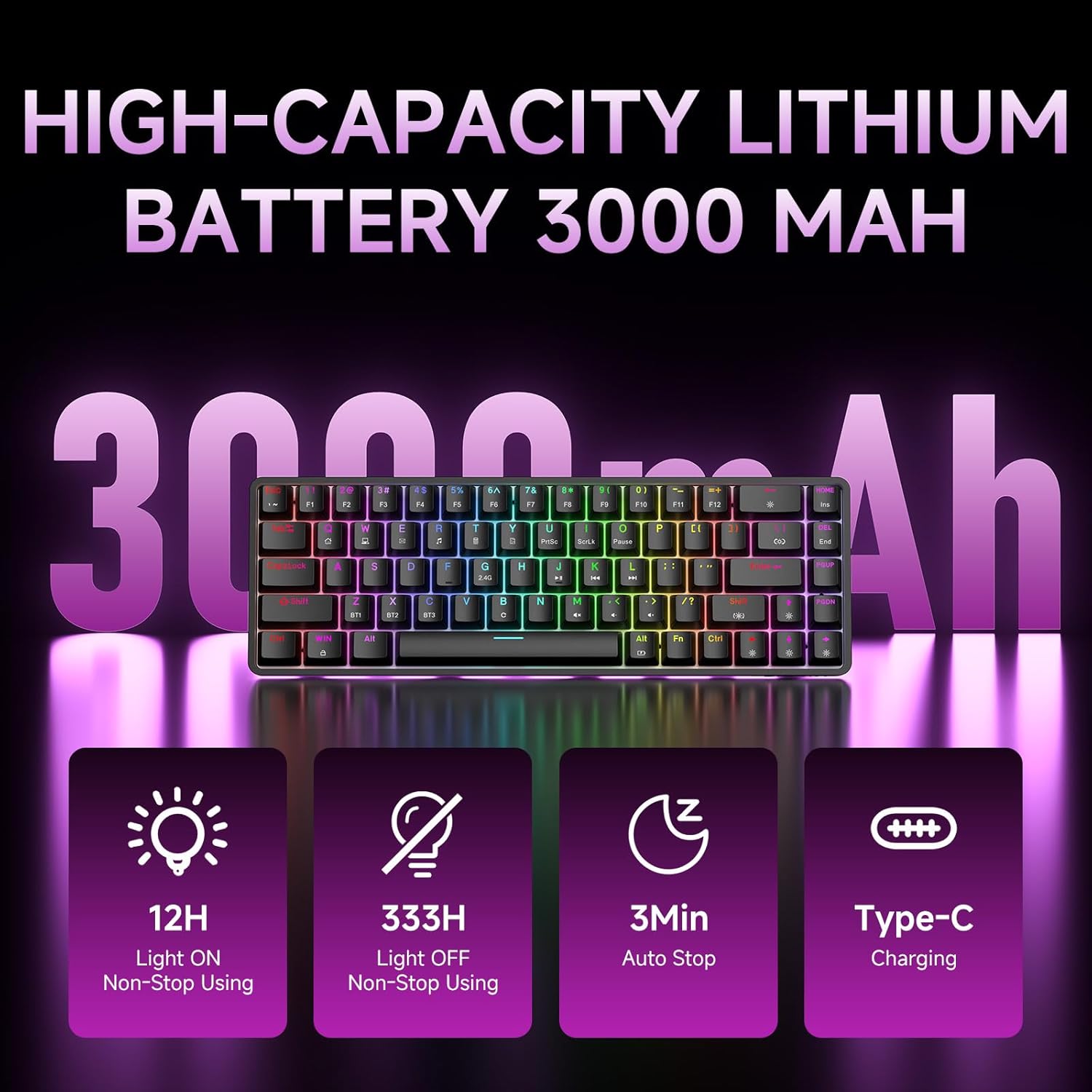
Figure 7: Battery capacity and power-saving features of the DK68.
Rengjøring og stell
- Use the provided keycap puller to carefully remove keycaps for cleaning.
- Clean the keyboard surface with a soft, damp klut. Unngå overdreven fuktighet.
- Ikke bruk sterke kjemikalier eller slipende rengjøringsmidler.
- Sørg for at tastaturet er slått av før rengjøring.
Feilsøking
- Tastaturet svarer ikke:
- Check the power switch on the back of the keyboard.
- Ensure the correct connection mode (wired, 2.4GHz, or Bluetooth) is selected.
- For 2.4 GHz, sørg for at USB-mottakeren er ordentlig koblet til.
- For Bluetooth, sørg for at tastaturet er paret og valgt på enheten din. Prøv å pare på nytt om nødvendig.
- If using wired mode, try a different USB port or cable.
- Bakgrunnsbelysningen fungerer ikke:
- Pressen Fn + Backspace to toggle the backlighting.
- Check battery level; low battery may disable backlighting.
- Nøkler registreres ikke:
- Ensure the keyboard is properly connected and powered on.
- If specific keys are not working, try removing and re-seating their keycaps.
Spesifikasjoner
| Trekk | Detalj |
|---|---|
| Modellnummer | DK68 |
| Tilkoblingsteknologi | 2.4 GHz trådløs, Bluetooth 5.0, USB-C kablet |
| Brytertype | Clicky Blue mekaniske brytere |
| Nøkkeloppsett | 68 taster (60 % layout) |
| Bakgrunnsbelysning | RGB (16.8 Million Colors, 20 Effects) |
| Batterikapasitet | 3000mAh litiumpolymer |
| Kompatible enheter | Spillkonsoll, bærbar PC, PC, nettbrett |
| Anti-Ghosting | Full Key Anti-Ghosting & NKRO |
| Materiale | Plast |
| Varevekt | 1.76 pund (ca. 800g) |
| Pakkedimensjoner | 14.33 x 4.37 x 1.73 tommer |

Figure 8: Keyboard dimensions and compact 68-key layout.
Garanti og støtte
For warranty information and technical support, please refer to the documentation included with your product or visit the official DIERYA website. Amazon's return policy for this product is 30 days from the date of receipt.