
1. Introduksjon
The Arregui SPIN UP + BRIDGE is an advanced invisible security lock designed to enhance the protection of your home or office. This electronic lock offers discreet installation, remaining unseen from the exterior, thereby increasing security against forced entry and manipulation. It integrates seamlessly with mobile applications for smart control and includes a powerful 120 dB alarm system. The included Arregui Bridge enables remote management and compatibility with smart home assistants.

Image: The Arregui SPIN UP + BRIDGE invisible security lock, shown installed on the interior of a wooden door, next to a traditional intercom unit.
2. Sikkerhetsinformasjon
Les alle instruksjonene nøye før installasjon og bruk. Ta vare på denne håndboken for senere referanse.
- Ensure the lock is installed on a clean, dry surface.
- Ikke utsett enheten for ekstreme temperaturer eller fuktighet.
- Use only specified AA 1.5V alkaline batteries.
- Oppbevar enheten utilgjengelig for barn.
- Ikke forsøk å demontere eller reparere låsen selv. Kontakt kvalifisert servicepersonell.
3. Pakkens innhold
Kontroller at alle komponentene er tilstede i pakken:
- Arregui SPIN UP Lock Unit
- Monteringsplate
- Gummiskiver
- Double-sided Adhesive Strips
- Tilbakestill verktøyet
- Umbrakonøkkel
- Festeskruer
- Bruksanvisning
- Arregui Bridge Device for Remote Connection
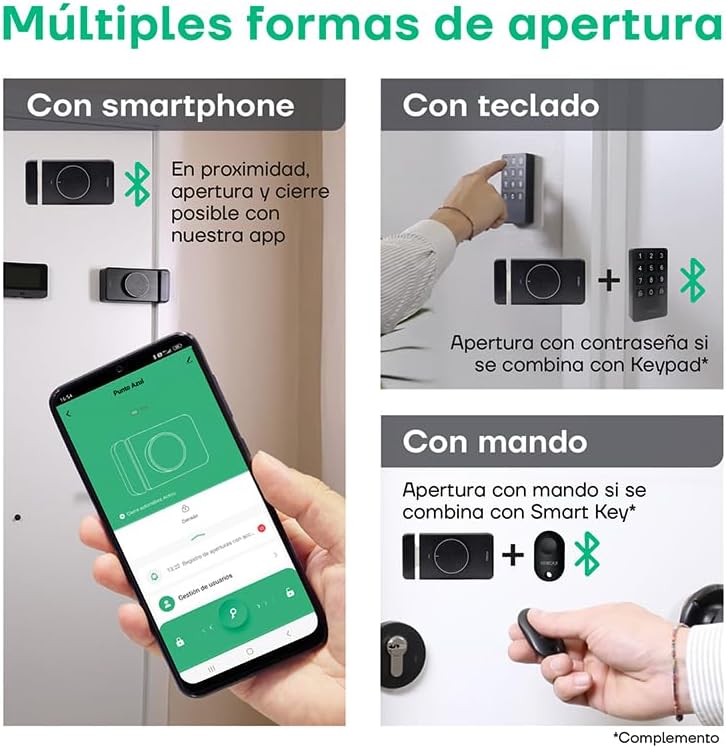
Image: An illustrative diagram detailing the various components and features of the Arregui SPIN UP smart lock, including its invisible design, app control, and alarm capabilities.
4. Oppsett og installasjon
The Arregui SPIN UP lock is designed for quick and wireless installation, requiring no complex wiring or construction work. It is installed on the interior side of your door, making it invisible from the outside.
4.1. Lock Installation
- Klargjør døren: Ensure the interior surface of your door is clean and dry where the lock will be mounted.
- Plasser monteringsplaten: Determine the optimal position for the lock on the interior side of your door. The lock can be placed in various positions to suit your door type. Use the double-sided adhesive strips or screws to secure the mounting plate.
- Attach the Lock Unit: Align the SPIN UP lock unit with the mounting plate and secure it firmly.
- Installer batterier: Open the battery compartment and insert 4 AA 1.5V alkaline batteries, ensuring correct polarity.

Bilde: Foran view of the Arregui SPIN UP lock, showcasing its sleek black design and central control knob.

Bilde: Side view of the Arregui SPIN UP lock, highlighting its compact profile and the bolt mechanism.

Bilde: Bakside view of the Arregui SPIN UP lock, showing the mounting points and internal structure.
4.2. Arregui Bridge Setup
The Arregui Bridge enables remote control of your lock via Wi-Fi.
- Strøm på: Plug the Arregui Bridge into a power outlet near your lock and Wi-Fi router.
- Par med app: Follow the instructions in the Arregui Security app to pair the Bridge with your lock and connect it to your home Wi-Fi network.
Video: En overview of the Arregui SPIN UP lock, demonstrating its features, installation, and various methods of operation including app control, remote key, and keypad. The video also showcases the alarm system and the benefits of the Arregui Bridge for remote access.
5. Bruksanvisning
5.1. App Control (Arregui Security App)
The Arregui Security app provides comprehensive control over your lock.
- Last ned app: Download the "Arregui Security" app from Google Play Store or Apple App Store.
- Paring: Enable Bluetooth on your smartphone and follow the in-app instructions to pair with your SPIN UP lock.
- Åpning/lukking: Use the app interface to lock or unlock your door.
- Brukeradministrasjon: Grant or revoke access permissions for other users.
- Tilgangshistorikk: View a detailed log of all lock activities.
- Remote Control (with Bridge): If the Arregui Bridge is installed and configured, you can control your lock from anywhere with an internet connection.
- Stemmekontroll: The lock is compatible with Google Assistant and Amazon Alexa for voice commands (requires Arregui Bridge).

Image: A smartphone screen showing the Arregui Smart Security application, illustrating its user-friendly interface for managing the lock.
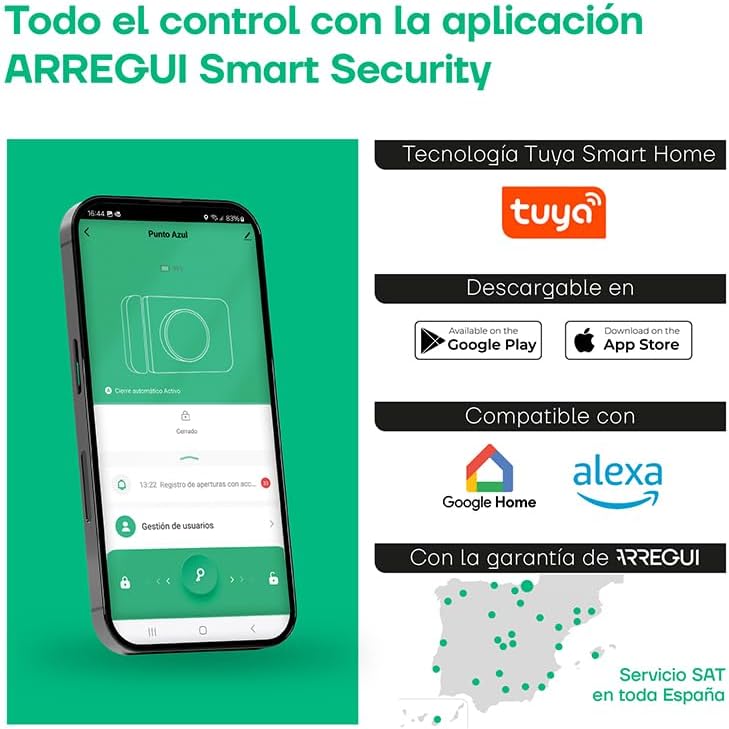
Image: A man using his smartphone to remotely open the Arregui SPIN UP lock, demonstrating the convenience of remote access via the Arregui Bridge.
5.2. Manual Opening
From the interior side of the door, the lock can be manually operated using the integrated knob.
5.3. Optional Opening Methods (Accessories)
The Arregui SPIN UP lock supports additional opening methods with optional accessories:
- Smart Key Remote: A dedicated remote control (not included) can be paired for convenient opening and closing.
- tastatur: An external keypad (not included) allows access via a numerical code.

Image: An infographic illustrating the multiple ways to open the Arregui SPIN UP lock, including smartphone app, keypad, and remote control.
6. Alarmsystem
The Arregui SPIN UP features an integrated 120 dB alarm to deter intruders.
- Utløserbetingelser: The alarm activates upon detection of vibration or attempts of forced entry.
- Varsler: In addition to the audible alarm, you may receive notifications via the Arregui Security app.
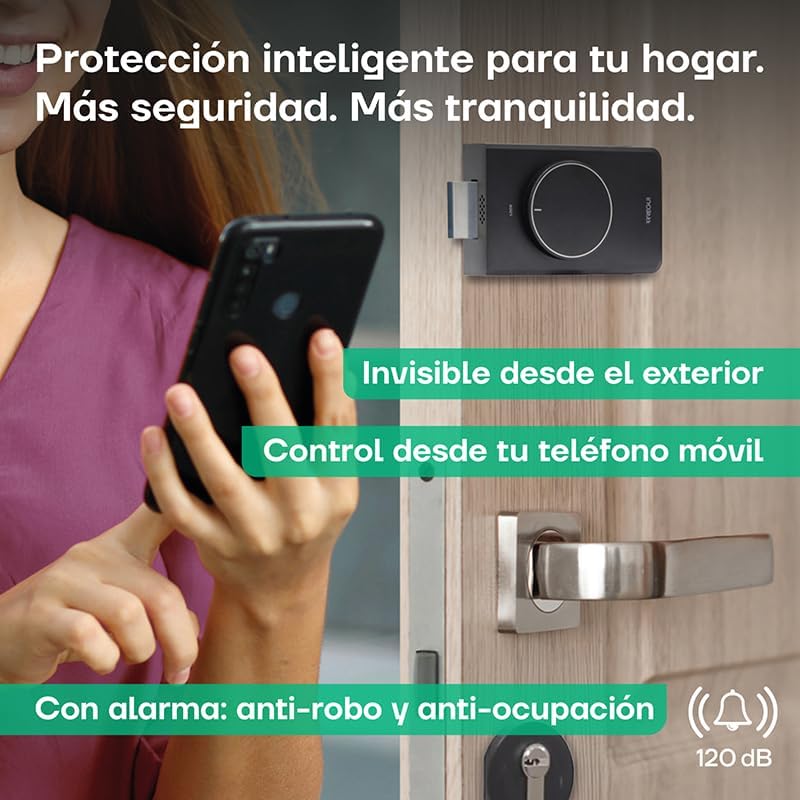
Image: The Arregui SPIN UP lock on a door, with a graphic overlay emphasizing its 120 dB anti-theft and anti-occupation alarm feature.
7. Vedlikehold
7.1. Batteribytte
The lock is powered by 4 AA 1.5V alkaline batteries. It is recommended to replace them when the low battery alert is triggered.
- Varsel om lavt batteri: The Arregui Security app will notify you when the battery level falls below 10%.
- Emergency Auto-Opening: For your safety, the lock will automatically open if the battery level drops below 10% to prevent you from being locked out.
- Accessing Battery Compartment: The battery compartment is easily accessible for replacement.
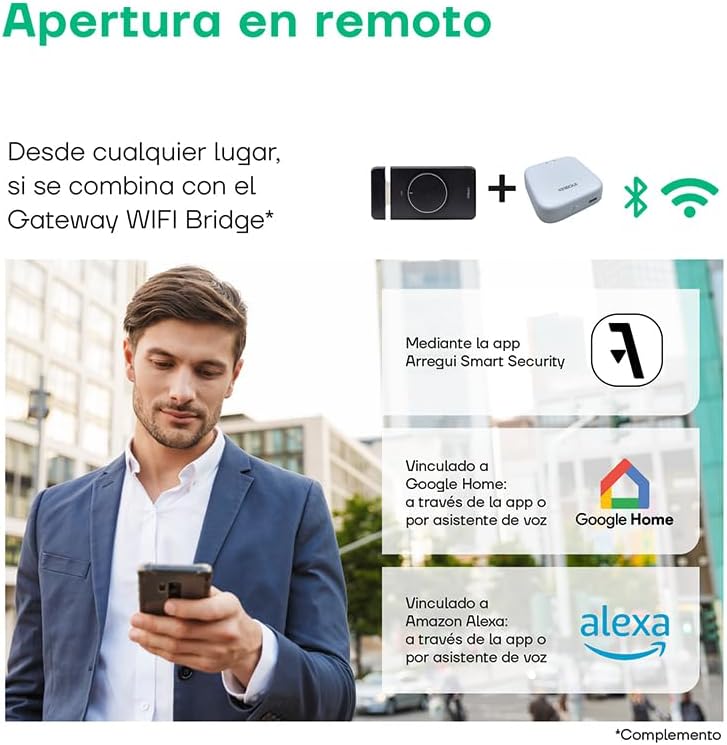
Image: The Arregui SPIN UP lock highlighting its power source (4 AA batteries), over 5,000 openings per set of batteries, easy battery access, low battery warning via app, and emergency auto-opening feature.
7.2. Rengjøring
Clean the lock unit with a soft, dry cloth. Do not use abrasive cleaners or solvents.
8. Feilsøking
- Låsen svarer ikke: Check battery levels. If low, replace batteries. Ensure Bluetooth is enabled on your smartphone and you are within range.
- Problemer med apptilkobling: Ensure your smartphone has a stable internet connection. For remote control, verify the Arregui Bridge is powered on and connected to Wi-Fi. Restart the app or your smartphone if issues persist.
- Alarm False Triggers: Review the sensitivity settings for the vibration sensor in the Arregui Security app. Adjust as needed.
- Lock Does Not Open/Close Smoothly: Check for any obstructions around the door frame or the lock mechanism. Ensure the lock is securely mounted.
- Tilbakestille låsen: If experiencing persistent issues, use the provided reset tool to perform a factory reset. Refer to the app for specific instructions on re-pairing after a reset.
9. Spesifikasjoner
| Trekk | Detalj |
|---|---|
| Merke | Arregui |
| Farge | Negro (svart) |
| Strømkilde | Batería (Battery) - 4x AA 1.5V |
| Kompatible enheter | Smart Speakers, Smartphone, Arregui Bridge |
| Dimensjoner (L x B x H) | 40 x 92 x 142 millimeter |
| Tilkoblingsteknologi | Wireless (Bluetooth, Wi-Fi via Bridge) |
| Installasjonstype | Battery/Wireless |
| Alert Type | Motion Only (Vibration/Forced Entry) |
| Kontrollmetode | Application, Remote Control (optional), Voice |
| Modellnummer | Con WIFI Gateway |
| Produsent | Arregui |
| Opprinnelsesland | España (Spain) |
10. Garanti og støtte
Arregui products are manufactured to high-quality standards. This product comes with a standard manufacturer's warranty against defects in materials and workmanship. Please retain your proof of purchase for warranty claims.
For technical assistance, troubleshooting, or warranty service, please contact Arregui's official customer support. Arregui offers a dedicated technical assistance service (SAT) throughout Spain.
For more information, visit the official Arregui webnettstedet eller kontakt deres kundeserviceavdeling.