
1. Introduksjon
Thank you for choosing the HelloBaby HB30 Video Baby Monitor. This device is designed to provide a secure and reliable way to monitor your baby, offering peace of mind without requiring a Wi-Fi connection. This manual provides essential information for the safe and effective use of your monitor.
2. Sikkerhetsinformasjon
- No Wi-Fi, Enhanced Privacy: The HelloBaby HB30 operates on 2.4GHz FHSS technology, ensuring a private and secure connection that is not susceptible to internet hacking.
- Kvelningsfare: Keep all power cords and cables out of reach of children. Ensure the camera unit and its power cord are at least 3 feet (0.9 meters) away from the crib or playpen. Never place the camera or cords inside the crib.
- Strømkilde: Use only the provided power adapters. Do not use other adapters as this may damage the unit or pose a safety risk.
- Water and Heat: Keep the monitor and camera away from water sources (e.g., bathtubs, sinks) and heat sources (e.g., radiators, stoves).
- Ventilasjon: Ensure proper ventilation around both units. Do not cover them with blankets or towels.
3. Pakkens innhold
Upon unboxing your HelloBaby HB30 Video Baby Monitor, please verify that all components are present:
- Foreldreenhet (monitor)
- Babyenhet (kamera)
- Strømadapter for foreldreenhet
- Strømadapter for babyenhet
- Brukerhåndbok
- Veggmonteringssett (skruer og ankere)
Video: Unboxing the HelloBaby HB30 Baby Monitor. This video demonstrates the contents of the package, including the monitor unit, camera unit, and accessories.
Video: Overview of the HelloBaby HB30 Monitor and Camera. This video showcases the monitor and camera units, highlighting their compact size and ease of use.
4. Produktet er overview
The HelloBaby HB30 is a feature-rich video baby monitor designed for simplicity and security. It includes a portable parent unit with a 2.4-inch color LCD screen and a camera unit with infrared night vision.
Nøkkelfunksjoner:
- Secure 2.4GHz FHSS Technology: Ensures a private connection without Wi-Fi.
- 2.4-tommers farge-LCD-skjerm: Gir en klar view av babyen din.
- Automatisk infrarød nattsyn: Monitors your baby clearly in low light or darkness.
- VOX Mode (Sound-Activated Screen): The screen activates when sound is detected, conserving battery.
- Toveis snakk: Allows you to comfort your baby remotely.
- 2x digital zoom: Get a closer look at your baby.
- Utvidbart system: Supports up to 4 cameras (additional cameras sold separately).
- Temperaturovervåking: Viser romtemperaturen.
- Vuggeviser: Built-in melodies to soothe your baby.
- Feeding Timer: Set reminders for feeding times.
- Lang overføringsrekkevidde: Up to 1000ft in open areas.

Image: HelloBaby HB30 Monitor and Camera highlighting its six core features.

Image: Illustration of the secure FHSS transmission technology used by the HelloBaby HB30, emphasizing no Wi-Fi or app requirement.
5. Oppsett
5.1. Lade foreldreenheten
Before first use, fully charge the parent unit for approximately 8 hours. Connect the small end of the power adapter to the parent unit and the other end to a power outlet. The battery indicator on the screen will show charging status.
5.2. Positioning the Camera Unit
Plasser kameraenheten på et sted som gir klar sikt view of your baby. Ensure the camera is at least 3 feet (0.9 meters) away from the crib to prevent entanglement with the power cord. The camera can be placed on a flat surface or mounted to a wall using the provided kit.
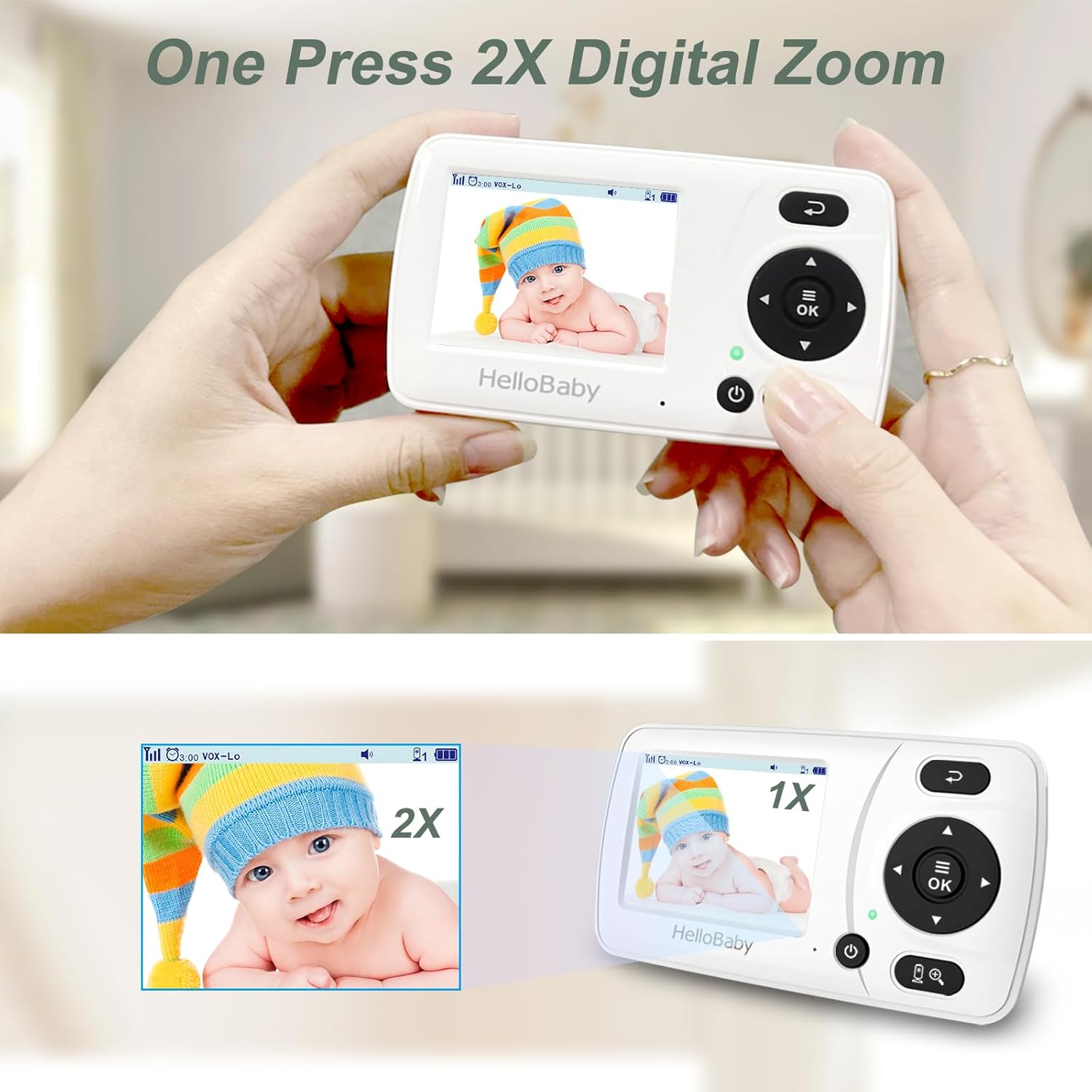
Image: The HelloBaby HB30 camera unit, demonstrating its adjustable stand for optimal positioning.

Image: The camera unit connected to a power outlet, illustrating the power setup.
5.3. Slå på
Connect the camera unit to a power outlet using its adapter. The camera will automatically power on. Press and hold the power button on the parent unit to turn it on. The units are typically pre-paired and will connect automatically.
Video: Demonstrating the power-on sequence and basic display of the HelloBaby monitor.
6. Bruksanvisning
6.1. Grunnleggende kontroller
Use the arrow buttons on the parent unit to navigate through menus and adjust settings. The 'OK' button confirms selections, and the 'Return' button goes back to the previous screen or live view.
6.2. Video Display & Zoom
The parent unit displays live video from the camera. Press the zoom button (magnifying glass icon) to activate 2x digital zoom. Use the arrow keys to pan the zoomed image.

Image: The 2x digital zoom feature on the HelloBaby HB30 monitor, showing a magnified view of a baby.
6.3. VOX Mode (Sound-Activated Screen)
VOX mode conserves battery by turning off the screen when no sound is detected. The screen will automatically turn on when your baby makes a sound. You can adjust the VOX sensitivity (Low, Medium, High) in the settings menu.

Image: Visual representation of the VOX (Sound-Activated Screen) mode, showing the screen turning on when a baby cries.
6.4. Toveis snakk
Press and hold the microphone button on the parent unit to speak to your baby through the camera's speaker. Release the button to hear your baby again.
6.5. Nattesyn
The camera automatically switches to infrared night vision in low light conditions, providing a clear black and white image of your baby.

Image: Comparison of day and automatic infrared night vision on the HelloBaby HB30 monitor.
6.6. Matingstimer
Access the 'Timer' option in the menu to set reminders for feeding. You can choose various intervals (e.g., 30 minutes, 1 hour, 2 hours).
6.7. Multiple Cameras
The HB30 system can support up to four camera units. To add or switch between cameras, navigate to the 'Camera' setting in the menu.
Video: Demonstrating camera switching and menu navigation on the HelloBaby monitor.
7. Vedlikehold
- Rengjøring: Use a soft, dry cloth to clean the surfaces of the monitor and camera units. Do not use abrasive cleaners or solvents.
- Linsepleie: Tørk forsiktig av kameralinsen med en myk, lofri klut for å sikre klar bildekvalitet.
- Batteripleie: For å forlenge batterilevetiden, unngå å utlade foreldreenheten helt for ofte. Lad den opp regelmessig.
- Lagring: If storing the unit for an extended period, ensure the battery is partially charged and store in a cool, dry place.
8. Feilsøking
| Problem | Mulig årsak | Løsning |
|---|---|---|
| No image/sound on parent unit | Enhetene er ikke slått på eller tilkoblet. Utenfor rekkevidde. | Ensure both units are plugged in and powered on. Move parent unit closer to camera. |
| Dårlig bildekvalitet | Low light conditions (night vision active). Camera lens dirty. Out of range. | Image quality is typically black and white in night vision. Clean camera lens. Move units closer. |
| Ingen lyd eller lav lyd | Volume too low. VOX mode active. | Increase volume on parent unit. Adjust VOX sensitivity or disable it. |
| Interferens | Andre 2.4 GHz-enheter i nærheten. | Move the monitor away from other wireless devices (e.g., Wi-Fi routers, microwaves). |
| Foreldreenhetens batteri tømmes raskt | VOX mode off (screen always on). Old battery. | Enable VOX mode to conserve battery. Contact support if battery life remains poor after full charge. |
9. Spesifikasjoner
- Modellnavn: HB30
- Skjermstørrelse: 2.4 tommer
- Tilkoblingsteknologi: Trådløs (2.4 GHz FHSS)
- Innendørs/utendørs bruk: Innendørs
- Strømkilde: Elektrisk med ledning
- Videoopptaksoppløsning: 720p
- Lite lysteknologi: Nattfarge (infrarød)
- Batteri: 1 Lithium Ion batteri kreves (inkludert)
- Varedimensjoner L x B x H: 3.14 x 6.37 x 5.43 tommer
- Varevekt: 0.32 unser
- UPC: 190282011600
10. Garanti og støtte
HelloBaby products are designed for reliability and performance. For warranty information, technical support, or assistance with your HB30 Video Baby Monitor, please refer to the contact details provided in your product packaging or visit the official HelloBaby webnettstedet. Ta vare på kjøpskvitteringen for garantikrav.