
1. Introduksjon
The GEEKOM A8 Max Mini PC is a high-performance, compact desktop computer designed for a wide range of applications, from business and office tasks to multimedia, creative work, and light gaming. Powered by the AMD Ryzen 9 8945HS processor, 32GB DDR5 RAM, and a 1TB NVMe SSD, it offers robust performance in a small form factor. This manual provides essential information for setting up, operating, maintaining, and troubleshooting your GEEKOM A8 Max Mini PC.
Video: Overview of GEEKOM Mini PCs, highlighting performance and value.
2. Oppsett
Follow these steps to set up your GEEKOM A8 Max Mini PC:
- Unboxing: Carefully remove the Mini PC and all accessories from the packaging. The box typically includes the A8 Max Mini PC, an HDMI cable, a power adapter, a user manual, and a VESA mount.
- Koble til eksterne enheter:
- Connect your monitor(s) using the HDMI or USB4 Type-C ports. The device supports up to four displays simultaneously, including 8K resolution.
- Connect your keyboard and mouse to the available USB 3.2 or USB4 ports.
- For wired network access, connect an Ethernet cable to one of the dual 2.5G LAN ports.
- If using an SD card, insert it into the professional UHS-II SD card reader.
- Strømtilkobling: Koble strømadapteren til DC-inngangsporten på mini-PC-en, og koble deretter adapteren til en stikkontakt.
- Strøm på: Press the power button located on the front of the device. The Mini PC comes pre-installed with Windows 11 Pro, ready for immediate use.
- VESA-montering (valgfritt): Use the included VESA mount to attach the Mini PC to the back of a compatible monitor or to a wall, saving desk space.

Bilde: Foran view of the GEEKOM A8 Max Mini PC, showing USB ports and SD card reader for easy peripheral connection.

Bilde: Bak view of the GEEKOM A8 Max Mini PC, illustrating the various connectivity options including HDMI, USB4, and dual 2.5G LAN ports.
3. Drift
The GEEKOM A8 Max Mini PC is engineered for high performance and versatility:
- Kraftig ytelse: Equipped with the AMD Ryzen 9 8945HS processor (8 cores, 16 threads, up to 5.2 GHz) and an integrated NPU chip (up to 16 TOPS), the A8 Max handles demanding AI applications and intensive computing tasks with ease.
- Minne og lagring: Features 32GB DDR5 RAM (expandable up to 128GB) and a 1TB M.2 2280 NVMe Gen4*4 SSD (expandable up to 4TB), ensuring fast data access and smooth multitasking.
- Avansert tilkobling:
- Dual 2.5G LAN ports provide stable, high-speed network connectivity, ideal for business environments and network-intensive tasks.
- Multiple USB ports (5x USB 3.2, 2x USB4 Type-C) offer extensive peripheral support. The USB4 ports deliver 40Gbps bandwidth, supporting eGPUs, high-speed storage, and multi-display setups.
- Dual HDMI 2.0 ports and dual USB4 Type-C ports enable connection to up to four displays simultaneously, with support for 8K resolution.
- Integrated Bluetooth 5.2 and Wi-Fi 6E ensure reliable wireless connections.
- Operativsystem: Comes with Windows 11 Pro pre-installed, offering a familiar and secure computing environment. It also supports Linux and Ubuntu.

Image: A GEEKOM A8 Max Mini PC powering a multi-display setup, demonstrating its capability to drive multiple screens simultaneously for enhanced productivity.
Video: Demonstrating the powerful performance of the GEEKOM A8 Max Mini PC for various demanding tasks.
4. Vedlikehold
To ensure optimal performance and longevity of your GEEKOM A8 Max Mini PC:
- Kjølesystem: The device features the IceBlast 2.0 Cooling System with dual copper heat pipes, a larger silent fan, and vortex airflow for efficient heat dissipation and minimal noise. Ensure proper ventilation around the device.
- Upgradability: The Mini PC is designed for easy upgrades. You can expand the DDR5 RAM up to 128GB and the M.2 NVMe SSD storage up to 4TB. Refer to the detailed text description accompanying the image below for guidance on accessing internal components.
- Rengjøring: Periodically clean the exterior of the Mini PC with a soft, dry cloth. Avoid using liquid cleaners directly on the device.

Bilde: En eksplodert view diagrammet viserasing the advanced IceBlast 2.0 Cooling System, including dual copper heat pipes and an enhanced heatsink, designed for efficient thermal management.
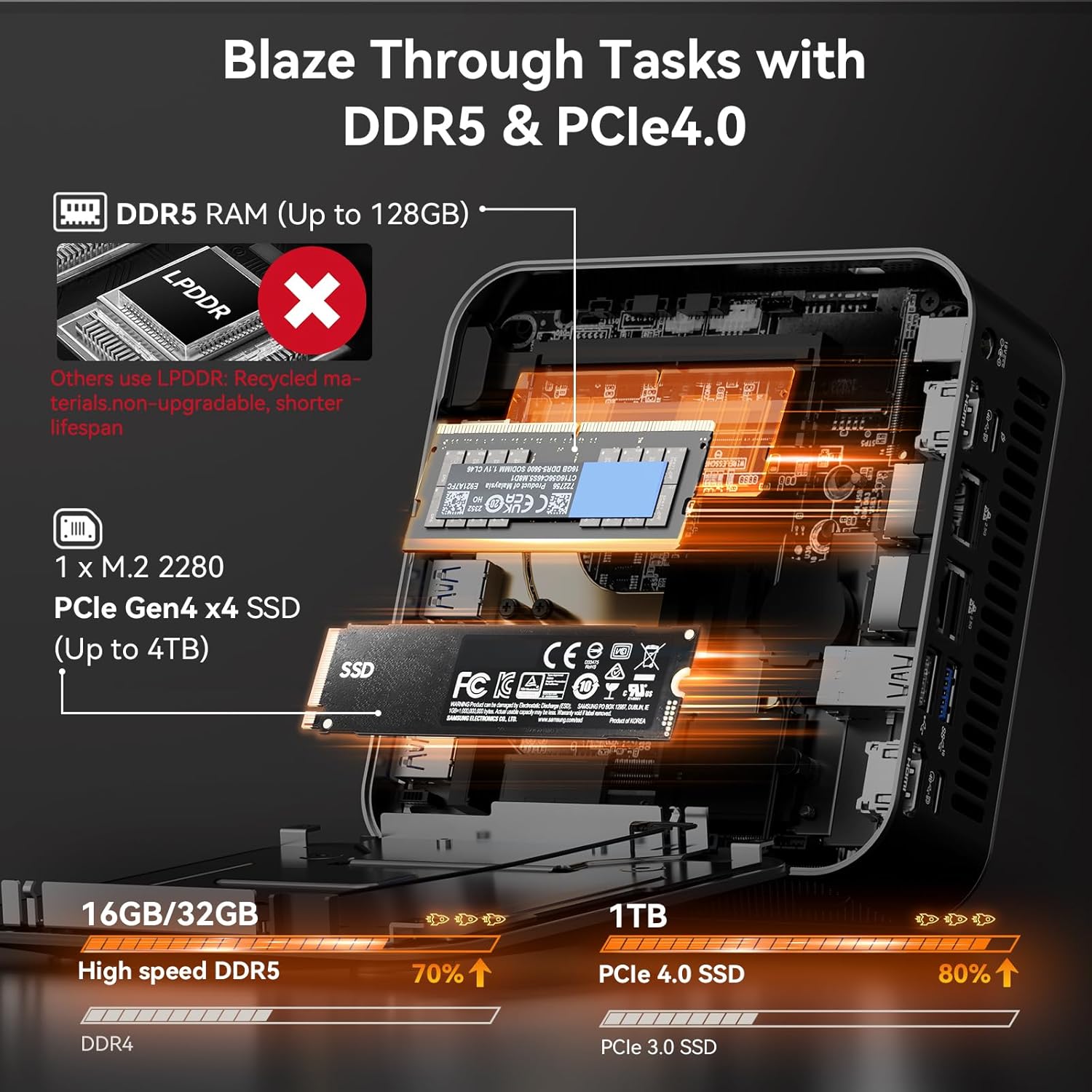
Image: Internal components of the GEEKOM A8 Max Mini PC, highlighting the DDR5 RAM slots and the M.2 2280 NVMe Gen4*4 SSD, both of which are user-upgradable.
Video: An animation detailing the GEEKOM Iceblast Improved Cooling System, showcasing its components and airflow for optimal thermal performance.
5. Feilsøking
If you encounter issues with your GEEKOM A8 Max Mini PC, consider the following common troubleshooting steps:
- Ingen strøm: Ensure the power adapter is securely connected to both the Mini PC and a working power outlet. Try a different outlet or power strip.
- Ingen visning: Verify that all monitor cables (HDMI, USB4 Type-C) are securely connected to both the Mini PC and the monitor. Try a different cable or monitor if possible. Ensure the monitor is set to the correct input source.
- Periferiutstyr ikke oppdaget: Reconnect the peripheral to a different USB port. Ensure drivers are up-to-date (Windows Update).
- Problemer med nettverkstilkobling: For wired connections, check the Ethernet cable and router/modem status. For Wi-Fi, ensure the Wi-Fi adapter is enabled and you are connected to the correct network. Restart your router/modem and the Mini PC.
- Systemnedgang: Close unnecessary applications. Check Task Manager for high resource usage. Ensure sufficient free storage space on the SSD. Consider upgrading RAM or SSD if performance issues persist during demanding tasks.
Video: A Q&A session addressing common questions about GEEKOM Mini PCs, which may include troubleshooting tips.
6. Spesifikasjoner
| Trekk | Detalj |
|---|---|
| Merke | GEEKOM |
| Modellnavn | A8 Maks |
| Operativsystem | Windows 11 Pro, Support Linux and Ubuntu |
| CPU modell | AMD Ryzen 9 8945HS |
| CPU-hastighet | 5.2 GHz (Max Boost) |
| Grafisk koprosessor | AMD Radeon 780M (integrert) |
| RAM-minne installert | 32 GB DDR5 |
| Maksimal RAM-minnestørrelse | 128 GB |
| Harddiskbeskrivelse | SSD (1TB M.2 2280 NVMe Gen4*4, expandable up to 4TB) |
| Tilkoblingsteknologi | Bluetooth 5.2, Wi-Fi 6E |
| Videoutgang | 2×HDMI 2.0, 2×USB4 Type-C (supports 8K resolution) |
| Totalt USB-porter | 8 (5x USB 3.2, 2x USB4 Type-C, 1x USB 2.0) |
| Ekstra funksjoner | SD Card Slot (UHS-II), VESA Mount, Kensington Lock Slot |
| Kjølemetode | Air (GEEKOM's self-developed IceBlast 2.0 Cooling System) |
| Strømforbruk | 45 watt |
| Varevekt | 1.64 kilo |
7. Garanti og støtte
The GEEKOM A8 Max Mini PC comes with a 3 års garanti, demonstrating GEEKOM's commitment to quality and reliability. This coverage extends to product materials and manufacturing processes.
For support, please refer to the following options:
- Amazon kundeservice: Log into your Amazon buyer's account, find your order, and click "Get help" to ask for assistance with this product.
- GEEKOM US Store: You can also contact the GEEKOM US Store directly through Amazon's seller contact options.
Video: En overview of GEEKOM's rigorous quality validation process, ensuring product reliability and durability.