
1. Introduksjon
This manual provides essential information for setting up, operating, and maintaining your HP OmniDesk Slim Desktop PC, Model S03-0006. This desktop PC is designed for daily tasks, offering an Intel Core i3-14100 processor, ample memory, and various connectivity options for productivity and entertainment.
2. Pakkens innhold
Bekreft at alle varene er til stede i pakken:
- HP S03-000 OmniDesk Slim Desktop PC
- Strømforsyning
- USB Black Wired Keyboard (if included with specific bundle)
- USB Wired Mouse (if included with specific bundle)
Merk: Ekstra tilbehør kan selges separat.
3. Produktet er overview
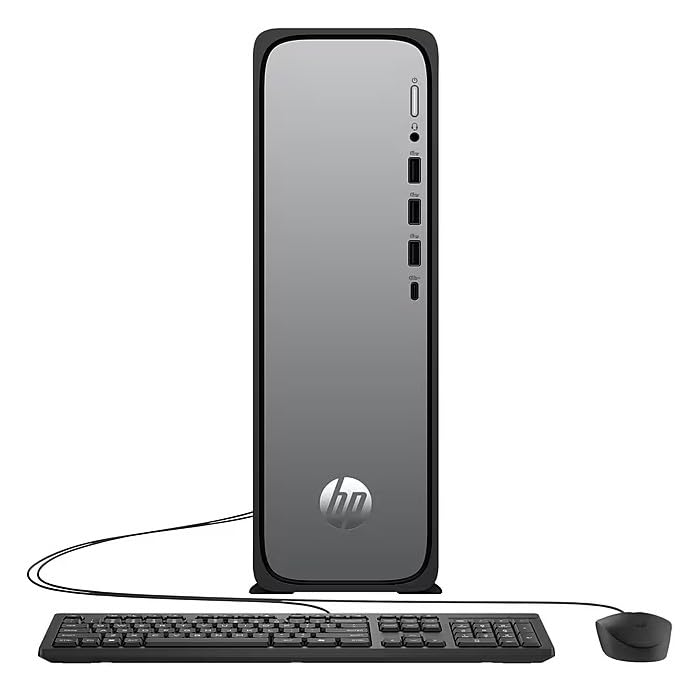
The HP OmniDesk Slim Desktop PC features a compact design with essential components for efficient computing.

Figur 3.1: HP OmniDesk Slim Desktop PC showcasing sin slanke profile, Intel Core i3-14100 processor, 8GB DDR5 RAM, 256GB SSD, Intel UHD Graphics 710, Wi-Fi 6, Bluetooth 5.4, Windows 11, and dual display support.
3.1. Porter og kontakter
Familiarize yourself with the various ports on your desktop PC for connecting peripherals and displays.
Figur 3.2: Front and rear port layout of the HP OmniDesk Slim Desktop PC. Front ports include a headphone/microphone combo jack, USB Type-A 5Gbps ports, and a USB Type-C 10Gbps port. Additional ports (typically rear) include 4 USB 2.0 Type-A, 1 RJ-45 (Ethernet), 1 HDMI Out, and 1 DisplayPort 1.4.
- Porter foran:
- Hodetelefon/mikrofon kombinasjon
- USB Type-A 5Gbps signaling rate (3 ports)
- USB Type-C 10Gbps signaling rate (1 port)
- Bakre porter:
- USB 2.0 Type-A (4 ports)
- RJ-45 (Ethernet)
- HDMI 1.4b (1 port)
- DisplayPort 1.4a (1 port)
4. Oppsettveiledning
Follow these steps to set up your HP OmniDesk Slim Desktop PC:
- Koble til skjermen: Connect your monitor to the PC using an HDMI or DisplayPort cable. Ensure the cable is securely plugged into both the PC and the monitor.
- Koble til eksterne enheter: Plug in your USB keyboard and mouse into the available USB ports on the PC.
- Koble til strøm: Connect the power supply cable to the PC's power input, then plug the other end into a wall outlet or surge protector.
- Strøm på: Press the power button on the front of the PC. The system will boot up, and you will see the Windows 11 setup screen.
- Førstegangs Windows-oppsett: Follow the on-screen instructions to complete the Windows 11 setup, including language, region, network connection, and user account creation.
5. Bruksanvisning
5.1. Grunnleggende betjening
- Slå på/av: Press the power button to turn on the PC. To shut down, click the Start button, then Power > Shut down.
- Start på nytt: Klikk på Start-knappen, deretter på Av/på > Start på nytt.
- Sove modus: Klikk på Start-knappen, deretter på Av/på > Hvilemodus.
5.2. Koble til et nettverk
Your PC supports both wired (Ethernet) and wireless (Wi-Fi) network connections.
- Kablet tilkobling: Connect an Ethernet cable from your router or modem to the RJ-45 port on the back of the PC.
- Trådløs tilkobling (Wi-Fi 6):
- Klikk på Wi-Fi-ikonet i oppgavelinjen.
- Velg ønsket Wi-Fi-nettverk fra listen.
- Skriv inn nettverkssikkerhetsnøkkelen (passordet) hvis du blir bedt om det, og klikk deretter Koble til.
5.3. Dual Display Support
To extend your desktop to a second monitor:
- Connect the second monitor to an available video output port (HDMI or DisplayPort) on your PC.
- Høyreklikk på skrivebordet og velg Skjerminnstillinger.
- Under "Multiple displays," select how you want the displays to behave (e.g., Extend these displays, Duplicate these displays).
6. Vedlikehold
- Programvareoppdateringer: Se etter og installer Windows-oppdateringer regelmessig for å sikre systemstabilitet og sikkerhet. Gå til Innstillinger > Windows-oppdatering.
- Driveroppdateringer: Keep your device drivers updated. HP Support Assistant (MyHP) can help manage these updates.
- Rengjøring: Use a soft, dry cloth to clean the exterior of the PC. Avoid liquid cleaners directly on components. Ensure ventilation openings are clear of dust.
- Sikkerhetskopier data: Regelmessig sikkerhetskopiering viktig files til en ekstern disk eller skylagring for å forhindre datatap.
7. Feilsøking
| Problem | Mulig løsning |
|---|---|
| PC-en slår seg ikke på. |
|
| Ingen visning på skjermen. |
|
| Ingen internettforbindelse. |
|
| Peripherals (keyboard/mouse) not working. |
|
8. Spesifikasjoner
| Modellnavn | HP OmniDesk Desktop HP S03-000 PC |
| Modellnummer | OmniDesk Slim S03-0006 |
| Prosessor | Intel Core i3-14100 (3.5 GHz, 6 MB Cache) |
| Grafikk | Intel UHD Graphics 710 (integrert) |
| VÆR | 8 GB DDR5 (4800 MT/s), Max 64 GB |
| Lagring | 256 GB SSD (Solid State Drive) |
| Operativsystem | Windows 11 Home |
| Tilkobling | Realtek Wi-Fi 6 (2x2), Bluetooth 5.4, Gigabit Ethernet (RJ-45) |
| Havner |
|
| Dimensjoner (H x B x D) | 11.61 x 3.94 x 11.97 tommer |
| Vekt | 8.38 pund |
| Sertifiseringer | ENERGY STAR certified, EPEAT Gold with Climate+ |
9. Garanti og støtte
9.1. Garantiinformasjon
This HP OmniDesk Slim Desktop PC comes with a 90-dagers begrenset garantiSe garantidokumentasjonen som følger med produktet for spesifikke vilkår og betingelser.
9.2. Teknisk støtte
For technical assistance, driver downloads, or further information, please visit the official HP support website. You can also utilize the pre-installed MyHP application for device customization, optimization, and access to helpful messages and settings.
Always provide your product model number (S03-0006) and serial number when contacting support.