
Introduksjon
This manual provides detailed instructions for the installation, operation, and maintenance of your JOYING 12.3 inch QLED Touch Screen Android 13 Car Stereo, model JY-HT902N12, designed specifically for the Honda Civic 2012. Please read this manual thoroughly before installation and use to ensure proper function and to maximize your experience with the device.
Oppsett og installasjon
The JOYING car radio is designed for a plug-and-play installation in the Honda Civic 2012. All necessary cables are supplied to facilitate the installation process without requiring modifications to the vehicle's original wiring.
Vehicle Dashboard Confirmation
It is crucial to confirm your vehicle's dashboard configuration before installation. The wiring harness may differ between vehicle options. Please refer to the images below to identify the correct option for your Honda Civic 2012 dashboard. If you are uncertain, contact customer support with a photo of your car's dashboard for assistance.

Figure 1: Confirming Car Dashboard Type. This image illustrates two common dashboard configurations for the Honda Civic 2012, labeled 'A: without screen' and 'B: with DA screen', to help identify the correct wiring harness for your vehicle.
Connecting the Head Unit
The rear of the head unit features various interfaces for connecting power, antennas, USB devices, and other accessories. Ensure all connections are secure and correctly matched to their respective ports.
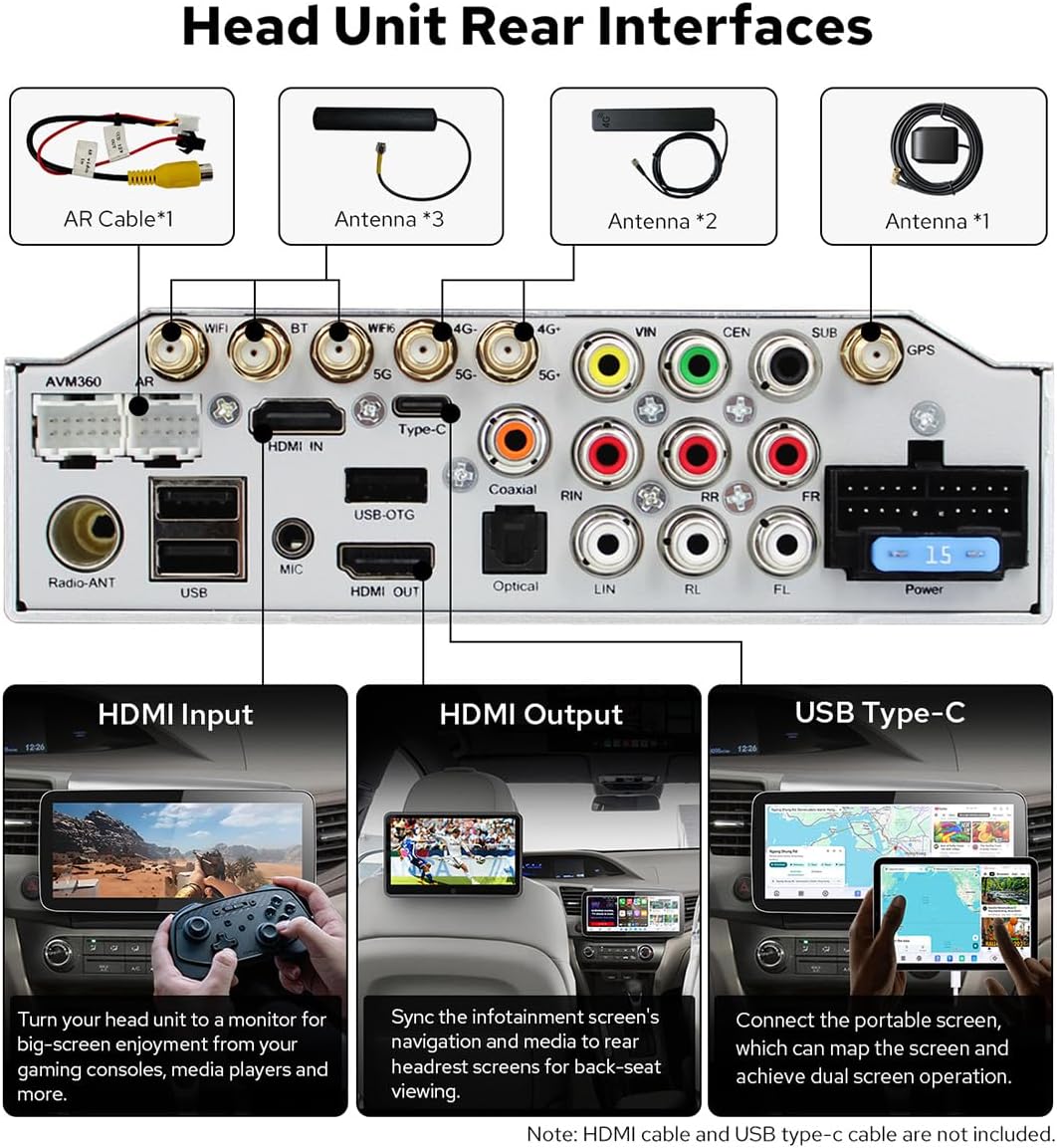
Figure 2: Head Unit Rear Interfaces. This diagram details the various input and output ports located on the back of the car radio, including connections for antennas, USB, HDMI, and power.
The system is designed to retain original vehicle features such as the OEM amplifier, factory subwoofer, factory reverse camera, and factory steering wheel controls. Proper wiring ensures these functions remain operational.

Figure 3: Retained Original Features. This image confirms that the car radio system is compatible with and retains the functionality of the vehicle's original amplifier, subwoofer, reverse camera, and steering wheel controls.
Bruksanvisning
Systemet er overview
The JOYING car radio operates on Android 13, powered by a Qualcomm QCM6490 8-core processor. It features 12GB RAM and 256GB storage, providing efficient multitasking and smooth application performance. The 12.3-inch QLED touchscreen offers a high-resolution display for navigation, entertainment, and various applications.
Navigation and Applications
The system integrates navigation, entertainment, and third-party applications into a single interface. You can switch between applications by tapping the designated icon.

Figure 4: Navigation and Application Interface. This image displays the user interface, demonstrating how to access and switch between different applications for navigation, media, and other functions.
CarPlay og Android Auto
The unit supports both wired and wireless Apple CarPlay and Android Auto. Connecting your smartphone allows access to contacts, maps, music, messages, and voice control features like Siri or Google Assistant.
Bluetooth-tilkobling
Dual-mode Bluetooth supports simultaneous connections to two smartphones or a combination of a phone and an OBD diagnostic dongle. This allows for flexible audio streaming and hands-free communication.

Figure 5: Dual-Mode Bluetooth and Smartphone Integration. This image highlights the system's ability to connect to multiple Bluetooth devices simultaneously and its support for wireless CarPlay and Android Auto.
Nettverkstilkobling
The system supports dual-band WiFi (2.4 GHz, 5 GHz, and 6 GHz) for high-speed and stable network access. A 4G module is also integrated, allowing internet access via a SIM card (SIM card not included; phone calls and SMS are not supported via the unit's SIM card functionality).
AM/FM-radio
The unit includes an AM/FM radio tuner with 18 preset FM stations for local broadcast listening.
Visningsmoduser
The display supports light and dark modes, with options for manual or automatic switching based on ambient light conditions.

Figure 6: Light/Dark Mode Display. This image illustrates the visual difference between the light and dark display modes, which can be set manually or to switch automatically.
Lydfunksjoner
The unit features a TDA7850 amplifier, AKM 4432 DAC, and AKM 7739 DSP for high-fidelity audio output. It supports DTS sound and offers 20 selectable sound effect styles with a 48-band EQ for audio customization.

Figure 7: DTS Sound Experience. This image visually represents the immersive audio experience provided by the DTS sound technology within the vehicle.

Figure 8: Audio Customization Interface. This image displays the user interface for selecting sound effect styles and adjusting the 48-band equalizer, along with key audio component specifications.
Bluetooth audio supports SBC, AAC, and Qualcomm aptX HD codecs, with aptX HD offering lossless quality for compatible Android phones.

Figure 9: Bluetooth Audio Codec Comparison. This table provides a comparison of different Bluetooth audio codecs supported by the unit, including their technical specifications and sound quality characteristics.
Multiband GNSS
The integrated Multiband GNSS supports GPS, GLONASS, NavIC, BeiDou, Galileo, and QZSS, utilizing GNSS L1 and L5 bands for accurate positioning and navigation.

Figure 10: Multiband GNSS Functionality. This image illustrates the integrated global navigation satellite system, displaying satellite connections and navigation features.
Vedlikehold
To ensure the longevity and optimal performance of your JOYING car radio, follow these maintenance guidelines:
- Rengjøring av skjermer: Bruk en myk, lofri klut til å tørke forsiktig av berøringsskjermen. For gjenstridige flekker, tørk littampRengjør kluten med vann eller et skjermsikkert rengjøringsmiddel. Unngå sterke kjemikalier eller slipende materialer.
- Programvareoppdateringer: Periodically check for available software updates from JOYING to ensure you have the latest features and performance enhancements. Follow the instructions provided with the update package.
- Generell pleie: Unngå å utsette enheten for ekstreme temperaturer, direkte sollys over lengre perioder eller høy fuktighet. Sørg for tilstrekkelig ventilasjon rundt enheten for å forhindre overoppheting.
Feilsøking
If you encounter issues with your JOYING car radio, refer to the following common troubleshooting steps:
- Ingen strøm: Sjekk alle strømtilkoblinger og sikringer. Sørg for at bilens tenning er på.
- Ingen lyd: Kontroller høyttalertilkoblingene. Sjekk volumnivåer og lydinnstillinger. Sørg for at riktig lydkilde er valgt.
- Berøringsskjermen reagerer ikke: Try restarting the unit. If the issue persists, perform a factory reset (refer to system settings for this option).
- GPS-signaltap: Sørg for at GPS-antennen er riktig installert og har en klar overflate view of the sky. Check GPS settings within the system.
- Bluetooth/WiFi Connection Issues: Ensure Bluetooth/WiFi is enabled on both the unit and your device. Try unpairing and re-pairing devices. Check for interference from other electronic devices.
- CarPlay/Android Auto kobler ikke til: Ensure your phone is compatible and the connection method (wired/wireless) is correctly configured. Try a different USB cable if using a wired connection.
For persistent issues or problems not covered here, please contact JOYING customer support for further assistance.
Spesifikasjoner
| Trekk | Detalj |
|---|---|
| Modellnummer | JY-HT902N12 |
| Skjermstørrelse | 12.3 tommer |
| Operativsystem | Android 13 |
| Prosessor | Qualcomm QCM6490 (8-Core) |
| VÆR | 12 GB |
| Lagringskapasitet | 256 GB |
| Tilkoblingsteknologi | Bluetooth, Ethernet, USB, Wi-Fi (2.4/5/6 GHz), 4G Module |
| Spesielle funksjoner | Bluetooth, Touchscreen, Wireless CarPlay & Android Auto, GPS, AM/FM Radio |
| Lydutgangsmodus | Stereo |
| Karttype | North America (Pre-installed) |
| Type berøringsskjerm | Kapasitiv |

Figure 11: Motherboard Feature Overview. This diagram provides a detailed look at the internal components of the car radio, including the main processor, GPU, NPU, and amplivligere.

Figure 12: Motherboard Audio Components. This diagram focuses on the audio-related components of the motherboard, such as the Audio DAC, Audio DSP, and Radio Tuner, detailing their specifications.

Figure 13: Advanced Cooling System. This image illustrates the internal cooling mechanisms, including fans and heat sinks, designed for high-efficiency thermal management of the car radio.
Pakkeinnhold
The following items are included in your JOYING car radio package:
- 12.3" Radio Unit
- Rammesett
- Single Din Cage
- Power Cable (may vary based on vehicle option)
- BT Antenna (1x)
- WiFi Antenna (2x)
- 4G Antenna (2x)
- USB Cable (2x)
- Brukerhåndbok (1x)
- GPS-antenne (1x)
- External Microphone (1x)
- AR Cable (1x)
- Screen Ribbon Cable (1x)

Figure 14: Included Package Contents. This image provides a visual representation of all items supplied with the JOYING car radio, including the main unit, installation accessories, and cables.
Valgfritt tilbehør
The following accessories are not included in the standard package and must be purchased separately:
- AR Front Camera: For recording the road ahead while driving.
- OBD2 Dongle: Connects via Bluetooth to retrieve real-time data and trouble codes from your vehicle's computer.
- AR Rear Camera: Automatically switches to reverse display when backing up.

Figure 15: Optional Accessories. This image displays additional accessories that can be purchased separately to enhance the functionality of the car radio, such as cameras and an OBD2 dongle.
Garanti og støtte
Garantiinformasjon
Your JOYING car radio (Model JY-HT902N12) comes with a 2 års garanti from the date of purchase. This warranty covers manufacturing defects and ensures the product meets its specified performance standards. Please retain your proof of purchase for warranty claims.
Kundestøtte
For technical assistance, troubleshooting, or warranty inquiries, please contact JOYING customer support. You can typically find contact information on the official JOYING webnettstedet eller gjennom kjøpsplattformen din.