
Introduksjon
This manual provides essential information for the safe and efficient use of your Xiaomi 55-inch 4K UHD Smart Quantum MagiQ S Mini LED Google TV. Please read these instructions thoroughly before operating the device and retain them for future reference.
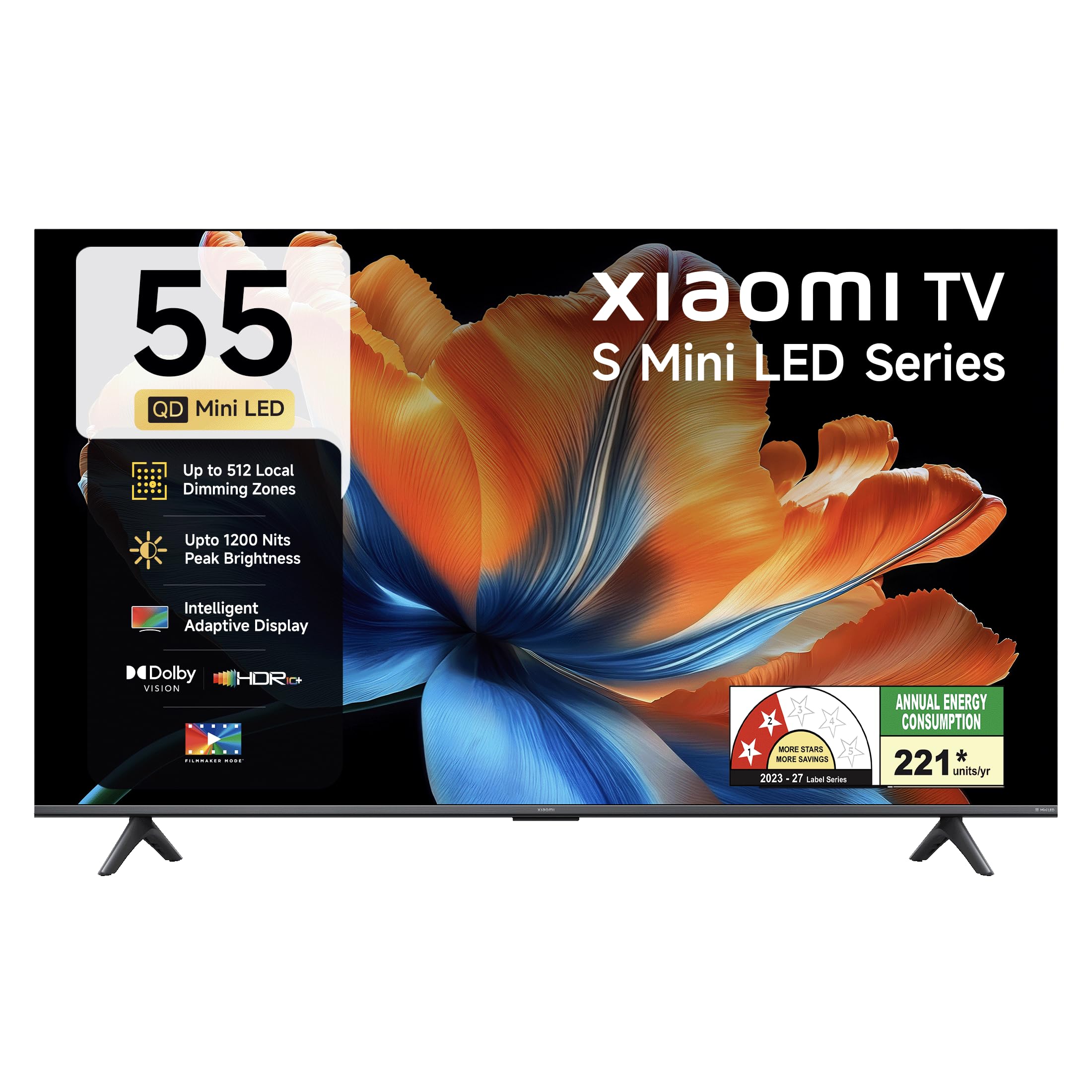
Bilde: Foran view of the Xiaomi 55-inch 4K UHD Smart Quantum MagiQ S Mini LED Google TV, showcasing dens slanke rammedesign.
Oppsettveiledning
1. Unpacking and Included Components
Carefully remove all items from the packaging. Ensure all components listed below are present and undamaged.

Image: Contents of the product box, including the TV unit, remote control, user manual, two stand units, four screws, two AAA batteries, and a power cord.
- 1 LED-TV-enhet
- 1 Fjernkontroll
- 1 Brukerhåndbok (dette dokumentet)
- 2 stativenheter
- 4 Screws for stand installation
- 2 AAA-batterier (for fjernkontroll)
- 1 strømledning
2. Stativinstallasjon eller veggmontering
Your television supports both table-top stand installation and wall mounting. Choose the method suitable for your environment.
- For stativinstallasjon: Attach the two provided stand units to the bottom of the TV using the four screws. Ensure they are securely fastened.
- For veggmontering: Use a compatible VESA wall mount (sold separately). Follow the instructions provided with your wall mount kit. Ensure the wall can support the TV's weight.
3. Koble til eksterne enheter
Connect your external devices such as set-top boxes, gaming consoles, or audio systems to the TV's ports.

Bilde: Bak view of the TV highlighting connectivity ports: Optical, Earphone, AV In, 3 HDMI ports (one with eARC), 2 USB 2.0 ports, Antenna, and Ethernet.
- HDMI-porter (x3): Connect gaming consoles, Blu-ray players, or set-top boxes. One port supports eARC for enhanced audio return channel functionality.
- USB-porter (x2): Koble til USB-lagringsenheter for medieavspilling.
- Ethernet-port: For kablet internettforbindelse.
- Optisk utgang: For tilkobling til eksterne lydsystemer.
- AV-inngang: For tilkobling av eldre enheter ved hjelp av komposittvideo og stereolyd.
- Antenne: For tilkobling av en jord- eller kabelantenne.
4. Første oppstart og oppsett
After connecting all necessary cables, plug the power cord into an electrical outlet. Press the power button on the remote control or the TV to turn it on. Follow the on-screen instructions for initial setup, which typically includes:
- Språkvalg
- Nettverkstilkobling (Wi-Fi eller Ethernet)
- Pålogging for Google-konto
- Kanalskanning
Bruk av Xiaomi Smart TV-en din
1. Fjernkontrollfunksjoner
The included remote control provides access to all TV functions. Insert the two AAA batteries into the remote control, ensuring correct polarity.

Image: Xiaomi remote control, featuring dedicated quick access buttons for popular streaming services and Google Assistant voice control.
- Strømknapp: Slår TV-en på eller av.
- Google Assistant-knapp: Aktiverer stemmekontroll for å søke etter innhold, styre smarthjemenheter og mer.
- Navigasjonsplate: Brukes til å navigere i menyer og velge elementer.
- Volum opp/ned: Justerer lydvolumet.
- Kanal opp/ned: Endrer TV-kanaler.
- Hurtigtilgangsknapper: Dedicated buttons for Netflix, Prime Video, YouTube, Disney+ Hotstar, SonyLIV, and Live TV.
- Dempeknapp: Demper TV-lyden.
2. Google TV Interface and Applications
Your TV runs on the Android 14 OS with Google TV, offering a personalized content experience. Access a wide range of applications from the Google Play Store.

Image: The PatchWall interface, providing customized content recommendations and curation from various streaming platforms.
- Content First-grensesnitt: Organiserer innhold fra alle strømmetjenestene dine på ett sted.
- Personal Profiles: Lag individuell profffiles for personlige anbefalinger.
- Apper som støttes: Pre-installed and downloadable apps include Netflix, Prime Video, YouTube, Zee5, JioCinema, SonyLiv, and more.
- Google Assistant: Use voice commands for navigation, search, and smart home control.
3. Bilde- og lydinnstillinger
Optimaliser din viewing and listening experience through various picture and sound modes.
Bildeinnstillinger:
- Filmskapermodus: Disables post-processing effects to display content as intended by the director.
- Dolby Vision: Enhances HDR content with dynamic metadata for optimized image quality frame by frame.
- HDR10+: Uses dynamic data to enhance every frame, providing an immersive viewopplevelse.
- Øyekomfortmodus: Reduces blue light and flicker for a more comfortable viewopplevelse.
- MEMC-motor: Bevegelsesestimering og bevegelseskompensasjonsteknologi for jevnere bevegelse i fartsfylte scener.
- AI Picture Optimization Engine: Advanced AI algorithms analyze content in real-time to enhance clarity, contrast, and color reproduction.

Image: Filmmaker Mode, designed to preserve original colors, contrast, and motion for an authentic cinematic experience.

Image: Dolby Vision technology, optimizing image quality with deeper blacks and brighter highlights.

Image: HDR10+ dynamic frame-by-frame tuning, ensuring consistent detail across dark and bright scenes.

Image: Eye Care Mode, providing flicker-free visuals with DC Dimming and reduced blue light for comfortable viewing.
Lydinnstillinger:
- 34 watt utgangseffekt: Powerful built-in box speakers.
- Dolby Audio: Gir rik, klar og kraftig lyd.
- DTS-X og DTS Virtual:X: Gir oppslukende, flerdimensjonal lyd.
- Xiaomi-lyd: Preset audio configurations developed for optimal sound quality.

Image: Xiaomi Sound, offering tailored audio experiences through expert-developed configurations.
4. Connectivity and Streaming
Your TV offers versatile connectivity options for seamless streaming and device integration.
- Dobbeltbånds Wi-Fi: Connects to 2.4GHz and 5GHz wireless networks.
- Bluetooth: Connect wireless headphones, speakers, or other Bluetooth accessories.
- Google Cast Built-in: Stream content directly from compatible apps on your smartphone or tablet.
- Apple AirPlay 2: Strøm innhold fra Apple-enheter.
- Miracast: Mirror your Android device's screen wirelessly.

Image: Stream content from your phone using Google Cast or Apple AirPlay 2.
Stell og vedlikehold
Riktig vedlikehold sikrer TV-en din lang levetid og optimal ytelse.
- Rengjøring av skjermer: Tørk forsiktig av skjermen med en myk, lofri klut. For gjenstridige merker, bruk en skjermspesifikk rengjøringsløsning på kluten, ikke direkte på skjermen.
- Kroppsrengjøring: Wipe the TV's frame and back panel with a soft, dry cloth. Avoid abrasive cleaners or solvents.
- Ventilasjon: Sørg for tilstrekkelig luftstrøm rundt TV-en. Ikke blokker ventilasjonsåpningene.
- Slå av: Slå alltid av TV-en og trekk støpselet ut av stikkontakten før rengjøring, eller hvis den ikke skal brukes over lengre tid.
- Programvareoppdateringer: Periodically check for and install software updates to ensure optimal performance and security.
Feilsøking av vanlige problemer
Refer to this section for solutions to common operational problems.
| Problem | Løsning |
|---|---|
| TV-en slår seg ikke på | Ensure the power cord is securely plugged into both the TV and a working electrical outlet. Check if the power outlet is active. Try pressing the power button on the TV itself. |
| Ikke noe bilde, men det er lyd | Check the input source. Ensure the connected device (e.g., set-top box) is turned on and functioning. Try a different HDMI cable or port. |
| Ingen lyd, men bildet er der | Check the volume level and ensure the TV is not muted. Verify audio output settings (e.g., internal speakers, external sound system). Check audio cables for external devices. |
| Fjernkontrollen reagerer ikke | Replace the AAA batteries in the remote control. Ensure there are no obstructions between the remote and the TV. Re-pair the Bluetooth remote if necessary (refer to TV settings). |
| Kan ikke koble til Wi-Fi | Ensure your Wi-Fi router is on and working. Re-enter the Wi-Fi password. Try restarting both the TV and the router. Check if other devices can connect to the Wi-Fi network. |
Tekniske spesifikasjoner
Detailed specifications for the Xiaomi 55-inch 4K UHD Smart Quantum MagiQ S Mini LED Google TV (Model L55MC-IN).

Image: Physical dimensions and weight of the Xiaomi 55-inch TV, both with and without the stand.
| Trekk | Spesifikasjon |
|---|---|
| Modellnummer | L55MC-IN |
| Skjermstørrelse | 55 tommer (138 cm) |
| Skjermteknologi | Mini LED |
| Oppløsning | 4K Ultra HD (3840 x 2160) |
| Oppdateringsfrekvens | 60 Hz (DLG 120 Hz) |
| Topp lysstyrke | Opptil 1200 nit |
| Operativsystem | Android 14 OS with Google TV |
| VÆR | 2 GB |
| ROM (intern lagring) | 32 GB |
| Lyd utgang | 34 watt |
| Lydteknologier | Dolby Audio, DTS-X, DTS Virtual:X |
| Tilkobling | Dual Band Wi-Fi, Bluetooth, 3 HDMI (1 eARC), 2 USB, Optical, Ethernet, AV In |
| Skjermspeiling | Google Cast, Apple AirPlay 2, Miracast |
| Spesielle funksjoner | Filmmaker Mode, MEMC, Eye Comfort Mode, AI Picture Optimization Engine |
| Produktdimensjoner (D x B x H) | 31.2D x 31.2W x 76.9H Centimeters (with stand) |
| Item Weight Without Stand | 11.6 kilo |
| Strømforbruk | 230 watt |
| Opprinnelsesland | India |
Garantiinformasjon
Your Xiaomi TV comes with a comprehensive warranty provided by the brand from the date of purchase.
- Standard garanti: 3-year comprehensive warranty for non-prebook customers (purchases between April 22nd - May 31st).
- Pre-book Customer Warranty: 4-year comprehensive warranty for pre-book customers (purchases between April 22nd - April 30th).
Warranty claims can be made using your Amazon invoice as proof of purchase. For detailed terms and conditions, please refer to the official Xiaomi warranty policy or contact customer support.
Kundestøtte
For any assistance, service requests, or queries regarding your Xiaomi TV, please contact Xiaomi customer support.

Bilde: Overview of Xiaomi's customer support commitments, including quick installation, prompt call-backs, and swift doorstep solutions.
- Installasjonstjenester: New TV installations are typically completed within 3 hours of your appointment.
- Service Requests: Expect a call back from the support team within 60 minutes for any service request.
- On-site Support: Experts aim to arrive at your home within 24 hours of your service request.
Please visit the official Xiaomi India webnettstedet eller se kontaktinformasjonen som er oppgitt på produktemballasjen for den mest oppdaterte kundestøtteinformasjonen.