
1. Overview
The Philips TAZ2200 is a versatile portable sound machine designed for enjoying various audio formats. It features a top-loading CD player, a front-loading cassette player, FM radio, Bluetooth 6.0 connectivity, USB playback, and a 3.5mm audio input. Equipped with dynamic bass boost and 6W stereo speakers, it delivers rich sound. The unit can be powered by AC mains or batteries and includes a carrying handle for portability.
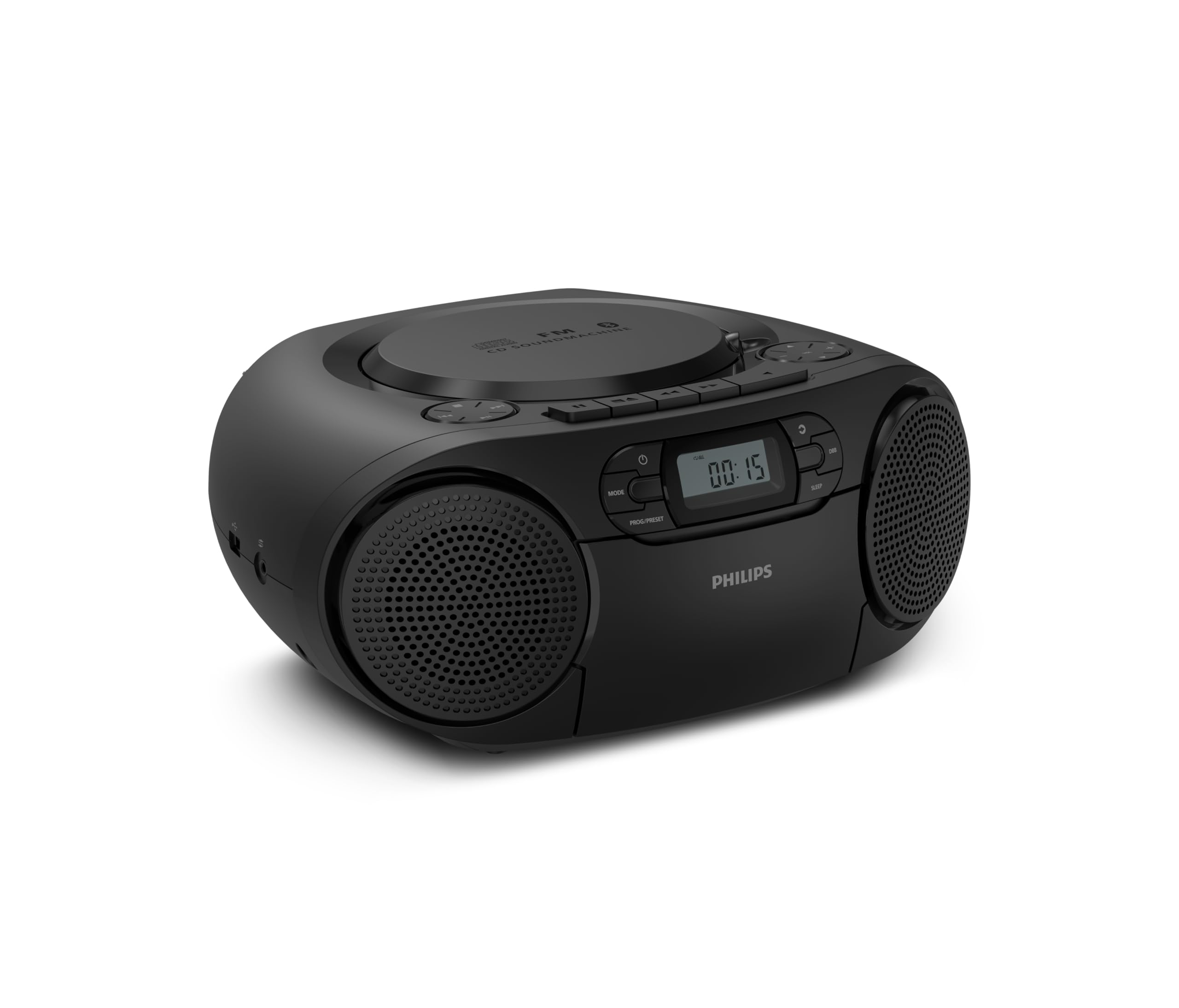
Front view of the Philips TAZ2200 CD Soundmachine, showing the main display and control buttons.
2. Sikkerhetsinformasjon
Please read these safety instructions carefully before using your device and keep them for future reference. Incorrect use may result in hazards.
- Strømkilde: Bruk kun den spesifiserte strømadapteren eller batteriene. Sørg for at volumettage samsvarer med enhetens krav.
- Vann og fuktighet: Ikke utsett enheten for regn, fuktighet, drypp eller sprut. Ikke plasser gjenstander fylt med væske, som for eksempel vaser, oppå enheten.
- Ventilasjon: Ensure adequate ventilation. Do not block any ventilation openings. Maintain a minimum distance around the unit for sufficient ventilation.
- Varme: Ikke plasser enheten i nærheten av varmekilder som radiatorer, varmeventiler, ovner eller andre apparater (inkludert ampløftere) som produserer varme.
- Batterier: Follow correct polarity when inserting batteries. Do not mix old and new batteries, or different types of batteries. Remove batteries if the unit is not used for a long period.
- Rengjøring: Trekk støpselet til enheten ut av stikkontakten før rengjøring. Bruk en myk, tørr klut. Ikke bruk flytende rengjøringsmidler eller sprayrengjøringsmidler.
- Service: Ikke prøv å utføre service på dette produktet selv. Henvis all service til kvalifisert servicepersonell.
3. Hva er i esken
Ved utpakking, sørg for at alle elementene som er oppført nedenfor er til stede:
- Philips TAZ2200 CD Soundmachine
- Strømkabel
- Hurtigstartguide
- Garantihefte
- Sikkerhetsblad
4. Kontroller og tilkoblinger
Kontroller på frontpanelet
The front panel features the main display, power button, mode selection, program/preset buttons, and dynamic bass boost (DBB) control. Playback controls for CD and USB are also located here.

Detaljert front view showing the display, power, mode, program/preset, and DBB buttons.
Side and Rear Connections
The side of the unit provides a USB port for digital audio playback and a 3.5mm audio input jack for connecting external devices.

Side view illustrating the USB port and Audio Input jack.
The top of the unit houses the CD compartment and additional playback controls, while the rear features the AC power input and the FM antenna.

Topp view showing the CD compartment and associated controls.

Bak view displaying the AC power input and the telescopic FM antenna.
5. Oppsett
5.1 Strømforsyning
Vekselstrøm
- Sørg for at enheten er slått av.
- Connect the supplied power cable to the AC IN socket on the rear of the sound machine.
- Plug the other end of the power cable into a wall power outlet.
Batteristrøm
For portable use, the unit can operate on 6 x C-type batteries (not included).
- Åpne dekselet til batterirommet på undersiden av enheten.
- Insert 6 C-type batteries, ensuring correct polarity (+/-) as indicated inside the compartment.
- Lukk batteridekselet godt.
5.2 Justering av antennen
For optimal FM radio reception, fully extend the telescopic antenna located at the rear of the unit. Adjust its position and angle to achieve the clearest signal.
6. Bruksanvisning
6.1 Generell drift
- Slå på/av: Trykk på MAKT knappen for å slå enheten på eller av.
- Volumkontroll: Bruk VOL+ or VOLUM - knappene for å justere volumnivået.
- Dynamisk bassforsterkning (DBB): Trykk på DBB button to activate or deactivate the dynamic bass boost feature for enhanced bass sound.
- Modusvalg: Trykk på MODUS button repeatedly to switch between CD, Cassette, FM Radio, Bluetooth, USB, and Audio Input modes.
6.2 CD-avspilling
- Åpne CD-dekselet på toppen av enheten.
- Place a CD (CD, CD-R, or CD-RW) with the label side facing up onto the spindle.
- Lukk dekselet til CD-rommet.
- Trykk på MODUS -knappen for å velge CD -modus.
- Trykk på SPILL/PAUSE -knappen for å starte avspillingen.
- Bruk HOPPE OVER knapper (|< or >> |) for å hoppe over spor.
- Trykk og hold |< or >> | for å søke i et spor.
- Trykk på STOPPE for å stoppe avspilling.
6.3 Kassettavspilling
- Open the cassette compartment door on the front of the unit.
- Sett inn et kassettbånd med den åpne kanten oppover.
- Lukk døren til kassettrommet.
- Trykk på MODUS -knappen for å velge kassettmodus.
- Trykk på SPILLE -knappen for å starte avspillingen.
- Bruk SPOLE FREM or SPOLE knapper for å spole båndet raskt fremover eller tilbake.
- Trykk på STOPPE for å stoppe avspilling.
6.4 FM-radio
- Trykk på MODUS -knappen for å velge FM-radiomodus.
- Automatisk skanning: Trykk og hold inne PROG/PRESET -knappen for å automatisk skanne og lagre tilgjengelige FM-stasjoner.
- Manuell innstilling: Trykk på TUNING knapper (|< or >> |) to manually tune to a desired frequency.
- Lagre forhåndsinnstillinger: After tuning to a station, press PROG/PRESET once, then use |< or >> | for å velge et forhåndsinnstilt nummer, og trykk på PROG/PRESET igjen for å bekrefte.
- Gjenkalle forhåndsinnstillinger: Trykk på i FM -modus PROG/PRESET repeatedly to cycle through saved preset stations.
6.5 Bluetooth-avspilling
- Trykk på MODUS button to select Bluetooth mode. The display will show 'BT' and flash, indicating it's in pairing mode.
- På den Bluetooth-aktiverte enheten din (smarttelefon, nettbrett), aktiver Bluetooth og søk etter tilgjengelige enheter.
- Select "Philips TAZ2200" from the list of devices.
- Once paired, the unit will emit a confirmation sound, and 'BT' will stop flashing.
- Start playing audio on your connected device. The sound will be streamed to the sound machine.
6.6 USB-avspilling
- Insert a USB flash drive into the USB port on the side of the unit.
- Trykk på MODUS for å velge USB-modus.
- Enheten vil automatisk oppdage og begynne å spille av kompatibel lyd. files (MP3, WAV, WMA).
- Bruk avspillingskontrollene (SPILL/PAUSE, HOPPE OVER, STOPPE) as you would for CD playback.
6.7 Audio Input (AUX)
- Connect one end of a 3.5mm audio cable (not included) to the AUDIO IN jack on the side of the sound machine.
- Connect the other end of the audio cable to the headphone jack or audio output of your external device (e.g., MP3 player, turntable).
- Trykk på MODUS button to select Audio Input mode.
- Start playing audio on your external device. The sound will be played through the sound machine.
7. Vedlikehold
- Rengjøring av enheten: Tørk av utsiden av enheten med en myk, lett tørr klutamp klut. Ikke bruk skurende rengjøringsmidler eller løsemidler.
- Stell av CD-spiller: Keep the CD compartment clean. If the lens is dirty, use a specialized CD lens cleaner. Avoid touching the lens.
- Vedlikehold av kassettspiller: Rengjør tapehodene og trykkrullene lett med en bomullspinne med jevne mellomrom.ampavsluttet med isopropylalkohol.
- Batteribytte: If using batteries, replace all 6 C-type batteries when the unit's performance diminishes or if the unit will not be used for an extended period.
- Lagring: Når enheten ikke er i bruk, oppbevar den på et rent og tørt sted, unna direkte sollys og ekstreme temperaturer.
8. Feilsøking
If you encounter any issues with your Philips TAZ2200, please refer to the table below for common problems and solutions.
| Problem | Mulig årsak | Løsning |
|---|---|---|
| Ingen strøm | Strømkabelen er ikke tilkoblet; Batteriene er utladet eller satt inn feil. | Sjekk strømtilkoblingen; Skift batterier eller sørg for riktig polaritet. |
| Ingen lyd | Volumet er for lavt; Feil modus valgt; Hodetelefoner er tilkoblet. | Increase volume; Select the correct source mode (CD, FM, BT, etc.); Disconnect headphones. |
| CD-en spiller ikke | CD-en er satt inn feil; CD-en er skitten eller ripete; CD-formatet støttes ikke. | Insert CD with label side up; Clean or replace CD; Ensure CD is CD-R/RW compatible. |
| Kassetten spiller ikke | Cassette inserted incorrectly; Tape is damaged. | Insert cassette correctly; Try a different cassette. |
| Dårlig FM -mottak | Antennen er ikke strukket ut eller plassert riktig; svakt signal. | Trekk den teleskopiske antennen helt ut og juster den; prøv å flytte enheten til et annet sted. |
| Bluetooth kobler ikke til | Unit not in pairing mode; Bluetooth device too far; Device already paired with another unit. | Ensure unit is in Bluetooth mode and flashing; Move device closer; Disconnect from other devices. |
| Problemer med USB-avspilling | USB-stasjonen er ikke satt inn riktig; inkompatibel file format; USB-stasjon ødelagt. | Reinsert USB drive; Ensure files are MP3, WAV, or WMA; Try a different USB drive. |
9. Spesifikasjoner
| Trekk | Spesifikasjon |
|---|---|
| Merke | PHILIPS |
| Modellnummer | TAZ2200/10 |
| Tilkoblingsteknologi | Bluetooth 6.0, USB, Audio Input (3.5mm) |
| Høyttalertype | Stereo (2 speakers) |
| Utgangseffekt | 6 watt (maks) |
| Støttede medier | CD, CD-R, CD-RW, Cassette, USB (MP3, WAV, WMA) |
| Radiotuner | Digital FM with 20 presets |
| Strømkilde | AC (wired), 6 x C-type batteries (not included) |
| Dimensjoner (LxBxH) | 24.5 x 28.5 x 12.5 cm |
| Vekt | 1.35 kilo |
| Farge | Sølv |
10. Garanti og støtte
10.1 Produktgaranti
This Philips TAZ2200 CD Soundmachine comes with a 2 års garanti fra kjøpsdatoen. Vennligst ta vare på kjøpsbeviset for garantikrav. Garantien dekker produksjonsfeil og funksjonsfeil under normale bruksforhold.
10.2 Kundestøtte
For technical assistance, troubleshooting beyond this manual, or warranty service, please refer to the contact information provided in the warranty booklet included with your product. You can also visit the official Philips support website for your region for further assistance and FAQs.