Introduksjon
This manual provides detailed instructions for the Redlemon Cassette to MP3 Converter and Player, Model 56084. This device allows you to play audio cassettes and convert their content directly to MP3 format on a USB flash drive. It also functions as a portable cassette player.
Please read this manual carefully before using the device to ensure proper operation and to maximize its features.
Produkt overview
Komponenter og kontroller
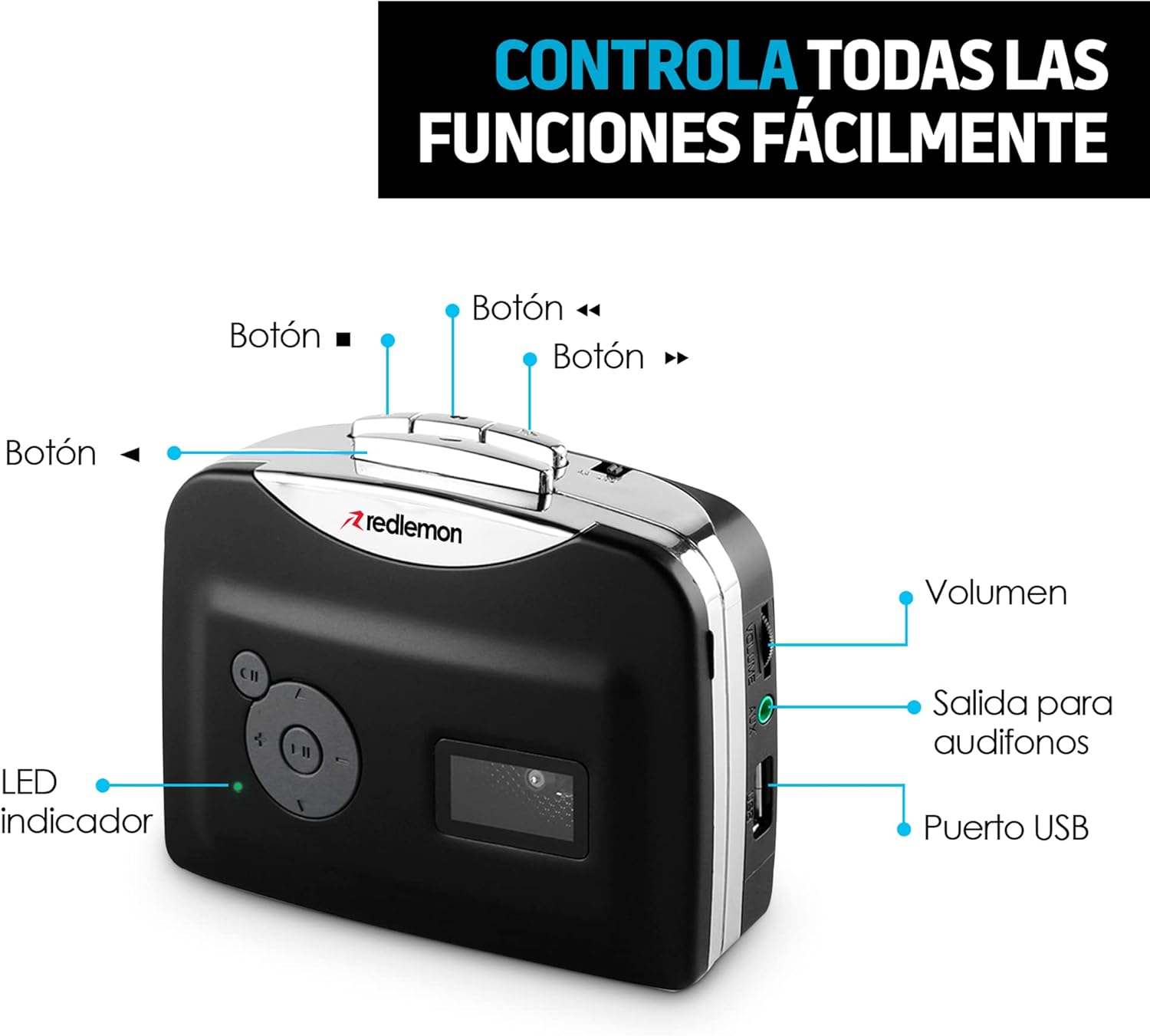
Bilde: Forside og side view of the Redlemon Cassette to MP3 Converter with labels indicating various buttons and ports.
- Play/Stop Button (►/■): Initiates or stops cassette playback.
- Fast Forward Button (►►): Fører båndet raskt fremover.
- Rewind Button (◄◄): Spoler båndet raskt tilbake.
- Direction Button (CH): Changes the playback direction of the cassette.
- Record Button (●): Starts or stops MP3 recording.
- Volumkontroll: Justerer lydutgangsnivået.
- 3.5 mm hodetelefonkontakt: Kobler til hodetelefoner for privat lytting.
- USB-port: Connects a USB flash drive for MP3 recording and playback, or for power supply.
- LED-indikator: Shows the device's status (e.g., power on, recording).

Image: The Redlemon Cassette to MP3 Converter with its lid open, revealing the cassette tape mechanism and internal components.
Oppsett
Slå på enheten
The device can be powered by two AA batteries or via a USB cable.
- Batteristrøm: Open the battery compartment on the back of the device. Insert two AA batteries, ensuring correct polarity. Close the compartment.

Image: A Redlemon Cassette to MP3 Converter with its battery compartment open, showing two AA batteries being inserted.
- USB-strøm: Connect the included USB cable to the device's USB port and to a USB power adapter (not included) or a computer's USB port.
Sette inn en kassett
- Gently press the 'Open' button or slide the latch to open the cassette compartment lid.
- Insert an audio cassette with the open side facing upwards.
- Close the compartment lid until it clicks securely.
Connecting Headphones or USB Drive
- Hodetelefoner: Plug the 3.5mm jack of your headphones into the headphone port on the side of the device.
- Minnepenn: Insert a USB flash drive into the USB port on the side of the device. Ensure the drive is formatted to FAT32.
Bruksanvisning
Spille kassetter
- Ensure a cassette is properly inserted and the device is powered on.
- Connect headphones to the 3.5mm jack.
- Press the Play button (►). The LED indicator will light up.
- Juster volumet med volumkontrollen.
- To change tape direction, press the CH button.
- To fast forward or rewind, press the ►► or ◄◄ buttons respectively.
- To stop playback, press the Stop button (■).

Image: A person smiling while listening to music through headphones connected to the Redlemon Cassette Player.
Converting Cassettes to MP3
This device allows direct recording of cassette audio to a USB flash drive in MP3 format.
- Ensure a cassette is inserted and a USB flash drive is connected to the USB port.
- Press the Play button (►) to start playing the cassette.
- Immediately after starting playback, press the Record button (●). The LED indicator will flash, indicating that recording has started.
- To stop recording, press the Record button (●) again. The LED indicator will stop flashing.
- To stop cassette playback, press the Stop button (■).
- The recorded MP3 files will be saved on the USB flash drive. You can then transfer these files to a computer, tablet, or smartphone.

Image: The Redlemon Cassette to MP3 Converter positioned next to a laptop displaying music management software, illustrating the digital conversion process.
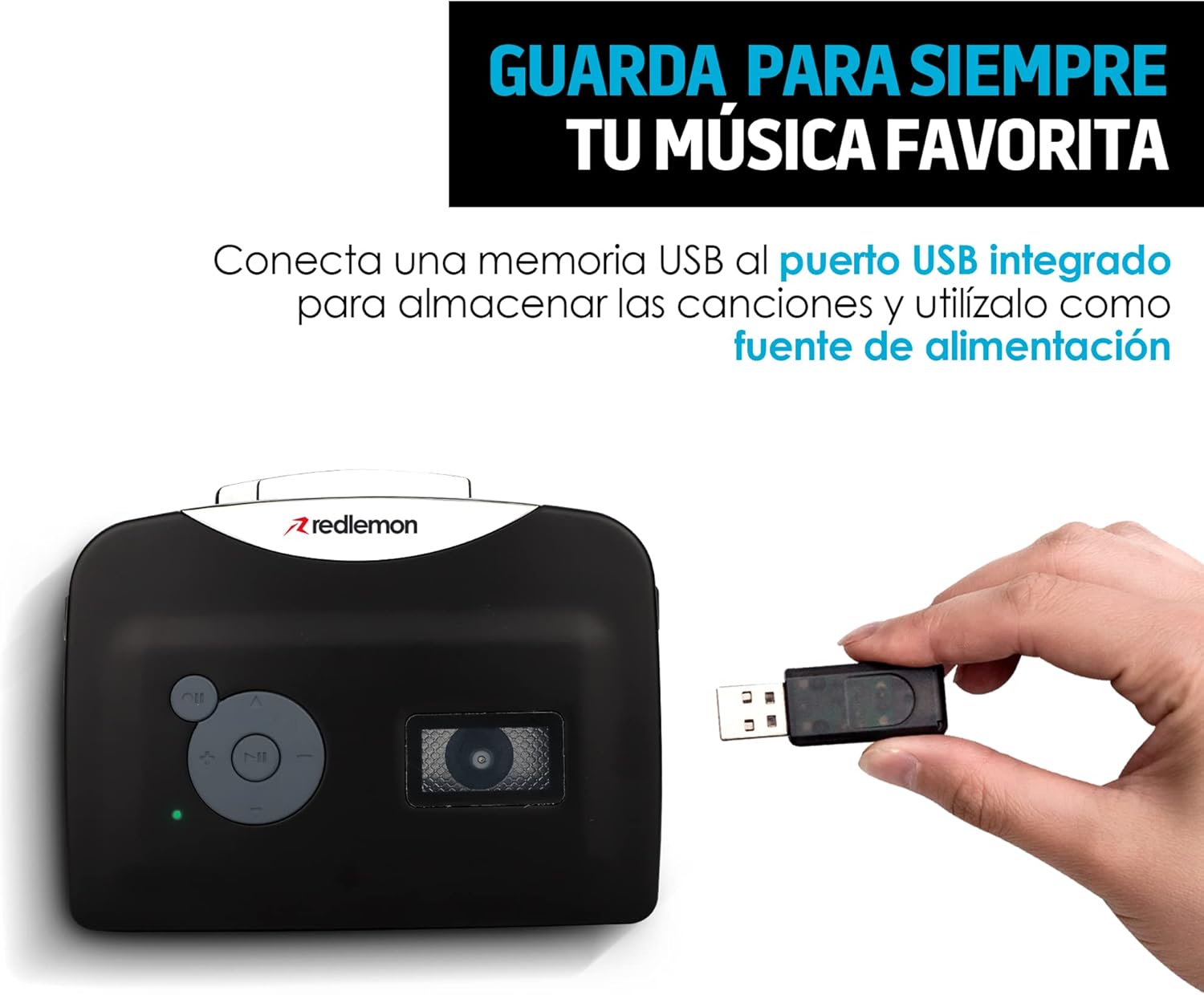
Image: A hand inserting a USB flash drive into the Redlemon Cassette to MP3 Converter, demonstrating how to save digital audio files.
Video Guide: Converting Cassettes to MP3
Video: A demonstration of how to use the Redlemon Cassette to MP3 Converter, including the recording process. (Duration: 1:20)
Video: En kort oppsummeringview of the Redlemon Cassette to MP3 Converter's features and operation. (Duration: 0:30)
Vedlikehold
Rengjøring
- Bruk en myk, tørr klut til å rengjøre utsiden av enheten.
- Ikke bruk flytende rengjøringsmidler eller aerosoler.
- Rengjør tapehodene og trykkrullene lett med en bomullspinne med jevne mellomrom.ampenn med isopropylalkohol for å sikre optimal lydkvalitet og forhindre skade på båndet.
Lagring
- When not in use for extended periods, remove the AA batteries to prevent leakage.
- Oppbevar enheten på et kjølig og tørt sted, unna direkte sollys og ekstreme temperaturer.
Feilsøking
Vanlige problemer og løsninger
- Enheten slår seg ikke på:
- Check if AA batteries are inserted correctly and are not depleted.
- If using USB power, ensure the USB cable is securely connected to a working power source.
- Ingen lyd under avspilling:
- Ensure headphones are properly plugged in.
- Juster volumkontrollen.
- Check if the cassette tape is correctly inserted and not damaged.
- Recording to MP3 fails or produces poor quality:
- Ensure the USB flash drive is inserted correctly and has sufficient free space.
- Verify the USB drive is formatted to FAT32.
- Important Recording Sequence: First, press the Play button (►) for the cassette, then immediately press the Record button (●). Pressing Record before Play may result in unwanted ambient noise being recorded.
- Check the condition of the cassette tape. Older or damaged tapes may produce lower quality recordings or inconsistent playback.
- Ensure the device is stable during recording to avoid interruptions or pauses in the audio.
- Cassette tape is not moving:
- Check if the cassette is properly seated in the compartment.
- Ensure the tape is not tangled or damaged.
Spesifikasjoner
| Merke | Rød sitron |
| Modell | 56084 |
| Kompatible enheter | Personal computer, Headphones, USB device |
| Spesielle funksjoner | Lett, bærbar |
| Skjermteknologi | Ingen visning |
| Batterier påkrevd | Ja (2 x AA, ikke inkludert) |
| Strømkilde | 2 AA Batteries or USB Cable |
| Koblingstype | AUX (3.5mm), USB |
| Støttede lydformater | MP3 |
| Medietyper | Cassette, MP3 |
| Oppladbart batteri inkludert | Ingen |
| Fjernkontroll inkludert | Ingen |
| Dimensjoner | 15 x 11.5 x 4.7 cm |
| Vekt | 240 g |
| UPC | 631145835990 |
Garanti og støtte
For warranty information and technical support, please refer to the official Redlemon webnettstedet eller kontakt kundeservicen deres direkte. Ta vare på kjøpskvitteringen som kjøpsbevis for eventuelle garantikrav.
You can visit the Redlemon store on Amazon for more information: Redlemon Store


