Introduksjon
This manual provides essential information for setting up, operating, maintaining, and troubleshooting your HP Elite Mini 800 G9 Desktop Computer. This compact and powerful mini PC is designed for business environments, offering high performance in a small form factor.
The HP Elite Mini 800 G9 features an Intel Core i5-12500T processor, 16 GB DDR5 RAM, and a 256 GB SSD, running on Windows 11 Pro. Its small size allows for flexible deployment options, including mounting behind a monitor or discreet placement on a desk.
Hva er i esken
Kontroller at alle varene er tilstede i emballasjen:
- HP Elite Mini 800 G9 stasjonær PC
- AC-adapter
- Tastatur
- Mus
Oppsett
Follow these steps to set up your HP Elite Mini 800 G9 Desktop Computer:
1. Utpakking og plassering
Carefully remove the mini PC and all accessories from the packaging. Place the mini PC on a stable, flat surface with adequate ventilation. Ensure no vents are obstructed.
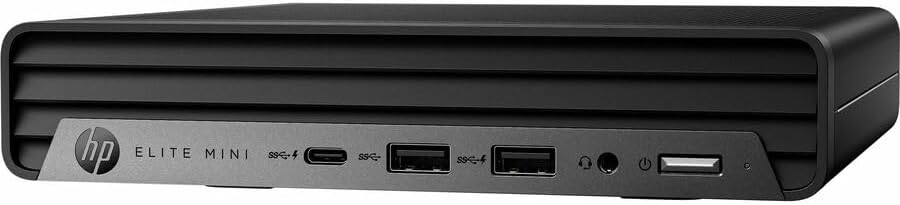
Bilde: Foran view of the HP Elite Mini 800 G9 Desktop PC, highlighting the accessible front ports including USB-C, USB-A, and a headphone jack.
2. Koble til eksterne enheter
- Koble til skjermen: Connect your monitor to one of the available video output ports (e.g., DisplayPort, HDMI) on the rear of the mini PC.
- Koble til tastatur og mus: Plug the included keyboard and mouse into the USB ports on the mini PC.
- Koble til nettverk (valgfritt): For a wired internet connection, connect an Ethernet cable from your router or network switch to the Ethernet port on the mini PC. Wireless connectivity (Wi-Fi 6) is also available.
- Koble til strøm: Connect the AC adapter to the power input port on the mini PC, then plug the power cord into a wall outlet.
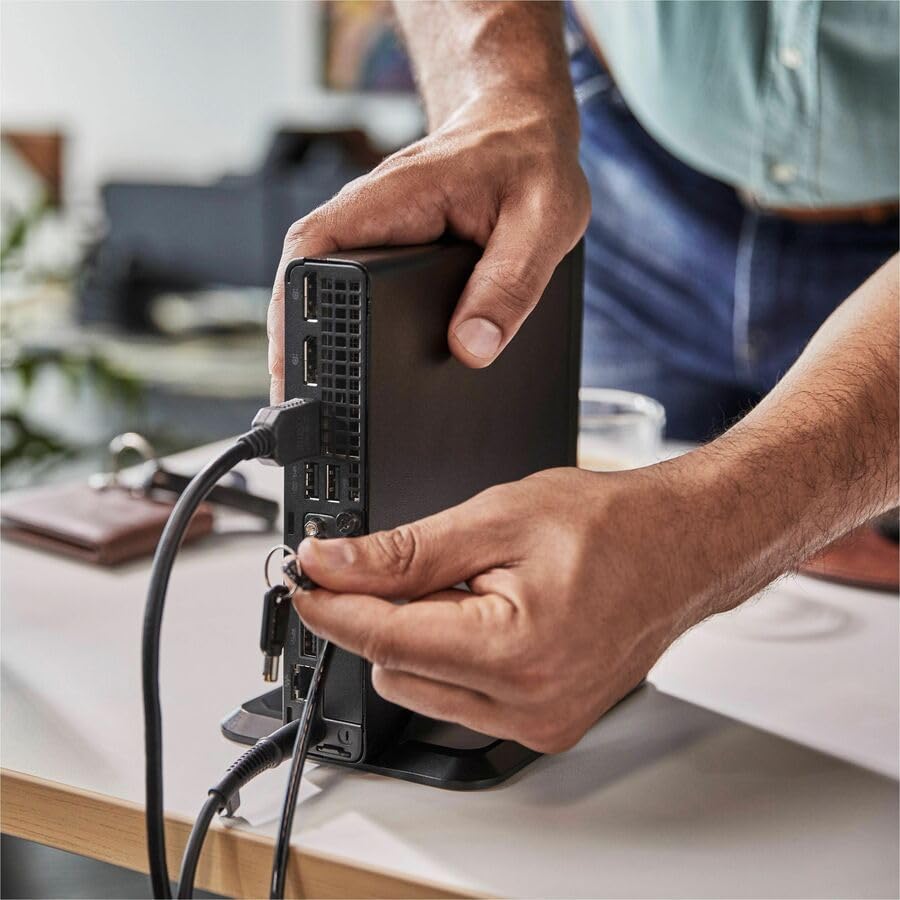
Image: A user connecting various cables, including power and display, to the rear ports of the HP Elite Mini 800 G9. This illustrates the typical connection process for peripherals.
Bruksanvisning
Once your HP Elite Mini 800 G9 is set up, follow these steps for basic operation:
1. Slå på
Press the power button located on the front of the mini PC. The power indicator light will illuminate, and the system will begin to boot up. The operating system (Windows 11 Pro) will load automatically.
2. Førstegangsoppsett (første gangs bruk)
Upon first boot, you will be guided through the Windows 11 Pro setup process. This includes selecting your region, language, accepting terms, and setting up a user account. Follow the on-screen prompts to complete this process.
3. Slå av
To properly shut down the computer, click the Start -knappen i Windows, og velg deretter Makt > Slå av. Avoid powering off the system by holding the power button, as this can lead to data loss or system corruption.

Image: A professional working at a desk, demonstrating the compact integration of the HP Elite Mini 800 G9, which is mounted discreetly behind a monitor.
Vedlikehold
Regular maintenance helps ensure the longevity and optimal performance of your HP Elite Mini 800 G9 Desktop Computer.
1. Programvareoppdateringer
Keep your operating system and drivers updated. Windows Update automatically handles OS updates. For driver updates, visit the official HP support webnettsted for modellen din.
2. Rengjøring
- Ytre: Bruk en myk, lofri klut litt dampskyll med vann eller et mildt rengjøringsmiddel for å rengjøre de utvendige overflatene.
- Vents: Periodically use compressed air to clear dust from the ventilation grilles to prevent overheating. Ensure the system is powered off before cleaning vents.
3. Sikkerhetskopiering av data
Regularly back up important data to an external drive or cloud storage to prevent data loss in case of hardware failure or other issues.
Feilsøking
This section addresses common issues you might encounter with your HP Elite Mini 800 G9.
Ingen strøm
- Ensure the AC adapter is securely connected to both the mini PC and a working power outlet.
- Kontroller at strømuttaket fungerer ved å koble til en annen enhet.
- Check the power button for any damage or obstruction.
Ingen visning på skjermen
- Confirm the monitor is powered on and correctly connected to the mini PC's video output port.
- Sørg for at riktig inngangskilde er valgt på skjermen.
- Try connecting the mini PC to a different monitor or using a different video cable if available.
Langsom ytelse
- Lukk unødvendige programmer som kjører i bakgrunnen.
- Se etter og installer eventuelle ventende Windows-oppdateringer eller driveroppdateringer.
- Run a disk cleanup and defragmentation (for HDDs, not typically needed for SSDs).
- Skann etter skadelig programvare eller virus med et anerkjent antivirusprogram.
Spesifikasjoner
Detailed technical specifications for the HP Elite Mini 800 G9 Desktop Computer:
| Trekk | Detalj |
|---|---|
| Modellnummer | AS1F8AT#ABA |
| Prosessor | Intel Core i5-12500T (12th Gen, Hexa-core, 2 GHz) |
| VÆR | 16 GB DDR5 RAM |
| Lagring | 256 GB SSD |
| Grafikk | Intel UHD Graphics 770 (integrert) |
| Operativsystem | Windows 11 Pro |
| Trådløs tilkobling | Wi-Fi 6 (802.11ax), Bluetooth |
| Dimensjoner (LxBxH) | 6.9 x 7 x 1.4 tommer |
| Vekt | 3.13 pund |
| Porter (foran) | USB-C, USB-A, Headphone/Microphone Combo |
| Porter (bak) | Multiple USB-A, Video Outputs (e.g., DisplayPort, HDMI), Ethernet, Power Input |
Garanti og støtte
Your HP Elite Mini 800 G9 Desktop Computer comes with a standard manufacturer's warranty. For specific warranty terms and conditions, please refer to the documentation included with your product or visit the official HP support webnettstedet.
For teknisk assistanse, drivernedlastinger eller ytterligere støtte, kan du gå til HPs kundestøtte. webnettsted: